The Daily Dose

laugh every day with cartoons jokes and humor
  • Home
  • About
    • Press
      • Press Release – Announcing Laughzilla the Third ebook
      • Press Release – The Daily Dose Kicks Off Its 16th Year with New Books and More Irreverent Laughter
      • Press Release – Themes Memes and Laser Beams Now Available in Paperback
      • Press Release – Announcing Themes Memes and Laser Beams
      • In The News
    • Privacy
  • Archive
  • Books
  • Shop
  • Collections
    • Galleries
      • Gallery
      • Captions
      • Flash Cartoons & Greeting Cards
        • Laughzilla’s Oska Flash Animation Cartoon Greeting Cards
        • Oska Cupid Love Humor
    • #OccupyWallStreet
    • cats
    • China
    • Food
      • Hors d’oeuvres
        • Ball of Cream Cheese
      • Entrees / Main Courses
        • Meatballs with Baked Beans and Celery
    • Gadaffy
    • Google
  • Links
  • Video
  • Submit a joke
DeviantART Facebook Twitter Flickr pinterest YouTube RSS

Subscribe for Free Laughs!


Latest Comics

  • This Memorial Day, Trump Meme Coin Congratulates Profit Takers
  • 25 Years of The Daily Dose
  • The Best Cartoons
  • Bitcoin sings “Fly Me To The Moon”
  • 22 years of The Daily Dose

Comic Archive

Internet Meme Miss South Carolina

Daily Dose News Roundup

  • Pony.ai and Uber to put more than 2,000 Chinese robotaxis on European streets
  • The next great game may not come from a million-dollar studio
  • Crypto impersonation scams grew 1,400% as AI supercharged fraud
  • How AI is transforming frontend engineering for modern web applications
  • Armenia just opened the region’s biggest AI factory. It exists because Washington signed a licence.

Quotable

"Happy end of 2009, people. The 00s are done. See you in the next decade, of teens and tweens." ~ Yasha Harari

Fresh Baked Goods

Get The Daily Dose's ebook: Laughzilla the Third - A Funny Stuff Collection of 101 Cartoons from TheDailyDose. Click here to get the e-book on Amazon kdp. Laughzilla the Third (2012) The Third Volume in the Funny Stuff Cartoon Book Collection Available Now.

Click here for the Paperback edition


Support independent publishing: Buy The Daily Dose's book: Themes Memes and Laser Beams - A Funny Stuff Collection of 101 Cartoons by Laughzilla from TheDailyDose. Click here to get the book on Amazon. Themes Memes and Laser Beams - The Second Volume in the Funny Stuff Cartoon Book Collection.

Click Here to get the book in Paperback While Available on Amazon

Themes Memes and Laser Beams - 101 Cartoons by Laughzilla. Get the e-book on Lulu.

Click Here to get The Daily Dose Cartoon ebook on amazon kindle

Funny Stuff :
The First Cartoon Book
from The Daily Dose.
Available on Lulu.

a couple of laughzillas on a blue diamond background

Facebook tweaks News Feed to show Page posts tagged with other Pages you like or follow, just like for friends

Feb25
by Sindy Cator on February 25, 2014 at 6:11 pm
Posted In: Around the Web, Social Media

144147602 1 520x245 Facebook tweaks News Feed to show Page posts tagged with other Pages you like or follow, just like for friends

Facebook today announced a change to the News Feed algorithm that will treat Pages even more like people. If one Page tags a second Page you like or follow, you may see that post in your News Feed even if you don’t like or follow the first Page.

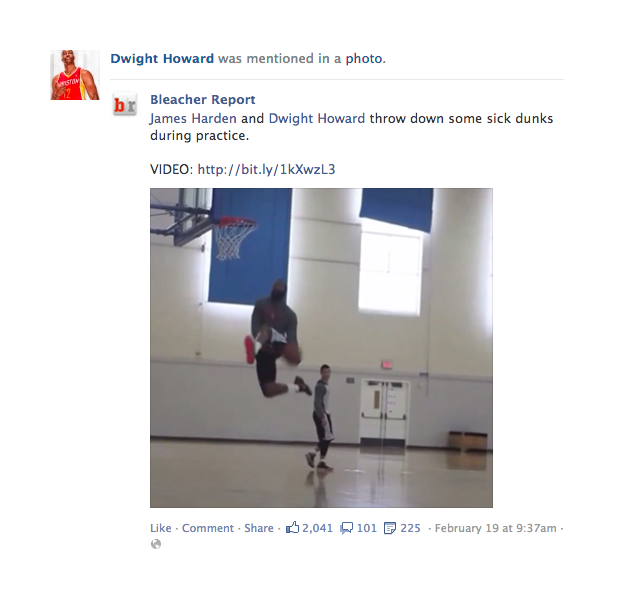
Facebook offers an example: this post below by the Bleacher Report might be shown in the News Feed to people who follow or like Dwight Howard, in addition to people who follow or like the Bleacher Report.

4 Facebook tweaks News Feed to show Page posts tagged with other Pages you like or follow, just like for friends

As you can see, Dwight Horward and James Harden are both tagged in the above post. If you haven’t liked or followed either, and you also don’t like or follow the Bleacher Report, the algorithm won’t consider showing you this Page post. This is exactly how updates from friends work: if a friend tags you in a photo, your friends may see the photo in their News Feed even if they’re not friends with the person who tagged you. If you’re not tagged, your friends won’t see it unless they are friends with the person who posted the photo in the first place.

Unlike on social networks like Twitter, where you see every update, there is still no guarantee you will see all such posts in your News Feed. Facebook still uses an algorithm that attempts to show you the best posts:

We look at many factors to make sure the most relevant stories appear in News Feed, including which posts are getting the most engagement (such as likes, comments, shares and clicks) across all of Facebook. We also consider which posts are getting the most engagement from people who like both the Page that posted and the Page that was tagged.

For example, if many people who like Dwight Howard also like the Bleacher Report, it suggests that these two Pages are connected. If we see that people who like both the Bleacher Report and Dwight Howard are liking the post above, that’s an indication that it may be relevant for people who only like Dwight Howard.

Facebook says it tested this feature for Pages and found that people liked seeing this type of content in their News Feeds. The company ran surveys and found these stories received “high scores.” Now the social network will undoubtedly be looking to see how the rest of its 1.23 billion users react.

Top Image Credit: Brendan Smialowski/AFP/GettyImages

└ Tags: facebook, syndicated
a couple of laughzillas on a blue diamond background

The importance of emotion in design

Feb25
by Sindy Cator on February 25, 2014 at 6:05 pm
Posted In: Around the Web, Design & Dev

design desktop 520x245 The importance of emotion in design

Paul Jarvis is a Web designer and bestselling author. His latest book, Everything I Know, is a guide to freelancing as a creative professional (without living on ramen noodles or settling for bad clients).


Business on the Internet is about standing out and being noticed.

We want what we do online to be thought of as remarkable and worthy of continued discussion.

Simply put, we want an audience to commit to a relationship with us. Page views, mailing list signups and product purchases are all the result of this pined-for engagement.

But to achieve this, we need to show them value, trust and possibly most importantly, create an emotional connection with them.

As consumers ourselves, we’ve all become accustomed to exceptionally designed online experiences. Even if we aren’t professional Web designers or graphic artists, we know what looks good and reward companies that have got their aesthetics just right by giving them our money (some examples are: Apple, Nest and Kickstarter).

Conversely, if your website and its products don’t measure up visually, trust and value won’t be established and sales could be lost.

More and more, companies are focusing on building a personality and story into every website and product. This evokes an emotional reaction from a visitor. Personality turns a lifeless product or soulless corporation into more than sum of its parts. Expressing the company’s personality helps create an emotional connection with the audience.

This isn’t just something large corporations do – savvy entrepreneurs and one-person shops have also caught on.

Effective emotional design is created for human beings first—not metrics, algorithms or SEO robots. And this can happen with products or companies with thousands of employees or just one (you).

Emotional design turns visitors into brand evangelists

Advertisers have employed emotion to sell products and build trust since the dawn of advertising (sometime around when the fictional world of Mad Men started).

The best commercials sell a feeling or an idea more so than an actual product. Chipotle’s Scarecrow is a perfect example of this—the ad is an emotional story that reaches far beyond selling burritos.

At its core, emotional design shows empathy for the audience a website serves.

Design like this puts the audience first, before the company or the business owner and their goals. Anything the company wants to accomplish is first filtered through the lens of:

  • How will this serve our audience better?
  • How will this website or product make their lives easier?
  • What about this website or product is valuable to them?

Effective emotional design is also focused on simplicity. Not purely for the sake of aesthetics, but because it is easier to trigger a single emotion response than several.

This means limiting a visitor’s choices to one or a very few options, then leading them there by evoking an emotional response, such as “I need this to solve X” or “This made me laugh so I want to tell my friends about it”.

Design that speaks to emotion is…

Clear and easily understood. This means navigation nomenclature makes sense and any calls to action are logical next steps.

Visually appealing. Design looks professional, consistent and elements of the layout are in expected places.

Enjoyable. The design wants to be looked at, the writing wants to be read and there are cues a visitor wants to follow to further pages.

Memorable. What about the design stands out? Is Unique?

Personal. No pretences or corporate machinations. It reflects the honest personality of what it represents.

“Emotion plays a powerful role in our lives and has gained significant attention as a priority area of study in interaction design”
– Golman & Jordan

Effective emotional Web design speaks to three main points

First Impressions. The look of a website is an instant trust builder or trust loser. If there are flames on buttons, horrible stock photos or poorly matched colours, a visitor will leave the site faster than they typed the URL.

How it functions. Once a visitor is past a favourable first impression, they’ll look for things like: clear navigation and intuitive next steps for a task they want to accomplish.

Perceived value. Because attention spans are short, what’s the value of staying on the website? Is the content worthwhile? Is the product or service worth paying for?

As a Web designer for the last two decades, the easiest way I’ve found to apply all of the above information to accomplish website and business goals for my clients (and my own projects) is by thinking of the website as a person.

It sounds silly (or at least it sounds silly for me to write it out), but it helps properly apply emotion to goals. For example, I think in general terms first:

  • How would they dress?
  • How would they speak?
  • What would they like/dislike?

Each time I have to factor a goal into the design, I think about what this website person would do. If there’s a BUY button, how would they tell someone else to buy it, using what language? If they wanted visitors to read articles, what design elements would they use to captivate the audience in reading? What colours and typefaces would represent their personal style?

By giving human qualities to non-human things (in fancy language = anthropomorphism) we can give life and emotions to what we make, which then evokes emotions from our audience.

This emotional resonance, when used correctly and honestly, can create a strong connection between a website, its products and its consumers.

Strong emotional Web design isn’t an afterthought or something you quickly add in right at the end. It’s factored into the entire process, so all functions, features, layout and language are designed with the correct and consistent feeling.

Would Apple sell as many computers or software if it didn’t all look gorgeous? Even the way its products are sold (from its keynote speeches highlighting case studies over features to its “coming soon” videos that feel more like feature films than technology products) appeals more to how you feel when you use them than the actual technical specifications.

Emotionally attractive design makes people feel good. It makes them feel like they belong with the product, company, person.

And once you make someone genuinely feel good, you’ve successfully stood out and been noticed in the best possible way.

Image credit: Shutterstock/goldnetz

└ Tags: syndicated
a couple of laughzillas on a blue diamond background

Collaborative word processor Quip brings its Android app to 7 new app stores, adds new features

Feb25
by Sindy Cator on February 25, 2014 at 5:49 pm
Posted In: Apps, Around the Web, collaborative word processor, Insider, quip, quip for android, quip news

457461861 520x245 Collaborative word processor Quip brings its Android app to 7 new app stores, adds new features

Quip for Android has received a few updates today that the company says includes a number of “most-requested” features. With the release, the modern word processor app becomes more accessible in seven new app stores, removes the need for an account, lets you import documents, make background updates, and even import your contacts right from your phone.

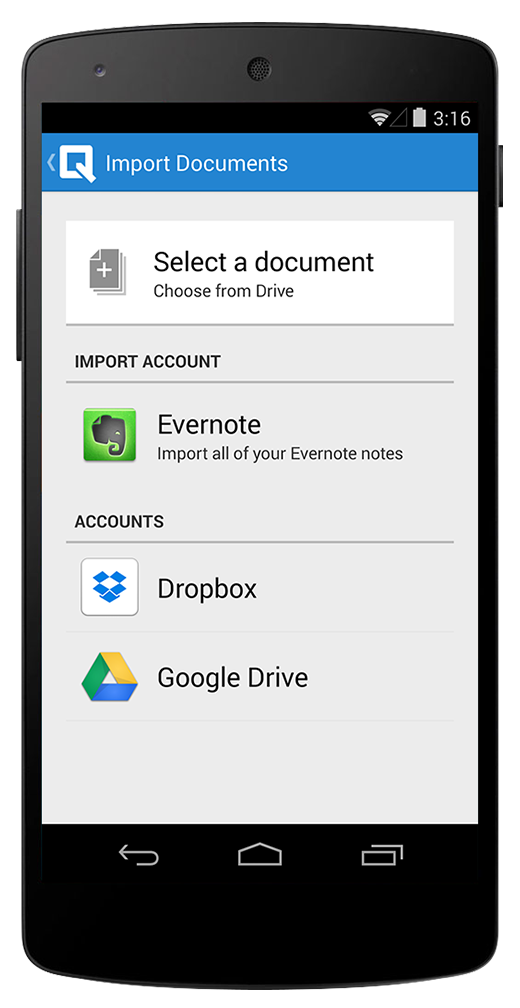
android 1 document import 220x426 Collaborative word processor Quip brings its Android app to 7 new app stores, adds new features Previously available in the Google Play app store in the US and in Europe, Quip is now branching out to allow users to take it out for a spin. Among the new markets include the Kindle Fire store, Yandex in Russia, and in 360 Mobile Assistant in China.

The next couple of updates are intended to bring Quip’s Android version up to parity with the rest of its platform. The first involves the removal of a restriction iOS app users have had for a while: no account is needed in order to use Quip.

With Quip for Android 1.6, you can start writing immediately without having to log in. And when you want to share a document and begin collaborating with others, the company says you only need to add your email address. We’re told that some users have expressed a desire to be able to have the freedom to create content without having the barrier to log in — adds a measure of complexity that you wouldn’t find in the Microsoft Word experience.

android 2 inbox import 220x426 Collaborative word processor Quip brings its Android app to 7 new app stores, adds new features Users can also import notes and documents into Quip now. Like the iOS version, Quip for Android supports importing files from Microsoft Word, Dropbox, Google Drive, and Evernote.

Quip has also added a feature to its Android app that allows it to process updates in the background. The company says that you won’t need to mark your documents for offline access or even force it to sync — it’ll all be handled automatically.

Lastly, you can now import contacts from your phone, Yahoo, Google, and Outlook.com right into Quip. This was done to make it easier for users to have access to friends and co-workers quickly — if you’re working on a document and need to share it with someone, instead of going into your address book and searching for their email address, it can be done with a single click inside Quip. Of course, the company says that it will never email your contacts without your “explicit permission.”

➤ Quip for Android

Photo credit: Andrew Burton/Getty Images

└ Tags: syndicated
a couple of laughzillas on a blue diamond background

Collaborative word processor Quip brings its Android app to 7 new app stores, adds new features

Feb25
by Sindy Cator on February 25, 2014 at 5:49 pm
Posted In: Apps, Around the Web, collaborative word processor, Insider, quip, quip for android, quip news

457461861 520x245 Collaborative word processor Quip brings its Android app to 7 new app stores, adds new features

Quip for Android has received a few updates today that the company says includes a number of “most-requested” features. With the release, the modern word processor app becomes more accessible in seven new app stores, removes the need for an account, lets you import documents, make background updates, and even import your contacts right from your phone.

android 1 document import 220x426 Collaborative word processor Quip brings its Android app to 7 new app stores, adds new features Previously available in the Google Play app store in the US and in Europe, Quip is now branching out to allow users to take it out for a spin. Among the new markets include the Kindle Fire store, Yandex in Russia, and in 360 Mobile Assistant in China.

The next couple of updates are intended to bring Quip’s Android version up to parity with the rest of its platform. The first involves the removal of a restriction iOS app users have had for a while: no account is needed in order to use Quip.

With Quip for Android 1.6, you can start writing immediately without having to log in. And when you want to share a document and begin collaborating with others, the company says you only need to add your email address. We’re told that some users have expressed a desire to be able to have the freedom to create content without having the barrier to log in — adds a measure of complexity that you wouldn’t find in the Microsoft Word experience.

android 2 inbox import 220x426 Collaborative word processor Quip brings its Android app to 7 new app stores, adds new features Users can also import notes and documents into Quip now. Like the iOS version, Quip for Android supports importing files from Microsoft Word, Dropbox, Google Drive, and Evernote.

Quip has also added a feature to its Android app that allows it to process updates in the background. The company says that you won’t need to mark your documents for offline access or even force it to sync — it’ll all be handled automatically.

Lastly, you can now import contacts from your phone, Yahoo, Google, and Outlook.com right into Quip. This was done to make it easier for users to have access to friends and co-workers quickly — if you’re working on a document and need to share it with someone, instead of going into your address book and searching for their email address, it can be done with a single click inside Quip. Of course, the company says that it will never email your contacts without your “explicit permission.”

➤ Quip for Android

Photo credit: Andrew Burton/Getty Images

└ Tags: syndicated
a couple of laughzillas on a blue diamond background

Sony Xperia Z2 hands-on: A promising rival to the Samsung Galaxy S5

Feb25
by Sindy Cator on February 25, 2014 at 5:41 pm
Posted In: Analysis and Opinion, Around the Web, Gadgets, Mobile

P1050054 520x245 Sony Xperia Z2 hands on:  A promising rival to the Samsung Galaxy S5

Just six months after the Xperia Z1, Sony is back with another flagship Android smartphone. Given the short space of time that’s elapsed between the two announcements, it’s understandable that the Xperia Z2 offers small, understated improvements over its predecessor.

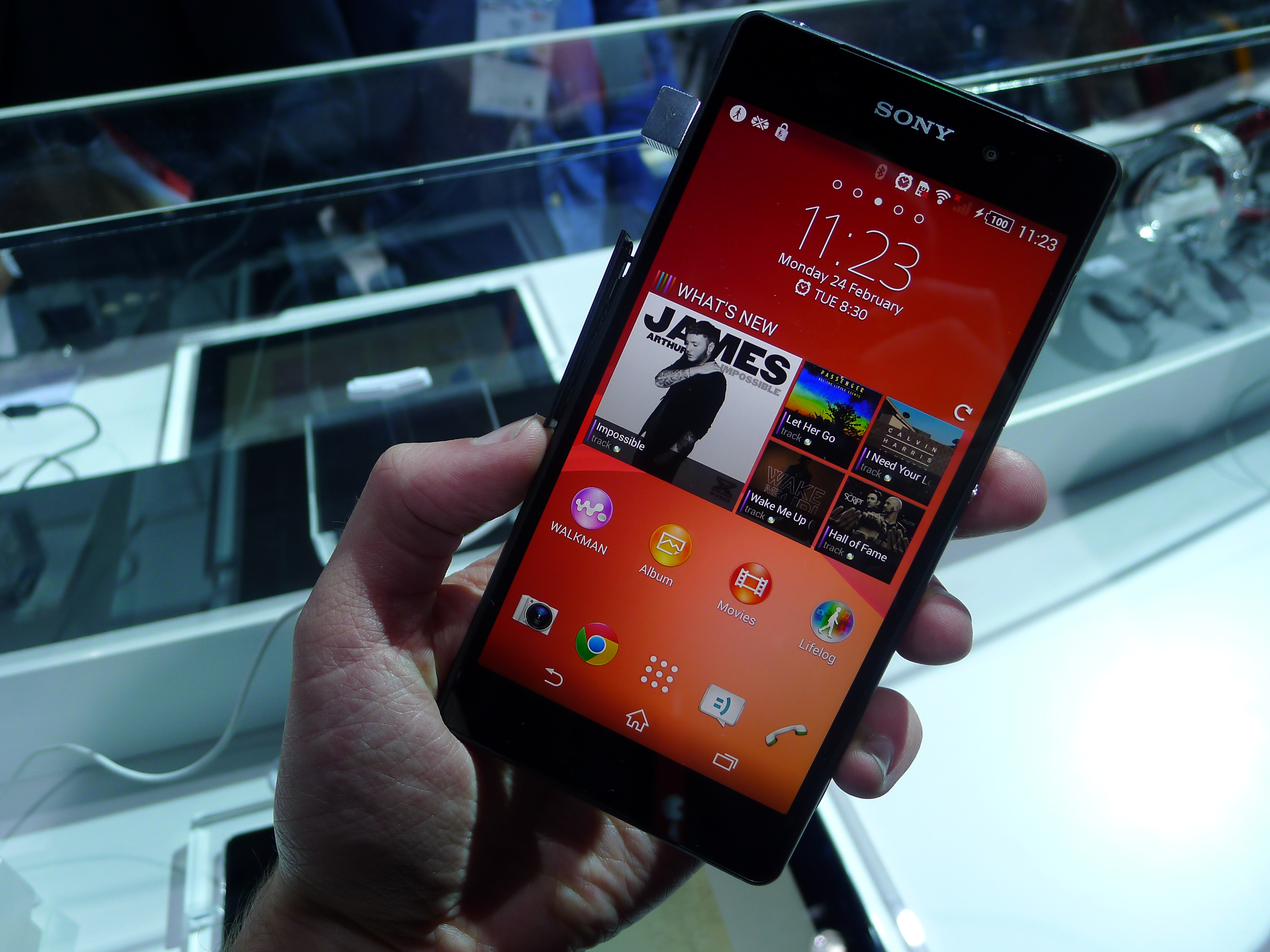
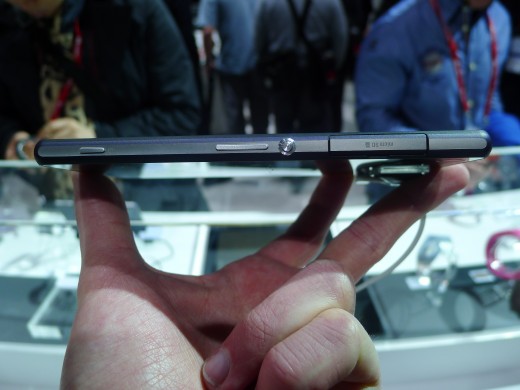
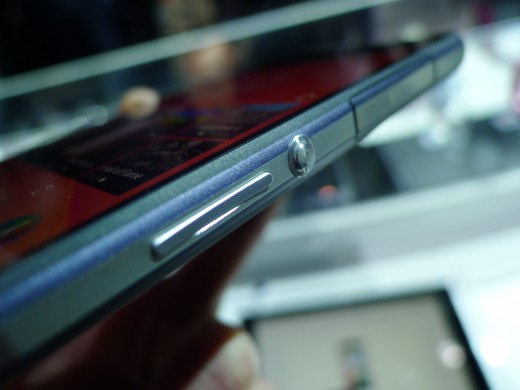
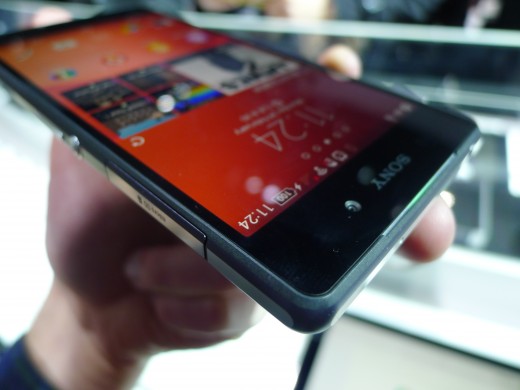
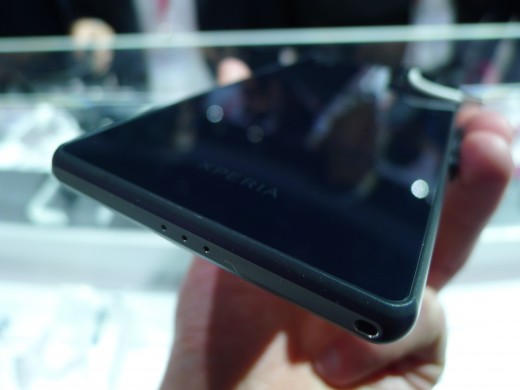
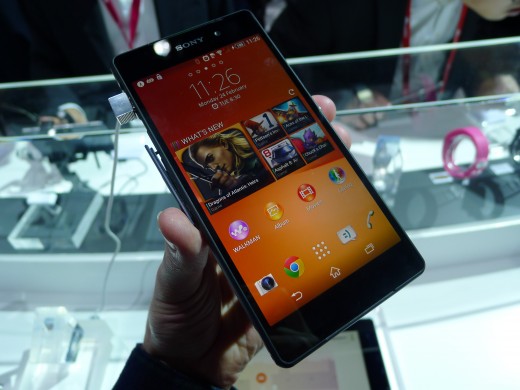
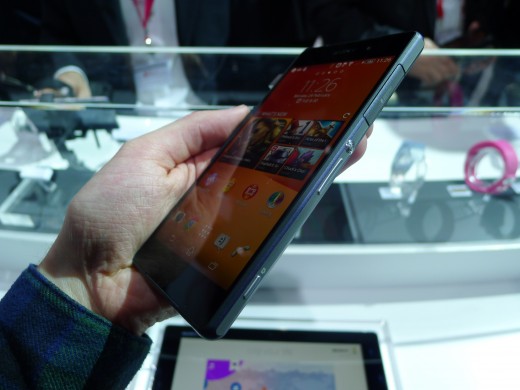
The 5.1-inch full HD (1080p) display is a fraction larger and brighter than the Xperia Z1, but the chassis that surrounds it looks almost identical. The new handset is a few millimeters taller and slightly thinner than its older brother, but in the hand these differences are barely noticeable. The Xperia Z2 offers the same ‘Omnibalance’ design found on the Xperia Z and from afar, it’s difficult to tell the two apart.

P1050037 730x547 Sony Xperia Z2 hands on:  A promising rival to the Samsung Galaxy S5

The formal, rectangular design isn’t particularly eye-catching, but it’s still attractive and comfortable to hold.

Instead, much of Sony’s focus has been directed at the components inside. The Xperia Z2 runs on a quad-core 2.3 GHz Qualcomm Snapdragon 801 processor, which is an improvement over the Snapdragon 800 found in the Xperia Z1. The RAM has been bumped up from 2GB to 3GB and the battery has been increased to 3200 mAh. All of these changes make the Xperia Z2 an incredibly capable smartphone.

While I haven’t done any benchmarking, the Xperia Z2 feels fast. Swiping through the Android interface and alternating between apps is buttery smooth, and it handles intensive tasks without complaint. The gains in computational power are clearly diminishing each year, but it’s liberating to use nonetheless.

Camera

P1050044 730x547 Sony Xperia Z2 hands on:  A promising rival to the Samsung Galaxy S5

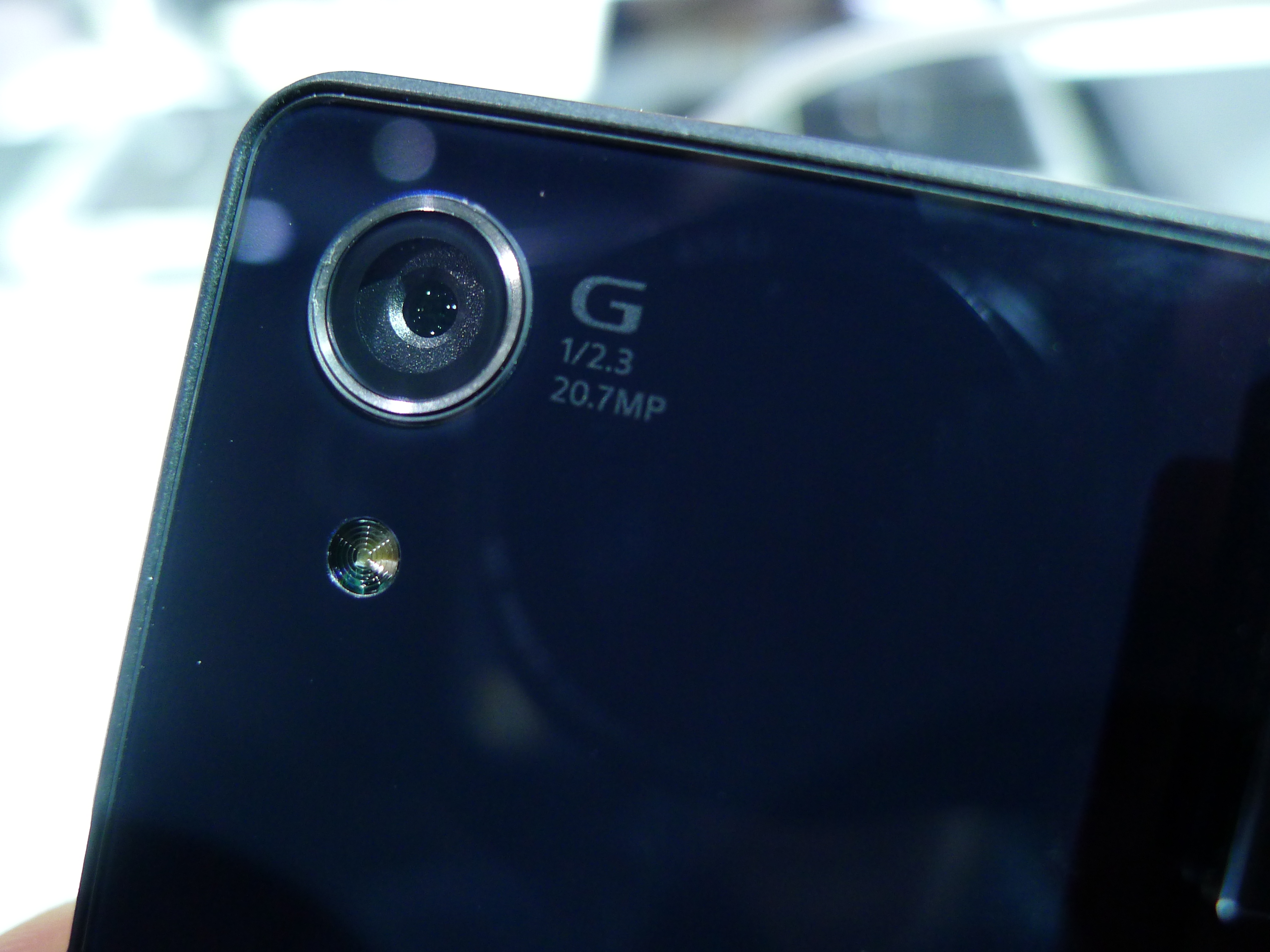
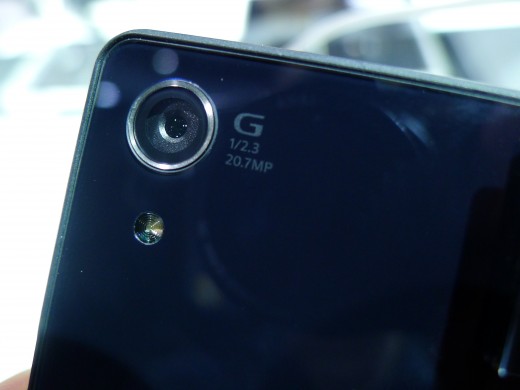
Sony unveiled the Xperia Z1 at IFA last year partly because of its upgraded rear-facing camera. The 13-megapixel sensor had been swapped out for a 20.1-megapixel version which often offered better photos by downsampling the original image to an 8.3-megapixel file.

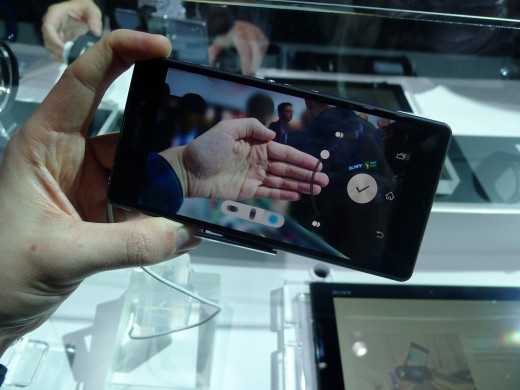
Six months later, the Xperia Z1 still offers one of the best smartphone cameras on the market. The Xperia Z2, unsurprisingly, opts for the same sensor with a few noticeable improvements on the software side. Sony now offers a ‘Timeshift’ mode for slow-motion video clips, background defocus for photos with plenty of ‘bokeh’ and a shortcut to Vine’s own camera interface.

Slow motion video worked beautifully and picking specific scenes to implement the effect was quick and intuitive. Most importantly, it doesn’t feel like a gimmick; I can see myself using it for all sorts of action shots, including the finish line at a bike race, a spectacular stage dive at a concert, or my baby cousin’s first steps. Although the feature isn’t unique – Apple offers slow-motion video with the iPhone 5s – I’m still impressed by the results.

P1050229 730x547 Sony Xperia Z2 hands on:  A promising rival to the Samsung Galaxy S5

In contrast, the background defocus effect was inconsistent. Perhaps it’ll be better suited to macro photography, but some brief test shots at Sony’s booth proved too much for this particular mode.

The Xperia Z2 also introduces ultra high definition (4K) video recording at 30 frames per second, with its SteadyShot image stabilization technology for smooth footage. A trade show booth isn’t the best place to test this feature, but all of the videos I shot were clear, detailed and with accurate color representation.

If you value the camera experience in an Android flagship, the Xperia Z2 appears to be an excellent choice.

Software

xperiawalkman 730x547 Sony Xperia Z2 hands on:  A promising rival to the Samsung Galaxy S5

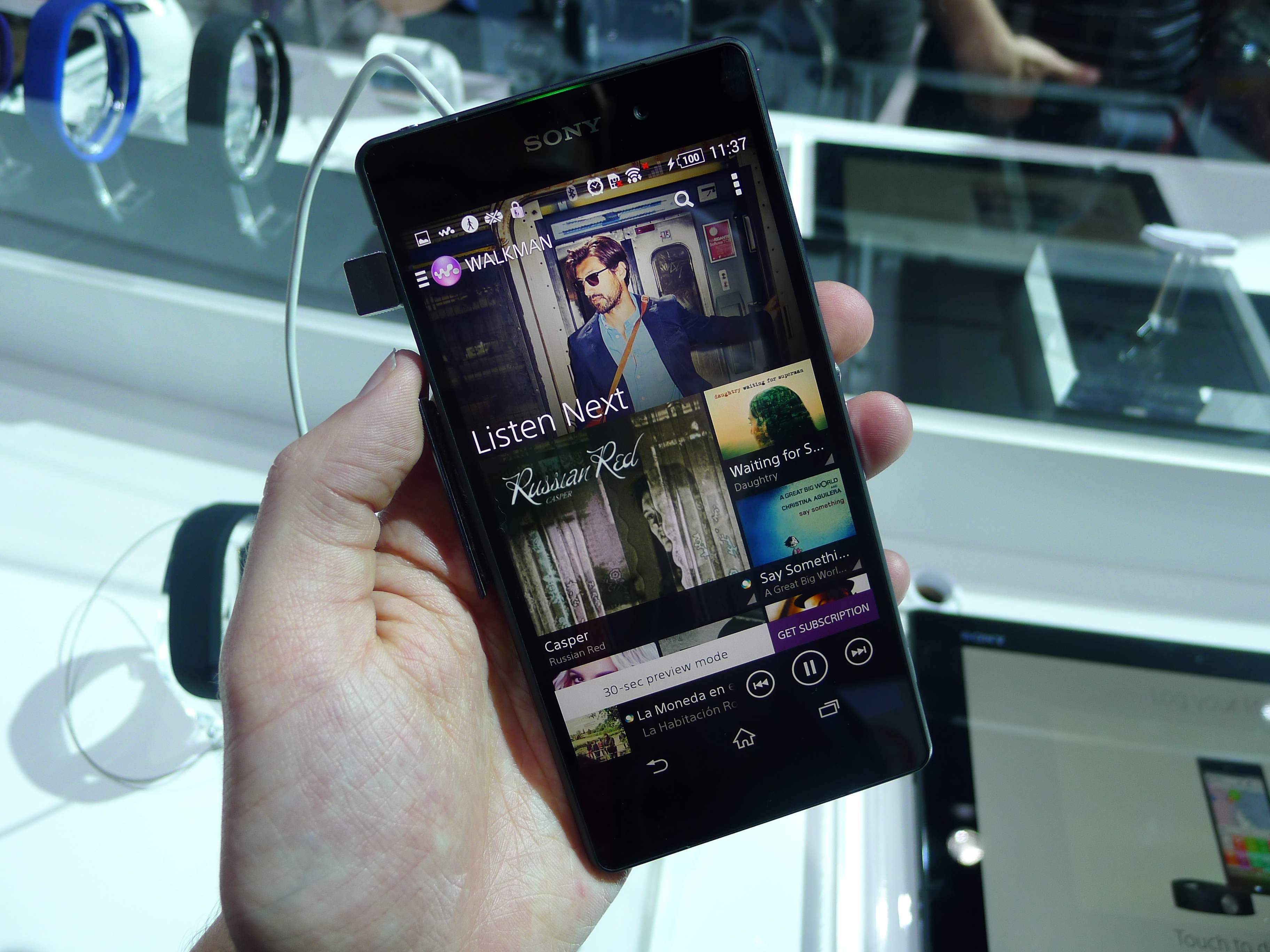
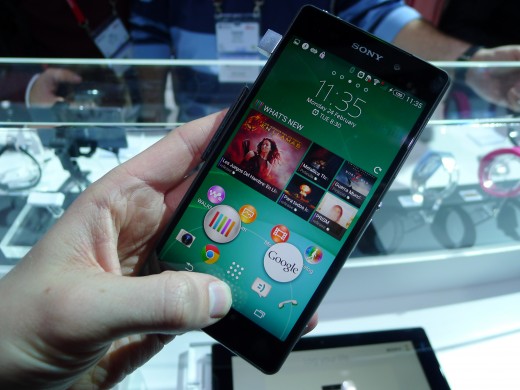
Elsewhere, Sony has kept the software experience fairly similar to the Xperia Z and Xperia Z1. Aside from the recent Motorola devices, it’s undoubtedly one the closest skins to stock Android – which is fantastic.

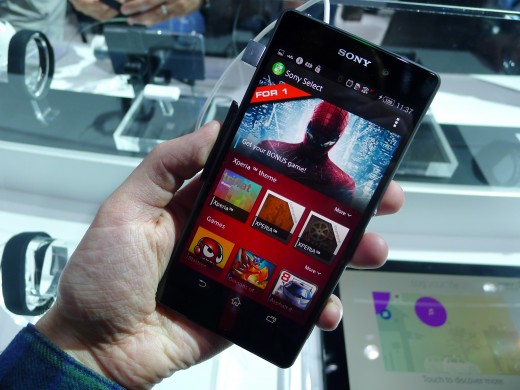
Sony offers a number of its own entertainment apps, including Music Unlimited, Video Unlimited and PlayStation Mobile, but they’re easy to ignore and pleasant enough if you want to switch across to its various digital storefronts.

There are some basic widgets that can be pulled out from the app switcher and there’s a new app called “What’s New” that suggests films, music, TV shows and video games you might want to check out. It can be launched with a long press on the home button – just as you would to open Google Now – and reinforces Sony’s focus on delivering and selling multimedia content.

P1050055 730x547 Sony Xperia Z2 hands on:  A promising rival to the Samsung Galaxy S5

If you want to shut out the masses on your daily commute, the Xperia Z2 is also equipped with digital noise cancelling (DNC) technology. It’s been optimized for Sony DNC headphones, although some third-party models will also be supported. The impact is immediate and should prove useful when you’re desperate for a little piece and quiet.

Wrap-up

The differences between the Xperia Z1 and Xperia Z2 are marginal. Nevertheless, this is one of the most impressive flagship Android smartphones that I’ve picked up this year – all of the core components have been improved and I was impressed both by the camera and the subtle software experience.

While I would have liked Sony to experiment more with the Xperia Z2′s industrial design, it’s still a nice looking piece of kit. If you’re a fan of the ‘Omnibalance’ aesthetic that Sony is always pushing, the Xperia Z2 looks to be another first-rate handset.

Gallery:

P10500372 520x390 Sony Xperia Z2 hands on:  A promising rival to the Samsung Galaxy S5
P1050040 520x390 Sony Xperia Z2 hands on:  A promising rival to the Samsung Galaxy S5
P10500411 520x390 Sony Xperia Z2 hands on:  A promising rival to the Samsung Galaxy S5
P1050043 520x390 Sony Xperia Z2 hands on:  A promising rival to the Samsung Galaxy S5
P10500441 520x390 Sony Xperia Z2 hands on:  A promising rival to the Samsung Galaxy S5
P1050046 520x390 Sony Xperia Z2 hands on:  A promising rival to the Samsung Galaxy S5
P1050048 520x390 Sony Xperia Z2 hands on:  A promising rival to the Samsung Galaxy S5
P1050049 520x390 Sony Xperia Z2 hands on:  A promising rival to the Samsung Galaxy S5
P1050050 520x390 Sony Xperia Z2 hands on:  A promising rival to the Samsung Galaxy S5
P1050051 520x390 Sony Xperia Z2 hands on:  A promising rival to the Samsung Galaxy S5
P10500551 520x390 Sony Xperia Z2 hands on:  A promising rival to the Samsung Galaxy S5
P1050060 520x390 Sony Xperia Z2 hands on:  A promising rival to the Samsung Galaxy S5
P1050067 520x390 Sony Xperia Z2 hands on:  A promising rival to the Samsung Galaxy S5
P1050232 520x390 Sony Xperia Z2 hands on:  A promising rival to the Samsung Galaxy S5

└ Tags: syndicated
  • Page 14,450 of 14,661
  • « First
  • «
  • 14,448
  • 14,449
  • 14,450
  • 14,451
  • 14,452
  • »
  • Last »
The Daily Dose, The Daily Dose © 1996 - Present. All Rights Reserved.
  • Home
  • About
  • Archive
  • Books
  • Collections
  • Links
  • Shop
  • Submit a joke
  • Video
  • Privacy Policy