

The Daily Dose

laugh every day with cartoons jokes and humor
  • Home
  • About
    • Press
      • Press Release – Announcing Laughzilla the Third ebook
      • Press Release – The Daily Dose Kicks Off Its 16th Year with New Books and More Irreverent Laughter
      • Press Release – Themes Memes and Laser Beams Now Available in Paperback
      • Press Release – Announcing Themes Memes and Laser Beams
      • In The News
    • Privacy
  • Archive
  • Books
  • Shop
  • Collections
    • Galleries
      • Gallery
      • Captions
      • Flash Cartoons & Greeting Cards
        • Laughzilla’s Oska Flash Animation Cartoon Greeting Cards
        • Oska Cupid Love Humor
    • #OccupyWallStreet
    • cats
    • China
    • Food
      • Hors d’oeuvres
        • Ball of Cream Cheese
      • Entrees / Main Courses
        • Meatballs with Baked Beans and Celery
    • Gadaffy
    • Google
  • Links
  • Video
  • Submit a joke
DeviantART Facebook Twitter Flickr pinterest YouTube RSS

Subscribe for Free Laughs!


Latest Comics

  • This Memorial Day, Trump Meme Coin Congratulates Profit Takers
  • 25 Years of The Daily Dose
  • The Best Cartoons
  • Bitcoin sings “Fly Me To The Moon”
  • 22 years of The Daily Dose

Comic Archive

Career Counseling

Daily Dose News Roundup

  • Snap lost a 400 million dollar AI deal, 20 million dollars a month to the Iran war, and 24 per cent of its stock price. The AR glasses had better work.
  • Volkswagen just became Rivian’s biggest investor. It is not buying trucks. It is buying the software its own engineers could not build.
  • Pinterest just crossed $1 billion in quarterly revenue. The bet that made it work was not social media. It was search.
  • Tesla is selling Chinese-made cars in Canada to escape the tariffs that both China and America imposed on it
  • Foreign automakers are not staging a comeback in China. They are learning to be the junior partner.

Quotable

"Now that we American humans have socialized healthcare, at least we're covered for heart meds when we first feel its sticker shock." ~ Yasha Harari

Fresh Baked Goods

Get The Daily Dose's ebook: Laughzilla the Third - A Funny Stuff Collection of 101 Cartoons from TheDailyDose. Click here to get the e-book on Amazon kdp. Laughzilla the Third (2012) The Third Volume in the Funny Stuff Cartoon Book Collection Available Now.

Click here for the Paperback edition


Support independent publishing: Buy The Daily Dose's book: Themes Memes and Laser Beams - A Funny Stuff Collection of 101 Cartoons by Laughzilla from TheDailyDose. Click here to get the book on Amazon. Themes Memes and Laser Beams - The Second Volume in the Funny Stuff Cartoon Book Collection.

Click Here to get the book in Paperback While Available on Amazon

Themes Memes and Laser Beams - 101 Cartoons by Laughzilla. Get the e-book on Lulu.

Click Here to get The Daily Dose Cartoon ebook on amazon kindle

Funny Stuff :
The First Cartoon Book
from The Daily Dose.
Available on Lulu.

a couple of laughzillas on a blue diamond background

Coinbase passes 1 million consumer wallets, 25,000 merchants, and 4,000 Bitcoin apps using its API

Feb27
by Sindy Cator on February 27, 2014 at 5:18 pm
Posted In: Around the Web, Insider

Coinbase today announced a new milestone: over 1 million consumer wallets, up from just 13,000 at the start of 2013. The company also revealed it is now seeing more than 25,000 merchants using its platform to attract new customers and more than 4,000 Bitcoin applications created using its API.

Without naming names, Coinbase also mentioned that recent issues in the Bitcoin community show that the virtual currency has a long road ahead of it. “We are fully committed to helping continue to bring the stability and confidence required to help ensure Bitcoin is as useful as possible for consumers, merchants and developers alike,” the startup declared. That’s a big promise for a big customer base.

See also – Coinbase releases an SDK to enable Bitcoin payments in Android apps and Coinbase launches point-of-sale app to let physical retailers accept payment in Bitcoin

Image Credit: George Frey/Getty Images

└ Tags: syndicated
a couple of laughzillas on a blue diamond background

The BBC’s proposed pay-to-keep download store for TV shows gets regulatory approval

Feb27
by Sindy Cator on February 27, 2014 at 5:06 pm
Posted In: Around the Web, Insider, UK

Back in October, we reported on the BBC’s plans to launch a new platform for downloading TV shows. The BBC Store will be a commercial, online service, letting UK users buy TV shows to keep forever – like iPlayer, but for downloads.

Now, one of the final hurdles has been circumvented, with the BBC Trust officially approving the proposals. The BBC Executive has issued the following response:

“We’re pleased the BBC Trust have approved proposals for BBC Store and recognise the benefits it brings licence fee payers, those who want to own BBC programmes and the creative industry as a whole. We know people want to buy DVDs of their favourite BBC shows and BBC Store is a natural progression in a digital age. Along with our proposal to extend catch-up on BBC iPlayer from 7 to 30 days, this is great news for fans of BBC shows. We will share more details about next steps at a later date.”

There are no details yet on the exact format or structure of the service, how much it will cost, or when it will launch. But we are expecting more information in the coming weeks. What we do know, however, is that the BBC Store will be a separate, standalone service to iPlayer, which itself will remain funded by the licence fee.

You can read the full regulatory approval here.

└ Tags: news, syndicated
a couple of laughzillas on a blue diamond background

How to make your posts stand out on the Web: The complete guide to social media formatting

Feb27
by Sindy Cator on February 27, 2014 at 5:05 pm
Posted In: Around the Web, How-To's, Insider, Social Media
Pages: 1 2 3 4 5 6

organized shelf 520x245 How to make your posts stand out on the Web: The complete guide to social media formatting

This post originally appeared on the Buffer blog.


Social media is a crowded place. You need every competitive advantage possible to stand out.

Luckily, giving your social media posts a little something extra doesn’t have to mean to a lot of extra work for you.

In this post, we’ll go over some simple tricks and best practices of social media formatting to help you create unique, stand-out posts on Twitter, Facebook, Google+, LinkedIn and Pinterest, along with some tools to help you create memorable blog tidbits worth sharing.

Let’s get started!

Stand out on Twitter

Offering just 140 characters and a very short shelf life, Twitter may be the most challenging medium to stand out on.

medians3 520x385 How to make your posts stand out on the Web: The complete guide to social media formatting

Here are a few ways to make the most of your tweets.

Symbols and emoticons

Adding symbols like ♥✩♬♡►♪☺♫ to your tweets isn’t just fun – it can also make your tweets shorter and easier to read. The Wall Street Journal even uses Twitter symbols to add bar charts to its tweets.

twitter sparklines 11 1 How to make your posts stand out on the Web: The complete guide to social media formatting

To get started using the more than 109,000 symbols available, head over to our Ultimate Guide to Adding Cool Symbols to Your Tweets.

Keep it short

Tweets get more traction when there’s a little room to spare – shoot for 120-130 characters.

Screen Shot 2013 08 16 at 10.51.12 AM 520x424 How to make your posts stand out on the Web: The complete guide to social media formatting

Add value with photos

Buffer’s research on Twitter posts with photos versus without indicates that photo posts vastly outperform non-photo posts in terms of both clicks and shares.

Tweets with images received 18% more clicks, 89% more favorites and 150% more retweets.

retweets 520x520 How to make your posts stand out on the Web: The complete guide to social media formatting

And according to HubSpot research, photo posts bring in 55% more leads, as well.

slide 81 638 520x292 How to make your posts stand out on the Web: The complete guide to social media formatting
Next: Stand out on Facebook

└ Tags: syndicated
a couple of laughzillas on a blue diamond background

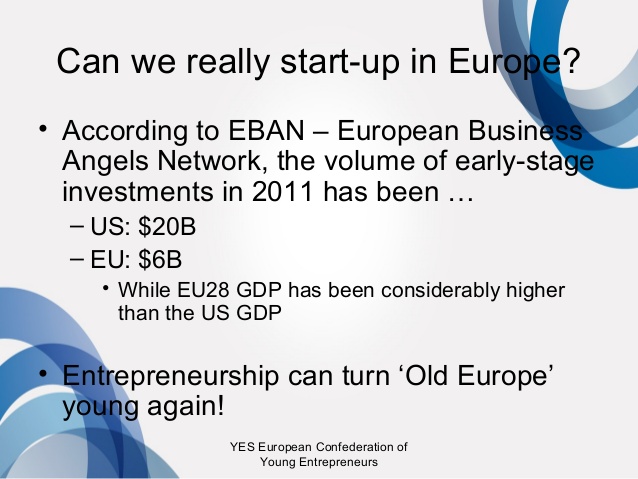
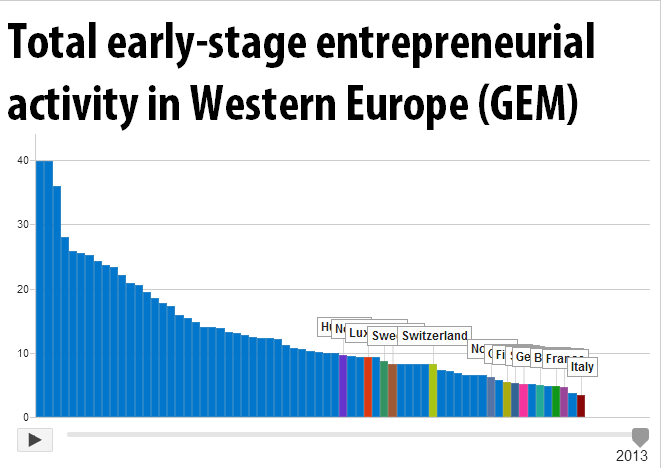
What are the fastest-growing tech startups in Europe?

Feb27
by Sindy Cator on February 27, 2014 at 4:29 pm
Posted In: Around the Web, Insider, Voice

blog header 520x245 What are the fastest growing tech startups in Europe?

Wouldn’t it be cool to have a list of the fastest-growing tech startups in Europe? Yes, that’s what we thought as well and it would make so much sense for TNW to follow and cover those companies on their way to their IPOs (hopefully).

So, we sat down with our partner Adyen (a global payments technology provider) and created something new: the Tech5.

The Tech5 is a pan-European initiative to identify the fastest-growing tech startups in each country.

As Europe has a lot of countries, we decided to model the Tech5 after two famous European competitions. Inspired by the Champions League and the Eurovision Song Contest, we came up with the ‘gameplay’ for the Tech5.

At the ‘final’ in Amsterdam during TNW Conference Europe (April 24-25), the 10 fastest growing companies from the 10 most vibrant tech communities in Europe will present their company (and represent their country) in front of 2,500 influencers, marketers, investors, journalists and thinkers in the tech scene.

The road to the final

As of today, high-growth tech startups from every European country can join the first phase of the Tech 5, if they meet the criteria. The companies from the ten most vibrant tech communities, based on the number of unique submissions that met the criteria, will move on to the next phase to determine the respective Tech5 lists per country. (e.g. German Tech5, UK Tech5).

The companies will be ranked based on growth rates in revenue and usage plus a public component and the fastest-growing companies get to present in Amsterdam.

The Tech5 lists will be published here on TNW and will be available to other media outlets as well. Note that TNW will destroy all non-public data that it may gather during the process after the final European Tech 5 is determined.

Here’s how you can be involved

  • If you live in a country that should get its own Tech5 list, spread the URL to your local tech scene or tweet this.
  • If you have a fast-growing startup and want to get valuable coverage, connections and a speaking slot at TNW conference? Please join the Tech5 via the famous ’10-second signup process’ (we should trademark that).
  • If you want to keep track of the results, leave your email here or meet up with the fastest growing companies of Europe and 2500 thousand peers in Amsterdam (be quick though).

Stay tuned for more info, we will cover the Tech5 lists of each country and more here on TNW.

➤ TNW Tech5

└ Tags: europe, news, syndicated
a couple of laughzillas on a blue diamond background

How to tell a unique story with Web Journals in iPhoto for iOS

Feb27
by Sindy Cator on February 27, 2014 at 4:15 pm
Posted In: Around the Web, How-To's

shutterstock 113297638 520x245 How to tell a unique story with Web Journals in iPhoto for iOS

You can tweet or update your blog. You can upload images or video to your favorite online photo storage or sharing app. You can post to your Facebook account or whatever social network you’re into.

But unless you have Apple’s iPhoto for iOS (iPhone or iPad), you cannot create a Web Journal. Web Journals are unique among Apple’s photo sharing utilities—even iPhoto for OS X doesn’t have one.

And that’s kind of sad because Web Journals are cool.

Screen Shot 2014 02 26 at 2.38.35 PM 520x631 How to tell a unique story with Web Journals in iPhoto for iOS

Link to your journal via iCloud, and anyone can view it online from any device.

What’s a Web Journal? You might say it’s a hybrid scrapbook, photo album, and slideshow. The scrapbook element is derived from the arrangement of photos and the mixture of non-photo widgets you can integrate into the presentation. Elements like notes, maps, symbols, and weather modules can satisfy the urge for a simple storytelling narrative—one that might even contain some documentary flair—without getting obsessive.

Flexible presentation

Web Journals are designed to be versatile and dynamic. You can post a Web Journal documenting each day of a trip, for example. Or you can use it to highlight the most important parts of a single event. You can update journal contents anytime, so material is always up to the minute.

The ability to craft the presentation offers more flexibility than a slideshow, and is more dynamic than a photo album. You can add captions and notes to a Web Journal. And finally, it’s designed to be synced with your iCloud account for viewing in the browser or on a mobile device by whomever you like.

I generally like to restrict Web Journals to between 12 and 20 shots — just enough to offer variety, but not too much. A Web Journal is not a photo album—it’s a curated selection of photos that look good together and can accommodate other artistic elements.

Like most operations in mobile iPhoto, creating a Web Journal is easy; here’s the basic walkthrough.

How to construct a Web Journal

1. Under the Share menu, locate Web Journal under Create a Project.

photo 34 520x390 How to tell a unique story with Web Journals in iPhoto for iOS

Under the Share button, you’ll find the command to create a Web Journal.

2. Go to the bottom of the menu where it says Choose Photos. You can select up to 200 photos.  You might want to choose all the photos in an album, but more likely you’ll select each photo individually. Drag to expand up to four rows of photos to the left of the main image, and tap the ones you want to include. Tap again to deselect, if you change your mind. When you’re done, tap the Next button at the upper right and then tap New Web Journal.

3. Name your new journal, select a background, and then create. Nothing is carved in stone here. You can always change your mind. It would be nice if Apple added some new background elements to the selection—but there’s something to be said for keeping the choices simple.

photo3 520x390 How to tell a unique story with Web Journals in iPhoto for iOS

There are a small number of choices for background, grid size, and photo arrangement.

4. Go back to the main menu using the arrow key on the upper left. You’ll find the new journal under the Projects tab.

And that’s it. You can leave the web journal just like that and be done. But of course you can do more.

Formatting tips

You can go back and change the background and the grid pattern or size.

Even when your images are all lined up in the grid, you can still edit them individually by tapping to bring up iPhoto’s edit module—meaning you can still crop, adjust exposure, sharpen, or add special effects to individual pictures. You don’t have to worry about setting everything up beforehand.

You can change the size of individual photos in the grid by using zoom and pinch or click and drag gestures, and drag and drop images into different locations until you’re pleased with the composition.

photo 42 520x390 How to tell a unique story with Web Journals in iPhoto for iOS

This web journal is customized to have all photos and widgets in place. Tap and hold each unit to resize, add a caption, or remove.

Add captions to each photo and choose from three different fonts. The keyboard automatically appears so you can type in your text.

When you edit one photo, you have the option of applying the same edits to other photos in the series. This is convenient if you’ve taken a number of shots at the same time of day.

When viewing the Web Journal on a mobile device, tapping any image automatically lets you view each photo in sequence via swipe.

Share your journal

When you’re done tweaking your Web Journal, you will want to put it on display. For that you have a few choices.

photo 71 520x390 How to tell a unique story with Web Journals in iPhoto for iOS

Upload your web journal via iCloud and send a link to anyone you want.

The most popular one will be to use your free iCloud account to share a link to your journal via email. You can also use iTunes or AirDrop to sync the images you used, or simply beam your journal (connect via the same Wi-Fi network or Bluetooth) to someone else running iPhoto for iOS.

➤ iPhoto for iOS

Image Credit: Shutterstock

└ Tags: creativity, syndicated
  • Page 14,404 of 14,641
  • « First
  • «
  • 14,402
  • 14,403
  • 14,404
  • 14,405
  • 14,406
  • »
  • Last »
The Daily Dose, The Daily Dose © 1996 - Present. All Rights Reserved.
  • Home
  • About
  • Archive
  • Books
  • Collections
  • Links
  • Shop
  • Submit a joke
  • Video
  • Privacy Policy