The Daily Dose

laugh every day with cartoons jokes and humor
  • Home
  • About
    • Press
      • Press Release – Announcing Laughzilla the Third ebook
      • Press Release – The Daily Dose Kicks Off Its 16th Year with New Books and More Irreverent Laughter
      • Press Release – Themes Memes and Laser Beams Now Available in Paperback
      • Press Release – Announcing Themes Memes and Laser Beams
      • In The News
    • Privacy
  • Archive
  • Books
  • Shop
  • Collections
    • Galleries
      • Gallery
      • Captions
      • Flash Cartoons & Greeting Cards
        • Laughzilla’s Oska Flash Animation Cartoon Greeting Cards
        • Oska Cupid Love Humor
    • #OccupyWallStreet
    • cats
    • China
    • Food
      • Hors d’oeuvres
        • Ball of Cream Cheese
      • Entrees / Main Courses
        • Meatballs with Baked Beans and Celery
    • Gadaffy
    • Google
  • Links
  • Video
  • Submit a joke
DeviantART Facebook Twitter Flickr pinterest YouTube RSS

Subscribe for Free Laughs!


Latest Comics

  • This Memorial Day, Trump Meme Coin Congratulates Profit Takers
  • 25 Years of The Daily Dose
  • The Best Cartoons
  • Bitcoin sings “Fly Me To The Moon”
  • 22 years of The Daily Dose

Comic Archive

Hillary Clinton Leaves State Department

Daily Dose News Roundup

  • Estonian energy storage firm Skeleton becomes unicorn with Siemens deal
  • Palantir CTO says the Pentagon has already replaced Anthropic’s AI
  • DeepSeek to lead seed round in $400mn robot AI start-up, Bloomberg reports
  • Turkey’s social media ban for under-15s starts on 1 November
  • Vittorio Colao defends copyright rules and the DSA in Europe’s AI debate

Quotable

"Larry King interviewed Lady Gaga. In other words, the Freaky King of Fluff interviewed the Queen of Freaky Pop." ~ Yasha Harari

Fresh Baked Goods

Get The Daily Dose's ebook: Laughzilla the Third - A Funny Stuff Collection of 101 Cartoons from TheDailyDose. Click here to get the e-book on Amazon kdp. Laughzilla the Third (2012) The Third Volume in the Funny Stuff Cartoon Book Collection Available Now.

Click here for the Paperback edition


Support independent publishing: Buy The Daily Dose's book: Themes Memes and Laser Beams - A Funny Stuff Collection of 101 Cartoons by Laughzilla from TheDailyDose. Click here to get the book on Amazon. Themes Memes and Laser Beams - The Second Volume in the Funny Stuff Cartoon Book Collection.

Click Here to get the book in Paperback While Available on Amazon

Themes Memes and Laser Beams - 101 Cartoons by Laughzilla. Get the e-book on Lulu.

Click Here to get The Daily Dose Cartoon ebook on amazon kindle

Funny Stuff :
The First Cartoon Book
from The Daily Dose.
Available on Lulu.

a couple of laughzillas on a blue diamond background

Mozilla launches JPEG encoder mozjpeg to reduce webpage loads, results show up to 10% decrease in file size

Mar05
by Sindy Cator on March 5, 2014 at 6:34 pm
Posted In: Apps, Around the Web, Insider

1414234 49900723 520x245 Mozilla launches JPEG encoder mozjpeg to reduce webpage loads, results show up to 10% decrease in file size

Mozilla today announced a new project called mozjpeg, the goal of which is to provide a production-quality JPEG encoder that improves compression rates. That being said, the company wants to maintain compatibility with “the vast majority” of deployed decoders.

Over the years, the number of images an average website displays has exploded, as has the file size of each image. Since HTML, JS, and CSS files are relatively small in comparison, Mozilla points out photos can “easily make up the bulk of the network traffic for a page load.” The company thus wants to reduce the size of these files, and while JPEG has been in use since around 1992, it is still the most popular lossy compressed image format on the Web.

JPEG is the only lossy compressed image format which has achieved nearly universal compatibility, not just with Web browsers but all software that can display images. As such Mozilla argues that it’s worth trying to optimize it, even with the ongoing search for a successor:

Production JPEG encoders have largely been stagnant in terms of compression efficiency, so replacing JPEG with something better has been a frequent topic of discussion. The major downside to moving away from JPEG is that it would require going through a multi-year period of relatively poor compatibility with the world’s deployed software. We (at Mozilla) don’t doubt that algorithmic improvements will make this worthwhile at some point, possibly soon. Even after a transition begins in earnest though, JPEG will continue to be used widely.

The company talked to engineers and concluded that JPEG encoders haven’t yet reached their full compression potential, even after 20 years and within the constraints of strong compatibility requirements.

Today’s mozjpeg version 1.0 release is a fork of libjpeg-turbo with ‘jpgcrush’ functionality added. The latter is a Perl script written by Loren Merritt which losslessly reduces file sizes by figuring out which progressive coding configuration uses the fewest bits. Results for mozjpeg range from 2-6 percent for PNGs encoded to JPEG by libjpeg-turbo and 10 percent on average for a sample of 1,500 JPEG files from Wikimedia.

Mozilla says it is not aware of any other production encoder that has this functionality built in, so the company decided to include it as mozjpeg’s first feature. The project’s next goal is to improve encoding by making use of trellis quantization. We’ll keep you posted as the project progresses and Mozilla shares its results.

➤ mozjpeg (GitHub)

Top Image Credit: Andreas Krappweis

└ Tags: syndicated
a couple of laughzillas on a blue diamond background

Facebook bans posts selling guns without background checks

Mar05
by Sindy Cator on March 5, 2014 at 5:59 pm
Posted In: Around the Web

144638499 520x245 Facebook bans posts selling guns without background checks

Facebook today unveiled new measures to toughen up its position on firearm sales promoted across its social network.

While Facebook doesn’t allow its users to advertize illegal drugs, weapons, prescription medicine and other sensitive items, it’s fairly common for people to post on their timeline offering spare rooms, second-hand cars and increasingly, it would seem, regulated firearms. Today, the company said it would delete posts that were advertizing guns without the necessary background checks.

“We will not permit people to post offers to sell regulated items that indicate a willingness to evade or help others evade the law,” Monika Bickert, Head of Global Policy Management for Facebook said.

“For example, private sellers of firearms in the US will not be permitted to specify ‘no background check required,’ nor can they offer to transact across state lines without a licensed firearms dealer.”

Furthermore, Facebook said it will now show “special in-app education” to Instagram users who are frequently searching for firearms.

As part of the new measures, the company will also limit posts that advertize regulated item, including firearms, to users over the age of 18. It will also send a message to the creator reminding them to comply with the law.

Finally, Facebook Pages that are used mostly to sell regulated items will need to make it clear that all sales and transactions must be carried out in accordance with the law. Access will also need to be limited to Facebook users over the age of 18, if and when it’s required by legislation.

➤ Facebook, Instagram Announce New Educational and Enforcement Measures for Commercial Activity

Image Credit: Ed Jones/AFP/Getty Images

└ Tags: facebook, news, syndicated, united states
a couple of laughzillas on a blue diamond background

Yahoo acquires visual identity platform startup Vizify, will shut the service down and issue refunds

Mar05
by Sindy Cator on March 5, 2014 at 5:38 pm
Posted In: Around the Web, Insider

103799517 520x245 Yahoo acquires visual identity platform startup Vizify, will shut the service down and issue refunds

Yahoo today acquired visual identity platform startup Vizify for an undisclosed sum, closing a deal that has been in the works for months. Founded by Todd Silverstein, Eli Tucker, and Jeff Cutler-Stamm in 2011, the service will be shutting down for existing Vizify bioholders and accounts.

“Since last summer, we’ve been engaged in a conversation with some of the incredible folks at Yahoo about the ways this more visual approach to data can inspire and entertain,” the Vizify team explains. “As our conversations progressed, we realized we’d found a partner who shared our passion for user experience, design, and visualizing information. Ultimately, we just couldn’t say no to the opportunity to bring our vision to the hundreds of millions of people who use Yahoo every day.”

Here is how Vizify will be handling the transition:

  • Those with a current paid plan will receive a full refund for everything you’ve paid Vizify.
  • Premium customers who registered a domain through Vizify (like your-name.com) will receive instructions so they can assume ownership of their domain, free of charge.
  • All bioholders, free and paid, will get a way to opt-in to “archive” a snapshot of their current bio that will remain live at the same URL through September 4, 2014.

If you’re a Vizify user, you’ll want to check out the FAQ page for more information as to how exactly this affects you. Vizify says it “can’t talk specifics just yet” in regards to what its employees will be doing at Yahoo, but it did say “a more visual approach to data at Yahoo” is in order.

See also – With 250k users, Vizify moves out of beta and launches mini self-infographics called Vizcards and Vizify joins forces with Twitter, now you can create an instant ‘movie trailer’ bio in no time at all

Top Image Credit: John Moore/Getty Images

└ Tags: syndicated
a couple of laughzillas on a blue diamond background

Yahoo acquires visual identity platform startup Vizify, will shut the service down and issue refunds

Mar05
by Sindy Cator on March 5, 2014 at 5:38 pm
Posted In: Around the Web, Insider

Yahoo today acquired visual identity platform startup Vizify for an undisclosed sum, closing a deal that has been in the works for months. The service will be shutting down for existing Vizify bioholders and accounts.

“Since last summer, we’ve been engaged in a conversation with some of the incredible folks at Yahoo about the ways this more visual approach to data can inspire and entertain,” the Vizify team explains. “As our conversations progressed, we realized we’d found a partner who shared our passion for user experience, design, and visualizing information. Ultimately, we just couldn’t say no to the opportunity to bring our vision to the hundreds of millions of people who use Yahoo every day.”

Here is how Vizify will be handling the transition:

  • Those with a current paid plan will receive a full refund for everything you’ve paid Vizify.
  • Premium customers who registered a domain through Vizify (like your-name.com) will receive instructions so they can assume ownership of their domain, free of charge.
  • All bioholders, free and paid, will get a way to opt-in to “archive” a snapshot of their current bio that will remain live at the same URL through September 4, 2014.

Vizify says it “can’t talk specifics just yet” in regards to what its employees will be doing at Yahoo, but it did say “a more visual approach to data at Yahoo” is in order.

More to follow.

└ Tags: syndicated
a couple of laughzillas on a blue diamond background

Which social media platform is best for your business?

Mar05
by Sindy Cator on March 5, 2014 at 5:24 pm
Posted In: Analysis and Opinion, Around the Web, How-To's, Insider, Social Media

SocialMediaUse 520x245 Which social media platform is best for your business?

It is commonly suggested that to increase your brand presence, you need to be active on all forms of social media. While that may be true, unless your company has a dedicated social media coordinator, finding the time to maintain every platform out there can be extremely time consuming.

If your company is just starting out on the Web and need to pick a few social media networks to rule over, here is our guide to choosing the best platform(s) for your business, and how to make the most out of them.

1. Twitter

Who should use it: Everyone – from individuals to the largest multinational corporations

What to share: Start, join, and lead conversations; interact directly with brands and customers

Post frequency: Multiple times per day

Twitter is the dominant democracy of the social-sharing economy. Relevancy, personality and brevity are the keys to making your voice heard.

Useful tools: Buffer lets you stockpile and schedule content in advance. Tools like this allow for posting around-the-clock, increasing the likelihood of snagging followers beyond your country or time zone without being working 24/7.

It’s a guarantee by this point that a conversation relevant to your industry or business is occurring on Twitter. The only question: are you part of it?

buffer 730x383 Which social media platform is best for your business?

2. Instagram

Who should use it: Lifestyle, food, fashion, personalities and luxury brands

What to share: Share visual content, including short videos (less than 15 seconds)

Post frequency: Once a day

Instagram invites brands with visual content into their customers’ zone-out time. Create and post content accordingly.

You’ll want to experiment with your own userbase and followers, but it’s likely that the best time to target your posts will be to get to your audience’s eyes during their commutes, nights, and weekends.

Useful tools: While hashtags are clickable and useful for search purposes, links in comments and captions are not.

Instead, use the integrated sharing functions for Facebook, Tumblr and Twitter to repurpose your Instagram posts for more shareable media. Include a relevant hashtag to become more discoverable on Instagram and to track engagement across sites where you share the content.

4QMvDq saAPga9luwN2wMkQ  2e3kml3TkuBTkF9b78SGh2iSSBFXC722gnByV7FcAs2000 730x209 Which social media platform is best for your business?

Additionally, Followgram is a great tool for tracking your stats on the most liked and commented posts, along with top tags and locations.

3. LinkedIn

Who should use it: Businesses (especially B2B service providers), Recruiters and Job-Seekers

What to share: Job-postings, company descriptions, employer/employee research

Post frequency: Two to four times a week

LinkedIn is the online analog to old fashioned networking. People – and connections to people – are everything

Keep a company description and profile page mindful of keyword SEO, but your network of employees and contacts is your most valuable (and potentially damaging) content on LinkedIn. Make sure people in your organization are appropriate, professional and on-brand. There’s nowhere online where employers and employees are more intimately linked.

Company seeking clients and individuals seeking employment should grow their LinkedIn networks by adding as many real connections as possible. Use your second and third-degree connections to request personal introductions (when reasonable), and weed out the Internet’s infinity of companies and applications, focusing on opportunities where you have some real connection.

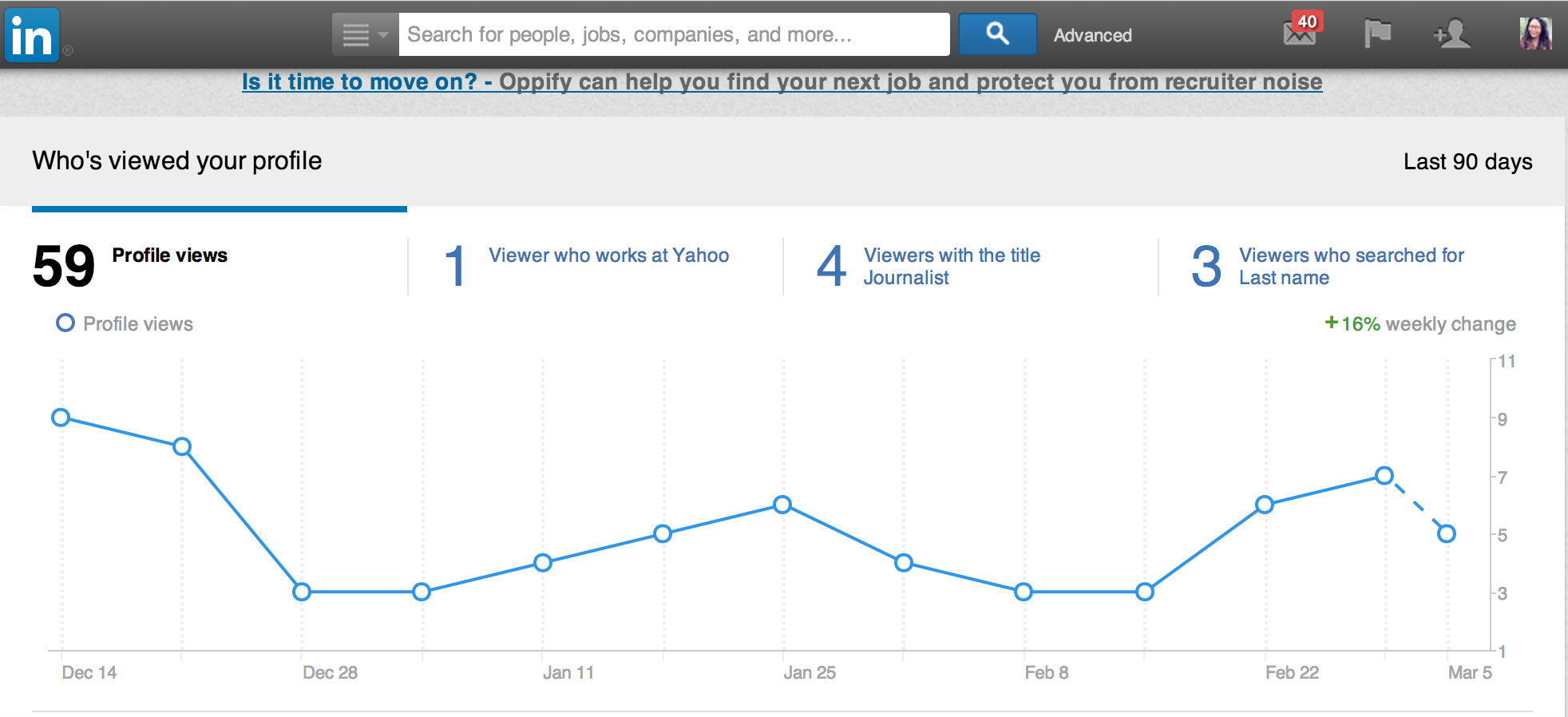
linkedin profile view 730x333 Which social media platform is best for your business?

Top tip: LinkedIn shares more about your own electronic creeping than any other network. Paid users can see who’s viewing their profiles.

If you’re researching a competitor or doing some preliminary job-seeking you’d rather your boss didn’t know about, try a Google search specifically for the LinkedIn page you want to see.

4. Facebook

Who should use it: Everyone and their grandmas (literally)

What to share: All types of online content, events, ads

Post frequency: Once or twice a day

Consider advertising or paying to promote your page on Facebook, but don’t make your brand’s Facebook page itself look like an advertisement. Inspire conversations and shares – and be sure to ask questions.

Of all social networks, Facebook is best equipped to linearly share responses to a post asking a question or sparking conversation. Answers then appear in friends of your respondents, spreading the conversation.

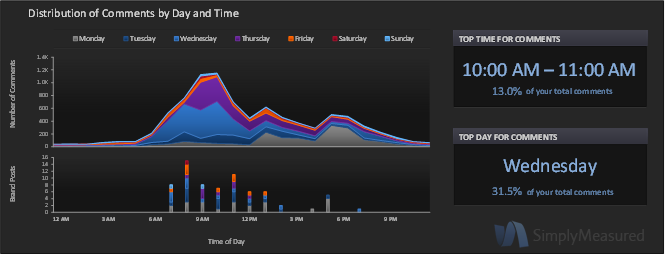
Facebook offers personal connection and an enjoyable distraction amidst the work day, but use typically peaks outside of work hours. There’s no shortage of options for analyzing Facebook data. Track the success of your content by date and time to hone in on the best times for engaging your audience.

Useful tools: URL shortener Bitly does more than just shrink down links. Each time you convert a link, Bitly offers stats on clicks generated from that specific link, making it helpful to see how much traffic is brought directly from sharing to Facebook.

fb shares Which social media platform is best for your business?

5. Google+

Who should use it: Brands already on the other major social networks, B2B networking, bloggers

What to share: More formal and professional than Facebook; Hashtags have major search value

Post frequency: Once or twice a day

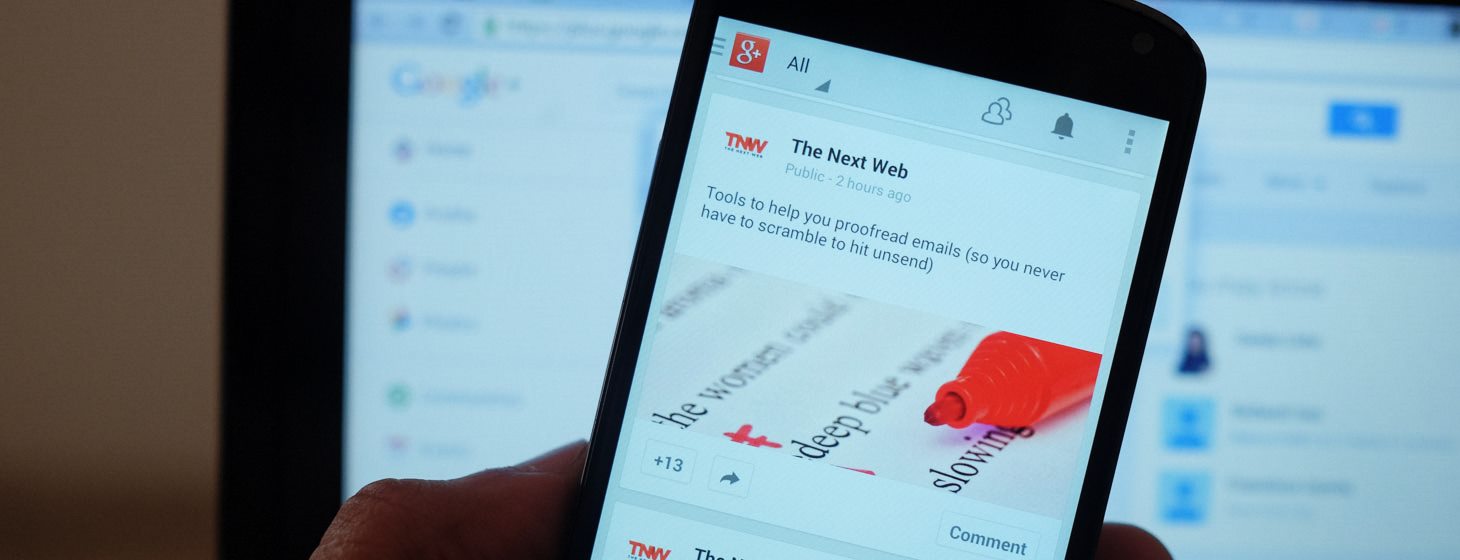
As Google’s proposed alternative to Facebook, keywords and search engine optimization are central to the appeal of Google+. Link often to content on your own website to direct this search boost where you want it most.

googleplus android 3 730x280 Which social media platform is best for your business?

Useful tools: Bloggers, set up Google Authorship to have your Google+ profile follow your content from across the Web in search results. More than any particular feature of Google+, users are enticed by integration with Google’s other products.

Case in point? Comments on this article’s next social network now link to Google+ accounts.

6. YouTube

Who should use it: Brands with video content and ads, anyone giving explanations or sharing expertise

What to share: Short (less than 1.5 minutes) video content

Post frequency: Once or twice a week

Google treats its own well, and YouTube is the prime example of this fact. YouTube videos feature prominently in Google search results.

Keep this in mind when naming and describing videos, and direct people looking for insight or explanations within your industry topics to your brand’s page.

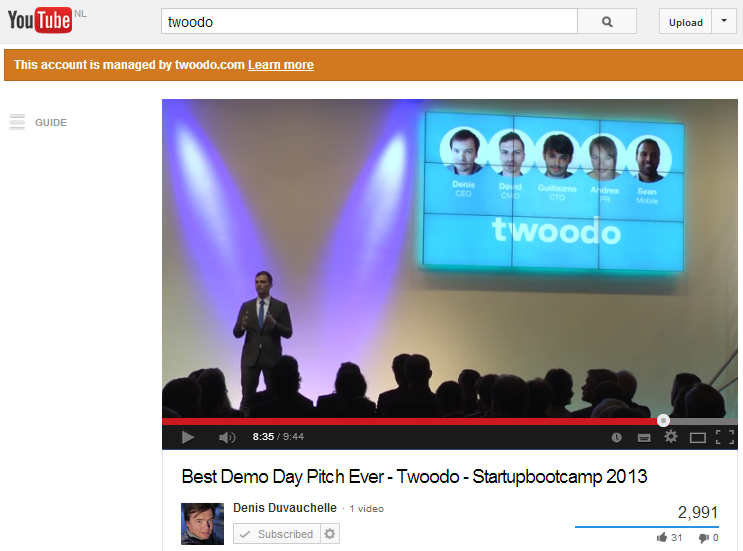
youtube 730x541 Which social media platform is best for your business?

Useful tools: A subscription widget or link to your website can help convert single views into long-term influence.

7. Pinterest

Who should use it: Fashion, food, design, travel and anything DIY; audience skews female by 4:1

What to share: Creative, visual content

Post frequency: Multiple times per day

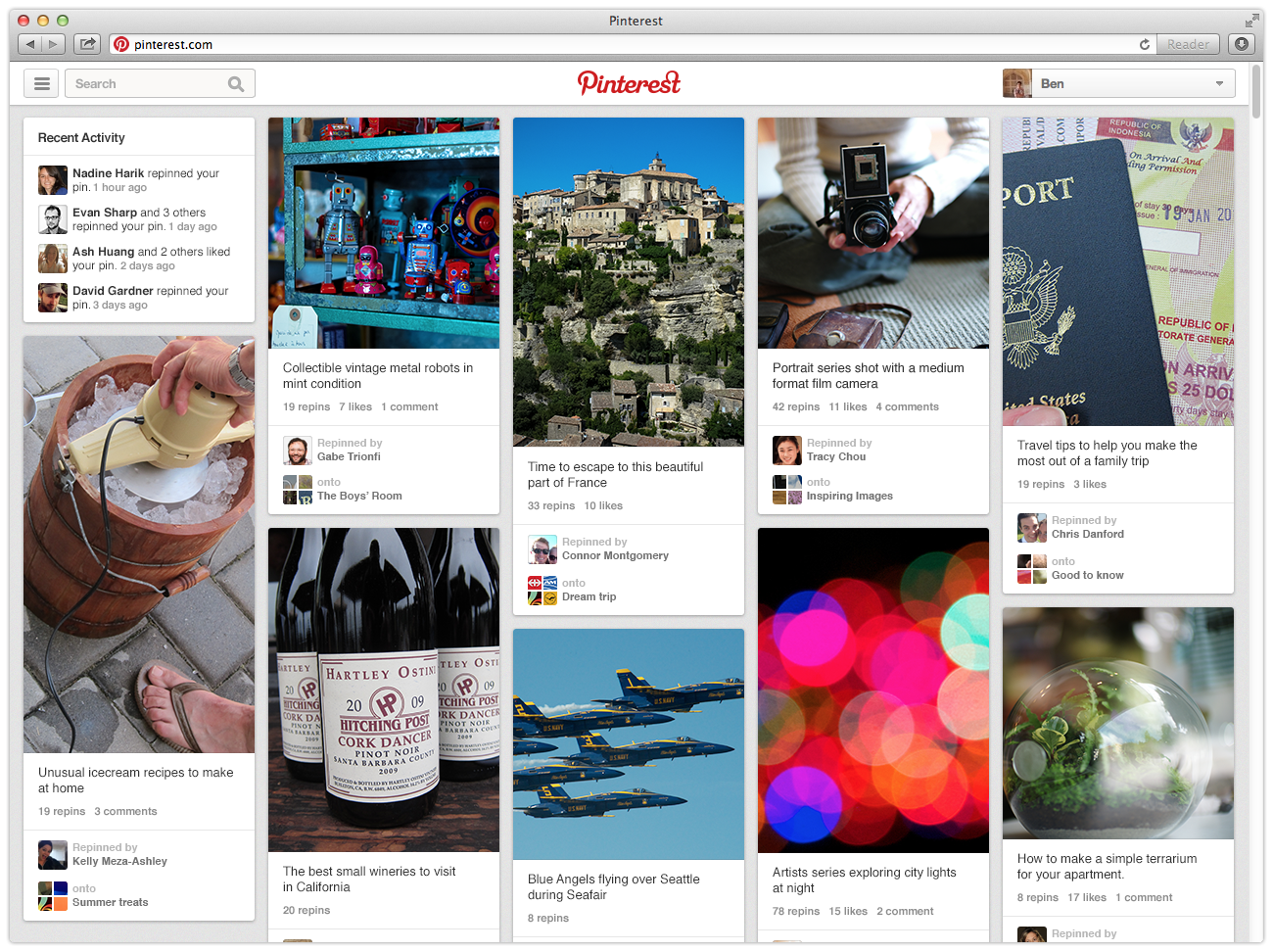
Users pin and re-pin posts to Pinterest Boards, which naturally push the content on Pinterest into categories. This makes easily-categorized content most apt for sharing, and wisely-chosen keywords essential to successful post captions.

Pinterest differs from other popular search engines in heavily favoring recent content. Pinning and re-pinning frequently is necessary to appear within current results for a given search term, regardless of how popular your content is.

pinterest2 730x545 Which social media platform is best for your business?

Top tip: That stunning visual content on Pinterest? Undoubtedly the hard work of a designer, photographer or videographer. Technically, you’re only supposed to pin content you own or that’s within the public domain. Be sure to attribute your pins appropriately.

8. Yelp and/or Foursquare

Who should use it: B2C companies, brick-and-mortar outlets (especially stores, restaurants, and travel/tourism related), reviewers and bloggers

What to share: Location-based business search and reviews

Post frequency: Before your physical business opens and whenever information changes. Otherwise, at least weekly.

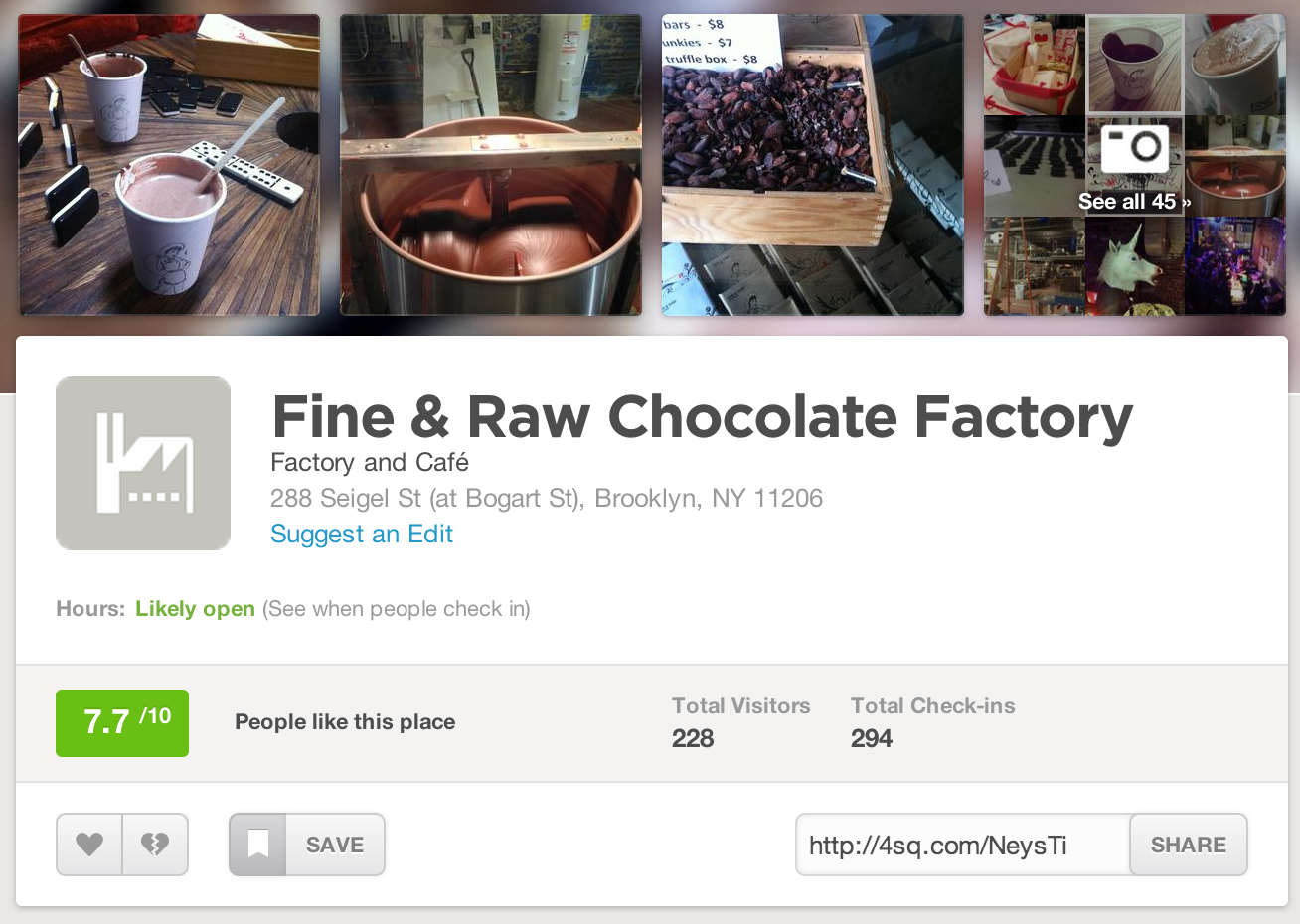
Share details about your business on an official company profile page. Monitor customer feedback related to your business, and respond to concerns raised in reviews. Consider it free promotion and advertisement (although paid promotions are also available).

Keep your information updated, and pay attention to keywords and SEO in crafting descriptions – Yelp listings in particular feature prominently in Google searches for local businesses.

On the consumer side of these B2C networks, reviewers and bloggers can use Yelp and Foursquare to grow their following. You can’t post a link in a review (Yelp with flag those and potentially suspend your profile), but you can develop a reputation for reliable reviews.

foursquare business profile 730x519 Which social media platform is best for your business?

Top tip: Both Yelp and Foursquare users tend to glance, so it’s important to get as many high numbered ratings as possible to gain a positive first impression. Add a link to your blog or personal website under the profile section to capture additional readership.

└ Tags: syndicated
  • Page 14,382 of 14,673
  • « First
  • «
  • 14,380
  • 14,381
  • 14,382
  • 14,383
  • 14,384
  • »
  • Last »
The Daily Dose, The Daily Dose © 1996 - Present. All Rights Reserved.
  • Home
  • About
  • Archive
  • Books
  • Collections
  • Links
  • Shop
  • Submit a joke
  • Video
  • Privacy Policy