The Daily Dose

laugh every day with cartoons jokes and humor
  • Home
  • About
    • Press
      • Press Release – Announcing Laughzilla the Third ebook
      • Press Release – The Daily Dose Kicks Off Its 16th Year with New Books and More Irreverent Laughter
      • Press Release – Themes Memes and Laser Beams Now Available in Paperback
      • Press Release – Announcing Themes Memes and Laser Beams
      • In The News
    • Privacy
  • Archive
  • Books
  • Shop
  • Collections
    • Galleries
      • Gallery
      • Captions
      • Flash Cartoons & Greeting Cards
        • Laughzilla’s Oska Flash Animation Cartoon Greeting Cards
        • Oska Cupid Love Humor
    • #OccupyWallStreet
    • cats
    • China
    • Food
      • Hors d’oeuvres
        • Ball of Cream Cheese
      • Entrees / Main Courses
        • Meatballs with Baked Beans and Celery
    • Gadaffy
    • Google
  • Links
  • Video
  • Submit a joke
DeviantART Facebook Twitter Flickr pinterest YouTube RSS

Subscribe for Free Laughs!


Latest Comics

  • This Memorial Day, Trump Meme Coin Congratulates Profit Takers
  • 25 Years of The Daily Dose
  • The Best Cartoons
  • Bitcoin sings “Fly Me To The Moon”
  • 22 years of The Daily Dose

Comic Archive

Rick Perry Government God Grenade Guns

Daily Dose News Roundup

  • The data center boom will fail its promise if safety and workforce development continue to lag behind
  • Google stops demoting EU publishers under its spam policy from Sunday
  • Salesforce is putting Claude at the centre of its products, and itself inside Claude
  • Spain wants data centres on 80% renewables every hour, or no grid connection
  • The UK and Ukraine have signed a declaration on AI-enabled military capabilities

Quotable

"Various dictators du jour; Kaddafi, Assad, Gbagbo, Abdullah, Kim, Sallah, Khalifa and others have released a joint statement expressing their intention to resign from power in favor of democracy. April Fool's." ~ Yasha Harari

Fresh Baked Goods

Get The Daily Dose's ebook: Laughzilla the Third - A Funny Stuff Collection of 101 Cartoons from TheDailyDose. Click here to get the e-book on Amazon kdp. Laughzilla the Third (2012) The Third Volume in the Funny Stuff Cartoon Book Collection Available Now.

Click here for the Paperback edition


Support independent publishing: Buy The Daily Dose's book: Themes Memes and Laser Beams - A Funny Stuff Collection of 101 Cartoons by Laughzilla from TheDailyDose. Click here to get the book on Amazon. Themes Memes and Laser Beams - The Second Volume in the Funny Stuff Cartoon Book Collection.

Click Here to get the book in Paperback While Available on Amazon

Themes Memes and Laser Beams - 101 Cartoons by Laughzilla. Get the e-book on Lulu.

Click Here to get The Daily Dose Cartoon ebook on amazon kindle

Funny Stuff :
The First Cartoon Book
from The Daily Dose.
Available on Lulu.

a couple of laughzillas on a blue diamond background

Twitter brings Bing translation to its mobile apps, adds in-line translation to Web platform

Jun13
by Sindy Cator on June 13, 2014 at 12:08 pm
Posted In: Apps, Around the Web, Product Updates

twitter crop
Twitter has rolled out a new feature for its iOS and Android apps which allow people to use Microsoft’s Bing translation engine to translate tweets with the tap of a button. First spotted by CNET, the feature doesn’t actually show the translation option in your stream of tweets, rather, you need to tap on the tweet first to look at it individually and then select to translate it. In addition to the new mobile translation option, Twitter has also extended the reach of its translation powers on the Web. Previously, if you wanted to translate a tweet you needed to click…

This story continues at The Next Web

└ Tags: news, syndicated, twitter
a couple of laughzillas on a blue diamond background

T Accounts

Jun13
by Sindy Cator on June 13, 2014 at 11:30 am
Posted In: Around the Web, Downloads

I’ve made an Excel template for filling out T accounts. For you non-accounting folks, a T account is a method to trace accounting transactions through the accounts on the general ledger. Hey, wake up! This post isn’t finished yet!

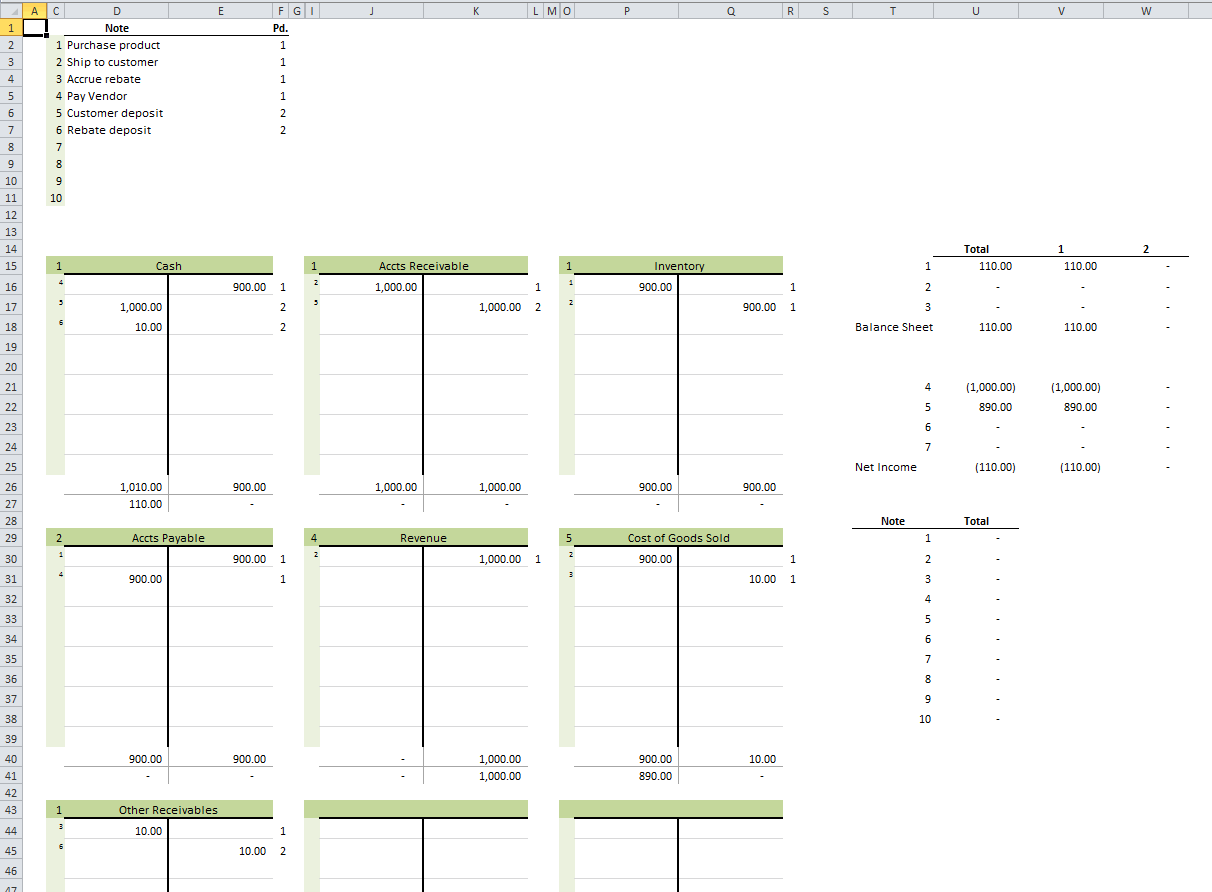
I’ve made a T account template at least three times in my Excel career. They never work out. They never make it easier than pencil-to-paper or marker-to-whiteboard. It doesn’t seem to stop me from trying, though, and now I’m making my latest attempt available to you. First, let’s look at this huge image (click to embiggen).

The top left section (C2:F11) is where you write a brief description for up to 10 transactions. Column C is the transaction number and can’t be edited. Column D is where you type the brief description. Column E is overflow for column D because I hate merged cells. Column F is the general ledger period. You can put them all in the same GL Period if it’s not applicable to your transactions. You don’t have to use this section. That is, you can leave off the descriptions and the periods, but good luck trying to figure out what you were thinking.

In this example, the transactions are listed in the order they will happen over time. This series of transactions represent a sale where we get a kickback from the vendor and we’re passing that savings on to the customer. First, we buy the inventory from the vendor. Next, we ship it to the our customer. At that point we need to make our costs correct by accruing the rebate we’re entitled to from the vendor. We pay the vendor, get paid by the customer, and finally get our rebate from the Vendor.

The main section of the workbook is a 3×3 grid of T accounts. This is where the magic happens. The top left cell of each T account is a financials statement classification number. It’s a data validation dropdown containing the numbers 1-7.

  1. Assets
  2. Liabilities
  3. Equity
  4. Sales
  5. Cost of Goods Sold
  6. Expenses
  7. Other Income and Expenses

That financial statement classification number is replicated down the hidden column B (and H and N) for formula purposes.

To the right of the financial statement classification number is the (merged) cell where you type the account name. The account name is only for your reference and has no bearing on any formulas in the model.

The lighter green section down the left side of the T account is a series of data validation dropdowns that allow you to select the transaction number. The main white area of the T account that’s divided vertically is the area where you record your debits and credits. At the bottom of the T account, the debits and credits are summed up and the net debit or credit is displayed.

There are two other areas to the right of the T accounts grid. The top area shows the effects on the major sections of your balance sheet and income statement. It expands to the right for however many periods you have. The financial statement classification number at the top left of the T account determines where your transaction ends up in this area. And, obviously, the period you identify in the transactions section determine the column.

The bottom area is a list of the 10 transactions and the net debit or credit by transaction. If any of these are not zero, you’re missing a piece of the transaction.

Please leave your thoughts and suggestions in the comments.

You can download TAccounts.zip

└ Tags: syndicated
a couple of laughzillas on a blue diamond background

T Accounts

Jun13
by Sindy Cator on June 13, 2014 at 11:30 am
Posted In: Around the Web, Downloads

I’ve made an Excel template for filling out T accounts. For you non-accounting folks, a T account is a method to trace accounting transactions through the accounts on the general ledger. Hey, wake up! This post isn’t finished yet!

I’ve made a T account template at least three times in my Excel career. They never work out. They never make it easier than pencil-to-paper or marker-to-whiteboard. It doesn’t seem to stop me from trying, though, and now I’m making my latest attempt available to you. First, let’s look at this huge image (click to embiggen).

The top left section (C2:F11) is where you write a brief description for up to 10 transactions. Column C is the transaction number and can’t be edited. Column D is where you type the brief description. Column E is overflow for column D because I hate merged cells. Column F is the general ledger period. You can put them all in the same GL Period if it’s not applicable to your transactions. You don’t have to use this section. That is, you can leave off the descriptions and the periods, but good luck trying to figure out what you were thinking.

In this example, the transactions are listed in the order they will happen over time. This series of transactions represent a sale where we get a kickback from the vendor and we’re passing that savings on to the customer. First, we buy the inventory from the vendor. Next, we ship it to the our customer. At that point we need to make our costs correct by accruing the rebate we’re entitled to from the vendor. We pay the vendor, get paid by the customer, and finally get our rebate from the Vendor.

The main section of the workbook is a 3×3 grid of T accounts. This is where the magic happens. The top left cell of each T account is a financials statement classification number. It’s a data validation dropdown containing the numbers 1-7.

  1. Assets
  2. Liabilities
  3. Equity
  4. Sales
  5. Cost of Goods Sold
  6. Expenses
  7. Other Income and Expenses

That financial statement classification number is replicated down the hidden column B (and H and N) for formula purposes.

To the right of the financial statement classification number is the (merged) cell where you type the account name. The account name is only for your reference and has no bearing on any formulas in the model.

The lighter green section down the left side of the T account is a series of data validation dropdowns that allow you to select the transaction number. The main white area of the T account that’s divided vertically is the area where you record your debits and credits. At the bottom of the T account, the debits and credits are summed up and the net debit or credit is displayed.

There are two other areas to the right of the T accounts grid. The top area shows the effects on the major sections of your balance sheet and income statement. It expands to the right for however many periods you have. The financial statement classification number at the top left of the T account determines where your transaction ends up in this area. And, obviously, the period you identify in the transactions section determine the column.

The bottom area is a list of the 10 transactions and the net debit or credit by transaction. If any of these are not zero, you’re missing a piece of the transaction.

Please leave your thoughts and suggestions in the comments.

You can download TAccounts.zip

└ Tags: syndicated
a couple of laughzillas on a blue diamond background

5 things Reddit can teach us about creating viral images

Jun13
by Sindy Cator on June 13, 2014 at 11:00 am
Posted In: Around the Web, How-To's

shutterstock_177828959
Alexander Huls is a freelance writer who has been writing about pop culture for over five years. His work has appeared in the New York Times, the Atlantic, National Post, Film School Rejects, and more. This post was originally published on the Shutterstock blog and has been reprinted with permission. Having one of your images or videos go viral can change your business in mere hours. And while that may be easier said than done, Reddit often makes it look simple. The site has become one of the most consistent places from which pictures and GIFs go on to be seen by millions…

This story continues at The Next Web

└ Tags: creativity, syndicated
a couple of laughzillas on a blue diamond background

Feedly’s downtime hits a third day as it suffers another round of DDoS attacks

Jun13
by Sindy Cator on June 13, 2014 at 10:56 am
Posted In: Around the Web, Insider, Product Updates

It seems that things just aren’t getting a lot easier for Feedly right now, with the company announcing for the third successive day that its service is currently down due to distributed denial of service (DDoS) attacks. The company, which has managed to get back online between the ongoing assaults for brief periods over the last three days, said on Twitter at around 11:15 BST today that the service is currently under attack. Feedly is currently being targeted by a third round of DDoS attacks. We are working on it. Sorry for the inconvenience. — feedly (@feedly) June 13, 2014 We’ll let you know when…

This story continues at The Next Web

└ Tags: news, syndicated
  • Page 13,566 of 14,664
  • « First
  • «
  • 13,564
  • 13,565
  • 13,566
  • 13,567
  • 13,568
  • »
  • Last »
The Daily Dose, The Daily Dose © 1996 - Present. All Rights Reserved.
  • Home
  • About
  • Archive
  • Books
  • Collections
  • Links
  • Shop
  • Submit a joke
  • Video
  • Privacy Policy