

The Prince of Venice Beach by Blake Nelson
Reviewed by LynDee from Olympia, Washington.
 Laughzilla the Third (2012)
The Third Volume in the Funny Stuff Cartoon Book Collection Available Now.
Laughzilla the Third (2012)
The Third Volume in the Funny Stuff Cartoon Book Collection Available Now. |
 Themes Memes and Laser Beams - The Second Volume in the Funny Stuff Cartoon Book Collection.
 Click Here to get the book in Paperback While Available on Amazon |

Funny Stuff : The First Cartoon Book from The Daily Dose. Available on Lulu. |
The Prince of Venice Beach by Blake Nelson
Reviewed by LynDee from Olympia, Washington.
Dilbert readers – Please visit Dilbert.com to read this feature. Due to changes with our feeds, we are now making this RSS feed a link to Dilbert.com.
A beautiful new Apple ad called ‘Dreams’ was released today as part of the company’s “Powerful” series that highlights the ways the iPhone is changing people’s lives around the world. The new ad is set to Jennifer O’Connor’s “When I Grow Up” and shows off a unique set of apps used by those around the world to achieve their dreams, such as in the fire service, weather industry and for language translation in real time. ➤ Apple (Powerful)
The post Apple’s new ad highlights how the iPhone helps people in inspiring ways appeared first on The Next Web.
I use XY charts for schedules and I like to have a vertical line showing today’s date. I do this so frequently I have a named range for each of the X and Y values. To get the current date to show up as 2 similar X values the best I could come up with is:
=(ROW(INDIRECT(“1:2″))/ROW(INDIRECT(“1:2″)))*TODAY()
There must be a better way, but I can’t just put ={TODAY(),TODAY()} as a value and I’m curious why.
Until somebody smart like Charles Williams jumps in with a better explanation, the reason you can’t put individual functions into an array is that you can’t. I know, it sucks. I’d like to be able to do that too.
Edit: Colin Legg beat Charles to it:
When you use { } within a formula they are delimiters for an array constant. The formula parser won’t let you embed functions or references within an array constant because, by definition, the elements wouldn’t be constant anymore.
That said, you can get there indirectly:
=TODAY()*{1,1}
={41854,41854}
Sure Jeff, but I want to be able to put different functions in each array position.
Not a problem…with a bit of cleverness, you can do the equivalent of this:
={MIN(SomeRange),Max(SomeRange)}
…like this:
=MIN(SomeRange)*{1,0}+MAX(SomeRange)*{0,1}
…which says to Excel:
So how does this tie in with what GMF wants to do, i.e. put a vertical line in an XY chart to show the current date?
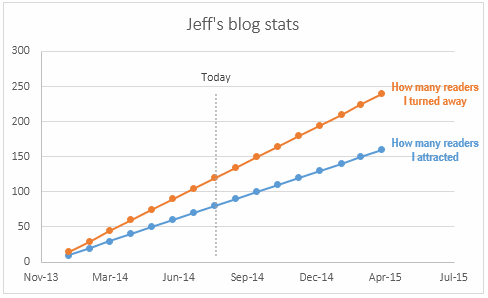
Well, because this is an XY chart, you only need two coordinates to draw that date line line: the point at the bottom, and the point at the top.
So to get the X values we want – today’s date, we define a name called Today:
=TODAY()*{1,1}
And for the Y values – the Min and Max values across both ‘Values’ series – we define a name called MinMax:
=MIN(SomeRange)*{1,0}+MAX(SomeRange)*{0,1}
And then we can add a new series called Today to our chart:
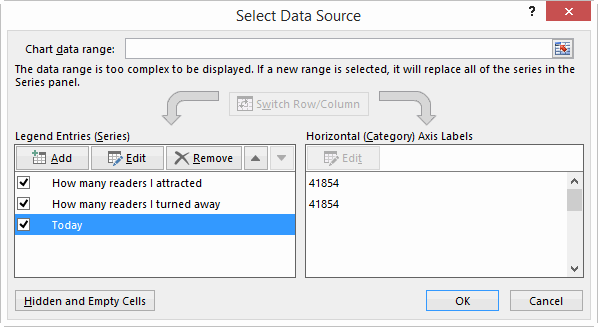
…with the X and Y coordinates of that series pointing at the appropriate name:
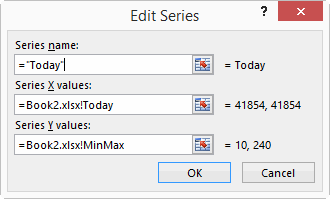
Of course, you don’t actually need a Named Range to do this… you can simply have some helper cells in the actual worksheet that calculate the Min and Max values of the entire block of data, and point your Today series at that:
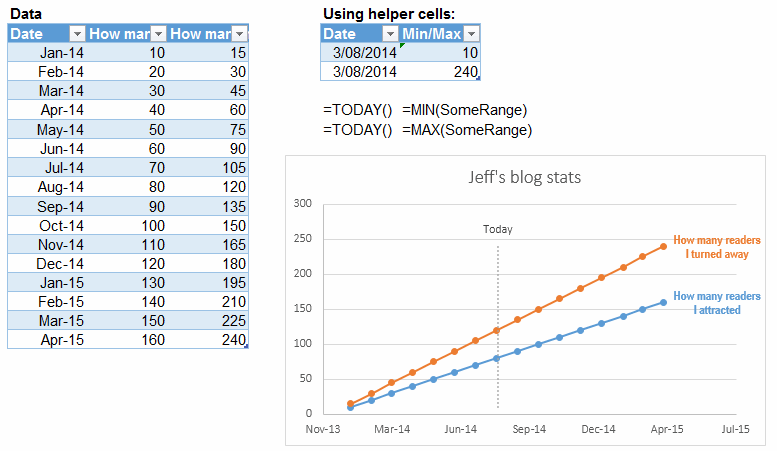
Here’s a sample file with both approaches: Todays Date on ScatterPlot
Maybe this stuff is all included in Dick and Mike’s book 101 Ready-To-Use Excel Formulas. I don’t know…I’m still waiting for my free advance copy in the post.
Well, that’s all folks. Hopefully this post moved those lines on the chart closer together rather than pushing them apart.

This post originally appeared on the Buffer blog. I have a blog post to write. This blog post, to be exact. And in the course of researching, outlining, writing, editing, and writing some more, I also have other hats to wear. Email marketing. Social media strategy. Blog promotion, blog design, and anything else that should happen across my plate. I’m sure you wear a lot of hats, too. How do you find time to put them all on? One of my tasks that I’m currently optimizing is implementing a social media strategy at Buffer. In the midst of writing posts like these, I’m also curious to see how much…
This story continues at The Next Web
The post How much time does a good social media strategy take to plan? appeared first on The Next Web.