

The Daily Dose

laugh every day with cartoons jokes and humor
  • Home
  • About
    • Press
      • Press Release – Announcing Laughzilla the Third ebook
      • Press Release – The Daily Dose Kicks Off Its 16th Year with New Books and More Irreverent Laughter
      • Press Release – Themes Memes and Laser Beams Now Available in Paperback
      • Press Release – Announcing Themes Memes and Laser Beams
      • In The News
    • Privacy
  • Archive
  • Books
  • Shop
  • Collections
    • Galleries
      • Gallery
      • Captions
      • Flash Cartoons & Greeting Cards
        • Laughzilla’s Oska Flash Animation Cartoon Greeting Cards
        • Oska Cupid Love Humor
    • #OccupyWallStreet
    • cats
    • China
    • Food
      • Hors d’oeuvres
        • Ball of Cream Cheese
      • Entrees / Main Courses
        • Meatballs with Baked Beans and Celery
    • Gadaffy
    • Google
  • Links
  • Video
  • Submit a joke
DeviantART Facebook Twitter Flickr pinterest YouTube RSS

Subscribe for Free Laughs!


Latest Comics

  • This Memorial Day, Trump Meme Coin Congratulates Profit Takers
  • 25 Years of The Daily Dose
  • The Best Cartoons
  • Bitcoin sings “Fly Me To The Moon”
  • 22 years of The Daily Dose

Comic Archive

The Daily Dose is 18 years old and counting with this cartoon caricature of laughzilla and the artist
The Daily Dose is 18 years old

Daily Dose News Roundup

  • Amazon Quick is now available on desktop, with a new mobile activity feed
  • Macron’s Paris space summit ends with €20bn in commitments and 51 signed deals
  • The Boring Company raises $3bn at a $23bn valuation, led by the UAE
  • CloudNC raises $20M to expand its AI machining tools and launch a quoting product
  • South Korea’s AI boom could need 20 new nuclear reactors’ worth of power

Quotable

"Any artistic event that is subjectively judged in part by the accompanying music and style, is not a sport. Of course in the Winter Olympics, they overlook that due to the revenues Figure Skating and Ice Dancing generate from all those bored spouses who would otherwise not watch the Games at all." ~ Yasha Harari

Fresh Baked Goods

Get The Daily Dose's ebook: Laughzilla the Third - A Funny Stuff Collection of 101 Cartoons from TheDailyDose. Click here to get the e-book on Amazon kdp. Laughzilla the Third (2012) The Third Volume in the Funny Stuff Cartoon Book Collection Available Now.

Click here for the Paperback edition


Support independent publishing: Buy The Daily Dose's book: Themes Memes and Laser Beams - A Funny Stuff Collection of 101 Cartoons by Laughzilla from TheDailyDose. Click here to get the book on Amazon. Themes Memes and Laser Beams - The Second Volume in the Funny Stuff Cartoon Book Collection.

Click Here to get the book in Paperback While Available on Amazon

Themes Memes and Laser Beams - 101 Cartoons by Laughzilla. Get the e-book on Lulu.

Click Here to get The Daily Dose Cartoon ebook on amazon kindle

Funny Stuff :
The First Cartoon Book
from The Daily Dose.
Available on Lulu.

a couple of laughzillas on a blue diamond background

Sync Pivots from dropdown

Aug16
by Sindy Cator on August 16, 2014 at 1:20 pm
Posted In: Around the Web

Over at the Excel Guru forum, Yewee asks:

I have 3 sheets in my excel worksheet.

1. Org
2. DataSource
3. Pivots Table

My Pivot table will get the data from the DataSource sheet. I will like to have the filter of the Pivot Table from one of the cell in Org Sheet.

How can I do that?

Incredibly easily, if you have Excel 2010 or later…because:

  • a PivotTable with nothing but one field in the Filters pane looks and behaves pretty much exactly like a Data Validation dropdown does; and
  • that PivotTable can be hooked up to the other PivotTables via slicers, so that it controls them.

If you’re a long-time reader of this blog you probably already know that, and may want to skip to the end to find a bit of VBA that makes setting up Slicers slightly more easy. But if you came here via Google, then pull up a pew and read on.

So let’s say these are the two Pivots that you want to control via a dropdown, and you want to put the dropdown where the red rectangle is:
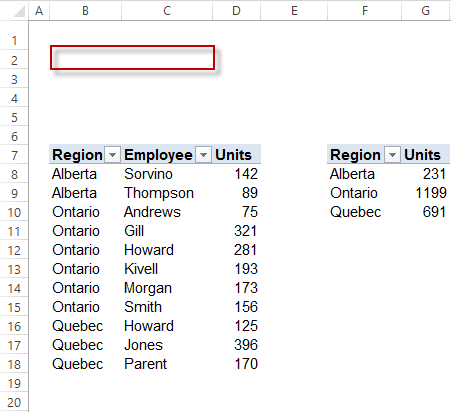
Two Pivots and target


First, create a new PivotTable from the datasource that the other pivots share (or make a copy of one of the existing Pivots) and in the PivotTable Fields pane add the field you want to filter the other Pivots by to the Filters pane. (If you created this Pivot by copying another, remove any other fields that might appear).
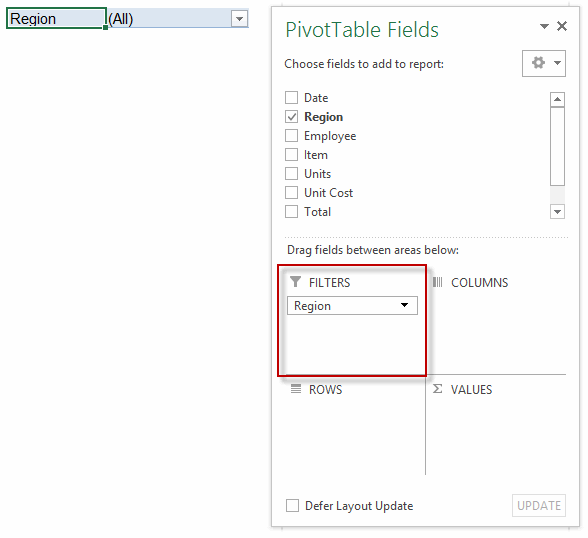
Faux DV and Fields List

Great: Now you have a PivotTable masquerading as a Data Validation Dropdown. From now on, I’ll call it the ‘Master Pivot’. So just drag that Master Pivot where you want it:
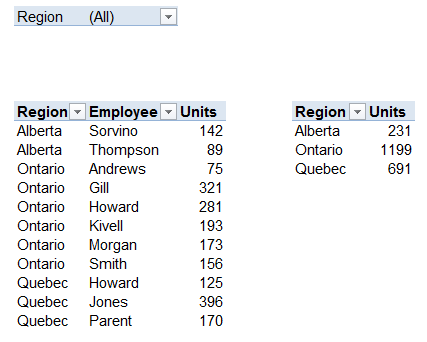
Faux DV and Pivots


From the ANALYZE tab of the PivotTable Tools contextual menu in the ribbon, click the Insert Slicer icon:
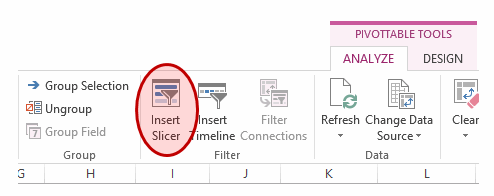
Insert Slicer


…and from the menu that comes up, choose the field name that matches the field you put in the Master Pivot:
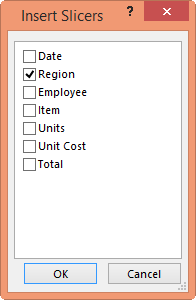
Chosen field


…and your slicer will magically appear:
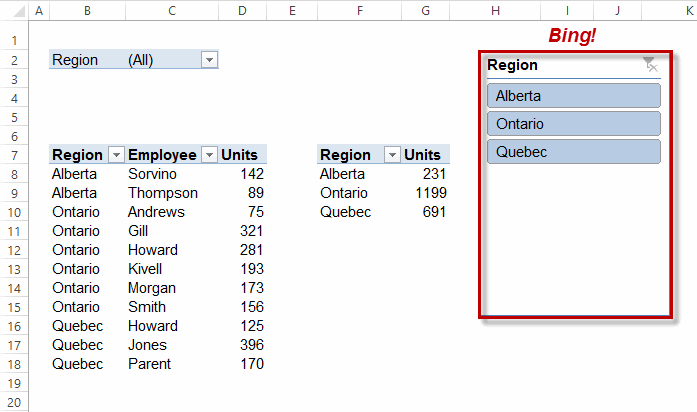
Slicer added


Now we connect that Slicer to the other PivotTables. To do that, right click on the Slicer that just appeared, and click the Report Connections option:
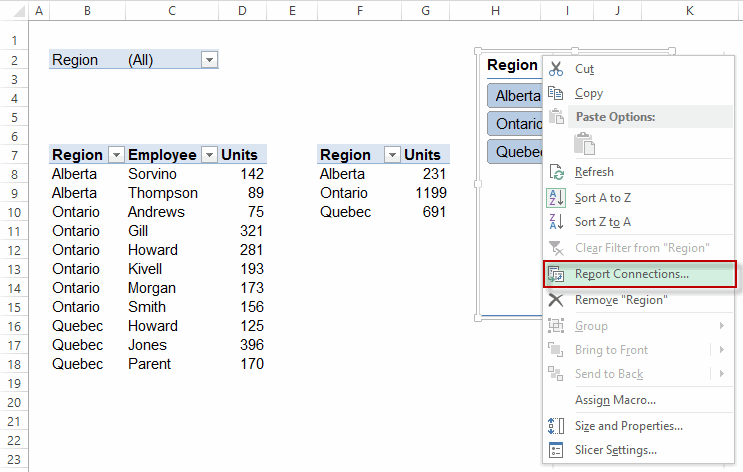
Right Click


You’ll see from the Report Connections box that comes up that currently it’s only connected to one PivotTable – which of course is the Master PivotTable that we used to insert the slicer in the first place:
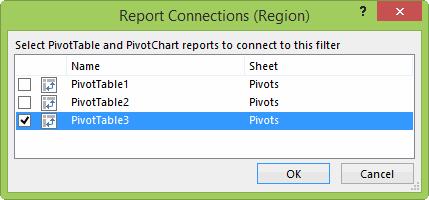
Report Connections Master


What we want to do is connect it to the other PivotTables, by checking those other checkboxes:
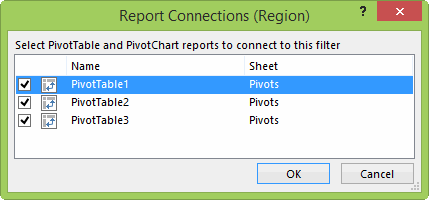
SlicerConnections_AllControlled


(Optional) We might want to make it so that the user can only select one thing at a time by clicking on the Master Pivot filter dropdown, and unchecking Select Multiple Items, if that’s your intent:
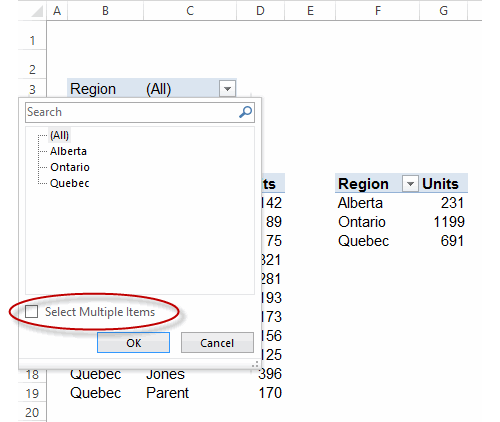
Dont select multiple items


…and now all we need to do is move that Slicer somewhere out of sight (but don’t delete it):

Faux DV and Pivots


Now when we select a region from that Master Pivot dropdown…
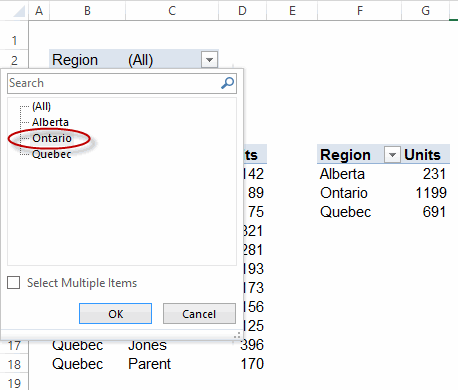
Select Region


… all the other Pivots are filtered to match:
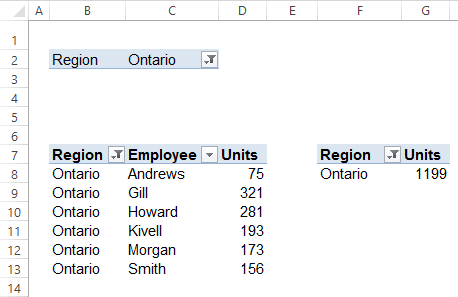
PivotsFiltered


That’s it…job done. As simple as possible, and no simpler.

Actually that’s a lie…unless there’s a good reason not to, it’s much simpler just to use a Slicer in the first place, and not bother with setting up the Master Pivot dropdown at all:
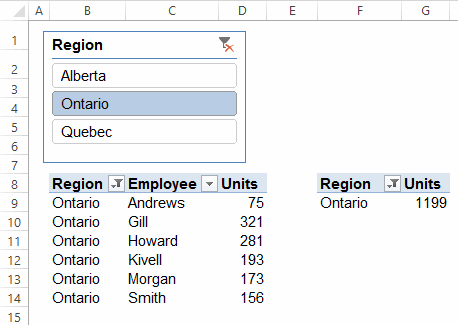
Just Use Slicer


Of course, that Slicer takes up much more room than our Master Pivot dropdown. So maybe that’s a good reason to use the Master Pivot approach, and not a slicer. Especially if we might want more than one dropdown to control all the Pivots and space is at a premium:
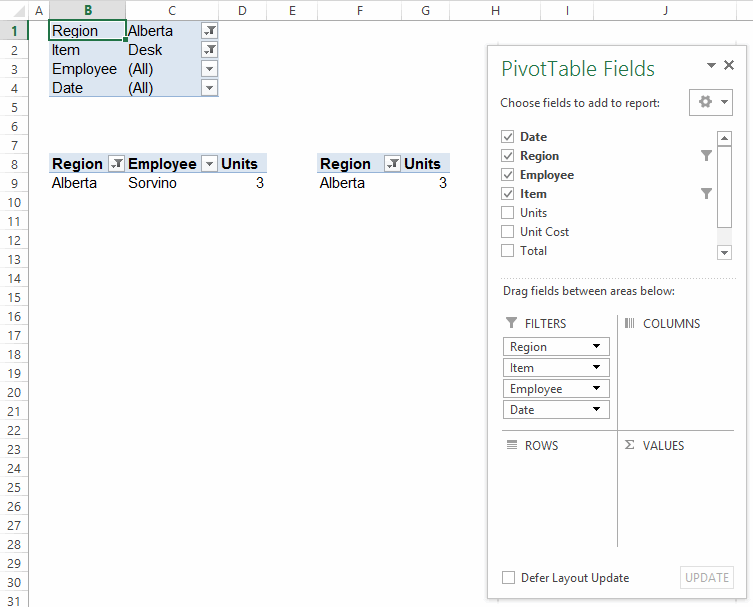
Multiple Dropdowns

Or you can do away with the Master Pivot altogether, and just set the slicers up between the actual ‘output’ pivots themselves, so that as soon as they change a PivotFilter setting in one of the Pivots, the others get changed too. (Note that this also happens with the ‘Master Pivot’ approach…it’s just that we don’t actually need to have that Master Pivot sitting there taking up space at all).

Programatically add and connect Slicers

I’ve always found it annoying that there’s no right-click option to add a Slicer to the currently selected PivotField. Plus connecting Slicers to multiple PivotTables is a drag. And also, I hate it how it adds new Slicers over the top of old slicers. So here’s some code that remedies all that:

Sub AddSlicer()
Dim pt As PivotTable
Dim ptOther As PivotTable
Dim pf As PivotField
Dim pc As PivotCache
Dim rng As Range
Dim sc As SlicerCache
Dim varAnswer As Variant
Dim bFoundCache As Boolean
Dim rngDest As Range

Set rng = ActiveCell

On Error Resume Next ‘in case user has not selected a PivotField
Set pt = rng.PivotTable
Set pc = pt.PivotCache
Set pf = rng.PivotField
On Error GoTo 0

If pt Is Nothing Then Exit Sub

If pf.Orientation <> xlDataField Then
    Set rngDest = Intersect(ActiveCell.EntireRow, ActiveCell.Offset(, ActiveCell.CurrentRegion.Columns.Count + 1))
    On Error Resume Next ‘SlicerCache might already exist
    With rng
        If pt.PivotCache.OLAP Then
            Set sc = ActiveWorkbook.SlicerCaches.Add2(pt, .PivotField.CubeField.Name)
        Else:  Set sc = ActiveWorkbook.SlicerCaches.Add2(pt, .PivotField.Name)
        End If
       sc.Slicers.Add SlicerDestination:=ActiveSheet, Top:=rngDest.Top, Left:=rngDest.Left
    End With
    If Err.Number > 0 Then ‘SlicerCache already existed. Work out what it’s index is
        On Error GoTo 0
        For Each sc In ActiveWorkbook.SlicerCaches
            For Each ptOther In sc.PivotTables
                If ptOther = pt Then
                    bFoundCache = True
                    Exit For
                End If
            Next ptOther
            If bFoundCache Then Exit For
        Next sc
    End If

    varAnswer = MsgBox(Prompt:="Make Slicer control the " & pf.Name & " field in all Pivots on the same sheet?", Buttons:=vbYesNo)
    If varAnswer = vbYes Then
        For Each ptOther In ActiveSheet.PivotTables
            If ptOther.CacheIndex = pt.CacheIndex And ptOther.Parent.Name = pt.Parent.Name Then
                sc.PivotTables.AddPivotTable ptOther
            End If
        Next
    End If

Else: MsgBox "You can’t add a Slicer to a Values field."
End If
End Sub

In addition, the below code will add the Add Slicer icon to the right-click menu that comes up when you right click on a PivotField:

Option Explicit

Private Sub Workbook_Open()
AddShortcuts
End Sub
 
Private Sub Workbook_BeforeClose(Cancel As Boolean)
DeleteShortcuts
End Sub

 
Sub AddShortcuts()
    Dim cbr As CommandBar
 
    DeleteShortcuts

    Set cbr = Application.CommandBars("PivotTable Context Menu")

    With cbr.Controls.Add(Type:=msoControlButton, Temporary:=True)
        .Caption = "Add Slicer"
        .Tag = "AddSlicer"
        .OnAction = "AddSlicer"
        .Style = msoButtonIconAndCaption
        .Picture = Application.CommandBars.GetImageMso("SlicerInsert", 16, 16)
    End With

End Sub
 
Sub DeleteShortcuts()
 
    Dim cbr As CommandBar
    Dim ctrl As CommandBarControl
   
    Set cbr = Application.CommandBars("PivotTable Context Menu")

    For Each ctrl In cbr.Controls
        Select Case ctrl.Tag
        Case "AddSlicer"
            ctrl.Delete
        End Select
    Next ctrl
 
End Sub

…meaning whenever I right click on a PivotField I get this:

AddSlicer


Clicking on that adds a Slicer to the selected field automatically, plus asks you:
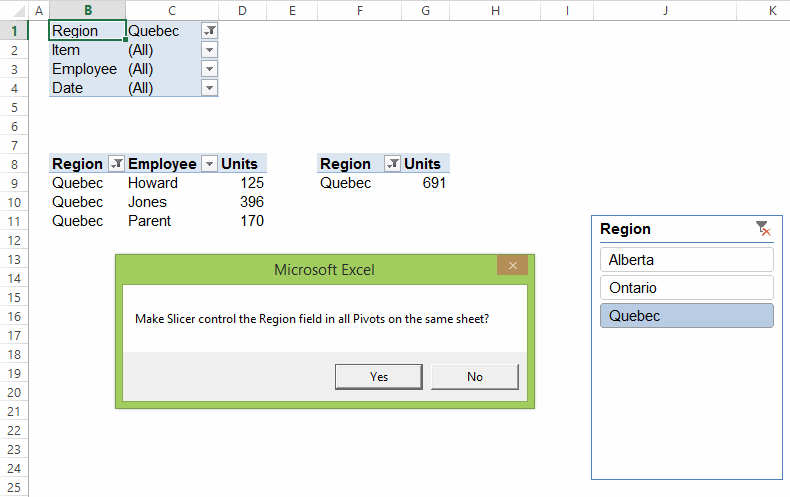
Control all pivots


Hell yes, I do!

Here’s a sample file:
Sync-PivotTables-from-dropdown_20140818



Nightmare

└ Tags: syndicated
a couple of laughzillas on a blue diamond background

5 strategies for keeping a startup vibe in a rapidly growing company

Aug16
by Sindy Cator on August 16, 2014 at 1:00 pm
Posted In: Around the Web, Entrepreneur

Berlin Startup Tour

Sandra Nguyen is the Vice President of People & Culture at Volusion, Inc. The dawn of a company is a truly special time for the pioneering team working to forge a path to success. During this stage, the entrepreneurial spirit is high and the group is empowered by close working relationships. This combination of excitement and cohesion, mixed with a passion for success fosters a fast-paced, agile environment where productivity is high and roadblocks are quickly removed. When rapid growth is fueled by this startup mindset, the natural need comes to hire more staff. But with additional headcount comes the…

This story continues at The Next Web

The post 5 strategies for keeping a startup vibe in a rapidly growing company appeared first on The Next Web.

└ Tags: syndicated
a couple of laughzillas on a blue diamond background

How to be less selfish in the social media era

Aug16
by Sindy Cator on August 16, 2014 at 11:00 am
Posted In: Analysis and Opinion, Around the Web, How-To's, Insider, LifeHacks, Social Media

helping climb

Max Ogles writes at MaxOgles.com about behavior change, psychology, and technology. He has a forthcoming e-book, “9 Ways to Motivate Yourself Using Psychology and Technology,” that you can receive for free here. A decent argument could be made that the sites we consider social media could easily be labeled narcissistic media. According to a Pew Research study from last year, the most popular social sites are Facebook, LinkedIn, Pinterest, Twitter and Instagram – in that order. From the photo of lunch that you shared on Instagram to the entirely uninteresting article about your employer that you published on LinkedIn, each of…

This story continues at The Next Web

The post How to be less selfish in the social media era appeared first on The Next Web.

└ Tags: syndicated
a couple of laughzillas on a blue diamond background

Daily Dose for Sat, Aug 16: Hadji Murat (Vintage Classics)

Aug16
by Sindy Cator on August 16, 2014 at 8:00 am
Posted In: Around the Web


Hadji Murat (Vintage Classics) by Leo Tolstoy
Reviewed by Suzy from Portland, Oregon.

└ Tags: syndicated
a couple of laughzillas on a blue diamond background

Less Educated Smokers at Greatest Risk for Stroke, Study Finds

Aug16
by Sindy Cator on August 16, 2014 at 7:00 am
Posted In: Around the Web

Title: Less Educated Smokers at Greatest Risk for Stroke, Study Finds
Category: Health News
Created: 8/14/2014 4:35:00 PM
Last Editorial Review: 8/15/2014 12:00:00 AM

└ Tags: syndicated
  • Page 13,030 of 14,667
  • « First
  • «
  • 13,028
  • 13,029
  • 13,030
  • 13,031
  • 13,032
  • »
  • Last »
The Daily Dose, The Daily Dose © 1996 - Present. All Rights Reserved.
  • Home
  • About
  • Archive
  • Books
  • Collections
  • Links
  • Shop
  • Submit a joke
  • Video
  • Privacy Policy