The Daily Dose

laugh every day with cartoons jokes and humor
  • Home
  • About
    • Press
      • Press Release – Announcing Laughzilla the Third ebook
      • Press Release – The Daily Dose Kicks Off Its 16th Year with New Books and More Irreverent Laughter
      • Press Release – Themes Memes and Laser Beams Now Available in Paperback
      • Press Release – Announcing Themes Memes and Laser Beams
      • In The News
    • Privacy
  • Archive
  • Books
  • Shop
  • Collections
    • Galleries
      • Gallery
      • Captions
      • Flash Cartoons & Greeting Cards
        • Laughzilla’s Oska Flash Animation Cartoon Greeting Cards
        • Oska Cupid Love Humor
    • #OccupyWallStreet
    • cats
    • China
    • Food
      • Hors d’oeuvres
        • Ball of Cream Cheese
      • Entrees / Main Courses
        • Meatballs with Baked Beans and Celery
    • Gadaffy
    • Google
  • Links
  • Video
  • Submit a joke
DeviantART Facebook Twitter Flickr pinterest YouTube RSS

Subscribe for Free Laughs!


Latest Comics

  • This Memorial Day, Trump Meme Coin Congratulates Profit Takers
  • 25 Years of The Daily Dose
  • The Best Cartoons
  • Bitcoin sings “Fly Me To The Moon”
  • 22 years of The Daily Dose

Comic Archive

Embassy Of Palestine At CNN Center Atlanta Ga

Daily Dose News Roundup

  • Pony.ai and Uber to put more than 2,000 Chinese robotaxis on European streets
  • The next great game may not come from a million-dollar studio
  • Crypto impersonation scams grew 1,400% as AI supercharged fraud
  • How AI is transforming frontend engineering for modern web applications
  • Armenia just opened the region’s biggest AI factory. It exists because Washington signed a licence.

Quotable

"Never, never try to scope the market." ~ Dear R. Koontz

Fresh Baked Goods

Get The Daily Dose's ebook: Laughzilla the Third - A Funny Stuff Collection of 101 Cartoons from TheDailyDose. Click here to get the e-book on Amazon kdp. Laughzilla the Third (2012) The Third Volume in the Funny Stuff Cartoon Book Collection Available Now.

Click here for the Paperback edition


Support independent publishing: Buy The Daily Dose's book: Themes Memes and Laser Beams - A Funny Stuff Collection of 101 Cartoons by Laughzilla from TheDailyDose. Click here to get the book on Amazon. Themes Memes and Laser Beams - The Second Volume in the Funny Stuff Cartoon Book Collection.

Click Here to get the book in Paperback While Available on Amazon

Themes Memes and Laser Beams - 101 Cartoons by Laughzilla. Get the e-book on Lulu.

Click Here to get The Daily Dose Cartoon ebook on amazon kindle

Funny Stuff :
The First Cartoon Book
from The Daily Dose.
Available on Lulu.

a couple of laughzillas on a blue diamond background

Welcome to The Next Web’s new Creativity Channel

Feb24
by Sindy Cator on February 24, 2014 at 5:34 pm
Posted In: Around the Web, Design & Dev, Voice

finger 1 520x245 Welcome to The Next Webs new Creativity Channel

Today we’re launching a new section of The Next Web inspired by the convergence of art, technology and design – the Creativity Channel.

Presented in partnership with Shutterstock, the channel will cover apps in fields like photography, video and digital art, and inspire you to be creative in all sorts of new ways. Our coverage of the design world has always proved popular so this is a natural extension of something we know you already enjoy about The Next Web.

To lead the Creativity Channel, we’ve brought on board a new member of the team, Jackie Dove. Based in Oakland, California, Jackie covered the world of photography and video apps with aplomb in her previous roles at Macworld and TechHive so she knows her stuff – please join me in giving her a warm welcome to TNW.

You’ll find content on the channel already and there will be fresh inspiration for you every day. Life’s too short to not be creative, so get out there and make something!

➤ The Creativity Channel

Image credit: Shutterstock

└ Tags: creativity, news, syndicated
a couple of laughzillas on a blue diamond background

How to use your body’s circadian rhythm as a recipe for productivity

Feb24
by Sindy Cator on February 24, 2014 at 5:22 pm
Posted In: Around the Web, Entrepreneur, How-To's, LifeHacks

179459853 520x245 How to use your body’s circadian rhythm as a recipe for productivity

Ilya Pozin is the founder of Open Me and Ciplex and a columnist for Inc, Forbes, and LinkedIn.


You know how you often wake up without an alarm at about the same time every day? That’s your circadian rhythm, which works as your body’s internal alarm clock.

Being aware of your circadian rhythm might just be the key to improving your productivity and even your quality of life.

Your circadian rhythm follows a roughly 24-hour cycle, and respond primarily to light and darkness. It doesn’t just control sleeping and waking, it also controls important functions like lung capacity, hormone production, and body temperature.

Just like the human body has an optimal time to wake and to sleep, the circadian rhythm can be a smart way to set up your daily activities in order to get the most out of your day. From the best time to tweet to the smartest power hour to get through your pile of work, here are some productivity cues from your body’s circadian rhythm:

At 6 a.m.

One of the first things most of us do to start the day is check email. Skimming through our email has become like reading the newspaper; it’s an activity we focus on most heavily earlier in the day.

Reading your emails early can help you knock one item off your to-do list so it doesn’t serve as a distraction later on in the day. It also clears room for emergency emails that may show up later in the day.

Before 12 p.m.

Studies have shown you work at highest brain capacity, with your best focus and attention, before lunch hour.

So if you need to power through your workload, stack your cognitive-heavy tasks before the afternoon.

At 1 p.m.

After or during lunch is the time to check your Facebook, read a Tweet, or look at pictures of baby animals. Between 1 p.m. and 4 p.m. is when you’re most likely to get distracted.

By keeping this in mind, you can dedicate your mornings to your most brain-busting work, and schedule mental breaks for the afternoon when your attention span is already at its lowest.

At 2 p.m.

Take a nap. This is when your sleepiness is at its peak. Post-food and pre-burst of energy, this afternoon lull is likely to lull you to sleep.

Some progressive offices offer nap pods and other sleeping hidey-holes, 2 p.m. is the time to take advantage. This way you can refresh your mental reserves and tackle the rest of your day with renewed energy.

If you can’t take a nap, at least go for a walk, take a breather, and relax.

Between 4 and 5 p.m.

The early evening hours are the best time to work out and do any work which requires greater coordination. This is when our hand-eye coordination and lung capacity are performing at their peak.

So dust off those gym membership cards and hit the treadmill immediately after work before you get home and crash.

At 9 p.m.

A study published in Thinking & Reasoning found we tend to think more creativity when we’re tired. Fatigue and tiredness have been shown to free up thinking along non-linear paths, leading us to find new solutions to problems.

So while you might be exhausted right before bed, take some time to work on a solution to a tough problem, think up new innovations, or work on creative pursuits.

Our brains are most likely to throw out the conventional ways of thinking and take us down new pathways when we’re tired from a long day.

Perhaps the best productivity hack is just listening to our own bodies. By following our circadian rhythm we can ensure we’re working at our peak performance rate, and get the most out of our day.

What do you think? Do you build your day around your circadian rhythm? Share in the comments!

└ Tags: syndicated
a couple of laughzillas on a blue diamond background

AdStage unveils an API to help third-party apps integrate with its social ad platform

Feb24
by Sindy Cator on February 24, 2014 at 5:00 pm
Posted In: Around the Web, Insider

AdStage 520x245 AdStage unveils an API to help third party apps integrate with its social ad platform

Social advertising management service AdStage has unveiled new tools and integrations designed to help it grow and become the de facto place where brands can build, manage, and optimize their ad campaigns. Included in today’s announcement is the launch of the company’s App Partnership Program and Platform API to help developers integrate their services with AdStage.

At least several new third-party applications have already been integrated into the platform — specifically, Wordtracker, Optimizely, and Unbounce. AdStage hopes that the release of its API will open the floodgates and motivate ad tech-related services to add support for its platform.

Since making its debut at the 2013 LAUNCH Festival, AdStage says that its business has been gaining traction. Company CEO Sahil Jain tells us that in the first four weeks, more than 1,100 ad accounts were linked to AdStage’s platform and was running more than 8,600 campaigns with some having total active daily budgets of more than $500,000.

To help the company grow, it has also secured $1 million in additional seed funding from its existing investor Digital Garage. Jain believes this will help it expand its engineering team, which ultimately could help it scale.

The industry has historically punished ‘ad tech’ companies because they were really agencies masquerading as tech companies. We’re ushering in a new era of ad technology and using this new capital to pour fuel on that fire, we’re aggressively hiring and pushing forward in full force.

Part of AdStage’s efforts to grow involve bolstering its developer credentials. It has begun laying the foundation for it with its first set of third-party apps, including one it created in-house called Ad Scrambler. This tool allows advertisers to create and conduct A/B testing on dozens of ad variations across multiple networks automatically. Other applications include Wordtracker’s keyword discovery app that lets you find relevant keywords to populate your paid search campaigns within AdStage, along with Unbounce and Optimizely, both which will allow marketers to build and test their landing pages to maximize revenue within the platform.

With regards to AdStage’s App Partnership Program and its API, developers are given the resources to build and manage their integrated apps. The company is opening up its platform for a “promotional beta price” of $99 per month, complete with a 30-day free trial. It claims that more than 6,000 businesses are on the wait list to date.

AdStage launched last year with a product it believed would be of incredible interest to marketers. It believed that current advertising workflows were inefficient — in order to manage campaigns on Yahoo, Facebook, Google, Twitter, and LinkedIn required someone to log into multiple locations. AdStage believed the answer was consolidation. It allows advertisers to easily customize their messages for different audiences with a single data source.

Before launching its App Partnership Program, the company relied on charging five percent commission fees to businesses. Obviously now it has two different sources to monetize its platform.

└ Tags: news, syndicated
a couple of laughzillas on a blue diamond background

Akvis OilPaint transforms your photos into works of art

Feb24
by Sindy Cator on February 24, 2014 at 4:34 pm
Posted In: Apps, Around the Web, Design & Dev, Product Reviews

oil painting 520x245 Akvis OilPaint transforms your photos into works of art

Sometimes a photo doesn’t seem like enough—or even much of anything—at least not to the disinterested observer. But to the photographer, each frame has a special meaning. Software like Akvis OilPaint seeks to provide visual artists with the tools to effectively convey a message directly from their mind’s eye to the canvas.

Akvis, a company with a 10-year history of making creative software and plug-ins, offers OilPaint as both a standalone program for Mac and Windows and as a plug-in to Adobe Photoshop, Photoshop Elements, and Corel Paint Shop Pro. The standalone version has various licenses that segment commercial and non-commercial use, vary the price, and include additional functions for the high-end version.

Many photography and design programs—Photoshop for example—offer their own paint modules, but they are generally fairly limited. While Corel Painter is the reigning sovereign of natural media painting, it is expensive and comes with a steep learning curve. Less complex, lower priced competitors like OilPaint and Psykopaint offer some similar options targeted to a wider audience.

Screen Shot 2014 02 17 at 3.01.14 PM 520x304 Akvis OilPaint transforms your photos into works of art

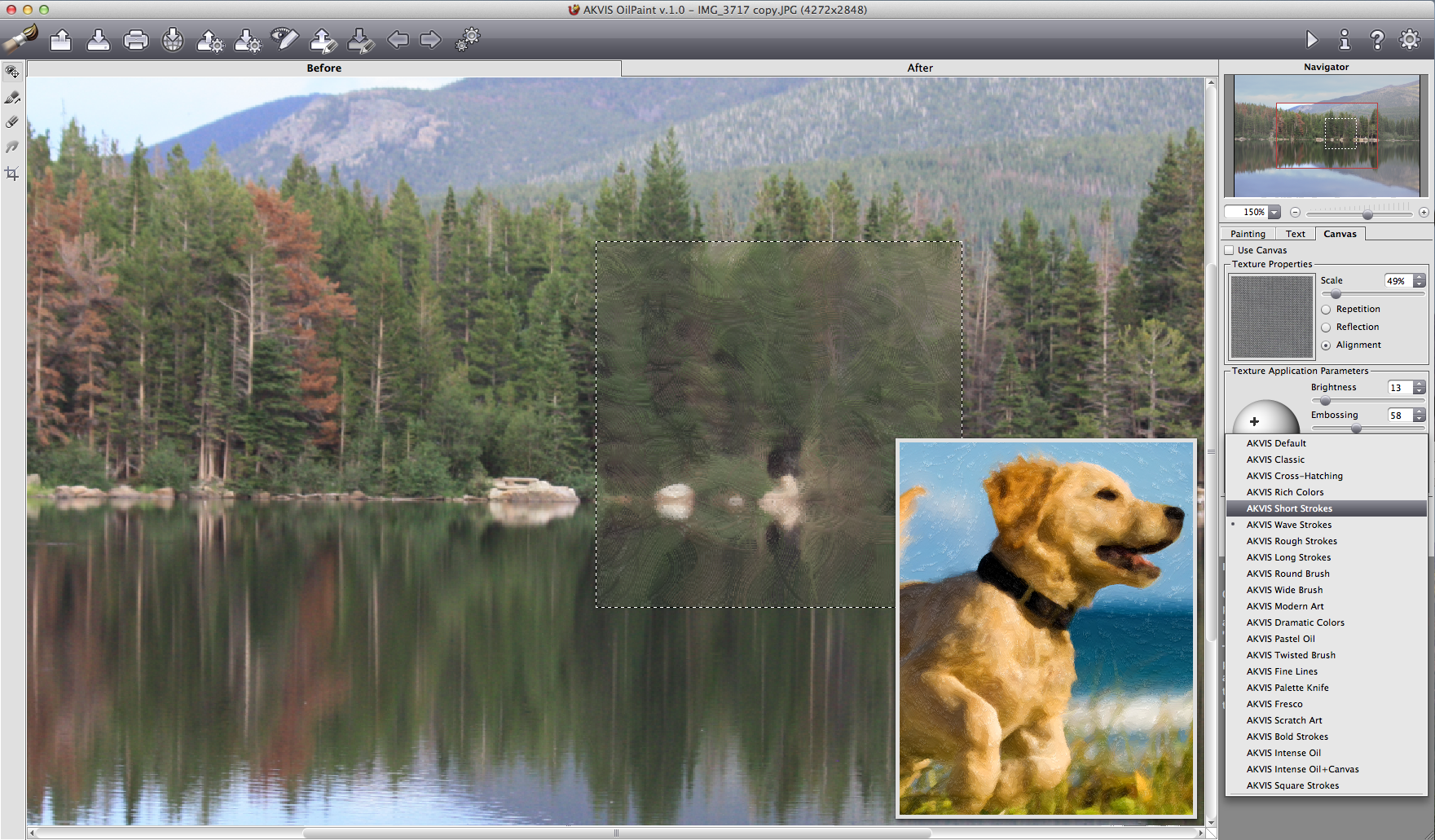
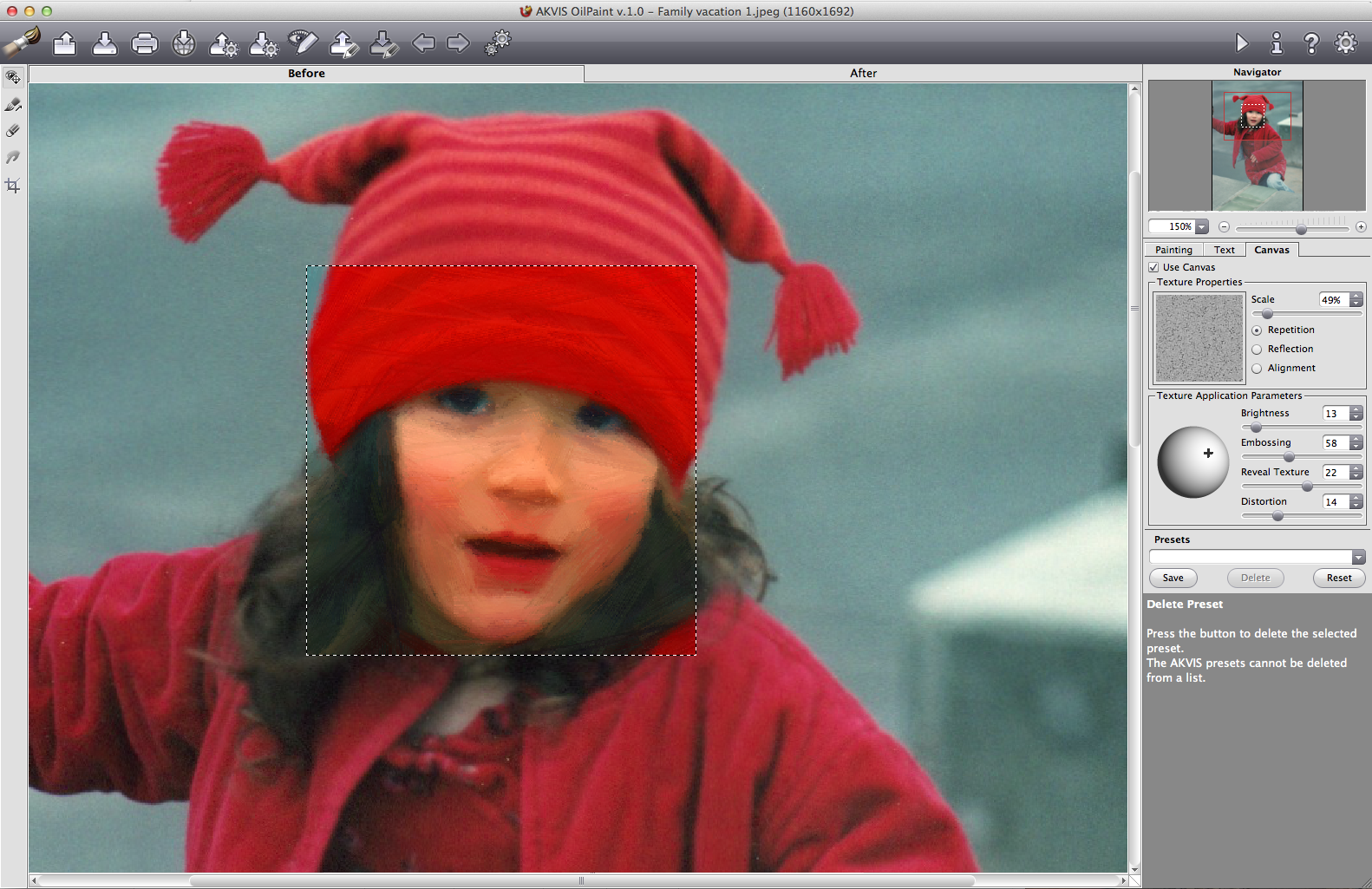
Within the Painting tab, multiple adjustable presets let you visualize the style of your painting.

Paint concentration

OilPaint’s application frame opens to three major tabbed modules: Painting, Text, and Canvas. Painting facilitates the conversion of photos into an assortment of stylized brush strokes that you can further adjust with controls like Simplicity, Saturation, Relief, Stroke length, Thickness, and Curvature. Those controls can be mixed into different effects, which you can then save as your own unique presets to be added to the default preset list. The app supports most popular image formats, including Raw.

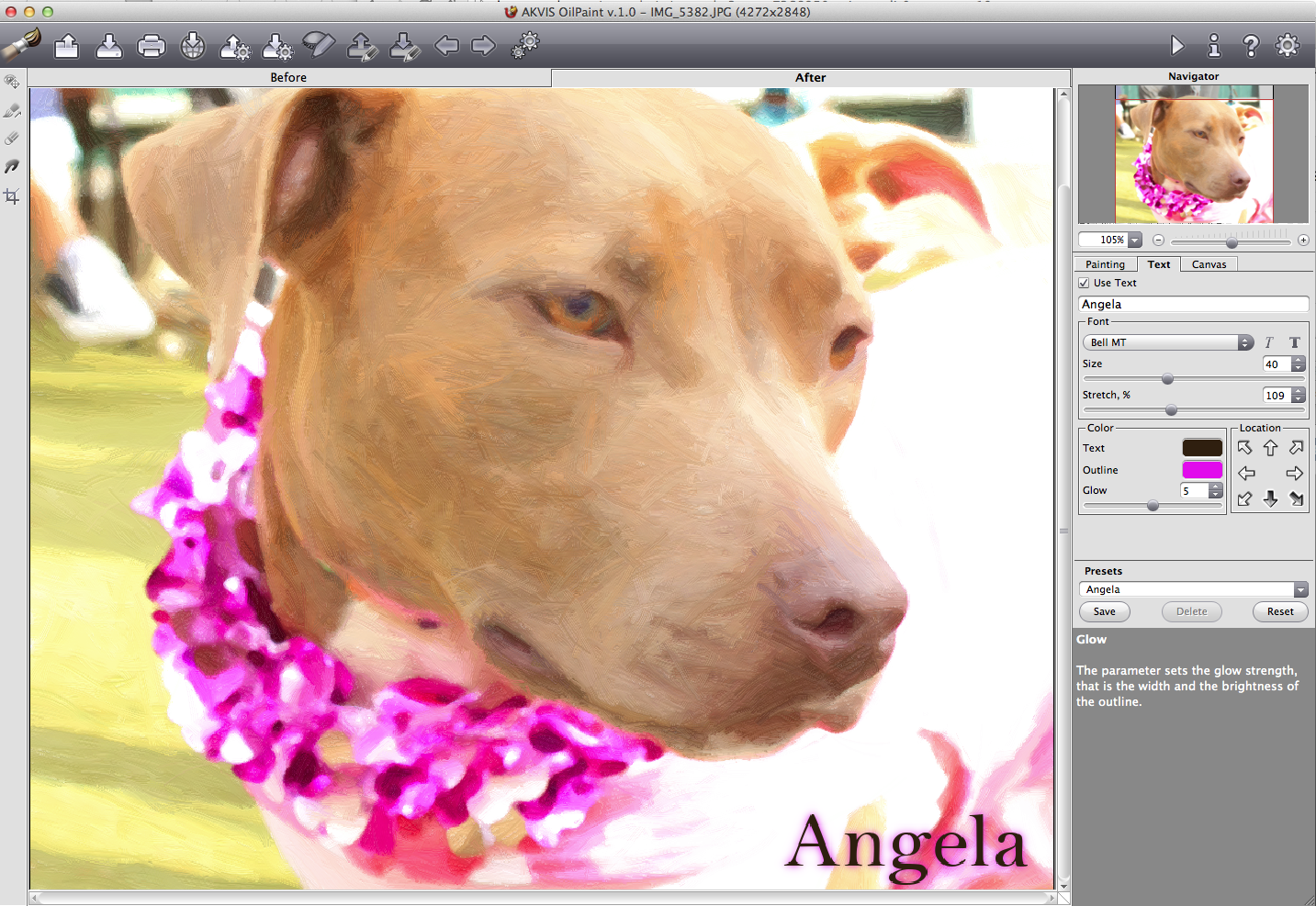
The Text tool, which lets you sign your painting or convey a greeting, calls up any font that you have in your system. It lets you navigate to where the text will appear on the canvas, and can even do some primitive tracking. Text is placed by the tool, as opposed to being entered into a text box, and that removes some placement flexibility. Akvis seems to like text to be located around the edges of the composition—regardless of whether or not you agree.

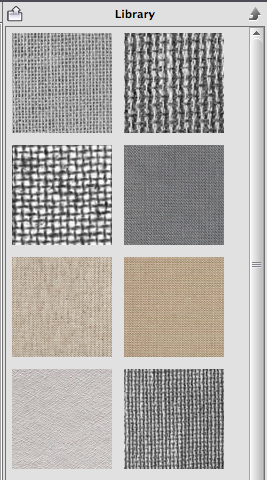
The Canvas tool offers a library of adjustable canvas backdrops to make your image look even more painterly.

Using these three elements together offers a myriad of artistic choices. You can also batch process folders full of images to a new target folder, preserving the originals. The more advanced Home and Business versions have a Stroke Direction tool that lets you create alternate stroke patterns in order to further customize your image. You can save these stroke guides and re-apply them, though I found this particular feature to be less intuitive than the rest of the program.

Screen Shot 2014 02 17 at 3.44.06 PM 520x336 Akvis OilPaint transforms your photos into works of art

Choose a canvas and preview what your image will look like painted on it.

Preview power

The main window features top and side toolbars with additional controls. It’s equipped with a small (300 pixel) preview window that I found too small to really give other than the faintest notion of what any control can do.

Screen Shot 2014 02 17 at 10.13.08 PM 220x395 Akvis OilPaint transforms your photos into works of art

OilPaint has a library of canvas backgrounds.

While you can adjust the size of the preview window via the preferences, the larger it is, the slower the preview performance. The best way to keep waiting to a minimum is to enlarge the image in the window so that the preview is proportionally larger. That also helps you see brush strokes in greater detail for more accurate edits. And it saves time. Every time you move the preview box just slightly, the app re-renders the preview.

Before you set out to paint your canvas, make sure your source image is fully edited. OilPaint works with the image you give it, and it does not contain classic image editing tools to adjust for exposure, saturation, sharpening, or other common retouching tasks. It does have a non-destructive crop tool, but it’s a very simple one that does not let you specify common photo sizes or aspect ratios.

While the concept of a standalone oil painting app might seem inconvenient to those who are used to one-stop-shop editing, it makes sense for OilPaint to focus on what it’s designed to do. Plus, if you use the plug-in, you can load it through the host program.

Screen Shot 2014 02 17 at 11.12.33 PM 520x358 Akvis OilPaint transforms your photos into works of art

The text tool works from the navigation pane, not in its own text box. So there’s less flexibility in where to place text.

Ease of use

If you’re just getting started with painting, Akvis provides a number of presets to kick off experimentation. As you mouse over each control, there’s a full explanation of what it does and when to use it—in addition to a full online help guide. A mouse click lets you toggle Before and After views, or you can use the Before and After tabs in the main window. It would have been nice to have a side-by-side simultaneous view.  

While you can’t open two images in the program at the same time in a Photoshop-style tabbed interface, you can have two instances of the program open at once with different image edits. But that would not be my recommended workflow.

When you’re ready to share your work with the world, there are in-app hooks into social networks like Twitter, Facebook, and Google+.

Summing up

If you want to make oil paintings out of your photos, Akvis OilPaint 1.0 is a fine choice. It’s fairly swift, very stable, and easy to learn and use. While it does not in any way compete with a pro-level app like Painter, photo enthusiasts who want to experiment with a painterly aesthetic will find the program’s level and range of prices quite reasonable.

Future improvements include making the text tool a little more flexible, the ability to work with more than one image at a time, and a greater library of canvas textures. The program runs on Windows XP, Vista, Windows 7, Windows 8, and on Mac OS X 10.4 through 10.9, in both 32-and 64-bit systems. OilPaint is available from the Akvis website for $49 for the standard and plug-in versions and $69 for the Home Deluxe version, and $89 for the Business version. The last two versions include both the app and the plug-in. The only difference between the Home Deluxe and Business versions is a license to use the software on commercial projects. A 10-day free trial is available.

Pros: Easy to use and learn, stable performance, speedy, supports a large number of formats, striking painterly results, a variety of adjustable presets.

Cons: Text tool is inflexible.; stroke direction tool could be more intuitive; no side-by-side preview.

➤ Akvis OilPaint

Image credit: Shutterstock

└ Tags: creativity, syndicated
a couple of laughzillas on a blue diamond background

The 9 best browser-based photo editing tools available today

Feb24
by Sindy Cator on February 24, 2014 at 4:07 pm
Posted In: Apps, Around the Web, Design & Dev, Images, Lists, Roundups
Pages: 1 2

Photoshop Express 520x245 The 9 best browser based photo editing tools available today

Picture this: You need to quickly fix an image and you loathe the thought of launching your desktop app. Or—same situation—except you’re not in front of your own computer. Do you leave that poor, underexposed shot as is? Or just forget about it? Of course not.

Online image editors, which operate directly in the browser, are there to rescue any shot quickly and easily. Here are nine online imaging tools that can perform photographic heavy lifting for you on any platform. Upload images directly from the computer, pull them off your social networks and send them back there, or retrieve them from online storage sites like Flickr and Picasa.

Does it get better than that? Yes it does. These editing tools are all free for basic edits, though some offer ad-free premium services for a reasonable price. Most rely on Flash, so be sure to first update your browser’s Flash plug-in for optimal functionality.

Pixlr

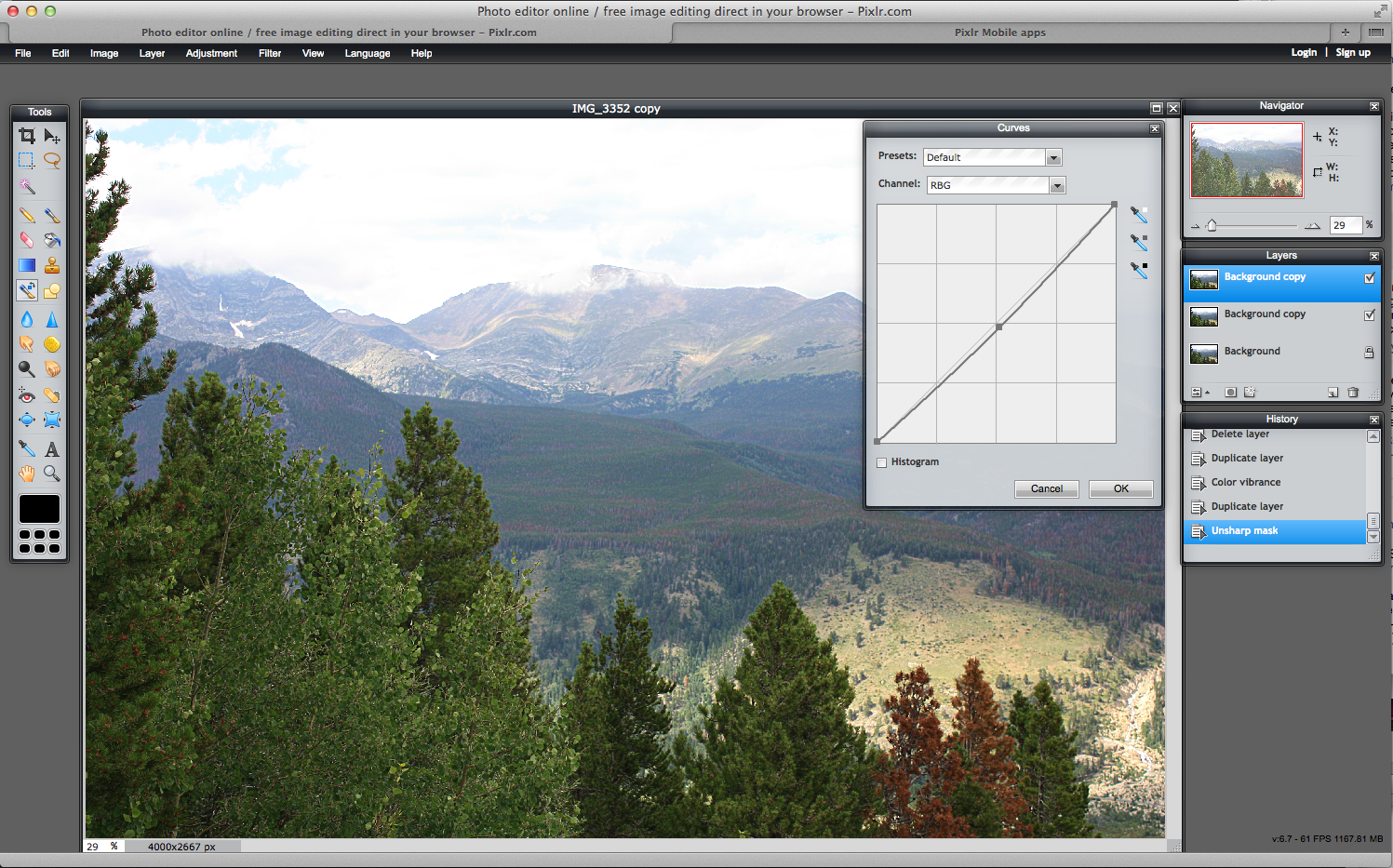
Pixlr Editor, one of the most full-featured imaging packages available,  gives you a choice of how deeply you want to dive into your editing tasks. Pixlr provides a complete editing environment that’s reminiscent of Photoshop and Pixelmator. It has a main toolbar and features palettes like Navigator, History, and the all-important Layers.

The top pulldown menu contains controls for adjustments, filters, transformations, and distortions. And if that’s not enough, it’s available in more than 25 languages. This elegant online program is swift and seamless even on home-based networking systems. The program operates within its own application frame and saves to its own format as well as four other universal ones including TIFF, and will post to your social network library or hard drive.

Screen Shot 2014 02 14 at 3.47.10 PM 520x324 The 9 best browser based photo editing tools available today

A deep and complete photo editor with layers and navigation, Pixlr Editor competes in feature set with Photoshop and Pixelmator in the cloud.

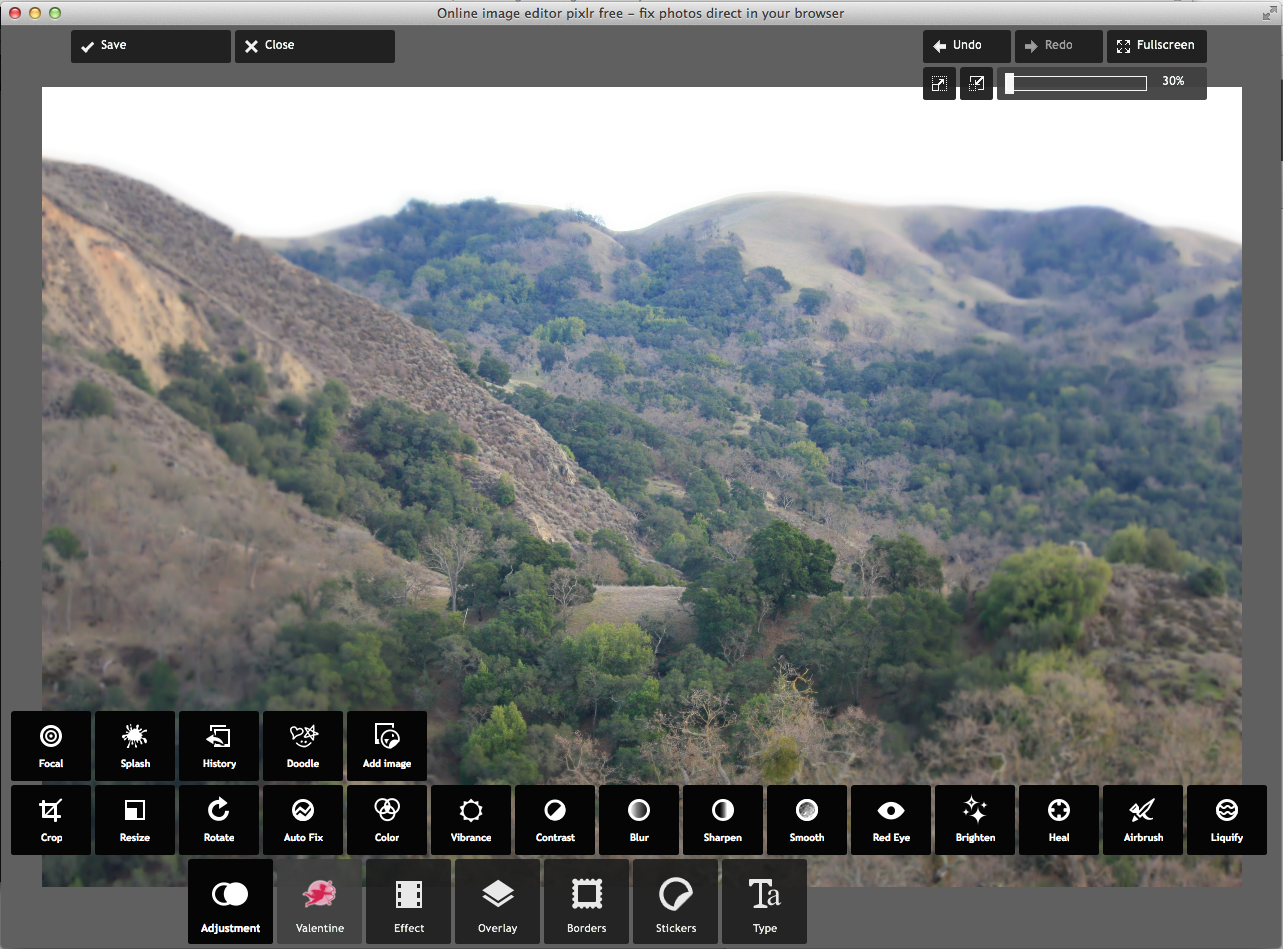
But what if you need a really quick and dirty edit? Don’t touch that dial. Opening an image in Pixlr Express offers a completely different experience. Seven tabs lead you around a slider-based interface that requires no prior knowledge of image editing. While the Express tool offers basic editing controls for exposure, sharpening, and cropping, it emphasizes special effects such as tilt shift and filter enhancement.

Screen Shot 2014 02 14 at 4.09.31 PM 520x384 The 9 best browser based photo editing tools available today

Want to edit your photo without making a big production out of it? Pixlr Express is fast and fun.

Pros: Complete collection of sophisticated editing tools; several levels of complexity; excellent performance; a choice of which editor to use.

Cons: Pixlr Editor may require some image editing background.

➤ Pixlr


Fotor

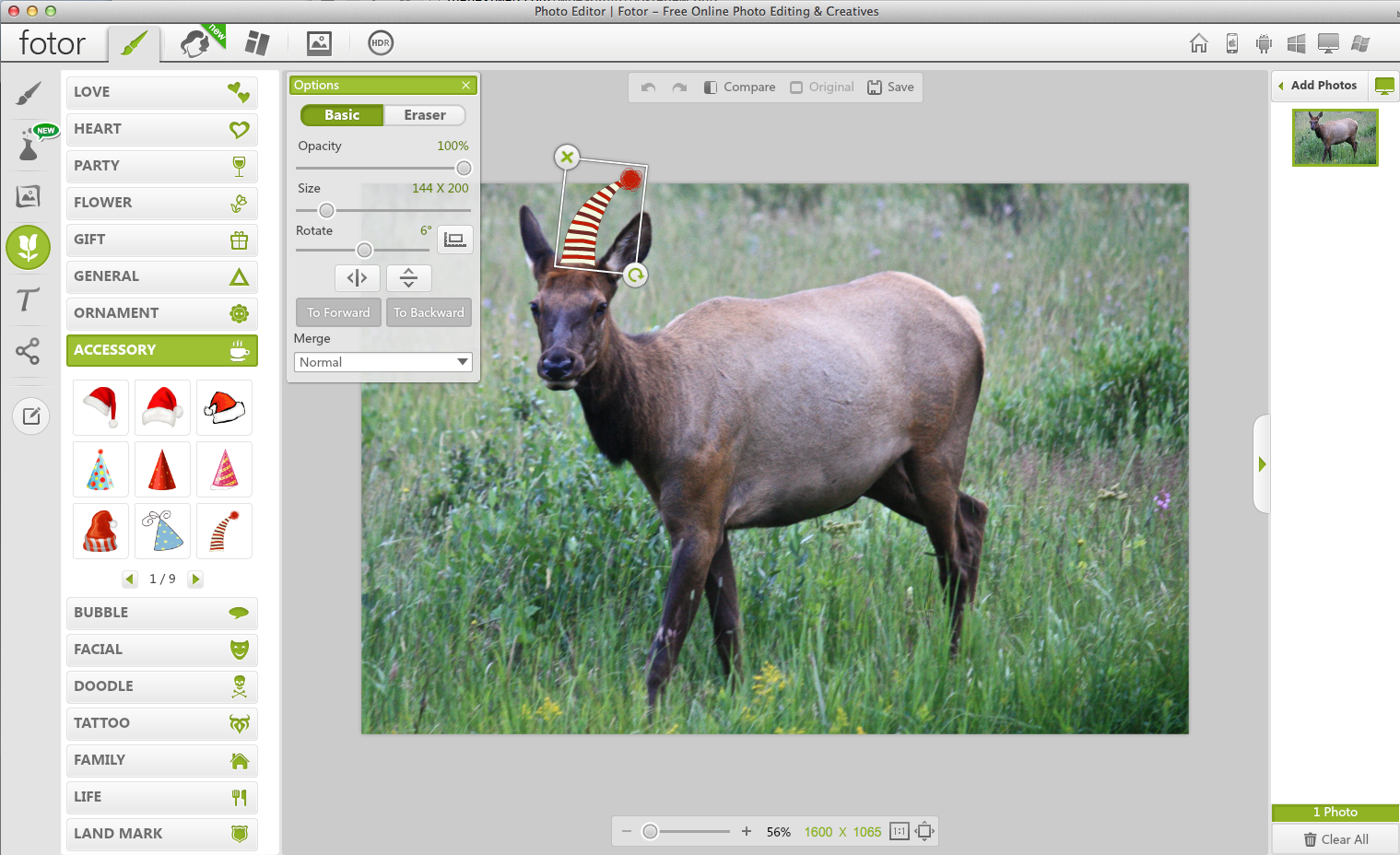
With its friendly, easy-to-use interface, Fotor offers five discrete photo enhancement utilities wrapped in one attractive package. In addition to classic photo editing, there are modules for creating collages, greeting cards, and HDR images. A new module, called Beauty, accompanies the selfie phenomenon to improve people portraits.

A new Effects module offers an assortment of filters such as Lens Flare, B + W, Color Splash, and Tilt-Shift. Frames, Clip Art, and Text, which let you add special elements to your images. Fotor is a simple program, but it’s ad-supported, so a module at the bottom of the window always feeds distracting ads into the interface. Each time you edit, you must execute your move. So if you want to apply multiple fixes to an image, you can’t visualize everything at once before saving. Despite that, Fotor offers excellent functionality and performance, and lots of entertaining opportunities to make your photos look engaging.

Screen Shot 2014 02 14 at 5.01.07 PM 520x317 The 9 best browser based photo editing tools available today

A five-in-one package, Fotor facilitates basic edits and special effects, as well as projects such as cards and collages.

Pros: Easy to use; friendly and engaging; different craft opportunities available; good performance.

Cons: Flashing ads can be distracting; each operation must be completed before moving to the next edit.

➤ Fotor


PicMonkey

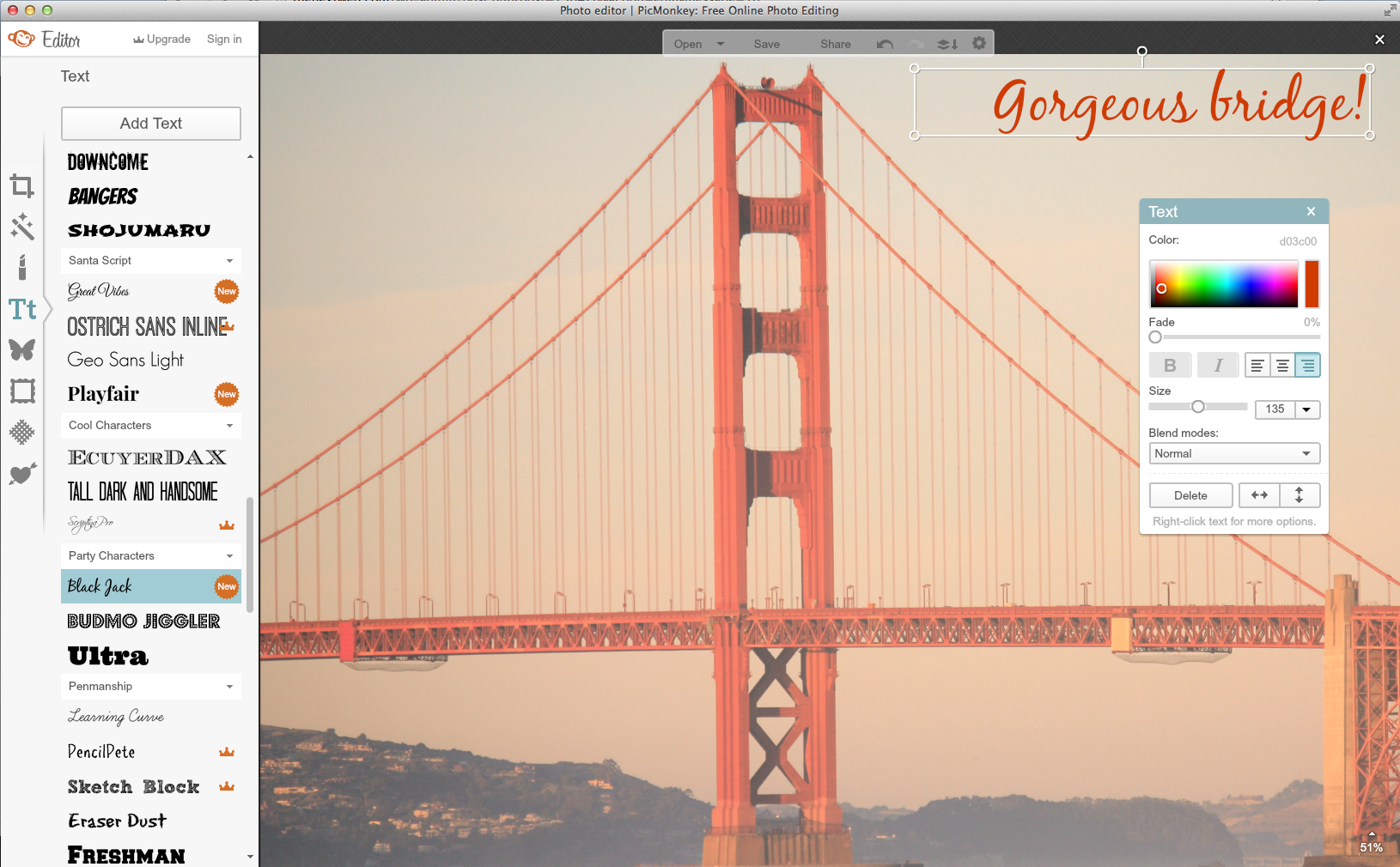
PicMonkey, a consumer-oriented online editor, conveniently lets you choose the output quality of the image right at the point of upload and, in primate motif, you can choose from Jack, Bubbles, and King Kong as shorthand for various quality levels. Each PicMonkey setting opens to additional controls that let you customize the edit, and like Fotor, you have to complete one task before moving to the next. A handy toolbar at the top lets you experiment freely with undo and redo.

In the tradition of in-app purchases, PicMonkey offers much of its service for free, however, if you look closely, a little crown appears on some choices denoting a paid upgrade. While I’m not fond of suggested in-app purchases as an interface element, it’s easy to excuse online services charging a premium for some items, especially if the rest of the app is free. I am especially impressed with the wide variety of filters and fonts available (Black Jack!).

Screen Shot 2014 02 14 at 8.03.56 PM 520x322 The 9 best browser based photo editing tools available today

PicMonkey lets you customize edits and offers a variety of classy elements to dress up your photos.

Pros: Many cool artistic elements; up front opportunity to customize output size.

Cons: Embedded premium services that you have to watch out for; flashing ads at the bottom of the window; must finish one operation before moving to another.

➤ PicMonkey


 BeFunky

Despite its busy interface—mostly due to ads placed around the canvas window—BeFunky has so many sophisticated elements going for it from its Cartoonizer and Inkify paints and grunge frames, to its huge collection of stickers  and backgrounds, that the brain literally halts in a snit of indecision. A humdrum photo is about to be transformed—and that is a good thing—but inevitably, you’re going to spend some quality time with BeFunky before sharing the final version. And even then, you may go back to check one more thing.

BeFunky’s built-in collage maker lets you add a number of photos in either preset or your own original patterns. It even has a Facebook cover to help construct your timeline photo.

Screen Shot 2014 02 14 at 8.20.33 PM 520x387 The 9 best browser based photo editing tools available today

Beneath its ad-based exterior, BeFunky sports some of the most sophisticated artistic elements out there for your photos.

Pros: An astronomical number of beautiful elements that boost the quality of your images; intuitive interface with many choices; built-in collage maker; good performance; just plain fun.

Cons: Garish page of ads support the free service.

➤ BeFunky


Ribbet

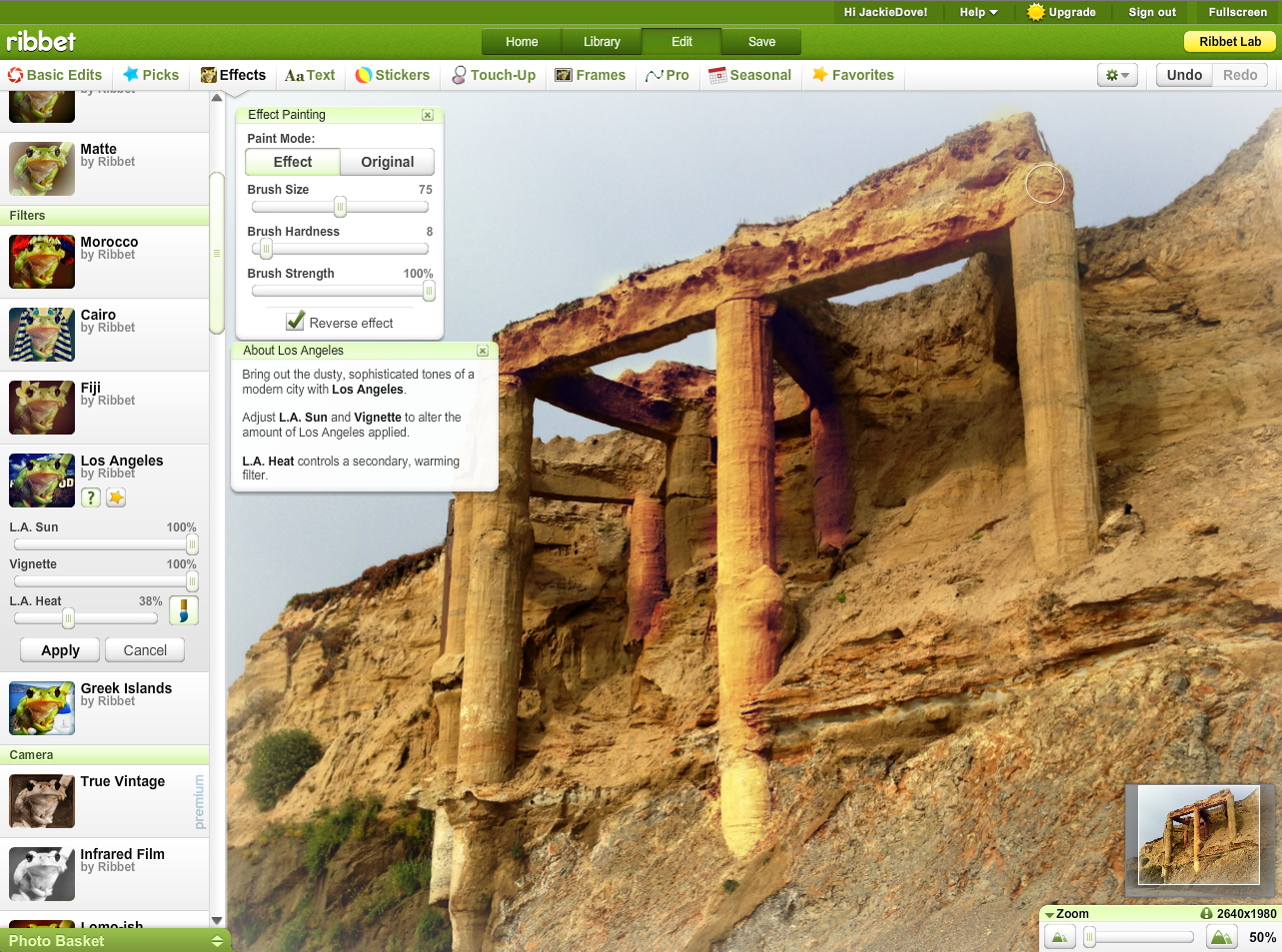
That’s right. Like the frog sound, and complete with a frog motif. If you ever used Picnik, the online editor acquired and shuttered by Google, you’ll immediately recognize the Ribbet interface. No mystery there, because Ribbet is built on the Picnik platform. It has the same friendly look and feel with outdoor-inspired progress bars.

The Edit menu is the place where where you’ll go to tune up your picture. While the Auto Fix control does a nice job in fixing exposure, check out some of the other basic editing tools first. Sophisticated choices are available from cropping to specific photo sizes or services like a Flickr buddy icon, Twitter picture, or desktop or mobile sized versions. That attention to detail spans the app’s special effects, stickers, text, frames, touchup, pro features, and seasonal filters, most of which you can adjust to your liking.

Premium features are free for now. While there are built-in pro features, Ribbet does let you access Pixlr right from the app.

In addition to editing and printing your photos, a collage module offers numerous basic, grid, and large photo styles, while the Labs section lets you create wearable items and accessories from you Ribbet-edits.  This app easily accommodates social networks such as Picasa and Google+, but you can also save to Facebook, Flickr, or print your photo.

Screen Shot 2014 02 22 at 12.28.52 PM 520x386 The 9 best browser based photo editing tools available today

Ribbet, the successor to Picnik, offers tons of classic edits, stickers, filters, and collage capabilities. Here, you can use a brush to paint edits on to a discrete part of the image.

Pros: Friendly, accessible interface, swift performance, large number of fun editing tools and free filters.

Cons: Must apply before moving to the next edit, no layers.

➤ Ribbet
Next: FotoFlexer

└ Tags: creativity, syndicated
  • Page 14,465 of 14,661
  • « First
  • «
  • 14,463
  • 14,464
  • 14,465
  • 14,466
  • 14,467
  • »
  • Last »
The Daily Dose, The Daily Dose © 1996 - Present. All Rights Reserved.
  • Home
  • About
  • Archive
  • Books
  • Collections
  • Links
  • Shop
  • Submit a joke
  • Video
  • Privacy Policy