
The Daily Dose

laugh every day with cartoons jokes and humor
  • Home
  • About
    • Press
      • Press Release – Announcing Laughzilla the Third ebook
      • Press Release – The Daily Dose Kicks Off Its 16th Year with New Books and More Irreverent Laughter
      • Press Release – Themes Memes and Laser Beams Now Available in Paperback
      • Press Release – Announcing Themes Memes and Laser Beams
      • In The News
    • Privacy
  • Archive
  • Books
  • Shop
  • Collections
    • Galleries
      • Gallery
      • Captions
      • Flash Cartoons & Greeting Cards
        • Laughzilla’s Oska Flash Animation Cartoon Greeting Cards
        • Oska Cupid Love Humor
    • #OccupyWallStreet
    • cats
    • China
    • Food
      • Hors d’oeuvres
        • Ball of Cream Cheese
      • Entrees / Main Courses
        • Meatballs with Baked Beans and Celery
    • Gadaffy
    • Google
  • Links
  • Video
  • Submit a joke
DeviantART Facebook Twitter Flickr pinterest YouTube RSS

Subscribe for Free Laughs!


Latest Comics

  • This Memorial Day, Trump Meme Coin Congratulates Profit Takers
  • 25 Years of The Daily Dose
  • The Best Cartoons
  • Bitcoin sings “Fly Me To The Moon”
  • 22 years of The Daily Dose

Comic Archive

Founder’s Fourtieth Birthday

Daily Dose News Roundup

  • Estonian energy storage firm Skeleton becomes unicorn with Siemens deal
  • Palantir CTO says the Pentagon has already replaced Anthropic’s AI
  • DeepSeek to lead seed round in $400mn robot AI start-up, Bloomberg reports
  • Turkey’s social media ban for under-15s starts on 1 November
  • Vittorio Colao defends copyright rules and the DSA in Europe’s AI debate

Quotable

"Germany has decided to close all of its nuclear power plants by 2022, and seeks to replace them mostly with wind power. As it was a political decision, they will actually use windbag power." ~ Yasha Harari

Fresh Baked Goods

Get The Daily Dose's ebook: Laughzilla the Third - A Funny Stuff Collection of 101 Cartoons from TheDailyDose. Click here to get the e-book on Amazon kdp. Laughzilla the Third (2012) The Third Volume in the Funny Stuff Cartoon Book Collection Available Now.

Click here for the Paperback edition


Support independent publishing: Buy The Daily Dose's book: Themes Memes and Laser Beams - A Funny Stuff Collection of 101 Cartoons by Laughzilla from TheDailyDose. Click here to get the book on Amazon. Themes Memes and Laser Beams - The Second Volume in the Funny Stuff Cartoon Book Collection.

Click Here to get the book in Paperback While Available on Amazon

Themes Memes and Laser Beams - 101 Cartoons by Laughzilla. Get the e-book on Lulu.

Click Here to get The Daily Dose Cartoon ebook on amazon kindle

Funny Stuff :
The First Cartoon Book
from The Daily Dose.
Available on Lulu.

a couple of laughzillas on a blue diamond background

Flight MH370′s disappearance, Boston bombers manhunt, and why privacy scares are still overhyped

Mar10
by Sindy Cator on March 10, 2014 at 2:11 pm
Posted In: Around the Web, Boris

boris top story post Flight MH370s disappearance, Boston bombers manhunt, and why privacy scares are still overhyped

Some of my best friends are digital rights advocates. They worry about privacy, tell me “all systems are connected” and that I should stop using credit cards or electronic payments to prevent governments from building dossiers about me. I’m glad they exist, and I support their efforts – sometimes by donating money and other times just with a Like or retweet. But I’m never too worried.

Recently, there have been two events that make me even more relaxed: The disappearance of Flight MH370 and the search for the Boston bombers.

Both are/were terrible tragedies and quickly made headlines around the world. Like most digital citizens, I followed developments by the minute. What surprised me the most in both cases, from a privacy standpoint, is how disconnected we still are.

Let’s start with the Boston Marathon bombings. On April 15, 2013, thousands of cameras – it be video, smartphone, or traditional shooters – were aimed at the finish line. Then, at 2:49 pm EDT, two pressure cooker bombs exploded, killing three people and injuring an estimated 264 others.

Think back with me to 1998. That’s the year director Tony Scott released “Enemy Of The State,” a movie where Will Smith and Gene Hackman team up to escape from bad guy Jon Voight who works at the NSA and abuses his powers to spy on people… or something like that. Watch the trailer if you missed or up for a trip down memory lane:

That movie is 16 years old, and even at the time, my conspiracy friends told me the movie only showed part of what the government could really do. You’d expect them to really advance in the past 16 years.

Come back to April 2013 and you’ll see that it took authorities three full days before they could release photos and surveillance video of two suspects Dzhokhar and Tamerlan Tsarnaev.

Now don’t get me wrong, I’m not saying the police didn’t do a fine job. It’s just that both CSI, “Enemy Of The State,” countless other movies and all those privacy advocates gave me the impression that it could have been done in seconds, not three days.

Later that week, the Tsarnaev brothers stole a car, which was enabled with a GPS device. Even without a GPS device, you would think they shouldn’t have gotten far.

But they did, and escaped from the police once more. It took another 24 hours before the suspect was found – not by a heat seeking satellite, a DNA sniffer robot, or a helicopter with heat-seeking, profile-enhancing gizmo. Nope, a Watertown resident discovered Dzhokhar Tsarnaev hiding in a boat in his back yard. All the while thousands of law enforcement officers were searching a 20-block area of Watertown, shutting down the public transportation system and most businesses and public institutions, creating a deserted urban environment of historic size and duration.

Again, I do not doubt great police work and I’m happy they caught those guys. It’s still not what I had expected in our so-called surveillance society.

Now skip forward to this past weekend. Global tracking systems, life data streams, and satellites watching every square meter around the world, but somehow we managed to lose an entire plane.

Malaysia Airlines Flight 370 took off, flew for an hour or so, and yet a Boeing 777 with 227 passengers and 12 crew members on board just disappeared. You might assume that when planes suddenly disappear, all kinds of alarm bells go off, but apparently that isn’t the case either. Air Traffic Control lost contact with the plane at 01:22 and it wasn’t until 02:40, a full hour later, that the plane was reported missing.

If I drop off the radar at the office for more than 10 minutes, everybody notices. But a Boeing 777 can go unnoticed for an hour and 18 minutes before it officially “disappeared.”

Now again, I want to stress that I don’t blame anyone and I’m sure this is just all standard practice. It is just so damn unexpected in a world where I can track my friends with my iPhone 24 hours a day and around the world. My $600 iPhone can show you where I am at all times, but a $261.5 million plane can just disappear?

I always assumed airplanes would keep contact with Air Traffic Control at all times and if something would go wrong, it would be apparent immediately. But that isn’t the case at all. Everything about the airplane is recorded, but only within the airplane itself.

If the plane disappears, the recorded reason why it disappeared disappears with it. You would think it wouldn’t be too hard to beam that info once every minute or so to a cloud-based server, but that isn’t so simple at all.

More than the technical aspects, the concept is also a privacy issue. Pilots would feel “watched” all the time and have complained about a loss of privacy if the flight data is streamed to a central location all the time. How ironic.

Now let’s get back to the connected systems in the world: that RFID chip in my passport that allows bad people to track me everywhere and leaves a trail of digital breadcrumbs around the world. As it turns out, those systems aren’t quite up and running either; reports say two of the passengers on that flight boarded with passports that were stolen years ago! (One used an Austrian passport that was stolen in 2012 and the other one used an Italian passport stolen in August 2013.)

All these years I thought that all systems worldwide were connected, and that if I checked in at some random airport in a random country with a flagged passport, somewhere in a darkened office, hipster geeks wearing NSA badges would notice a green dot alerting the situation.

The headset-wearing geeks would turn around to their superior and say, “Boris has just popped up on the grid in Kuala Lumpur. Want me to put a tracker on him? I’m synchronizing all video feeds now and I’m tracking him through the airport. He will lose a visual in two minutes though as he will drop off our satellite feed.”

The superior would adjust his reading glasses, look at the clipboard in his hand and reply, “Nah, that’s just Boris. He’s a harmless blogger. Cut him loose.”

I guess it isn’t 1998 yet.
└ Tags: syndicated
a couple of laughzillas on a blue diamond background

Rove’s stylish location-based diary app now lets you save specific memories from your lifelog

Mar10
by Sindy Cator on March 10, 2014 at 1:52 pm
Posted In: Apps, Around the Web, Insider

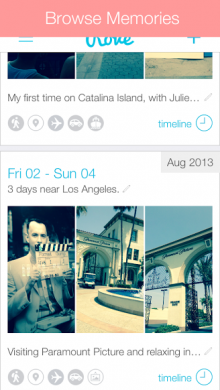
Roves 220x390 Roves stylish location based diary app now lets you save specific memories from your lifelogRemember Rove, the beautiful and stylish location diary app for iPhone? Well, it has just been given a lick of paint and a handful of updates.

To recap, Rove is similar to Moves insofar as it records your journeys wherever you go, except Rove focuses more on the locations than your physical activity, letting you annotate your escapades with photos. With Version 2.0, that went live in the App Store on Friday, a number of enhancements have been introduced, including a new ‘memory feed’ which lets you save specific ‘memories’ from the automated lifelog. It’s all about letting you cherry-pick the best moments from your life to revisit at a later date.

In addition to this, you’ll notice a new layout and design, while the photo-import feature now automatically filters out any screenshots you have on your device. And you should also hopefully notice that it’s less of a battery-drain too – creator Edouard Tabet says by as much as 30%.

➤ Rove | App Store

└ Tags: news, syndicated
a couple of laughzillas on a blue diamond background

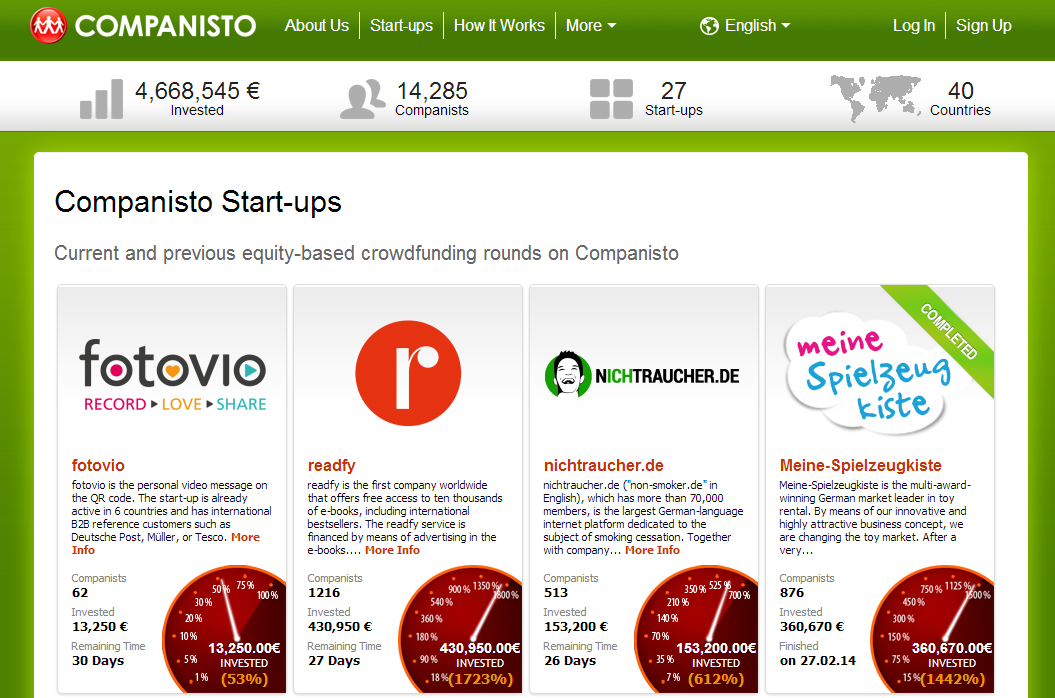
Companisto extends its equity crowdfunding platform to the whole of Europe

Mar10
by Sindy Cator on March 10, 2014 at 1:15 pm
Posted In: Around the Web, Insider

money 520x245 Companisto extends its equity crowdfunding platform to the whole of Europe

Equity-based crowdfunding company Companisto has announced the launch of a new pan-European platform where startups can present their ideas in exchange for a slice of their business.

Announced today, the platform allows submissions from any business based in Europe but allows investment from anywhere in the world, providing the largest possible pool of backers.

Like other non-equity based platforms like Kickstarter or Indiegogo, businesses are expected to put up a detailed presentation, video and financial projections to lure in potential investors. However, unlike alternative options, the amount of money a project can raise is unlimited, while the minimum backing starts from just €5. In exchange for an investment, equity-holders are entitled to a share of profits, as well as potentially benefiting from an exit, Companisto said.

Companisto 730x482 Companisto extends its equity crowdfunding platform to the whole of Europe

Before now, the platform was restricted to the German-speaking market and had seen more than 15,600 investments totalling more than €4.5 million. It seems like getting your project accepted onto the platform is the first challenge; Companisto said that more than 1,000 startups have applied to date, but only 25 have made it through the selection process.

➤ Companisto

Featured Image Credit – Shutterstock

└ Tags: europe, news, syndicated
a couple of laughzillas on a blue diamond background

Review: Flamingo for Mac is a better way to use Google Hangouts

Mar10
by Sindy Cator on March 10, 2014 at 1:00 pm
Posted In: Around the Web, Google, Insider

shutterstock 173085458 520x245 Review: Flamingo for Mac is a better way to use Google Hangouts

Google Hangouts is one of the best chat services around, but its lack of a native desktop client irks many users.

Unless you install the Hangouts extension and let Chrome run in the background all the time, you’ll likely miss out on chats regularly, a problem for many users. That’s where Flamingo for Mac comes in.

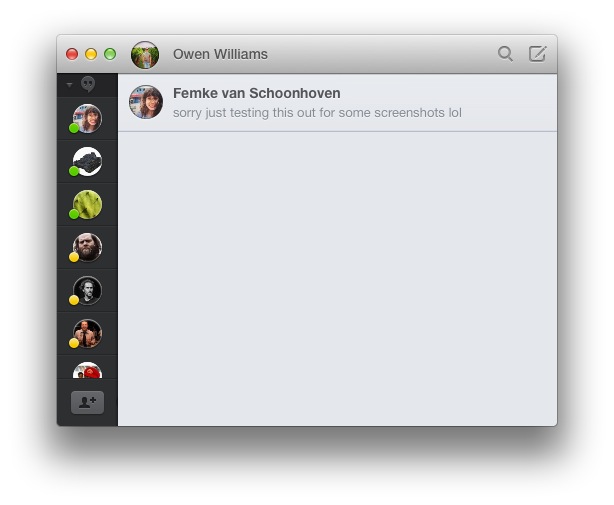
Flamingo is a third-party Google Hangouts and Facebook chat client that integrates beautifully with OS X and works as you would expect an official client to. It’s everything Google Hangouts should be, but isn’t.

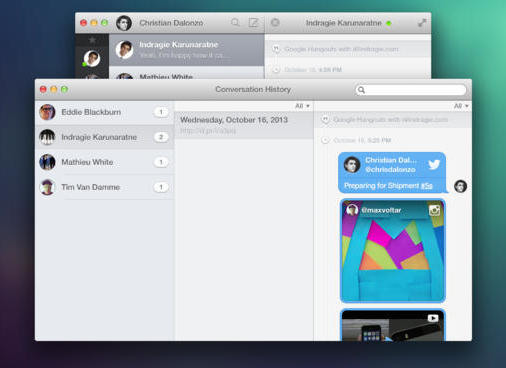
Screen Shot 2014 03 09 at 11.56.26 am Review: Flamingo for Mac is a better way to use Google HangoutsFlamingo is simple, but extremely functional. It works with multiple Gmail addresses at the same time, so you’re able to be signed in to more than one account at once, unlike the official Google Hangouts extension.

Over time, the app keeps track of your conversations with friends and makes them available for searching quickly to find something you talked about previously, while rich media that has been shared are shown prominently.

 Review: Flamingo for Mac is a better way to use Google Hangouts

The best part about Flamingo is its unique ability to quickly send files to friends using other cloud hosting services. You can use the direct connection to one another, or opt to use CloudApp or Droplr to deliver any files pasted into the window.

When not being used, Flamingo disappears into the background and hides in the tray as you would expect (which is far less annoying than Google’s official client that hides at the lower right area of the screen).

There is a drawback though — Google hasn’t opened the Hangouts API to let third-party developers open video hangouts, so Flamingo isn’t able to initiate or receive calls just yet. The developer is hopeful that the company will eventually allow non-official apps to initiate calls but Google is yet to budge in that area.

Despite this, Flamingo still comes in very useful, simply for the ability to be logged into multiple Google accounts in the background at the same time without the need for Chrome. It’s surprising Google still hasn’t built a better Hangouts client, but Flamingo’s done it for them.

Flamingo is available for $9.99 in the Mac App Store right now and it’s well worth the money, despite the current lack of video calling.

Top Image Credit: Jordi C / Shutterstock

└ Tags: news, syndicated
a couple of laughzillas on a blue diamond background

Recordense for Android is a stylish recorder for annotating audio with notes

Mar10
by Sindy Cator on March 10, 2014 at 12:07 pm
Posted In: Apps, Around the Web, Insider, Product Reviews

Recordsens 520x245 Recordense for Android is a stylish recorder for annotating audio with notes

A quick peruse in Google Play reveals there’s no shortage of audio recording apps at your disposal. Some are pretty basic, while some offer more advanced functionality such as time-tags, and the ability to annotate recordings with photos.

The latest one to hit our radar goes by the name of Recordense, which is a really nicely-designed app that shows a lot of potential. In a nutshell, it lets you mark and tag any part of a recording in real-time, and allocate a category to it. It’s pretty simple stuff, but we took a quick peek under the hood to see exactly what it does.

Recordense: The lowdown

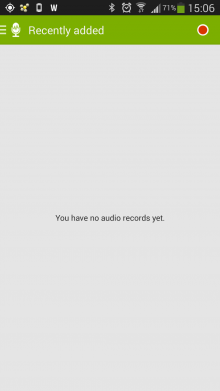
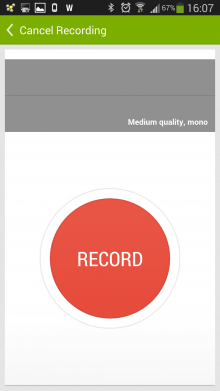
Perhaps one of the app’s biggest flaws, is when you first launch it. You’re greeted by what’s basically a blank screen, with the record button just about visible at the top-right hand side of the app. Over time, the more recordings you make, this blank canvas will be filled with your recordings, but it doesn’t look overly engaging for first-time users. We are, however, told that this will be remedied with the next release of the app, when a large record button will be included by default on the opening screen.

At any rate, for now you will see a giant record button, but only when you tap the little icon at the top.

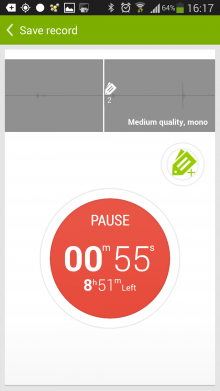
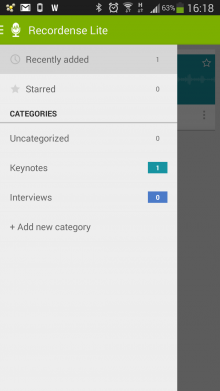
a4 220x391 Recordense for Android is a stylish recorder for annotating audio with notes    b4 220x391 Recordense for Android is a stylish recorder for annotating audio with notes

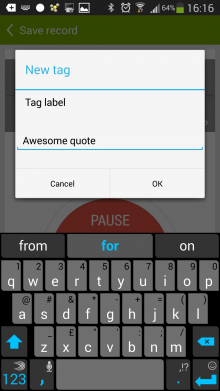
During the recording process, you simply hit the ‘tag’ button and give it a name – for example, if you want to remember the location of a quote from a keynote speaker.

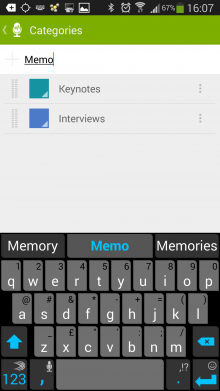
    d4 220x391 Recordense for Android is a stylish recorder for annotating audio with notes    c4 220x391 Recordense for Android is a stylish recorder for annotating audio with notes

Once the recording is complete, you can save it to a dedicated folder which you name, and also give its own unique color.

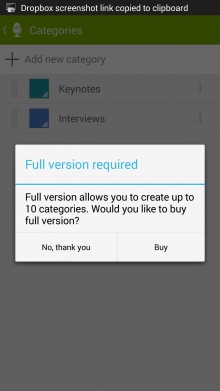
Now, in the Lite version of the app, you can only create two categories – for more, you’ll have to cough up two of your Earth (US) dollars to procure the full version. Also, you’ll only be able to use three tags per-recording in the Lite version.

e3 220x391 Recordense for Android is a stylish recorder for annotating audio with notes    f3 220x391 Recordense for Android is a stylish recorder for annotating audio with notes

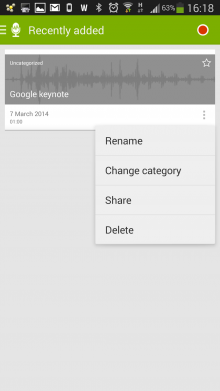
In the full version, you can still only create up to ten categories though, which will be fine for most people, but still seems a little on the low side. For each recording, you can share directly to other third-party apps, including email and Dropbox.

This will be helpful to those wishing to transcribe an interview using another service.

g2 220x391 Recordense for Android is a stylish recorder for annotating audio with notes    h2 220x391 Recordense for Android is a stylish recorder for annotating audio with notes

For now, Recordense uses the m4a format, compressed in AAC, though Lemberg, the UK-based company behind the app, tell us that it’s open to supporting other formats if it garners enough requests. It’s also worth adding here that you can’t choose the sample rate in the Lite version – for that you’ll need to upgrade.

All in all, however, Recordense is a beautifully designed app that does what it proclaims to do well. But as noted, it’s not perfect – and it’s perhaps a little on the simple side in terms of features. Why not let users annotate audio with photos too, for example? Plus, it would be great if you could choose where to save your recording – such as an external SD card. More updates are in the pipeline though, and we can’t wait to check future iterations.

Recordense widget 220x59 Recordense for Android is a stylish recorder for annotating audio with notesThe cherry on the cake for us, however, is the 4×1 widget that lets you record and create tags directly from your homescreen. It’s a nice touch, and should prove popular with those requiring speedy access to their audio-recorder.

It’s also worth adding here that Recordense actually existed briefly in another guise, known as Recorder With Tags, but it was recently replaced with Recordense. The reason? A simple re-branding exercise, it seems. A spokesperson tells us that ‘Recorder With Tags’ was too general, so they elected to build a more recognizable brand name instead.

You can grab yourself Recordense on Google Play now, or have a quick gander at the official promo skit below. Meanwhile, if you have an iOS device, you might wish to check out Recordium.

➤ Recordense Lite | Recordense [Full Version]

└ Tags: syndicated
  • Page 14,348 of 14,673
  • « First
  • «
  • 14,346
  • 14,347
  • 14,348
  • 14,349
  • 14,350
  • »
  • Last »
The Daily Dose, The Daily Dose © 1996 - Present. All Rights Reserved.
  • Home
  • About
  • Archive
  • Books
  • Collections
  • Links
  • Shop
  • Submit a joke
  • Video
  • Privacy Policy