
The Daily Dose

laugh every day with cartoons jokes and humor
  • Home
  • About
    • Press
      • Press Release – Announcing Laughzilla the Third ebook
      • Press Release – The Daily Dose Kicks Off Its 16th Year with New Books and More Irreverent Laughter
      • Press Release – Themes Memes and Laser Beams Now Available in Paperback
      • Press Release – Announcing Themes Memes and Laser Beams
      • In The News
    • Privacy
  • Archive
  • Books
  • Shop
  • Collections
    • Galleries
      • Gallery
      • Captions
      • Flash Cartoons & Greeting Cards
        • Laughzilla’s Oska Flash Animation Cartoon Greeting Cards
        • Oska Cupid Love Humor
    • #OccupyWallStreet
    • cats
    • China
    • Food
      • Hors d’oeuvres
        • Ball of Cream Cheese
      • Entrees / Main Courses
        • Meatballs with Baked Beans and Celery
    • Gadaffy
    • Google
  • Links
  • Video
  • Submit a joke
DeviantART Facebook Twitter Flickr pinterest YouTube RSS

Subscribe for Free Laughs!


Latest Comics

  • This Memorial Day, Trump Meme Coin Congratulates Profit Takers
  • 25 Years of The Daily Dose
  • The Best Cartoons
  • Bitcoin sings “Fly Me To The Moon”
  • 22 years of The Daily Dose

Comic Archive

obama caricature on america's position after leaving iraq june 17, 2014
The President Obama caricature that clears up America’s Iraq policy

Daily Dose News Roundup

  • Estonian energy storage firm Skeleton becomes unicorn with Siemens deal
  • Palantir CTO says the Pentagon has already replaced Anthropic’s AI
  • DeepSeek to lead seed round in $400mn robot AI start-up, Bloomberg reports
  • Turkey’s social media ban for under-15s starts on 1 November
  • Vittorio Colao defends copyright rules and the DSA in Europe’s AI debate

Quotable

"You can't buy a new Nexus One Google Phone anymore, but you can still Google it." ~ Yasha Harari

Fresh Baked Goods

Get The Daily Dose's ebook: Laughzilla the Third - A Funny Stuff Collection of 101 Cartoons from TheDailyDose. Click here to get the e-book on Amazon kdp. Laughzilla the Third (2012) The Third Volume in the Funny Stuff Cartoon Book Collection Available Now.

Click here for the Paperback edition


Support independent publishing: Buy The Daily Dose's book: Themes Memes and Laser Beams - A Funny Stuff Collection of 101 Cartoons by Laughzilla from TheDailyDose. Click here to get the book on Amazon. Themes Memes and Laser Beams - The Second Volume in the Funny Stuff Cartoon Book Collection.

Click Here to get the book in Paperback While Available on Amazon

Themes Memes and Laser Beams - 101 Cartoons by Laughzilla. Get the e-book on Lulu.

Click Here to get The Daily Dose Cartoon ebook on amazon kindle

Funny Stuff :
The First Cartoon Book
from The Daily Dose.
Available on Lulu.

a couple of laughzillas on a blue diamond background

PicJoy for iPhone auto tags your photos for swifter searching

Jun16
by Sindy Cator on June 16, 2015 at 1:15 pm
Posted In: Apps, Around the Web

picjoyfeat

We’ve been hearing a lot about photo search recently, and with the huge abundance of images shot, almost every photographer now finds it a challenge to organize and manage burgeoning photo collections — no less locate the exact shot they’re looking for.

Photo apps like Flickr, Google Photos and PhotoTune — employ complex algorithms that can either recognize specific objects in your photos or otherwise categorize and classify your images in various ways to help out with that task.

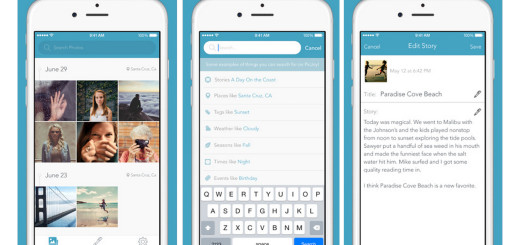
The newest entrant into this arena is PicJoy from HitLabs, an iPhone app launching today, that automatically organizes your photos via visual and contextual clues.
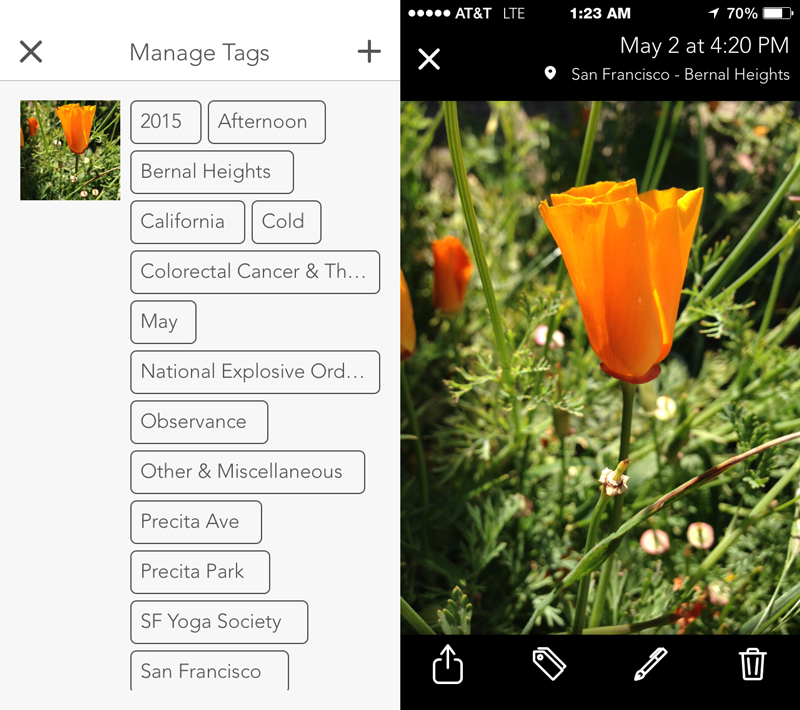
picjoy1Auto tagging — some items are not helpful.

As a deep-learning organizer, PicJoy automatically tags images on your iPhone and in your iCloud account and lets you sort photos based on location, date and context. PicJoy’s automatic categorization feature gathers information like date, season, weather, holidays, events and landmarks. 

In experimenting with a pre-release version of the app, I found those tags plentiful — maybe even a little too detailed. One image I shot at the Lafayette Reservoir contained no fewer than 20 different tags ranging from the general — United States —  to the specific, Lafayette Reservoir. Other tags included Weekend, park and Flag Day (yes, it was Flag Day — who knew?).

Another image, of a California Golden poppy, had similar tags, mostly involving location and time, though never an identification of the flower itself, or even that there was a flower in the picture because right now the app relies on EXIF and other location, weather, and day of week types of data, as opposed to image recognition.

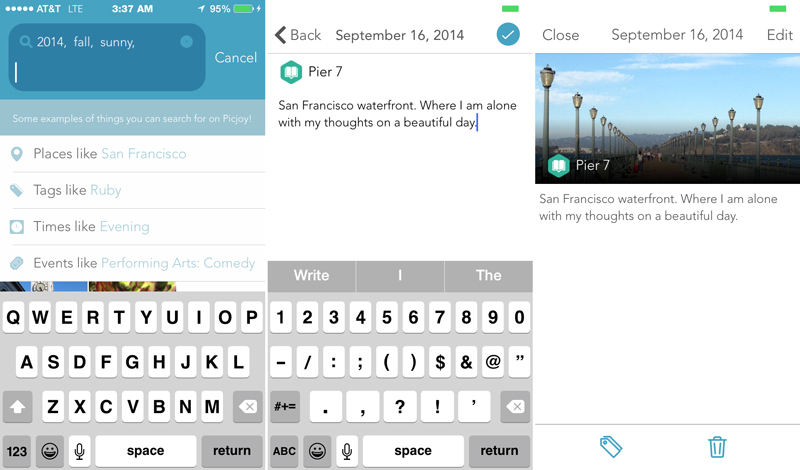
picjoy3Searching with auto tags

For that, PicJoy lets you add tags to any image, though at this stage in the app’s development, tags that you add will not carry over to similar images. For example, I tagged my cat Ruby as Cat and also as Ruby. However, none of the other 20 pictures of her picked up that tag.

A “machine learning” approach, where computer vision tech will start to recognize patterns and objects found within photos, is also coming soon, according to HitLabs co-founder Shane Bills.

Small things were jarring: some tags ran too long for the space and were cut off with ellipses. When searching for times like Night, the app obviously clocked to my current time zone rather than the time zone when the photo was shot. Weather like Sunny brought up shots that were taken indoors. I could not remove irrelevant tags.

But PicJoy isn’t just about search — once you find your photo, you’ll want to share it with someone or perhaps just call it out for yourself. For that, the app offers a story feature lets you annotate selected photos to provide better context and memories surrounding a particular image. 
picjoy5Storytelling

At the moment, PicJoy’s storytelling feature is nothing more than a single photo and a caption of any length you choose. There’s nothing wrong with that — I’m quite fond of photos and captions — but it’s rather a narrow definition of storytelling. It would have been nice to have the option to add photos as a sequence, and Bills says that is likely to be added in future versions. 

Captions will also be used later as another part of the search algorithm. Story sharing capabilities will also improve over time.

PicJoy preserves the privacy of its users by only storing metadata on its servers to organize your photos, not to use your information – the app scans a photo collection and applies tags, and thereafter photos are erased from everywhere but your phone.
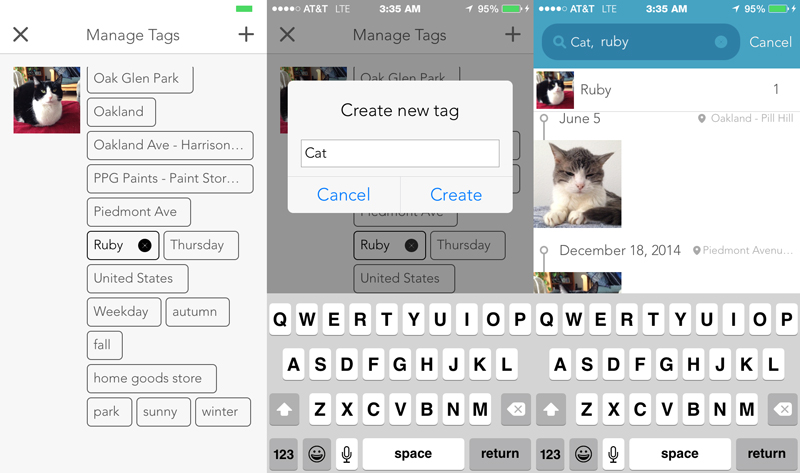
picjoy4Manual tagging

At launch, the app is compatible with iCloud, but other cloud storage integrations such as Dropbox, Google Drive and Amazon Photos are promised.

PicJoy is a 1.0 app and definitely a work in progress. While its newness is revealed in some bare-bones features at launch, I look forward to the company filling in the gaps and making the app more flexible and complete.

PicJoy is available for free in the iTunes Store and is optimized the iPhone 5, iPhone 6 and iPhone 6 Plus. It runs on iOS 8.

➤ PicJoy [iOS]

Read next: Meta35 helps film shooters sync and embed metadata with scanned photos
└ Tags: syndicated
a couple of laughzillas on a blue diamond background

Eyefi lets GoPro and Olympus shutterbugs upload videos to its cloud service

Jun16
by Sindy Cator on June 16, 2015 at 1:00 pm
Posted In: Around the Web

Smart-Tags_Wall-Clockfeat

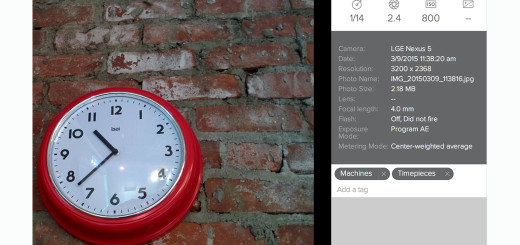
Eyefi, maker of the Mobi wireless camera card and companion cloud sharing service, has announced it now works with wireless GoPro and Olympus cameras. Not only is Eyefi’s Cloud storage and viewing service supporting video for the first time, but users of those designated models are not confined to using Eyefi cards.

The new connectivity operates with GoPro Hero+ LCD, Hero 3, GoPro Hero 4 and Olympus Stylus 1, Olympus PEN E-P5, Olympus Stylus TG- 860 and Olympus OM-D E-M5 Mark II models.

Coupled with the free Eyefi apps for iOS and Android, the cloud service lets photographers organize, edit and share their photos as soon as they get their shot. Eyefi Cloud syncs their photo library to all user devices and facilitates integration with smartphones that can access your account so that images from different cameras can flow into the same timeline.

Smart-Tags_Bay-Bridge

In addition, Eyefi also announced new smart tag technology and photo discovery features. These automatically organize, classify and analyze your photos so you can search for specific pictures as well as improve your shooting technique.

Smart tags, which are optional and must be enabled, automatically identify and tag the subjects in your photos using a variety of built-in tags such as person, landscape, structure, outdoor, food and drink as well as custom tags you can create.

Powered by machine learning, it employs 10 pre-defined categories and more than 80 subcategories. Smart tags are customizable so users can control how their images are organized, making them easier to find.

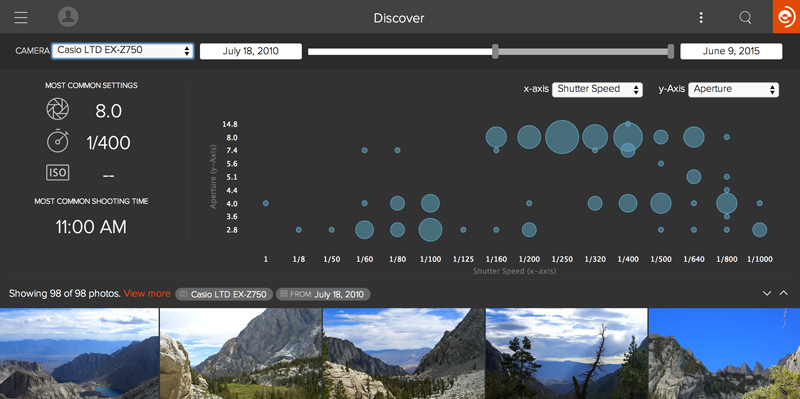
Discover_Speed_Aperture_Casio

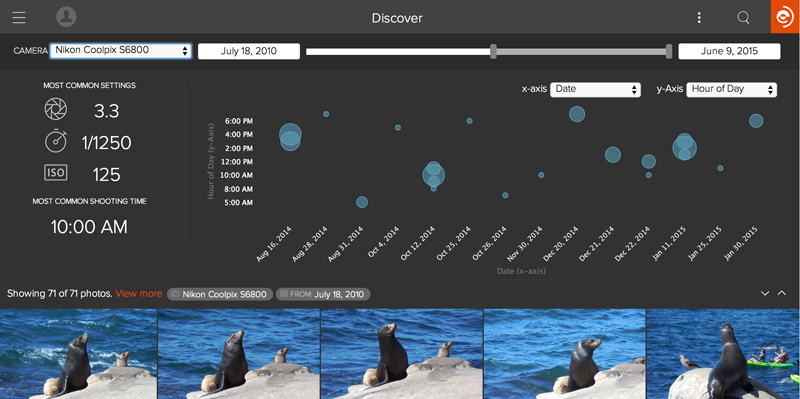
A new Discover feature offers a visualization tool that helps photographers learn more about how they shoot and how their combinations of settings affect the look of their images.

“It’s like FitBit for photography,” said Mark Dooley, Eyefi’s vide president of marketing. “People don’t always understand the effects of certain camera settings or what characteristics make up their favorite photos.”

Discover uses metadata — model, ISO, aperture, shutter speed, time of day — to present relevant information to photographers, in a graphical representation.

Discover_TOD_Date_Coolpix

Eyefi also announced a new $4.99 per month pricing option for its Eyefi Cloud service. Mobi users who don’t currently subscribe to Eyefi Cloud can do so through a $4.99 in-app purchase. The cloud service stores all images in original resolution.

Wi-Fi camera connectivity is available on Android devices today, and will be released on iOS devicesin the third quarter.

➤ Eyefi

Read next: Meta35 helps film shooters sync and embed metadata with scanned photos

└ Tags: creativity, syndicated
a couple of laughzillas on a blue diamond background

Sony’s Xperia Z4v is ready to get wet with Verizon this summer

Jun16
by Sindy Cator on June 16, 2015 at 1:00 pm
Posted In: Around the Web, Mobile, sony, Xperia Z4v

Sony Xperia Z4v

Sony announced today that it’s launching its Xperia Z4v Android phone in the US this summer through Verizon Wireless.

The 4G LTE-capable waterproof device features a high-resolution 5.2-inch 2560×1440 display, along with a 20.7-megapixel rear camera and a 5-megapixel shooter on the front.

Xperia Z4v

It’s powered by a 64-bit Snapdragon 810 octa-core processor and includes 32GB of onboard storage, with the option to add another 128GB with a MicroSD card.

The Z4v will be able to shoot 4K video, play full versions of PS4 games while on the same Wi-Fi connection as the console and stream high-resolution audio over bluetooth thanks to LDAC support. You’ll be able to get your own in black or white later this summer.

➤ Sony Xperia Z4v [Verizon Wireless]

Read next: Samsung Galaxy S6 active will be available from AT&T June 12 onwards

└ Tags: syndicated
a couple of laughzillas on a blue diamond background

Watch out Apple Music, here comes a streaming service for electronic music fans

Jun16
by Sindy Cator on June 16, 2015 at 1:00 pm
Posted In: Apps, Around the Web, Digitally Imported, Insider, streaming music

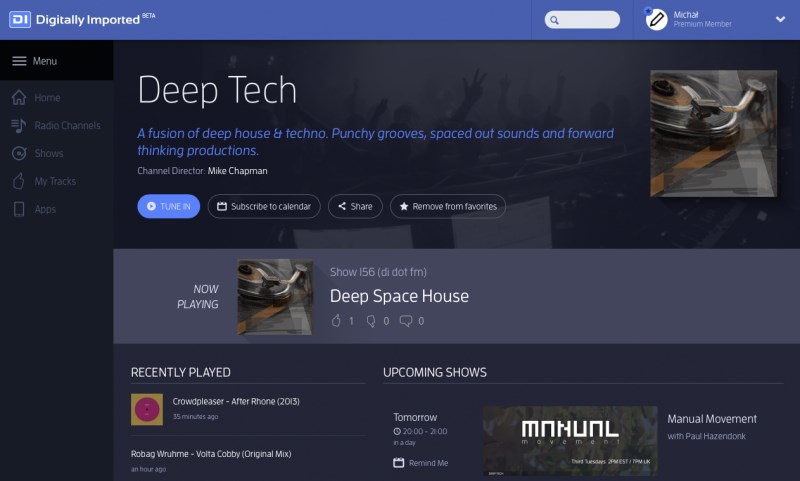
Digitally Imported

After spinning electronic music on its online radio stations endlessly since 1999, Digitally Imported is launching its own streaming service to cash in on the burgeoning on-demand entertainment business.

Available as part of the company’s premium subscription ($7 per month or $70 a year), the service will feature the company’s full catalog of mixed shows from 2015, as well as 400,000 tracks across its 80 channels. Users will be able to search for content by track, show, artist or channel.

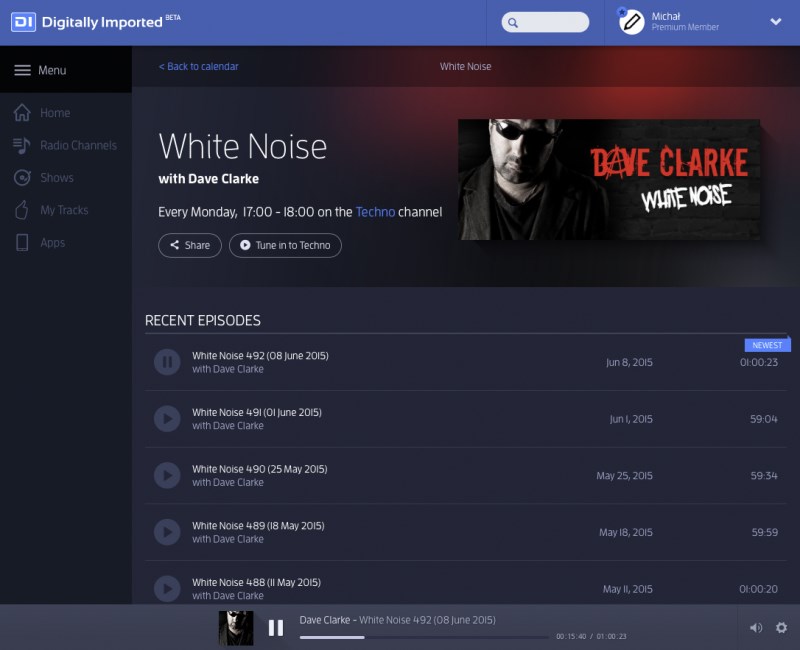
Digitally Imported

Premium subscribers will also be able to purchase their favorite tracks (later this year), create customized shareable playlists and unlock exclusive content.

Digitally Imported

While the company is right to hop on the streaming bandwagon while the on-demand trend is on the up-and-up, Digitally Imported certainly has its work cut out for it. Apple Music is set to launch internationally soon in an already crowded space. Is there really room for a niche competitor?

Digitally Imported boasts “100% human-curated streaming radio” that some listeners may stay loyal to, but without truly exclusive content or an avenue for rapid growth like messaging, the service will face an uphill task in staying alive over the next few years.

Digitally Imported’s on-demand service is launching first in the US and will expand worldwide as the company finalizes agreements for other regions.

➤ Digitally Imported

Read next: Spotify’s ‘taste rewind’ is a blast from the musical past

└ Tags: syndicated
a couple of laughzillas on a blue diamond background

7 steps to a perfect meeting

Jun16
by Sindy Cator on June 16, 2015 at 12:58 pm
Posted In: Around the Web, Insider, meeting, secrets

meeting

This post is brought to you by Barco, we design and develop visualization solutions for a variety of selected professional markets.

If I were to ask you, “describe what would the perfect meeting look like to you?” what would you say? Would it end on time? Would you achieve all the objectives you set out for it? Would you finish with a collective high five and a big ‘whoop’? When was the last time you left a meeting and felt any of those things?

Business meetings, on average, consume two days a week of time for managers and professional people in large organisations. Half of those meetings, according to the Institute of Leadership and Management (ILM), are a waste of everyone’s time. When you consider the cost of having people in meetings instead of generating revenue or fixing problems, these little gatherings can start to get expensive.

So what can you do about it? We’ve come up with a seven-stage plan for ensuring your meetings end with a smile instead of a frown.

1. Invite only the relevant people

If you’re having a meeting to discuss sales targets, how useful is it to have your tech team sat in? According to ILM, anywhere between 15 and 25 per cent of attendees to a meeting needn’t be there. But how do you know if the people sat opposite you are the right ones?

Typically, anyone who has been sent in place of someone else who couldn’t attend, senior members of staff who need to be “visible” in key meetings, and anyone, whether it’s the CEO or intern who sits on their laptop, tablet or phone ‘multi-tasking’.

MEETINGS

The presence of these types not only makes a meeting feel over-subscribed it also upsets the sense of ‘democracy’ (see point six) felt by members who are contributing.

2. Be prepared

Astonishingly, 75 percent of meetings don’t have an agenda laid out in advance. Even those that do tend to just be a list of topics, with no fixed outcomes built in. So if you saw a meeting pop up in your calendar saying, “sales strategy” would you have any idea what that meeting would involve, or what you would need to prepare in order to make it worth your while?

The best meetings have a series of clear, actionable steps that have precise outcomes. A good example would be, “to have an answer on whether we should launch a new feature”. But before you even reach that point, you have to have thought about what steps will lead you to that outcome? In the example above, a step-by-step process would look something like the following;

– Have the tech team finished development on the new feature?

– Has the new feature been tested?

– Has the marketing team devised a strategy for launch?

– Are all stakeholders happy that the feature is ready?

Breaking down each actionable outcome into a series of smaller stepping stones can help make meetings more productive.

team work

3. Ease of set up

If your meeting requires a lot of equipment, the first question that needs to be asked is, “is there a simpler way of showing people what I want to show them?” Steve Jobs famously hated slides in meetings and said, “people who know what they’re talking about don’t need PowerPoint”. While that may be slightly harsh, the best form of communication is normally your voice.

Earl Miller, a Picower professor of neuroscience at MIT, says that for the most part, we simply can’t focus on more than one thing at a time.

So if you’re trying to show people a technical slide on sales projections, and you’re talking at the same time, one of those pieces of information is going to get lost. Paring back your setup so that the information you are trying to deliver to a team is in its simplest form will increase retention and improve people’s perception of that meeting.

4. Bring your own device (BYOD)

Relying on a device that the presenter is not used to using, is only going to lead to presentation anxiety and boredom from the user if it goes wrong. Once you’ve managed to get your device connected, you realise the tangle of cables you have to use is chopping off the sides of your presentation. While for many businesses, the logistics of creating support for devices on iOS, Android, Windows and even BlackBerry would give them a headache.

meeting

There are solutions available, such as Barco’s own ClickShare range, which throws a digital lasso over all devices to all them to talk to each other seamlessly. While we’d all love it if Apple, Microsoft and Google would all agree on a standard presentation format, we might be waiting a while. Instead, encouraging presenters to use their own devices by creating easy-to-use connection points to presenting hardware can reduce the stress of giving a presentation to more acceptable levels.

5. Visualization

Visualization first hit the headlines when sports stars began referring to it after they’d won tournaments and trophies. The technique is a cognitive tool that accesses your imagination to help picture how you are going to do something. Whether it be kicking the winning field-goal or giving a presentation. Recreating every aspect of the experience, whether it be sounds, sights, smell, tastes or even touch can help you the presenter find a state of relaxation.

In 1987, when Jim Carey was only a struggling comic, he visualized a successful and lucrative career. To make his vision concrete, he wrote himself a check for $10 million for “acting services rendered” dated for Thanksgiving of 1995, which he placed in his wallet.

By 1995, Carey was already an established comedic actor commanding far more than $10 million per picture. So before your next meeting, take five minutes to imagine what a successful meeting will look like for you, and then simply follow your own lead.

Meeting

6. Democracy

Meetings can often involve impassioned debates – which is a healthy part of the decision making process. However, underpinning a debate is every member of the team feeling respected by their colleagues.

The Marshall School of Business conducted a survey of over 500 professionals and found that the single biggest thing to make someone feel unheard was smartphone use. Whether it be taking a call, writing a text or email, or even glancing at your phone while someone else is talking can drastically undermine the sense of fairness that team members need to feel in order to contribute to meetings.

person smartphone meeting

At the White House, during Cabinet meetings attendees are asked to write their name on sticky notes, place them on their phones, and deposit their phones in a basket. If it’s good enough for the President, it’s good enough for your next weekly catch-up.

7. Results

Going back to that Steve Jobs again, in his overhaul of Apple in the nineties, he made sure that every meeting had clearly defined results. As a prerequisite, every task brought up in a meeting was assigned a D.R.I.—Directly Responsible Individual. This meant that any task that required action had one individual attached to it. Doing so provides public accountability for an individual to ensure that the project or task got done, and it sends clear, organized instructions for the team to follow.

Take-away

There is no silver bullet solution to the perfect meeting. Instead, it’s a series of small changes that when combined and baked into every meeting, can help the whole process run more smoothly.

Read Next: The secrets to successful kickoff meetings

Image credit: Shutterstock

└ Tags: syndicated
  • Page 10,812 of 14,673
  • « First
  • «
  • 10,810
  • 10,811
  • 10,812
  • 10,813
  • 10,814
  • »
  • Last »
The Daily Dose, The Daily Dose © 1996 - Present. All Rights Reserved.
  • Home
  • About
  • Archive
  • Books
  • Collections
  • Links
  • Shop
  • Submit a joke
  • Video
  • Privacy Policy