The Daily Dose

laugh every day with cartoons jokes and humor
  • Home
  • About
    • Press
      • Press Release – Announcing Laughzilla the Third ebook
      • Press Release – The Daily Dose Kicks Off Its 16th Year with New Books and More Irreverent Laughter
      • Press Release – Themes Memes and Laser Beams Now Available in Paperback
      • Press Release – Announcing Themes Memes and Laser Beams
      • In The News
    • Privacy
  • Archive
  • Books
  • Shop
  • Collections
    • Galleries
      • Gallery
      • Captions
      • Flash Cartoons & Greeting Cards
        • Laughzilla’s Oska Flash Animation Cartoon Greeting Cards
        • Oska Cupid Love Humor
    • #OccupyWallStreet
    • cats
    • China
    • Food
      • Hors d’oeuvres
        • Ball of Cream Cheese
      • Entrees / Main Courses
        • Meatballs with Baked Beans and Celery
    • Gadaffy
    • Google
  • Links
  • Video
  • Submit a joke
DeviantART Facebook Twitter Flickr pinterest YouTube RSS

Subscribe for Free Laughs!


Latest Comics

  • This Memorial Day, Trump Meme Coin Congratulates Profit Takers
  • 25 Years of The Daily Dose
  • The Best Cartoons
  • Bitcoin sings “Fly Me To The Moon”
  • 22 years of The Daily Dose

Comic Archive

Happy New Year Cinema

Daily Dose News Roundup

  • Estonian energy storage firm Skeleton becomes unicorn with Siemens deal
  • Palantir CTO says the Pentagon has already replaced Anthropic’s AI
  • DeepSeek to lead seed round in $400mn robot AI start-up, Bloomberg reports
  • Turkey’s social media ban for under-15s starts on 1 November
  • Vittorio Colao defends copyright rules and the DSA in Europe’s AI debate

Quotable

"The anti-Khadafi rebels are being routed by Gadaffi's troops, a Tsunami in Japan shifts world attention, and protests for freedom took place in Eastern Saudi Arabia, worrying the King and oil markets worldwide. TGIF, right?" ~ Yasha Harari

Fresh Baked Goods

Get The Daily Dose's ebook: Laughzilla the Third - A Funny Stuff Collection of 101 Cartoons from TheDailyDose. Click here to get the e-book on Amazon kdp. Laughzilla the Third (2012) The Third Volume in the Funny Stuff Cartoon Book Collection Available Now.

Click here for the Paperback edition


Support independent publishing: Buy The Daily Dose's book: Themes Memes and Laser Beams - A Funny Stuff Collection of 101 Cartoons by Laughzilla from TheDailyDose. Click here to get the book on Amazon. Themes Memes and Laser Beams - The Second Volume in the Funny Stuff Cartoon Book Collection.

Click Here to get the book in Paperback While Available on Amazon

Themes Memes and Laser Beams - 101 Cartoons by Laughzilla. Get the e-book on Lulu.

Click Here to get The Daily Dose Cartoon ebook on amazon kindle

Funny Stuff :
The First Cartoon Book
from The Daily Dose.
Available on Lulu.

a couple of laughzillas on a blue diamond background

Pinterest enhances its guided search for superior results

Jun16
by Sindy Cator on June 16, 2015 at 9:41 pm
Posted In: Apps, Around the Web

New-search-filter

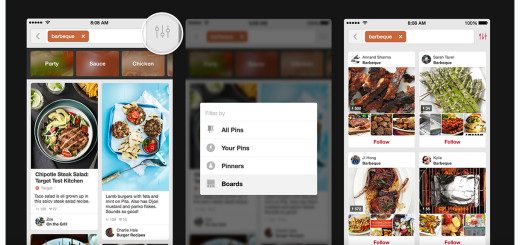
Pinterest has seen a good bit of success with its guided search feature over the last year — with search up some 30 percent — but there’s always room for improvement. Pinterest today launched five improvements to add more snap to your search.

New typeahead functionality: Search results used to be segmented behind filters, but with the new system, faster typeahead results will show up for pinners and boards as you type.

New search typeahead

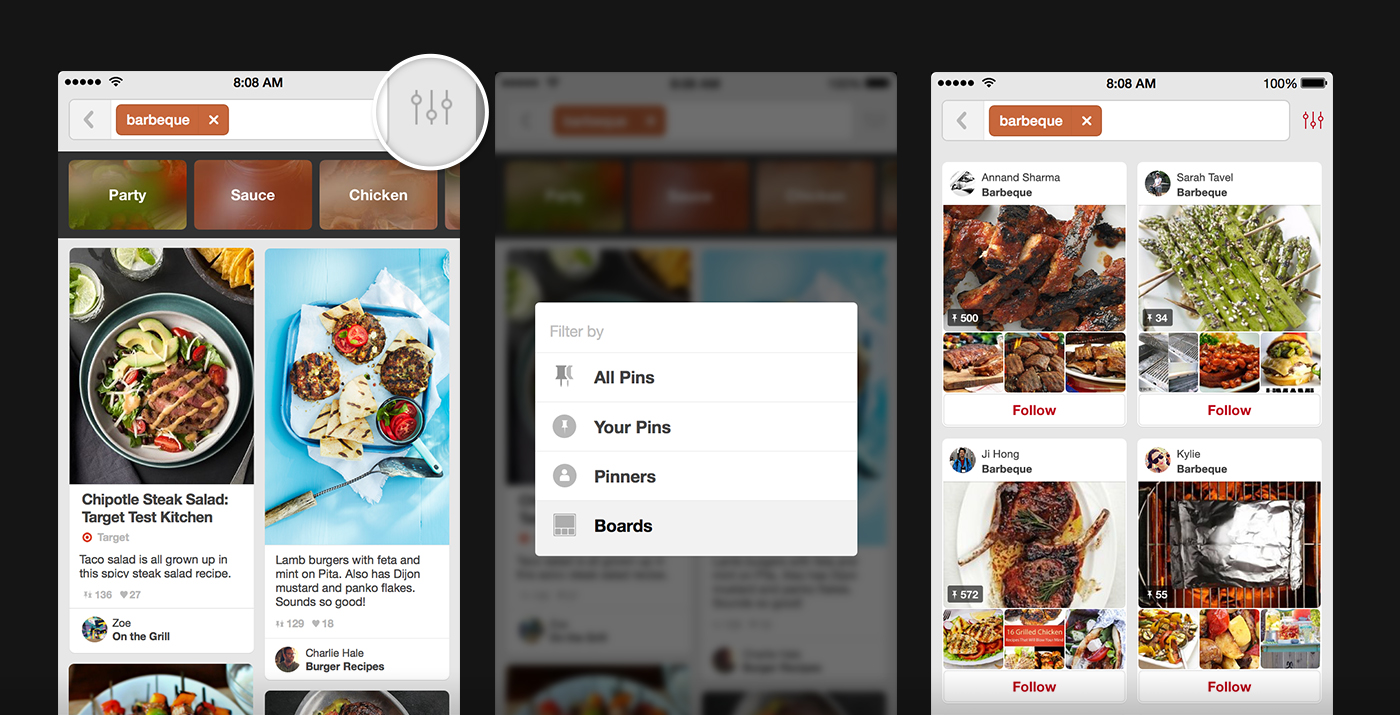
New filters: A filter button now refines your search by all pins, your pins, pinners and boards.

New search filter

Autocorrect: Don’t slow down the action with typos — Pinterest says about 12 percent of searches contain spelling mistakes. Now, Pinterest shows you what it thinks you’re looking for, even if you’re not sure about the spelling.

Trending searches: In addition to you recent searches, Pinterest will also show you top trending searches as well. May come in handy.

New trending on PinterestVerified accounts: Interested in following certain people (celebrities, public figures) or brands (retailers, media outlets)? Look for a check mark next to their name when you search.

New verified accounts

Pinterest says it’s seeing some positive results with these search enhancements. Research indicates more than twice as many people are finding more boards and pinners to follow with these enhancements. Plus, pinners are more than 50 percent more likely to repin or click through a pin with the new autocorrect feature.

➤ Pinterest search just got smarter

Read next: PicJoy for iPhone auto tags your photos for swifter searching

└ Tags: syndicated
a couple of laughzillas on a blue diamond background

Lego Dimensions’ Portal trailer with Gandalf, Batman, Wyldstyle and GLaDOS is perfect

Jun16
by Sindy Cator on June 16, 2015 at 9:28 pm
Posted In: Around the Web, games, Lego, Lego Dimensions, Lego Movie, Lord of the Rings, Shareables, video

Lego Glad

It’s been a while since we’ve had a Portal fix, but Lego Dimensions is at least going to satiate our desires just a little bit.

The title, which arrives in September, takes the pop culture mashing moves from ‘The Lego Movie’ and applies them to a game/toy combo.

Lego Glad

As well as giving us more time with the murderous AI GLaDOS and Wheatley, it features characters and gameplay from ‘The Simpsons’, ‘Doctor Who’, ‘Ghostbusters’, ‘Jurassic World’, ‘Midway Arcade’, ‘Scooby Doo!’, DC Comics, ‘Lord of the Rings’, ‘The Lego Movie’, ‘The Wizard of Oz’ and ‘Back to the Future’, among others.

The onscreen action will be tied to tests that you can only solve using the real world Lego Toy Pad accessory. It’s a nifty move by the company to keep you buying minifigs, but when it’s managed to cram that many characters from disparate franchises into a shared world, who cares?

Lego Dimensions will be available for Xbox One, PlayStation4, PlayStation 3 and Wii U. I want to play it now. 

➤ LEGO Dimensions: E3 Portal Trailer – The LEGO Toy Pad Does More [Lego]

Read next: Lego launches its Minecraft competitor 

└ Tags: syndicated
a couple of laughzillas on a blue diamond background

Snapchat CEO just uploaded a ridiculously low-res video explaining Snapchat

Jun16
by Sindy Cator on June 16, 2015 at 8:02 pm
Posted In: Around the Web, Insider, Shareables

wtf snapchat

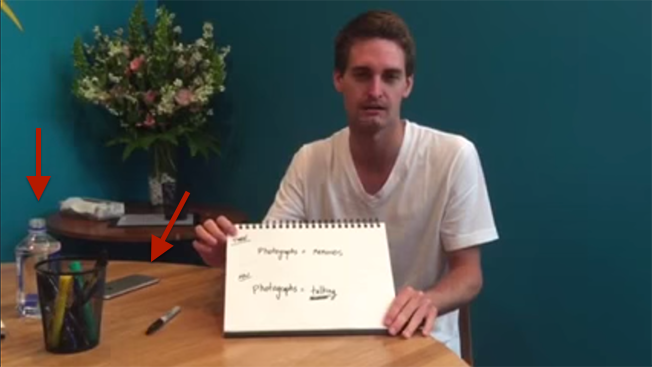
In what appears to be an act against his will, Snapchat CEO Evan Spiegel has uploaded a new video explaining how Snapchat works to help parents understand the latest teen craze.

We’re not parents ourselves, but we still have questions.

Not so much about how Snapchat works but why this video exists in its current state. The video – uploaded on June 16, 2015 in all its 240p glory – is horribly edited and doesn’t even use a tripod to stabilize the shot. Judging by what looks like be an iPhone 6 next to Spiegel, we do believe this was filmed during the year 2014 or later.

Snapchat just raised $537.6 million last month. What the heck happened?

Spiegel also took about 25 times longer to explain the app’s premise than the average lifespan of an actual Snapchat.

Evan, what are you doing? You created a product that capitalizes on our short attention span! You should know that four minutes is too long to watch such a low-res production.

Let’s investigate further. There is an open bottle of water on his desk. He does seem kind of sleepy in the video – maybe he’s tired from practicing this speech? Or was he drugged?

what happened evan

Most importantly, Evan, are you okay? Why is the room so dark? Where’s Ghostface Chillah?

“When you see your children taking a zillion photographs of things that you would never take a picture of, it’s ’cause they are using photographs to talk,” Spiegel sums up millennials for parents. “Instant expression says, ‘my identity is who I am right now.’”

I’m not the first to admit that millennials are getting a bad rep, but dangit Evan, this is not helping.

Read next: This might be Snapchat’s best product to date

└ Tags: syndicated
a couple of laughzillas on a blue diamond background

Apple reportedly bans Monster from making official iPhone accessories over Beats lawsuit

Jun16
by Sindy Cator on June 16, 2015 at 7:27 pm
Posted In: Around the Web, Insider

beats

According to The Wall Street Journal, former Beats hardware partner Monster is claiming it has been blocked from making headphones or other official peripheral devices for Apple products.

Apple’s Made For iPhone (MFi) licensing program gives hardware manufacturers “components, tools, documentation, technical support, and certification logos needed to create AirPlay audio accessories and electronic accessories that connect to iPod, iPhone, and iPad.”

Monster has been making headphones under the MFi program since 2005.

Monster was reportedly banned from the program due to its standing lawsuit against Beats, where Monster claims it has been cheated from income on the hardware it helped create.

Monster was reportedly removed from the MFi program effective May 5, and general counsel David Tognotti says Apple’s lawyers told him it was because the relationship was no longer “mutually beneficial.”

Existing Monster MFi products can be sold through September.

➤ Apple Revokes Monster’s Authority to Make Licensed Accessories [The Wall Street Journal]

└ Tags: syndicated
a couple of laughzillas on a blue diamond background

Review: Automatic’s smart driving monitor adds context to your daily commute

Jun16
by Sindy Cator on June 16, 2015 at 6:03 pm
Posted In: Around the Web, Insider

AutomaticTNW

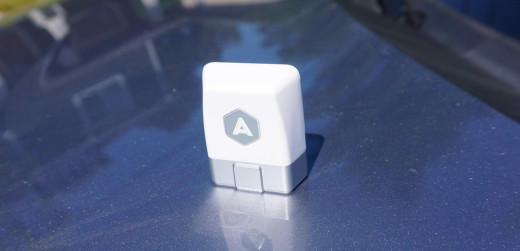
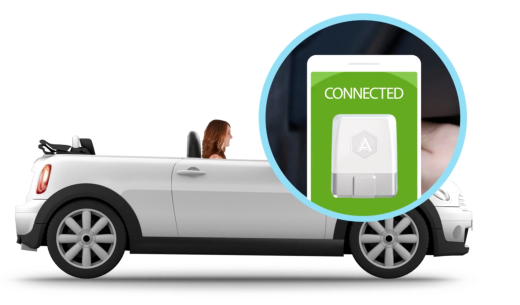
With a small in-dash dongle and flashy app, Automatic wants to quantify the time you spend behind the wheel of your car. By providing you with information about your driving style and linking to other apps, Automatic hopes you’ll want to make its service part of your daily routine.

The real question is why you’d want to make Automatic part of your life.

Do you really want to know how many times you pump the brakes too hard, or speed up to get around someone? Does it actually matter how many minutes you spent driving over 70 miles per hour?

Automatic tries to succeed where others in the “Internet of Things” realm often fail: context. Making info make sense to you is the real lynchpin for success with any (or all) of your connected gadgets.

AutomaticTNW2

Hardware

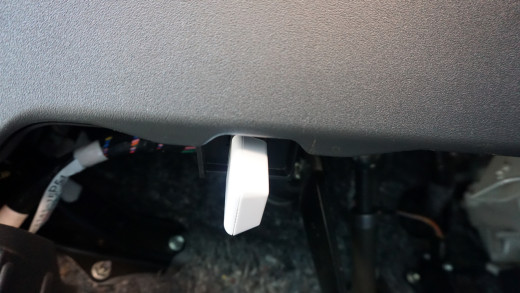
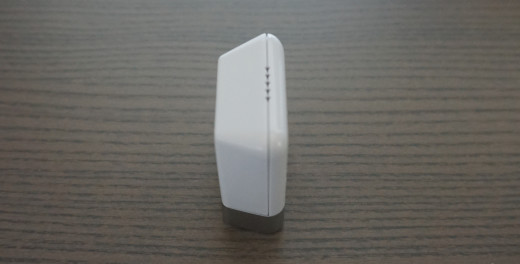
Aside from your smartphone (both iOS and Android are supported), Automatic has proprietary hardware you’ll need to pick up. The small dongle slides neatly into the OBD port in your car, often found somewhere underneath the dash.

There isn’t much to the hardware itself. It’s small and white, little more than a Bluetooth beacon that can access your car’s computer.

Internally, there are plenty of components there to read the info your car shares with the sensor. Your lone reminder Automatic is still there comes from a tiny speaker that emits beeps as you drive.

AutomaticTNW1

How it works

Many might be content to plug their dongle in and open the app, then hope for the best. If Automatic is being asked to explain things about your drive or car to you, it’s worth some background on how it gets that info.

Your car has a code, which is what Automatic’s hardware reads via the OBD port. Some auto manufacturers charge for access to the information those codes have, depending on your vehicle. Auto manufacturers may charge big money, too, so your little dongle is only as good as what it can read.

Typically, any OBD reader can provide basic info. If your check engine light came on because your gas cap wasn’t on tight, a simple reader may be able to tell you. Other detailed info may not be readable by anyone other than a mechanic with an expensive machine. Your mileage will ostensibly vary.

AutomaticTNW4

The app

While you won’t be dealing with Automatic’s hardware much, the app will be something you see often.

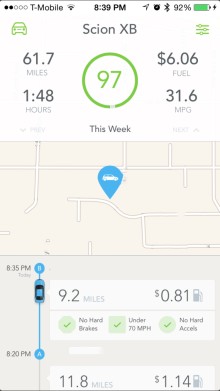
The main screen shows a timeline of your drives, and some ongoing stats up top. You’ll see your drive score for the week, as well as how much you’ve driven. Automatic can even tell you how much you’ve spent on gas, both total and for each trip.

When you conclude a trip, Automatic notes your end point and saves it to help you remember where you’ve parked.

AutomaticSS1TNW

Trip previews also show you stats like how often you brake or accelerate to harshly, and how much time you spent driving over 70 miles per hour.

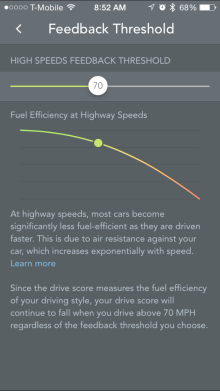
The miles per hour metric may seem arbitrary, but Automatic has a clever graph detailing your expected gas expenditure depending on your speed. At 70 miles per hour, your miles per gallon ratio starts going south quickly, according to Automatic.

IMG_2599

Tapping on a trip will bring up stats for the journey. You’ll see your miles per gallon, drive time, miles travelled, and cost of gas for that specific journey. A map shows you the route taken, and even where you hit the brakes or gas too hard. You’ll also see where you were when you crested 70 miles per hour.

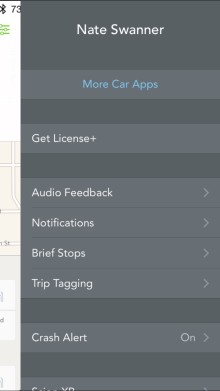
A slide-out menu lets you toggle features like when you’d like to receive audible notifications, and lets you cobble trips with less than 15 minutes between them together.

AutomaticSSTNW2

There’s also a crash alert option, which notifies the authorities as well as a select group of contacts if you’ve been in a serious accident.

A secondary menu on the other side of the screen tells you if your car has issues that need addressing, and suggests mechanics in your area sourced via Yelp.

Use

In testing both for a few weeks — including a long trip to San Francisco for WWDC — I found some positive points for Automatic.

There are, unfortunately, also some annoyances.

Starting a drive, you’ll get a quick audible alert that the device and phone are linked. Unless you violate the three main tenets of Automatic — hard braking, quick acceleration, or too much time driving over 70 miles per hour — you won’t hear anything else.

AutomaticTNW5

Those audible cues can be disabled on the settings menu if you just want Automatic to shut up and let you drive, which is a good idea if you’re easily distracted. A few beeps may leave you daydreaming about what you just did wrong — Automatic’s audible cues are never positive.

Automatic is simple. You get granular info about your trips, but that’s about it. From there, Automatic lets other apps that link to its service do the heavy lifting.

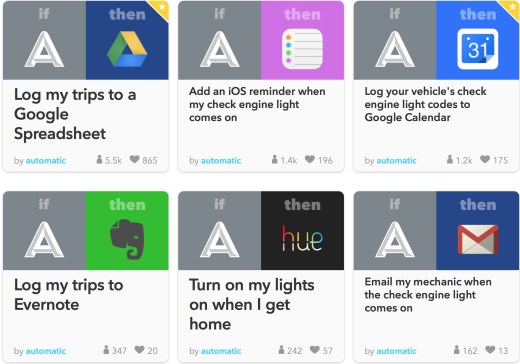
You can use IFTTT for all kinds of redirection of information, but most of the other available apps relate to trip expensing.

Screen Shot 2015-06-15 at 5.08.20 PM

Automatic’s business trip tagging feature is limited; you can tag trips, but there’s no breakout view for those business trips. It’s hard to imagine why the feature exists if there’s no separate view specific to tagged trips.

You can also link to Nest to pre-heat or cool your home as you get closer. Linking Automatic with Jawbone provides a look at how driving may be affecting your health.

Your parking location can be found on your wrist by linking to the Pebble app, and Automatic provides the same info with an Apple Watch glance.

Automatic’s drain on the phone is noticeable. During heavier use, it drew up to 16 percent of my phone’s battery. Over time, Automatic pulled about 5 percent — but I don’t drive much. I’d wager someone who was commuting daily might see a bit more battery drain than I did.

IMG_2502

With iOS, you’ll need to have the Automatic app running in the background. If you can remember to open the app each time you jump behind the wheel, there are no problems. Otherwise, you may miss logging some of your drive data.

Perhaps most agitating was Automatic’s inability to notice I was using cruise control. If my car accelerated quickly or broke too hard on its own, it affected my drive score.

Screen Shot 2015-06-15 at 5.09.45 PM

Verdict

Automatic is handy. I never encountered as much myself, but I do like that you may get some details on what that check engine light means via the app. The collision reporting feature is a smart safety feature and — though the selection is a bit clumsy right now — allowing other apps to link to Automatic expands its reach.

Those who use their own vehicle for business purposes will also like the ability to tag trips for business, and you can choose to have the app prompt you to tag trips at the end of a journey if you like. The downside is that the Automatic app has no breakout view for business trips.

As a standalone service, Automatic is the brains to your car’s brawn — and that’s precisely why you’d want it.

Context is important, and Automatic delivers. You’ll not only know what Automatic thinks you’ve been doing wrong, but your drive score reflects it. If you brake too hard, too often — your score drops. Jump off the line at red lights and you’ll get knocked. Drive too fast for a long period of time and Automatic will reflect it in your drive score.

Avoiding accidents is obviously paramount when you’re behind the wheel, but Automatic may make you a better driver by keeping tabs on your behavior. Add in vehicle diagnostics and third party apps and Automatic really shines.

Read next: Google’s self-driving cars have now logged over 300,000 test miles without a single accident


└ Tags: syndicated
  • Page 10,809 of 14,673
  • « First
  • «
  • 10,807
  • 10,808
  • 10,809
  • 10,810
  • 10,811
  • »
  • Last »
The Daily Dose, The Daily Dose © 1996 - Present. All Rights Reserved.
  • Home
  • About
  • Archive
  • Books
  • Collections
  • Links
  • Shop
  • Submit a joke
  • Video
  • Privacy Policy