



Blood, sweat, and tears: How we got from 0 to 500K downloads on a budget
Think global, start early
Being from Israel – population of 8M – means no sizeable market on the home front. Therefore, we knew we needed to look for our market elsewhere from the onset.
Many app developers believe that the US is their target market, and while it may be true for some, it’s definitely not true for all. WhatsApp founder Jan Koum is an Ukranian immigrant, and I’m betting it had helped him realize the potential of going global from day one. Needless to say, it worked well for him!
We first launched our product in English to target the US market, but pretty soon after we translated our app’s AppStore description to Russian, a language two of my co-founders are fluent in. It cost us exactly $0.
The Result? Our app caught fire on the Russian AppStore and we hurried to localize the app’s user interface as well. Russia, with its 145M population has been providing 21 percent of our downloads ever since, and it is our second largest market after the US to date.
Since we had no money to afford a professional translation service, I took advantage of the fact that Israel is very much a country of immigrants and asked for help from my relatives from Brazil and Argentina to do our Portuguese and Spanish localizations (thank you Luciana and Jaco!). These, too, were highly effective. Brazil, with a population of 200M and Mexico with 120M are now in our top 5 download countries.
Later, we used Fiverr translators for the German and French localizations ($5 each) and ran it by some native speaking friends to make sure all is well. Don’t skip on verifying the text when using Fiverr, because for five bucks, high quality is not guaranteed.
When we translated the app’s description to German using their service, my German friend Jan looked at it and started laughing, telling me that the language wouldn’t even be good enough for a porn movie… so I switched to a better Fiverr translator.
When we had a bit of funding at hand, we used One Hour Translation to localize to Italian for about $100. What a splurge! Italy, France and Germany are now in our top 15 download countries.
You get the picture. Localization of the AppStore metadata (name, description, keywords, screenshot text) yielded the best instant boost in downloads, while localization of the app’s UI makes for a better user experience and increases engagement.
Using the resources we had at no or little cost allowed us to quickly grab markets that are less well served. As a bonus, I had the chance to share our vision with my friends and family and get their help, advice and support.
For iOS, if you’re wondering where to begin your localization efforts, know that not all AppStores were created equal; some countries have their own AppStore and some share one, so you may want to shoot for the single country AppStore languages first.
A tip from our dev team: don’t hard-code strings in your app. If you do that, it will be a major headache to localize later. Even if you start with only one language, use the localizable.strings mechanism – your code will be cleaner and it will be super easy to add more languages later on.
ASO like a pro
ASO (Appstore Search Optimization) for apps plays a similar role to SEO for websites. It is basically an optimization of your AppStore metadata done in order to rank better on search results.
A popular figure says that 62 percent of the people find new apps by searching the AppStore, so it’s easy to understand why this is super important. I’m going to limit my tips to Apple’s AppStore, as that’s been my experience so far.
First, you need to optimize your app’s name, as it carries the most weight amongst your keywords. Don’t use just your app’s name in the name section, add to it a short description with relevant keywords. It will not only help you rank better on search results, but also help the people who find you understand exactly what you do, quickly.
Let’s say for example that your app’s name is Xanadu, and it helps people find vacations. You brainstorm and come up with two possible app names: “Xanadu – Find a Great Vacation” and “Xanadu – Your Vacation Starts Here.” Which one’s better?
Tentatively, I lean towards the first because it’s closer to how people search, as in “Find a vacation,” whereas the latter is more “marketish.” Before I commit, I always check my assumptions with keyword research tools, otherwise I’m just shooting in the dark.
My favorite keyword optimization tool these days is AppCodes (reasonably priced at $15/mo). It informs me that if I choose “find a vacation” I will have to compete with 79 apps for the keywords, including some strong competitors.
I have a 52 percent chance of making it to the top 16 on iPhone or top 9 on iPad, but the popularity of this search is unknown. The alternative “vacation starts” will compete with just three more apps and I’ll have a 93 percent chance of ranking high on search results, but the combination of an unknown popularity with a small number apps (little known, with a small number of downloads) matching this phrase hint that it’s an inferior option.
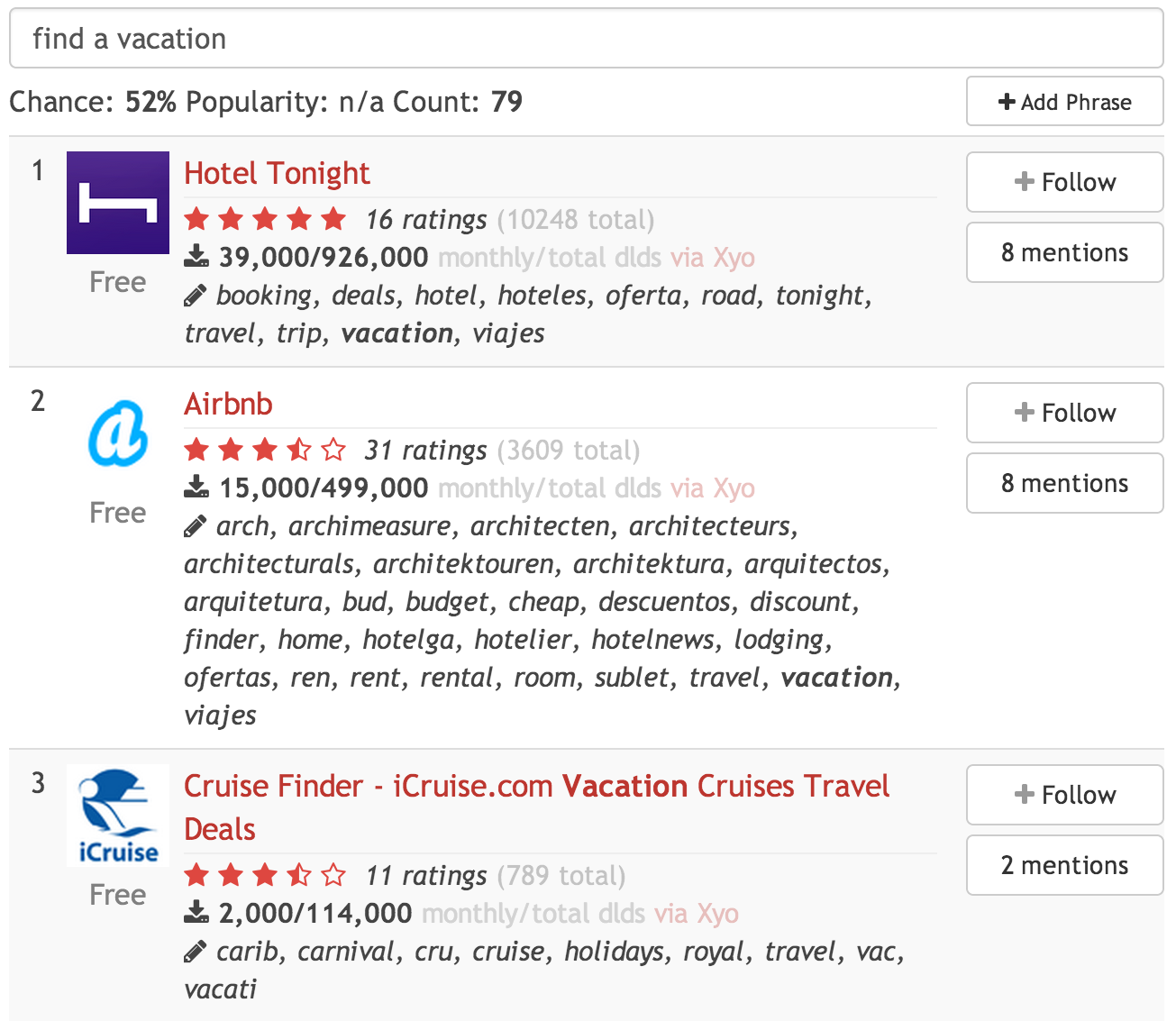
Option 1: “Find a vacation”

Option 2: “Vacation starts”
In addition, looking at the competitors, I get some hints about more keywords that are relevant to my domain and I can continue my research in a more enlightened way.
The rule of thumb for good keywords is not to focus on single words, but on short phrases and you want the phrases that have a high chance to rank on top and high popularity.
Your actual keywords are limited to 100 characters, so make the most of it. Don’t repeat any of the keywords in your app’s name or you’ll waste valuable characters.
Enter your keywords, separated by a comma, without any spaces. No need for prepositions and according to AppCodes there’s also no need to use “free” or your category name as Apple allegedly adds these to the keywords automatically.
One more thing to bear in mind is that localization is also very important in keywords. If your app is offered on the Russian AppStore too, will the Russian people be looking for “Find a vacation”? I seriously doubt it. I would research “поиск поездки“ instead.
While it can be a real challenge to optimize your keywords in languages you do not speak, it can also be quite rewarding, as fewer people bother to do it.
How do you get your keyword ideas? You can Google ideas and see what the autocomplete dishes out, ask your friends (also a great resource for foreign language keywords), research your competitors’ keywords, scan your AppStore reviews for hints, or my favorite – use Twitter.
I monitor a lot of the chatter around our app on Twitter and pay close attention to how people describe it. TweetDeck’s custom timeline lets me save relevant tweets on an ongoing basis.
Then when the time comes to groom my keywords again, I take a second look at these tweets and research the phrases I find. It’s super great for foreign languages because it contains a lot of slang and short terms which people often actually search for, but are not common knowledge if you’re not a native speaker.
Done with optimizing your keywords? Great! Now monitor your “performance” – i.e. your position for these keywords as the app goes live.
AppCodes recommends to replace any keywords that yields a position after the 10th, as people won’t go beyond. I am a little more lenient, as it is pretty hard to get to a top 10 position, especially on the first iterations.
Shoot for the first 25 places on your first iterations and improve from there. It is possible to get to the top 10 search results, I can guarantee you that, but you need to be creative and analytical at the same time. Isn’t that fun?
Keywords aside, AppStore reviews and rating also have a big impact on your AppStore ranking, which may also affect search results.
If your update is buggy, users will be intolerant and trash you in reviews and ratings. It may sound trivial, but make an effort to release highly-polished updates, especially with Apple’s week long approval process, to keep and improve your hard earned ranking.
Next: A one-woman PR team