The Daily Dose

laugh every day with cartoons jokes and humor
  • Home
  • About
    • Press
      • Press Release – Announcing Laughzilla the Third ebook
      • Press Release – The Daily Dose Kicks Off Its 16th Year with New Books and More Irreverent Laughter
      • Press Release – Themes Memes and Laser Beams Now Available in Paperback
      • Press Release – Announcing Themes Memes and Laser Beams
      • In The News
    • Privacy
  • Archive
  • Books
  • Shop
  • Collections
    • Galleries
      • Gallery
      • Captions
      • Flash Cartoons & Greeting Cards
        • Laughzilla’s Oska Flash Animation Cartoon Greeting Cards
        • Oska Cupid Love Humor
    • #OccupyWallStreet
    • cats
    • China
    • Food
      • Hors d’oeuvres
        • Ball of Cream Cheese
      • Entrees / Main Courses
        • Meatballs with Baked Beans and Celery
    • Gadaffy
    • Google
  • Links
  • Video
  • Submit a joke
DeviantART Facebook Twitter Flickr pinterest YouTube RSS

Subscribe for Free Laughs!


Latest Comics

  • This Memorial Day, Trump Meme Coin Congratulates Profit Takers
  • 25 Years of The Daily Dose
  • The Best Cartoons
  • Bitcoin sings “Fly Me To The Moon”
  • 22 years of The Daily Dose

Comic Archive

Gun Lobby Vs Empty Chair Cartoon

Daily Dose News Roundup

  • Only 3.3 per cent of users pay for Copilot, so Microsoft is finally making it optional
  • McKinsey built a free AI tool so candidates stop paying $500/hour interview coaches
  • SpaceX’s IPO filing reveals Musk’s clean energy contradiction. xAI burns gas while Tesla sells solar.
  • The Rise of LLMs Is Not an Accident
  • ClickUp cuts 22 per cent of staff and introduces $1 million salary bands for those who remain

Quotable

"Reminder for alcoholics: One Kamikaze can sink your whole Pearl Harbor Day!" ~ Yasha Harari

Fresh Baked Goods

Get The Daily Dose's ebook: Laughzilla the Third - A Funny Stuff Collection of 101 Cartoons from TheDailyDose. Click here to get the e-book on Amazon kdp. Laughzilla the Third (2012) The Third Volume in the Funny Stuff Cartoon Book Collection Available Now.

Click here for the Paperback edition


Support independent publishing: Buy The Daily Dose's book: Themes Memes and Laser Beams - A Funny Stuff Collection of 101 Cartoons by Laughzilla from TheDailyDose. Click here to get the book on Amazon. Themes Memes and Laser Beams - The Second Volume in the Funny Stuff Cartoon Book Collection.

Click Here to get the book in Paperback While Available on Amazon

Themes Memes and Laser Beams - 101 Cartoons by Laughzilla. Get the e-book on Lulu.

Click Here to get The Daily Dose Cartoon ebook on amazon kindle

Funny Stuff :
The First Cartoon Book
from The Daily Dose.
Available on Lulu.

a couple of laughzillas on a blue diamond background

Facebook reveals it shared user data with dozens of major companies

Jul02
by Sindy Cator on July 2, 2018 at 10:24 pm
Posted In: Around the Web


Over the weekend, Facebook revealed it had partnerships with 52 organizations with which it shared user data, possibly without users’ consent. Facebook disclosed the partnerships in a 700-page manifesto to Congress’s House Energy and Commerce Committee. Some of the partnerships had already been uncovered, with the revelation last month of agreements with Apple, Amazon, Samsung and other device manufacturers. In those cases, Facebook released a counterstatement saying releasing data to hardware makers at the time was the only way mobile users could have the full Facebook experience, as the app itself didn’t exist. But some of the other companies on the…

This story continues at The Next Web

Or just read more coverage about: Facebook

└ Tags: facebook, syndicated
a couple of laughzillas on a blue diamond background

Facebook reveals it shared user data with dozens of major companies

Jul02
by Sindy Cator on July 2, 2018 at 10:24 pm
Posted In: Around the Web


Over the weekend, Facebook revealed it had partnerships with 52 organizations with which it shared user data, possibly without users’ consent. Facebook disclosed the partnerships in a 700-page manifesto to Congress’s House Energy and Commerce Committee. Some of the partnerships had already been uncovered, with the revelation last month of agreements with Apple, Amazon, Samsung and other device manufacturers. In those cases, Facebook released a counterstatement saying releasing data to hardware makers at the time was the only way mobile users could have the full Facebook experience, as the app itself didn’t exist. But some of the other companies on the…

This story continues at The Next Web

Or just read more coverage about: Facebook

└ Tags: facebook, syndicated
a couple of laughzillas on a blue diamond background

Facebook just bought an AI startup to help it fight fake news

Jul02
by Sindy Cator on July 2, 2018 at 9:32 pm
Posted In: Around the Web, artificial intelligence, UK


TechCrunch has reported that Facebook is acquiring London-based startup, Bloomsbury AI, as part of its efforts to fight against fake news on the world’s largest social network. Bloomsbury’s product is an NLP engine that helps machines answer questions on information derived from documents. TechCrunch’s sources report that Facebook plans to use the firm’s team and technology in policing the platform, and combating the scourge of bullshit fake news stories that have proliferated since the 2016 US general election. This is easily the biggest UK AI acquisition this year, and one of the most interesting since Google sucked up the machine…

This story continues at The Next Web

Or just read more coverage about: Facebook

└ Tags: syndicated
a couple of laughzillas on a blue diamond background

How quantum computers will change everything without you noticing

Jul02
by Sindy Cator on July 2, 2018 at 7:41 pm
Posted In: Around the Web


The recent string of quantum computing breakthroughs has optimism in the field at an all-time high. That quantum computers are imminent seems certain, but we shouldn’t expect IBM or Apple to start shipping the first generation of personal quantum computers (PQCs maybe?) anytime soon — or ever. Understanding what quantum computing means to the world is as much a matter of philosophical guesswork as mathematical certainty. Humans don’t have a firm grasp on how the universe works, especially when it comes to quantum mechanics. Quantum computers promise to unlock those mysteries, but predicting the future of this technology would be…

This story continues at The Next Web

└ Tags: science, syndicated, tech
a couple of laughzillas on a blue diamond background

Hyperlink Formula Events

Jul02
by Sindy Cator on July 2, 2018 at 6:55 pm
Posted In: Around the Web, Events, Hyperlinks, VBA

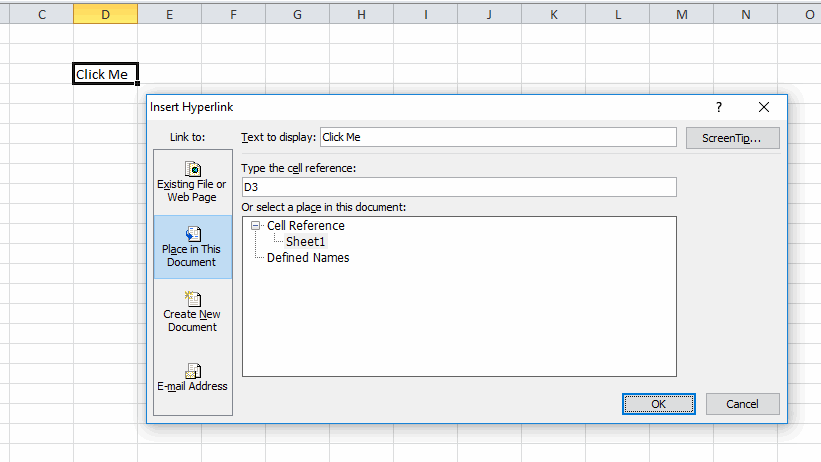
I like to use hyperlinks as user interface elements. They sit nicely in a cell, blend nicely with the surrounding data, and are well understood by users (blue underline means click here). Typically I’ll create a hyperlink that points to itself and then use the FollowHyperlink event to do stuff when it’s clicked.

If a user were to insert rows or columns the hyperlink moves but not the cell it refers to. That is, inserting a column to the left will move the hyperlink to E3, but it will still point to D3. I don’t like it, but it’s not a deal breaker. It means that I can’t use the location of the link to determine which hyperlink was clicked. This is bound to fail:

If Target.Range.Address = Me.Range("D3").Address Then

I tend to use the caption, which, unlike the example above, is generally meaningful and unique. But not always.

If Target.TextToDisplay = "Click Me" Then

If each link points to a different place, I could use the SubAddress property

If Target.SubAddress = Me.Name & "!D3" Then

If there’s a space in the sheet name, there needs to be quotes around it. And if someone changes the sheet name, it mucks up the whole hyperlink. So there are a few things that can go wrong.

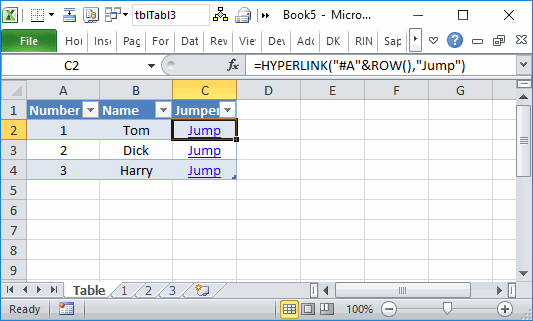
My biggest pet peeve is that I can’t use the HYPERLINK() function and the FollowHyperlink event together. That event only responds to inserted hyperlinks, not to links created by a formula. The use case for this is that I could add a column to a Table that had the HYPERLINK() function in it and that formula would automatically expand as the table expanded. Here’s a really contrived example.

When the user clicks a Jump link, it should go to that page. So in the case, the data I need is in the first column (the name of the sheet). Here’s a method I’ve been working on using the SheetChange event. When the user clicks on C2, that cell is selected. Then the link takes the user to A2 and that cell is selected. So I’m looking for a combination of column C then column A.

Private msLastAddress As String

Private Sub Worksheet_SelectionChange(ByVal Target As Range)

    If Not Intersect(Target, Me.ListObjects(1).ListColumns(1).DataBodyRange) Is Nothing And _
        Target.Offset(0, 2).Address = msLastAddress Then
        
        Me.Parent.Worksheets(CStr(Target.Value)).Activate
    End If
    
    msLastAddress = Target.Address
    
End Sub

The module-level variable holds the last cell that was selected. If the currently selected cell is in the first column of the Table and the last cell was two cells to the right, it’s a match. If you’re wondering why I included the seemingly meaningless data in the second column, I’ll tell you. This method fails a lot if the two columns are adjacent because any time you arrow to the left through the table, you’d fire off the code. Having a column B in between fixes that.

You’ve probably already guess that there are a few problems with this. You could arrow to somewhere in the Jumper column and then click in the Number column and trigger the code when you didn’t expect to. Plus whenever you’re dealing with selections, you need to account for multi-cell selections, which I don’t here. But I’m going to try it out and see how it goes.

One side effect of this was that it broke my keyboard hyperlink clicker. It used to look like this.

Public Sub FollowLink()
    
    Dim vaSplit As Variant
    Dim sForm As String
    
    Const sLINKFORM As String = "=HYPERLINK("
    Const sIFFORM As String = "=IF(TRUE,"
    
    On Error GoTo ErrHandler
    
    If ActiveCell.Hyperlinks.Count > 0 Then
        ActiveCell.Hyperlinks(1).Follow
    Else
        If InStr(1, ActiveCell.Formula, sLINKFORM) = 1 Then
            On Error Resume Next
                ActiveWorkbook.FollowHyperlink Evaluate(Replace(ActiveCell.Formula, sLINKFORM, sIFFORM))
            On Error GoTo ErrHandler
            
            If Err.Number > 0 Then
                Err.Clear
                FollowSplitLink
            End If
        Else
            PTDrillDown
        End If
    End If
    
ErrExit:
    On Error Resume Next
    Exit Sub
    
ErrHandler:
    MsgBox Err.Description
    Resume ErrExit
    
End Sub

When you use a ROW() function in the hyperlink address, the Evaluate returns a Variant array and this results in a Type Mismatch error. The relevant parts have been changed to

On Error Resume Next
                vEval = Evaluate(Replace(ActiveCell.Formula, sLINKFORM, sIFFORM))
                If TypeName(vEval) = "Variant()" Then
                    ActiveWorkbook.FollowHyperlink vEval(1)
                Else
                    ActiveWorkbook.FollowHyperlink vEval
                End If
            On Error GoTo ErrHandler

Now if the result is a Variant array, it pulls the first element.
└ Tags: syndicated
  • Page 3,427 of 14,645
  • « First
  • «
  • 3,425
  • 3,426
  • 3,427
  • 3,428
  • 3,429
  • »
  • Last »
The Daily Dose, The Daily Dose © 1996 - Present. All Rights Reserved.
  • Home
  • About
  • Archive
  • Books
  • Collections
  • Links
  • Shop
  • Submit a joke
  • Video
  • Privacy Policy