The Daily Dose

laugh every day with cartoons jokes and humor
  • Home
  • About
    • Press
      • Press Release – Announcing Laughzilla the Third ebook
      • Press Release – The Daily Dose Kicks Off Its 16th Year with New Books and More Irreverent Laughter
      • Press Release – Themes Memes and Laser Beams Now Available in Paperback
      • Press Release – Announcing Themes Memes and Laser Beams
      • In The News
    • Privacy
  • Archive
  • Books
  • Shop
  • Collections
    • Galleries
      • Gallery
      • Captions
      • Flash Cartoons & Greeting Cards
        • Laughzilla’s Oska Flash Animation Cartoon Greeting Cards
        • Oska Cupid Love Humor
    • #OccupyWallStreet
    • cats
    • China
    • Food
      • Hors d’oeuvres
        • Ball of Cream Cheese
      • Entrees / Main Courses
        • Meatballs with Baked Beans and Celery
    • Gadaffy
    • Google
  • Links
  • Video
  • Submit a joke
DeviantART Facebook Twitter Flickr pinterest YouTube RSS

Subscribe for Free Laughs!


Latest Comics

  • This Memorial Day, Trump Meme Coin Congratulates Profit Takers
  • 25 Years of The Daily Dose
  • The Best Cartoons
  • Bitcoin sings “Fly Me To The Moon”
  • 22 years of The Daily Dose

Comic Archive

a couple of laughzillas on a blue diamond background
21 years down. It’s official. We can drink now.

Daily Dose News Roundup

  • Armenia just opened the region’s biggest AI factory. It exists because Washington signed a licence.
  • Cloudflare built a browser for AI agents. It uses 7x less memory than Chromium and runs entirely on Workers.
  • Fusion’s best-funded bet raised another $1bn, and hired the banker who took Moderna public
  • Everyone else is shrinking satellites. K2 raised $500m to build giant ones, and put AI in orbit.
  • The unsexy layer AI agents actually need: DataBahn raises $40m to sell it

Quotable

"Skype sold out to Microsoft for $8.5 Billion because they tired of running a business that loses money, and they figured Microsoft would crash it and shut it down neatly for them." ~ Yasha Harari

Fresh Baked Goods

Get The Daily Dose's ebook: Laughzilla the Third - A Funny Stuff Collection of 101 Cartoons from TheDailyDose. Click here to get the e-book on Amazon kdp. Laughzilla the Third (2012) The Third Volume in the Funny Stuff Cartoon Book Collection Available Now.

Click here for the Paperback edition


Support independent publishing: Buy The Daily Dose's book: Themes Memes and Laser Beams - A Funny Stuff Collection of 101 Cartoons by Laughzilla from TheDailyDose. Click here to get the book on Amazon. Themes Memes and Laser Beams - The Second Volume in the Funny Stuff Cartoon Book Collection.

Click Here to get the book in Paperback While Available on Amazon

Themes Memes and Laser Beams - 101 Cartoons by Laughzilla. Get the e-book on Lulu.

Click Here to get The Daily Dose Cartoon ebook on amazon kindle

Funny Stuff :
The First Cartoon Book
from The Daily Dose.
Available on Lulu.

a couple of laughzillas on a blue diamond background

Google will block local extensions in Chrome 33 for Windows, disable existing ones not in the Chrome Web Store

Feb12
by Sindy Cator on February 12, 2014 at 9:50 pm
Posted In: Apps, Around the Web, Google, Insider

Google today announced it will block local Chrome extensions on Windows as of version 33. As a result, Windows users will only be able to use extensions for the company’s browser that they install from the Chrome Web Store.

In a FAQ, the company is reminding developers how exactly this change will affect their projects:

  • Users can only install extensions hosted in the Chrome Web store, except for installs via enterprise policy or developer mode.
  • Extensions that were previously installed, but not hosted on the Chrome Web Store will be hard-disabled (i.e the user cannot enable these extensions again), except for installs via enterprise policy or developer mode.

Google originally announced the policy changes in November, saying they would go into effect in January. Chrome 33 beta was indeed released last month, but the stable version won’t arrive until later this month or even early March.

Image Credit: Miguel Saavedra

└ Tags: syndicated
a couple of laughzillas on a blue diamond background

Thanks for nothing, ListObject

Feb12
by Sindy Cator on February 12, 2014 at 9:37 pm
Posted In: Around the Web

Why is it that you can do this:

Dim lo as ListObject
Set lo = ActiveCell.ListObject
If lo Is Nothing Then ‘Do something

…but you can’t do this:

Dim pt as PivotTable
Set pt = ActiveCell.PivotTable
If pt Is Nothing Then ‘Do something

…and instead you have to do this:

Dim pt as PivotTable
On Error Resume Next
Set pt = ActiveCell.PivotTable
If Err.Number > 0 then ‘Do something
Err.clear

Huh? Huh?

└ Tags: syndicated
a couple of laughzillas on a blue diamond background

The Old Reader launches Premium version for users with more than 100 feeds: $3 per month or $30 per year

Feb12
by Sindy Cator on February 12, 2014 at 8:21 pm
Posted In: Around the Web, Insider

94788580 520x245 The Old Reader launches Premium version for users with more than 100 feeds: $3 per month or $30 per year

The Old Reader, a popular RSS service and alternative to Google Reader, today announced a Premium version, which is required for users with more than 100 feeds. The Old Reader Premium will cost $3 per month or $30 per year, although there is a two-week promotional price (up to 5,000 accounts) of $2 per month or $20 per year for a minimum of the next two years.

The company says 90 percent of its users can continue using the free service, but the remaining 10 percent will be asked to subsidize them. All functionality will remain available to free accounts, but if you have more than 100 feeds, you’ll be forced to upgrade (there’s a two-week trial period you might want to check out if you’re in this group).

If you do end up upgrading, here are the features you can expect:

  • Full-text search.
  • Faster feed refresh times.
  • Up to 500 Subscriptions.
  • 6 months of post storage.
  • Instapaper and Readability integration.
  • Early access to new features.

The goal is naturally to build a business model for the RSS reader. A service at such scale can’t be maintained for free forever:

Our next goal is to ensure the long term financial viability of The Old Reader. Hosting, development, and support are not inexpensive and while it’s never been our goal to get rich off of this application, long term sustainability and growth will require revenue. So we explored several models for generating revenues including a premium offering and advertising. In the end, we’d like to avoid advertising as we feel it’s too invasive and runs counter to our strong belief in the open web.

If you want to subscribe to more than 100 feeds without paying for premium version, we recommend InoReader and Feedly.

See also – The Old Reader team pulls a 180, announces the RSS reader may remain open to the public and The Old Reader lives: Site will stay open to the public thanks to an unnamed ‘corporate entity’ in the US

Top Image Credit: Thinkstock

└ Tags: syndicated
a couple of laughzillas on a blue diamond background

Yahoo’s Aviate now plays music and displays contextual info when headphones are plugged into a phone

Feb12
by Sindy Cator on February 12, 2014 at 8:06 pm
Posted In: Around the Web, Insider, yahoo, yahoo aviate, yahoo aviate listening space

Yahoo-owned Aviate has released a new feature to help users simplify their lives. Called Listening Space, the intelligent home screen app will now automatically recognize when you’ve plugged your headphones in so it can then open up your music apps you like. After a song plays, the screen will display the artist and album information to help you be fully informed about it, including any Wikipedia entries, YouTube videos, and upcoming concerts happening around you.

In January, Aviate was acquired by Yahoo in order to help the Sunnyvale-based company create a more “contextual knowledge” search feature. The purpose of Aviate was to help make phones smarter and organize themselves around what people do everyday, rather than have us work around the technology.

The update to Aviate is available now on Google Play using the code “MUSIC” — it’s still in private beta. Yahoo cautions that if you’re not able to download the update right away, keep trying as it’s rolling out to the public.

Listening Space will work on devices running Android 4.0 and later, but if you have a Samsung Galaxy phone, you should update your operating system to run at least Android 4.3.

➤ Plug in and rock out! Aviate adds Listening Space (Aviate)

Photo credit: JOE KLAMAR/AFP/Getty Images

└ Tags: syndicated
a couple of laughzillas on a blue diamond background

Looking to create beautiful, cross-platform surveys? Try Typeform.

Feb12
by Sindy Cator on February 12, 2014 at 7:58 pm
Posted In: Apps, Around the Web, Insider, Product Reviews

typeform tablet 520x245  Looking to create beautiful, cross platform surveys? Try Typeform.

For companies wishing to garner feedback from the global masses, there’s no shortage of survey and polling platforms already. But now, 50,000 sign-ups on and after more than a year in beta, Barcelona-based Typeform is throwing its hat into the virtual polling ring, with a sweet, user-friendly tool.

Typeform 1.0 officially launches today, so we thought we’d take a quick peek under the hood to see what it’s all about.

How it works

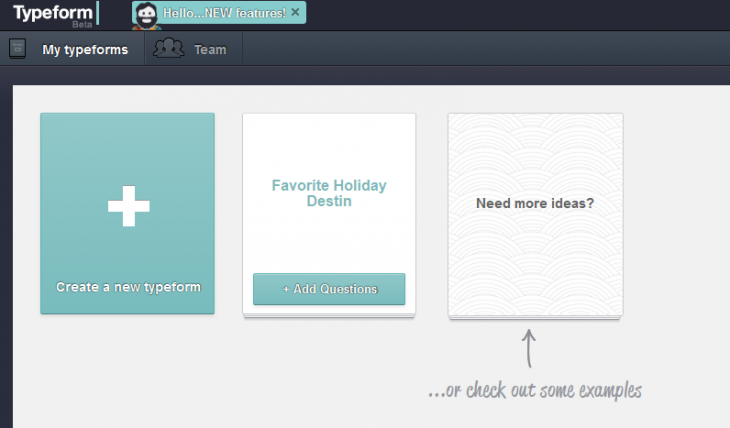
Typeform’s core raison d’être is to make it easy to create and distribute visually-appealing online forms – which it calls ‘Typeforms’. When you log-in, you’ll see the main dashboard area containing any previously created Typeforms, or you can create a new one from scratch.

a 730x428  Looking to create beautiful, cross platform surveys? Try Typeform.

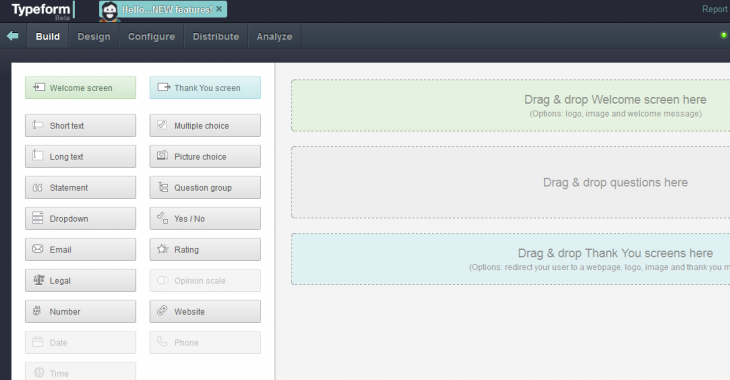
For each form, you can choose a welcome screen, which lets you upload images or paste links to YouTube videos. This could be useful for explaining a complex form, or if it’s part of a bigger project that requires a little more context.

In terms of the questions you can choose from, well, there’s short text, long text, dropdown menus, multiple choice, ratings, yes/no, and more. You simply drag your preference over from the left and drop it in the main canvas area.

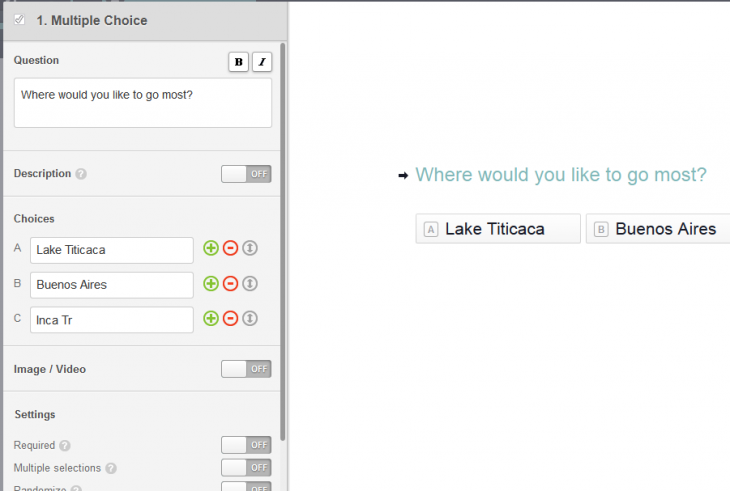
c 730x380  Looking to create beautiful, cross platform surveys? Try Typeform.

The question types offer fairly granular details, letting you format the question and include a more detailed description, or insert images/videos.

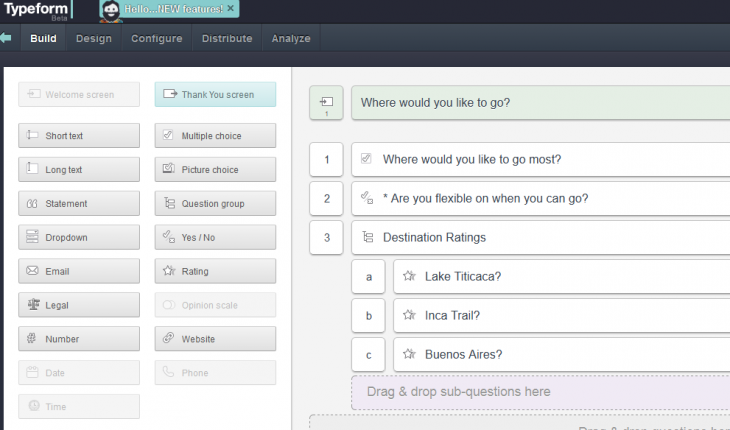
d 730x491  Looking to create beautiful, cross platform surveys? Try Typeform.

It even has a handy ‘Question Group’ feature that lets you create sectioned questions/sub-questions.

f 730x430  Looking to create beautiful, cross platform surveys? Try Typeform.

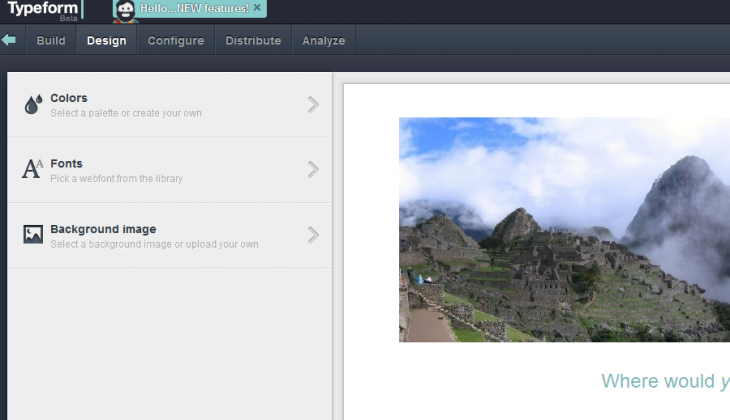
Once you’re done, you can choose your preferred color scheme, fonts and background images…

g 730x420  Looking to create beautiful, cross platform surveys? Try Typeform.

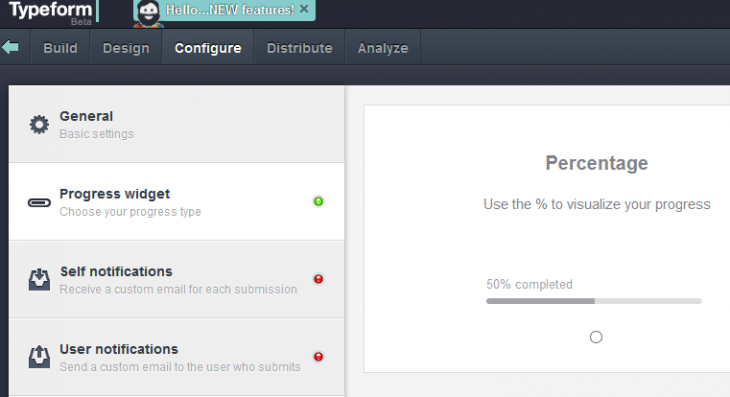
…while you can configure settings such as ‘Progress’ too, choosing to display either a percentage or numerical value for a user’s current status in completing a form.

h 730x397  Looking to create beautiful, cross platform surveys? Try Typeform.

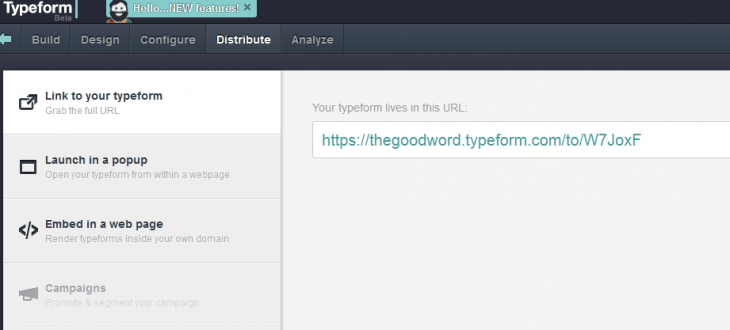
But it’s the distribution features that will likely interest you most in the post-creation phase. And with Typeform, you can grab a URL to share through your own channels, or stipulate that it launches as a pop-up within any given webpage.

i 730x330  Looking to create beautiful, cross platform surveys? Try Typeform.

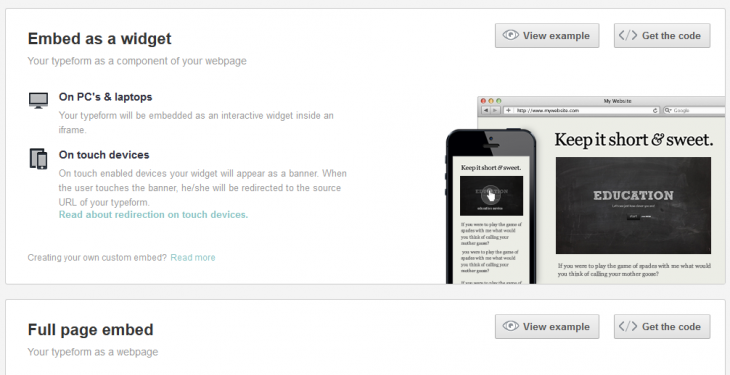
Alternatively, you can grab the embed code which will automatically optimize it for a standard browser or touchscreen device. Similarly, you can make the Typeform fill an entire webpage by selecting ‘Full Page Embed’.

embeds 730x375  Looking to create beautiful, cross platform surveys? Try Typeform.

Here’s a little something I cobbled together in roughly 60 seconds – no prizes for design here:

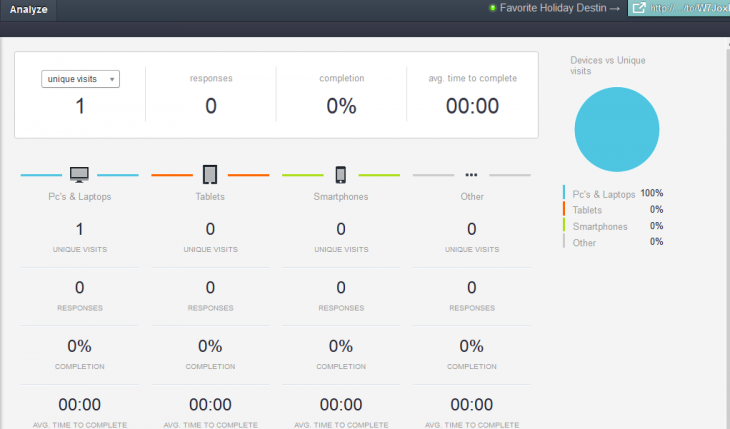
And what’s the point of distributing forms if you can’t track response rates? Yes, Typeform offers a really beautiful way of keeping tabs on things, detailing number of responses, completion rate and average time, as well as platforms (e.g. PCs, tablets, or smartphones)

analytics 730x429  Looking to create beautiful, cross platform surveys? Try Typeform.

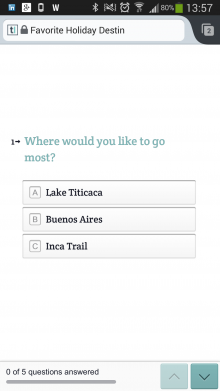
Speaking of platforms, the surveys and polls are automatically optimized for mobile, and based on our tests work really well – there was no lag, and simple animated transitions greet each user interaction.

Screenshot 2014 02 12 13 56 45 220x391  Looking to create beautiful, cross platform surveys? Try Typeform.    Screenshot 2014 02 12 13 57 07 220x391  Looking to create beautiful, cross platform surveys? Try Typeform.

Today also heralds the unveiling of Typeform’s pricing plans for PRO users, which is worth a mention.

While perhaps most people will get by more than fine with the free version, given that it comes with no limits on the number of questions or responses, the PRO version throws some extra nuggets into the mix, including Logic Jump, a feature that bumps users between questions based on their answers; customized Typeforms for each respondent using hidden fields and custom URLs; automated email notifications; and the ability to remove Typeform branding. More PRO features will be added in the future too.

The PRO Solo plan costs $10 per credit – which basically lets you unlock unlimited data from the additional PRO features – but only for ONE Typeform. The PRO monthly plan, costing $240 a year if billed monthly, serves up access to the data on for an unlimited number of Typeforms. Oh, and the company is currently offering 50% off the PRO yearly plan – you simply need to plug in the following code when signing up: E2A0R1L4Y.

All in all, Typeform is more than a worthy addition to the existing slew of survey apps out there, and it should find many more fans now it has officially shed its public beta tags. And you check it out now.

➤ Typeform

└ Tags: syndicated
  • Page 14,565 of 14,660
  • « First
  • «
  • 14,563
  • 14,564
  • 14,565
  • 14,566
  • 14,567
  • »
  • Last »
The Daily Dose, The Daily Dose © 1996 - Present. All Rights Reserved.
  • Home
  • About
  • Archive
  • Books
  • Collections
  • Links
  • Shop
  • Submit a joke
  • Video
  • Privacy Policy