
The Daily Dose

laugh every day with cartoons jokes and humor
  • Home
  • About
    • Press
      • Press Release – Announcing Laughzilla the Third ebook
      • Press Release – The Daily Dose Kicks Off Its 16th Year with New Books and More Irreverent Laughter
      • Press Release – Themes Memes and Laser Beams Now Available in Paperback
      • Press Release – Announcing Themes Memes and Laser Beams
      • In The News
    • Privacy
  • Archive
  • Books
  • Shop
  • Collections
    • Galleries
      • Gallery
      • Captions
      • Flash Cartoons & Greeting Cards
        • Laughzilla’s Oska Flash Animation Cartoon Greeting Cards
        • Oska Cupid Love Humor
    • #OccupyWallStreet
    • cats
    • China
    • Food
      • Hors d’oeuvres
        • Ball of Cream Cheese
      • Entrees / Main Courses
        • Meatballs with Baked Beans and Celery
    • Gadaffy
    • Google
  • Links
  • Video
  • Submit a joke
DeviantART Facebook Twitter Flickr pinterest YouTube RSS

Subscribe for Free Laughs!


Latest Comics

  • This Memorial Day, Trump Meme Coin Congratulates Profit Takers
  • 25 Years of The Daily Dose
  • The Best Cartoons
  • Bitcoin sings “Fly Me To The Moon”
  • 22 years of The Daily Dose

Comic Archive

Occupy Sweep

Daily Dose News Roundup

  • Estonian energy storage firm Skeleton becomes unicorn with Siemens deal
  • Palantir CTO says the Pentagon has already replaced Anthropic’s AI
  • DeepSeek to lead seed round in $400mn robot AI start-up, Bloomberg reports
  • Turkey’s social media ban for under-15s starts on 1 November
  • Vittorio Colao defends copyright rules and the DSA in Europe’s AI debate

Quotable

"Gadaffi offered talks to Libya's revolutionaries while he attacked them. That's like selling someone fire insurance while you torch their house." ~ Yasha Harari

Fresh Baked Goods

Get The Daily Dose's ebook: Laughzilla the Third - A Funny Stuff Collection of 101 Cartoons from TheDailyDose. Click here to get the e-book on Amazon kdp. Laughzilla the Third (2012) The Third Volume in the Funny Stuff Cartoon Book Collection Available Now.

Click here for the Paperback edition


Support independent publishing: Buy The Daily Dose's book: Themes Memes and Laser Beams - A Funny Stuff Collection of 101 Cartoons by Laughzilla from TheDailyDose. Click here to get the book on Amazon. Themes Memes and Laser Beams - The Second Volume in the Funny Stuff Cartoon Book Collection.

Click Here to get the book in Paperback While Available on Amazon

Themes Memes and Laser Beams - 101 Cartoons by Laughzilla. Get the e-book on Lulu.

Click Here to get The Daily Dose Cartoon ebook on amazon kindle

Funny Stuff :
The First Cartoon Book
from The Daily Dose.
Available on Lulu.

a couple of laughzillas on a blue diamond background

SurveyMonkey’s new app lets you create surveys and monitor results on the move

Feb20
by Sindy Cator on February 20, 2014 at 2:56 pm
Posted In: Apps, Around the Web, Product Updates

shutterstock 168863828 520x245 SurveyMonkeys new app lets you create surveys and monitor results on the move

SurveyMonkey, a provider of online survey tools, has launched a mobile app to for users to create, monitor and analyze surveys on the go.

SurveyMonkey CEO Dave Goldberg says that the company has seen a 14 times increase in its mobile traffic over the past three years — and an app is a natural progression.

The new SurveyMonkey mobile app is currently only available for iOS devices — namely the iPhone, iPod touch and iPad. It’s free and available in the US, Canada, Australia and most other English-speaking markets — though there is also an option to upgrade to a paid plan with more advanced features.

Users can create custom surveys and polls through what SurveyMonkey calls an “intuitive user interface,” or more in-depth surveys with available templates designed by experts. The backend is powered by the company’s analytics engine, which means it analyzes data speedily for employees to react to trends identified by their surveys, such as issues with customer satisfaction.
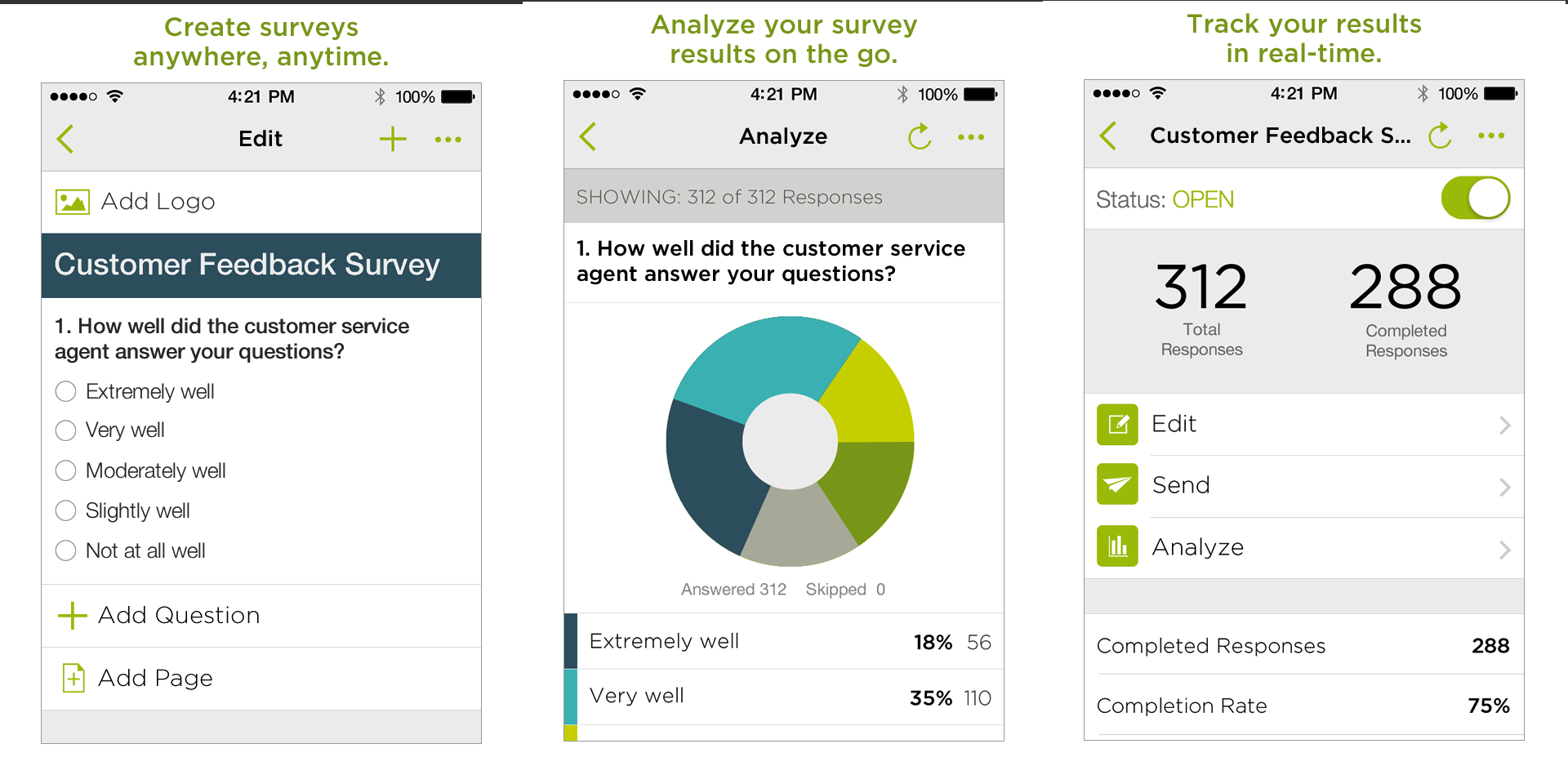
SurveyMonkey App 730x365 SurveyMonkeys new app lets you create surveys and monitor results on the moveAt the same time, SurveyMonkey has announced a Mobile Feedback SDK to let developers gain in-app feedback so they can make product decisions as they seek to decrease negative reviews and improve app store ratings. The SDK will be released some time this year for both iOS and Android devices, while a beta program is available now.

SurveyMonkey is also integrating mobile analytics solution Flurry, which is used in more than 400,000 apps by over 125,000 developers, into its SDK.

Given that SurveyMonkey says it currently powers more than two million survey responses every day, moving to a native mobile experience will no doubt add a layer of convenience for existing users — and even capture a brand new audience that is used to navigating mobile apps instead of Web browsers.

➤ SurveyMonkey: iOS

Headline image via Shutterstock

└ Tags: news, syndicated
a couple of laughzillas on a blue diamond background

UberConference integrates with Dropbox to give users another option to share files within meetings

Feb20
by Sindy Cator on February 20, 2014 at 2:00 pm
Posted In: Around the Web, Insider, uberconference, uberconference dropbox

UberConference users can now share files while on a conference call after Firespotter Labs, the company behind the service, added support for Dropbox. The company has added support for Dropbox to its growing list of file-sharing service integrations. It joins Evernote, Box, and Google Drive, giving users more access to files from among some of the Web’s most popular applications.

UberConference CEO Craig Walker said in a statement, “Dropbox has changed the landscape of document sharing for over 200 million people, and we wanted to make it easy for UberConference users to share their Dropbox documents. Both UberConference and DropBox let you take your office anywhere, so this integration makes collaborating that much more seamless.”

Once in a call, participants can click on the “Share Files” button in the UberConference dashboard in order to import files from their Dropbox account. Afterwards, the contents of the file will be visible to all attendees and a link to it will be delivered to them upon the conclusion of the call.

dropbox screenshot2 520x256 UberConference integrates with Dropbox to give users another option to share files within meetings
Dropbox screenshot 520x232 UberConference integrates with Dropbox to give users another option to share files within meetings

Photo credit: PETER PARKS/AFP/Getty Images

└ Tags: syndicated
a couple of laughzillas on a blue diamond background

Lovely not only helps you find your dream apartment, it now automates rental payments too

Feb20
by Sindy Cator on February 20, 2014 at 1:59 pm
Posted In: Apps, Around the Web, Insider

Apartment 520x245 Lovely not only helps you find your dream apartment, it now  automates rental payments too

Lovely, the US-only app that helps you find your dream apartment, has announced it’s introducing a new automated rent-payment feature for the Web, iOS and Android.

Indeed, the Pay with Lovely feature should go some way towards separating it from the pack, given you can now search, apply AND pay without leaving the app. Once you’ve set things up with your bank, you just need to add your landlord’s email address who then confirms the figure for the recurring amount.

ios payments upsell 2 220x390 Lovely not only helps you find your dream apartment, it now  automates rental payments too    payments flow 4 220x390 Lovely not only helps you find your dream apartment, it now  automates rental payments too

You will receive a notification five days before a payment is scheduled for processing, once a payment has been initiated, and also when it’s deposited in your landlord’s account.

While it’s a shame it remains a US-only service for now, Lovely has gained quite a few fans since it launched for the Web first back in 2011, followed by an iPhone app a year later and Android just a few months back. The real value of Lovely, arguably, is in the breadth of features contained within its mobile apps, which let you apartment-hunt on the fly.

For example, you can create shortlists (Favorites) of places that interest you, and it makes it easy to know when your saved listings go off the market. You can also set up alerts which automatically notify you when new listings hit the market, while Google Maps integration displays at a glance where apartments are located, and delivers in-app directions. You can also liaise with your potential landlord through the app too.

To sign-up for the new automated rent-payment service, you’ll need to do so from the Lovely website.

➤ Lovely

└ Tags: news, syndicated
a couple of laughzillas on a blue diamond background

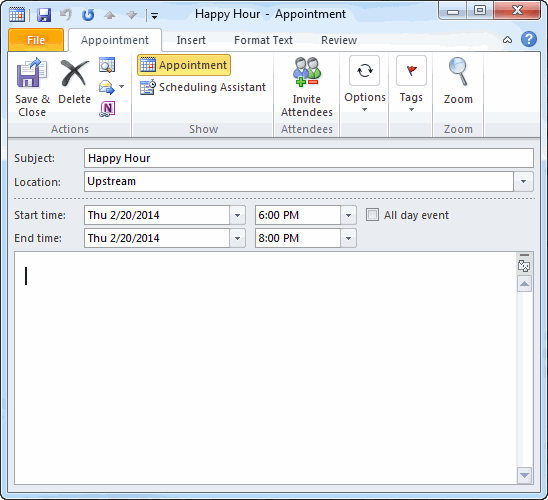
Creating an Appointment in Outlook 2010 Installation

Feb20
by Sindy Cator on February 20, 2014 at 1:45 pm
Posted In: Around the Web, Outlook, RegEx

Creating an Appointment in Outlook 2010
Creating an Appointment in Outlook 2010 Part II

You can download MGoogleCal.zip

Here are the steps to install the code.

  1. Download the zip file from the link above
  2. Unzip the four files and make a note of where they are
  3. Open Outlook 2010
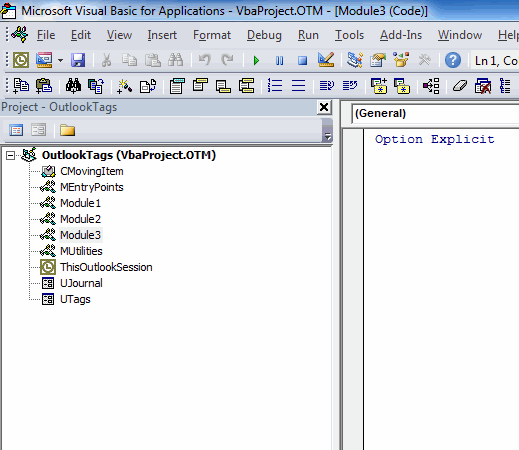
  4. Press Alt+F11 to open the VBE
  5. Press Ctrl+R to show the Project Explorer

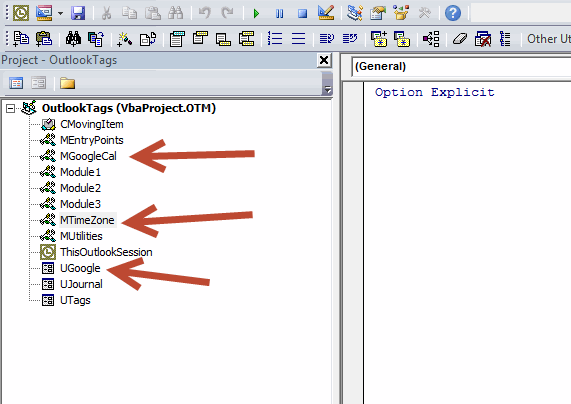
    Yours will no doubt look different than mine, but you should have a project called VbaProject.OTM.

  6. Right click anywhere in that project and choose Import File…
  7. Import the two .bas files and the one .frm file (you have to do them all separately)

  8. Edit (thanks Steffan): Choose Tools – References from the menu and add a reference to Microsoft VBScript Regular Expressions 5.5
  9. Choose Debug – Compile from the VBE menu
  10. Choose File – Save VbaProject.OTM from the VBE menu
  11. Close the VBE
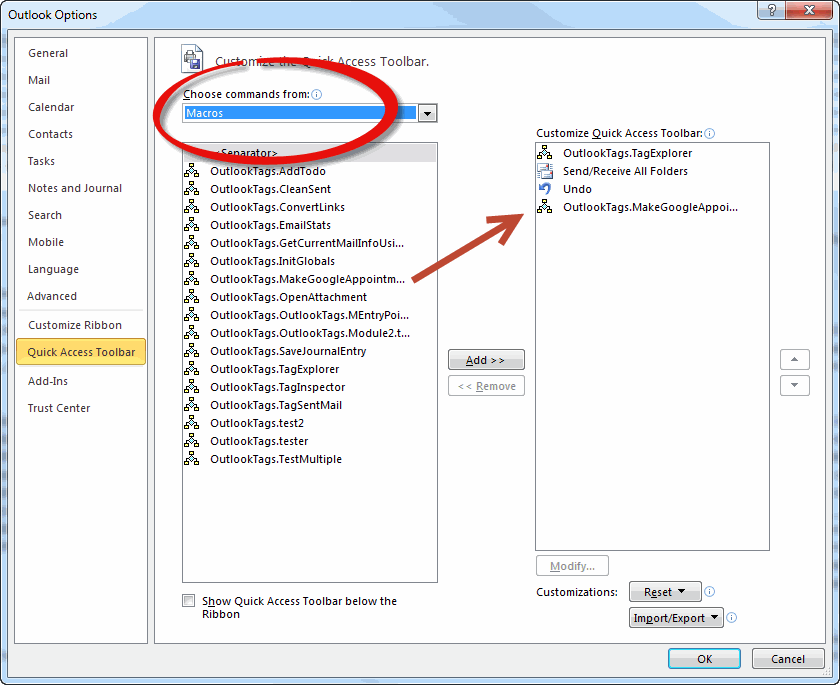
  12. Right click on the Ribbon and choose Customize Quick Access Toolbar
  13. Choose Macros from the Choose commands from: dropdown
  14. Add MakeGoogleAppointment to the Customize Quick Access Toolbar listbox

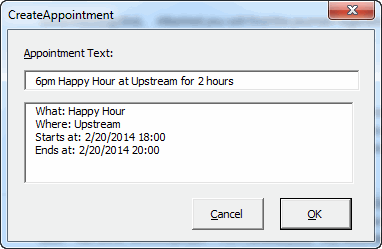
  15. Press Alt+4 to open the form. My icon is fourth on the QAT so Alt+4 will run the macro. Yours may be in a different spot, so use the number for your situation. If you just press Alt, you’ll see the numbers on the QAT.
  16. Create an appointment

  17. Click OK

  18. And you’re done.

Important: Don’t forget this is mostly untested. Install at your own risk. And let me know what doesn’t work.

└ Tags: syndicated
a couple of laughzillas on a blue diamond background

Fleksy opens its alternative keyboard to all iOS developers

Feb20
by Sindy Cator on February 20, 2014 at 12:57 pm
Posted In: Around the Web, Insider

20140220 124446 520x245 Fleksy opens its alternative keyboard to all iOS developers

Remember the big hullabaloo a couple of weeks back when SwiftKey finally arrived on iOS? Well, fellow smart keyboard app Fleksy has just announced that it’s rolling its iOS software development kit (SDK) out of private beta as it looks to become the first iOS-wide alternative keyboard.

As you no doubt know, Apple restricts third-party keyboards from replacing the default iOS incarnation. But that doesn’t stop developers from creating their own keyboards for use within specific apps.

As we saw with SwiftKey, which has been offering its own replacement keyboard on Android for some time already, its arrival on iOS was restricted to the standalone SwiftKey Note app.

Fleksy, on the other hand, has also offered an iOS keyboard alternative of sorts for a while (on Android too), again as a standalone app that lets you export the text to other services, including Facebook and Twitter. Back in December, the company announced it was ramping up its presence across the iOS ecosystem by opening the Fleksy SDK to third-party services.

For the private beta phase, apps such as Wordbox, Google Voice Connect, Launch Center Pro and BlindSquare were the first to offer Fleksy as an alternative.

fleksy1 Fleksy opens its alternative keyboard to all iOS developers
Today, Fleksy is unveiling an updated SDK as it opens the curtains for its official public launch. So now any app developer can offer Fleksy as an alternative keyboard.

The new Fleksy SDK will be completely free of charge, and can be implemented into any iOS app in minutes. For launch, more than ten new partner apps have been brought on board too, including You Doodle, Cotton Notes, Write for iOS, Tap Forms Organizer, SnapStatus, Remoter VNC, EVOmail, hAppy for ADN, Matcha, Vert 2, and MUDRammer.

If Apple isn’t going to allow third-party system-wide keyboard apps, this is probably as good as you’re going to get for now. And it will be interesting to see how the uptake goes in the coming weeks and months now that it’s open to everyone.

Meanwhile, check out the official Fleksy SDK promo video below.

➤ Fleksy SDK

└ Tags: syndicated
  • Page 14,509 of 14,673
  • « First
  • «
  • 14,507
  • 14,508
  • 14,509
  • 14,510
  • 14,511
  • »
  • Last »
The Daily Dose, The Daily Dose © 1996 - Present. All Rights Reserved.
  • Home
  • About
  • Archive
  • Books
  • Collections
  • Links
  • Shop
  • Submit a joke
  • Video
  • Privacy Policy