The Daily Dose

laugh every day with cartoons jokes and humor
  • Home
  • About
    • Press
      • Press Release – Announcing Laughzilla the Third ebook
      • Press Release – The Daily Dose Kicks Off Its 16th Year with New Books and More Irreverent Laughter
      • Press Release – Themes Memes and Laser Beams Now Available in Paperback
      • Press Release – Announcing Themes Memes and Laser Beams
      • In The News
    • Privacy
  • Archive
  • Books
  • Shop
  • Collections
    • Galleries
      • Gallery
      • Captions
      • Flash Cartoons & Greeting Cards
        • Laughzilla’s Oska Flash Animation Cartoon Greeting Cards
        • Oska Cupid Love Humor
    • #OccupyWallStreet
    • cats
    • China
    • Food
      • Hors d’oeuvres
        • Ball of Cream Cheese
      • Entrees / Main Courses
        • Meatballs with Baked Beans and Celery
    • Gadaffy
    • Google
  • Links
  • Video
  • Submit a joke
DeviantART Facebook Twitter Flickr pinterest YouTube RSS

Subscribe for Free Laughs!


Latest Comics

  • This Memorial Day, Trump Meme Coin Congratulates Profit Takers
  • 25 Years of The Daily Dose
  • The Best Cartoons
  • Bitcoin sings “Fly Me To The Moon”
  • 22 years of The Daily Dose

Comic Archive

Happy St. Patrick’s Day From Bashar Assad, The Butcher Of Syria

Daily Dose News Roundup

  • Netflix launches Playground, a standalone games app for children aged eight and under
  • Monzo is shutting down its US operation, and its European banking licence explains why
  • Anthropic cuts Claude subscribers off from OpenClaw in cost crackdown
  • Musk wants a million data centre satellites. Bezos wants 51,600. Scientists want to know why.
  • Google launches Gemma 4: four open-weight models from smartphones to workstations

Quotable

"Israel is once again allowing the import of all items into Gaza except weapons. Hamas is protesting on the grounds that they live on guns, not humus." ~ Yasha Harari

Fresh Baked Goods

Get The Daily Dose's ebook: Laughzilla the Third - A Funny Stuff Collection of 101 Cartoons from TheDailyDose. Click here to get the e-book on Amazon kdp. Laughzilla the Third (2012) The Third Volume in the Funny Stuff Cartoon Book Collection Available Now.

Click here for the Paperback edition


Support independent publishing: Buy The Daily Dose's book: Themes Memes and Laser Beams - A Funny Stuff Collection of 101 Cartoons by Laughzilla from TheDailyDose. Click here to get the book on Amazon. Themes Memes and Laser Beams - The Second Volume in the Funny Stuff Cartoon Book Collection.

Click Here to get the book in Paperback While Available on Amazon

Themes Memes and Laser Beams - 101 Cartoons by Laughzilla. Get the e-book on Lulu.

Click Here to get The Daily Dose Cartoon ebook on amazon kindle

Funny Stuff :
The First Cartoon Book
from The Daily Dose.
Available on Lulu.

a couple of laughzillas on a blue diamond background

Collaborative word processor service Quip adds document copying and quick search to its desktop app

Feb18
by Sindy Cator on February 18, 2014 at 9:44 pm
Posted In: Apps, Around the Web, Insider, quip, quip desktop document templates, quip document templates, quip quick search, quip updates

169331163 520x245 Collaborative word processor service Quip adds document copying and quick search to its desktop app

feature copy 220x312 Collaborative word processor service Quip adds document copying and quick search to its desktop appOffice productivity service Quip has released an update for its desktop version that now lets you easily create copies of documents and enables quicker discovery of files. These features are expected to be made available for its iOS and Android apps “soon”.

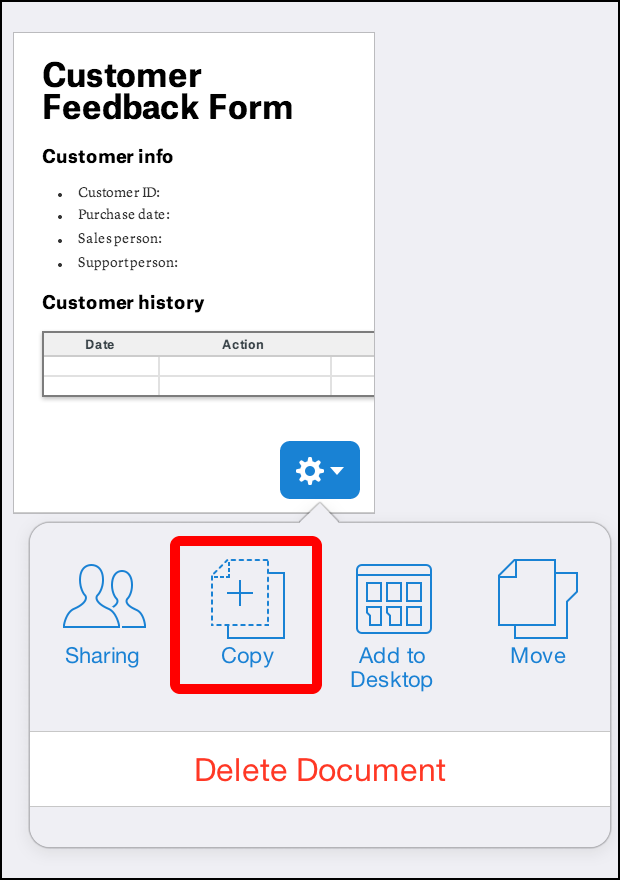
To create your own copy of any document within Quip, right click on the thumbnail image of the file and select “Copy”. This can also be done if you’re editing the document directly. The company believes that with this duplication effort, you can have a “clean” file to use as a template in the future.

Another new feature added is a Quick Search option. Users can tap on the slash (“/”) button on their keyboard and a search field will present itself — just like with Apple’s Spotlight search. Quip says that Quick Search will display your most recent documents that you’ve worked on.

Lastly, Quip has made it easier to find keyboard shortcuts. Users can hit either the Cmd-/ on Mac or Ctrl-/ on Windows to enable a window to appear.

feature shortcuts full 520x336 Collaborative word processor service Quip adds document copying and quick search to its desktop app
feature search full 520x327 Collaborative word processor service Quip adds document copying and quick search to its desktop app

Quip launched last year as a means of reinventing how work was done regardless of the device you were on. Its first target was how documents were created and maintained. It has slowly been releasing updates to help improve the experience, including being able to import files from Microsoft Word, Evernote, and Dropbox.

Photo credit: JOE KLAMAR/AFP/Getty Images

└ Tags: syndicated
a couple of laughzillas on a blue diamond background

The open office: Friend or foe to startup success?

Feb18
by Sindy Cator on February 18, 2014 at 9:02 pm
Posted In: Analysis and Opinion, Around the Web, Entrepreneur

83017290 520x245 The open office: Friend or foe to startup success?

Ilya Pozin is the founder of Open Me and Ciplex, and is a columnist for Inc, Forbes, and LinkedIn.


Is your open office floorplan killing your employees? A recent article in The New Yorker took a hard-hitting look at the open office trend to take stock if the concept was a good or bad idea.

The findings, culled from various research studies, don’t look great for the open office as a paragon of productivity.

But should we throw out the open office baby with the noisy bathwater? Let’s take a look at some reasons companies — startups in particular — love the open office, why they might want to reconsider this love affair, and how to strike the right balance.

Open offices foster collaboration

Currently, about 70 percent of all offices have an open floor plan. The number is probably much higher for startup companies which thrive on the ability of workers to collaborate and develop ideas together.

Open offices aren’t all headaches and wasted productivity, or they would have never come into vogue in the first place. The original thinking behind the layout posited that open spaces would foster more collaboration between workers.

In busy, hectic startups, it can be nice for the whole team to be completely accessible. It can also lend itself to the flat corporate structure preferred by many startups, including my company Ciplex.

A 2007 report titled “A Model of Satisfaction with Open-Plan Office Conditions” studied 779 open office floorplans and found employees were more satisfied with their jobs and work environment. Another study, a three-year research project conducted by UCLA, found open offices lead to a performance increase of an amazing 440 percent.

Plus, they’re great for Millennial workers, since this age group has been proven to crave mentorship. Thanks to increased social collaboration, open office floor plans increase transparency and improve company culture.

Of course, there are downsides…

Open offices hurt productivity

Collaboration, mentorship, and transparency all sound great right? Sign me up! The problem with open office floor plans is they can kill your team’s productivity.

Organizational psychologist Matthew Davis found open offices could be damaging to worker’s productivity, attention spans, creative thinking, and overall satisfaction.

The noise pollution level in open office environments is especially high, meaning it can be harder for your workers to concentrate on their tasks. A study by Cornell University found exposure to high levels of noise in the workplace can trigger increased levels of epinephrine, the hormone involved in the fight or flight response.

The same spirit of collaboration and openness helping your team brainstorm great ideas can backfire when your workers can’t actually get anything accomplished.

How do we strike a balance?

So should you do away with the open office floor plan altogether? Not so fast! The solution is to strike a balance between the collaborative nature of open office floorplans and the privacy afforded by being able to shut people out.

The best way to proceed is to strike a balance between the two, so workers can get things accomplished without leaving collaboration behind:

Compromise

Give workers a mix between open office environments for team collaboration, and quiet spaces where they can focus and work solo.

That’s what they do at RED Interactive Agency, and it’s served the company well. The organization has a combination of office “pods” for teams to work together on projects, balanced with plenty of open spaces. Glass windows on offices and conference rooms allow workers to feel like they never leave the flow of the overall office, while whiteboards help them spark creativity and collaborate in quiet spaces.

Like RED, set up your office with plenty of quiet spaces for meetings and private places where employees can shut the door on noise. If an employee needs peace and quiet to focus, they can find a sanctuary away from all the hustle and bustle. But if they enjoy the chaos, they still have a spot right in the thick of things.

After all, a recent study found 70 decibels of ambient noise can actually help workers sharpen focus and increase productivity.

Invest in furniture to block out the noise

A furniture company called Vitra, recently profiled in Forbes, makes furniture to help block out the noise of an open floor plan office. This includes work bays with sky-high walls, alcove sofas for private meetings, and even chairs to help filter out noise pollution.

Offer telecommuting as an option. Sorry Marissa Mayer, sometimes telecommuting is actually a good option. In this case, allowing your workforce to telecommute at least occasionally might just help you boost productivity while giving employees a much-needed break from office distractions.

According to one recent study, workers who switch from office work to working from home see their stress levels drop by 25 percent. The Bureau of Labor Statistics has even found telecommuting can boost productivity and increase retention.

Even better? It’s also good for your bottom line.

A study by Cisco found the company saved $277 million a year by allowing employees to telecommute.

The open office floor plan doesn’t need to be a nightmare, and it certainly doesn’t need to go the way of the dinosaur. With a few simple fixes, you can strike a balance between fostering collaboration and protecting privacy.

What do you think? Do you hate open offices or see their value? How would you strike a balance between the two? Share in the comments!

└ Tags: syndicated
a couple of laughzillas on a blue diamond background

ViziCities helps developers bring data visualizations to 3D cityscapes

Feb18
by Sindy Cator on February 18, 2014 at 7:21 pm
Posted In: Around the Web, Insider

Screenshot 2014 02 18 17.01.02 520x245 ViziCities helps developers bring data visualizations to 3D cityscapes

If you like maps, data and funky graphics you might like this.

For the past year, UX designer Peter Smart and former Mozilla technical evangelist Robin Hawkes have been working on a project called ViziCities, an open-source platform that creates 3D visualizations of cities around the world. The code was finally added to Github this past weekend under an MIT license, with a view towards encouraging third-party developers to do cool stuff with it.

So what exactly is ViziCities all about, you ask?

Well, as luck would have it, Hawkes and Smart put together a demo of the kinds of things you can do with it, but it is still quite early-stage and it’s more about getting a feel for what it looks like. Indeed, it uses JavaScript and WebGL for rendering, which is fed with OpenStreetMap data for geographic entities, covering streets, buildings, bodies of water (rivers, canals, etc), and green areas. Given that OpenStreetMap covers much of the world, there is a lot of scope for creating cool and useful Web applications and tools here.

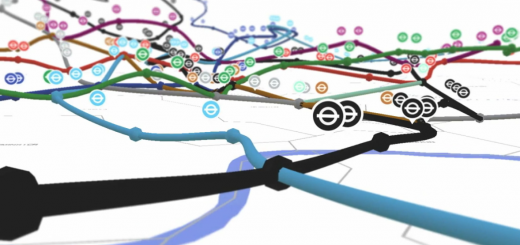
However, it’s not just about reimagining cities in 3D – data is the name of the game here. To give you an idea of what’s possible, the guys previously built a live visualization of the London Underground in 3D, as well as the London bus network. Check this video out:

In future iterations, ViziCities will also include things like real-time public transport flows that show traffic traversing conurbations. Similarly, they plan to throw social data into the mix too, so you could visualize tweets or maybe even Instagram photos flying out of cities. Just like this:

Longer term, there’s a lot of potential in this project, and it will be interesting to see where it goes from here.

“We’ve already been in touch with Data.gov.uk, TfL, Code For America, IBM, and others about how they could use our platform to improve things for citizens of cities around the world,” says Hawkes.

ViziCities is one to watch for sure.

➤ ViziCities | GitHub

└ Tags: syndicated
a couple of laughzillas on a blue diamond background

Designing the details: Why empty states matter

Feb18
by Sindy Cator on February 18, 2014 at 6:29 pm
Posted In: Analysis and Opinion, Around the Web, Design & Dev, How-To's

blank page 520x245 Designing the details: Why empty states matter

Hamish McNeill is the QA Manager at Realmac Software, a small, award-winning independent iOS and OS X development studio behind Clear, Ember and Rapidweaver. The original version of this article was published on the Realmac Software blog.


One of my favourite things to do with new apps is to check out and screenshot the first-run experience. After navigating any initial welcome screens, I go in search of empty states; views within the app typically devoid of content or data.

Essentially a blank slate, an empty state can be used to form the first impression made on a user. It’s the importance of these views that I find so interesting as they can often be a good indicator as to the level detail put in to building the app.

As you’ll see, empty views can often be far from empty.

Warm welcome

It may just be the nature of a QA engineer, but I’ll openly admit that when using an app for the first time I’m incredibly skeptical of its quality until soundly proven otherwise. A good first impression goes a long way to pacify such doubts.

“First impressions are crucial. If you fail to design a thoughtful blank slate, you’ll create a negative (and false) impression of your application or service.”

– The Blank Slate, Getting Real by 37signals

It’s common courtesy to greet new users upon arrival, even a simple “Welcome to [App Name]” can help show a user they’re valued. However, it’s as important to decide what to say next:

Do any gestures which perform key functions in the app need to be introduced?

Is there ‘dummy’ content designed to be manipulated by the user?

Does the user need to be shown how to add content of their own?

Ensure the tone of the copy used in such first-run or welcome views is helpful and friendly, also take care not to appear condescending.

When showing helpful information to assist users in getting up and running, avoid overwhelming them with too much information on the first run. Don’t even think about pointing an arrow at a new feature just for the sake of highlighting the new.

Would new (or existing) users find this feature easily themselves? If so, then there might not be a need to annotate it.

Apple provide a good point of reference for gauging how much useful information should be shown to new users. Both iBooks and iTunes use similar first-run experiences on the Mac.

ibooks welcome@2x 730x547 Designing the details: Why empty states matter

Do you think Apple want users to go to the iBooks Store?

iBooks tells the user what’s missing from this view, boldly stating that they’ve no books in their library while clearly directing them how to add content. Users are directed to the iBooks Store not only by showing an arrow that highlights the Store button but also by having a dedicated call to action button within the empty view itself.

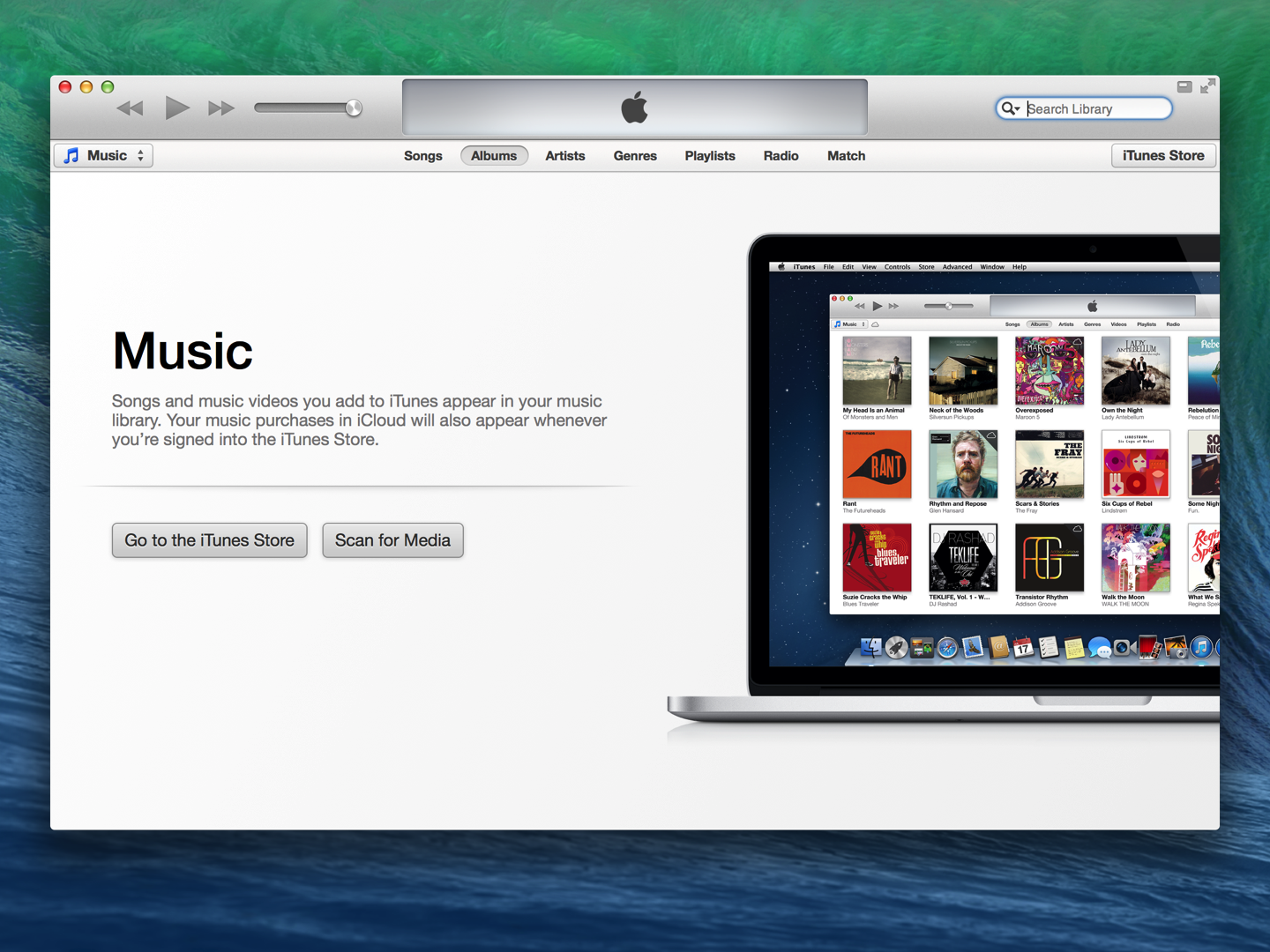
While iTunes similarly channels users into adding (or purchasing) content, Apple also show the user an iTunes product-shot, filled with content, essentially showing the regular state of the app.

itunes welcome@2x 730x547 Designing the details: Why empty states matter

iTunes shows users what their library could look like.

What’s presented here is actually an uncluttered, ideal, view of how their library may look, set upon a backdrop of what is probably a clean install of OS X.

Being able to make a potentially complex app like iTunes appear both beautiful and simple within the first-run experience only serves to encourage users to follow the suggested steps and begin using the app in earnest.

Inbox Zero

While many empty states guide users in performing actions to create and add content, this isn’t suitable for every scenario.

A great example of this is Inbox Zero, perhaps the most well known of empty states. Inbox Zero is essentially a view from which a user has removed, cleared or dealt with all previous content (email being the usual suspect here).

Such views are often designed to be rewarding and rightly so for users may aim (and often struggle) to reach this point within the app on a regular basis.

For example, the user of a fitness app has just completed a list comprising of their daily exercise routine. What should the fitness app do or suggest within the empty list-view now?

It’s probably not a good idea to suggest adding more (or creating new) exercises here. A more helpful suggestion would be to congratulate the user on their impressive workout while showing an option to add a reminder, encouraging the user to plan their next training session.

This behaviour may help the user get on with another task while encouraging use of the app in the longer term, instead of being a plea for constant, prolonged use in the immediate-term.

While I’ll leave covering regular Inbox Zero type views in more detail for a future post, it’s worth keeping in mind areas on an app that may not be viewed quite so often.

Discover

Like with first-runs I enjoy exploring apps for other empty, explanatory views or features that I might not know in detail. Again, Apple allows users to discover even more apps via the ‘Near Me’ section within the App Store that also features a great empty state.

app store near me@2x 730x547 Designing the details: Why empty states matter

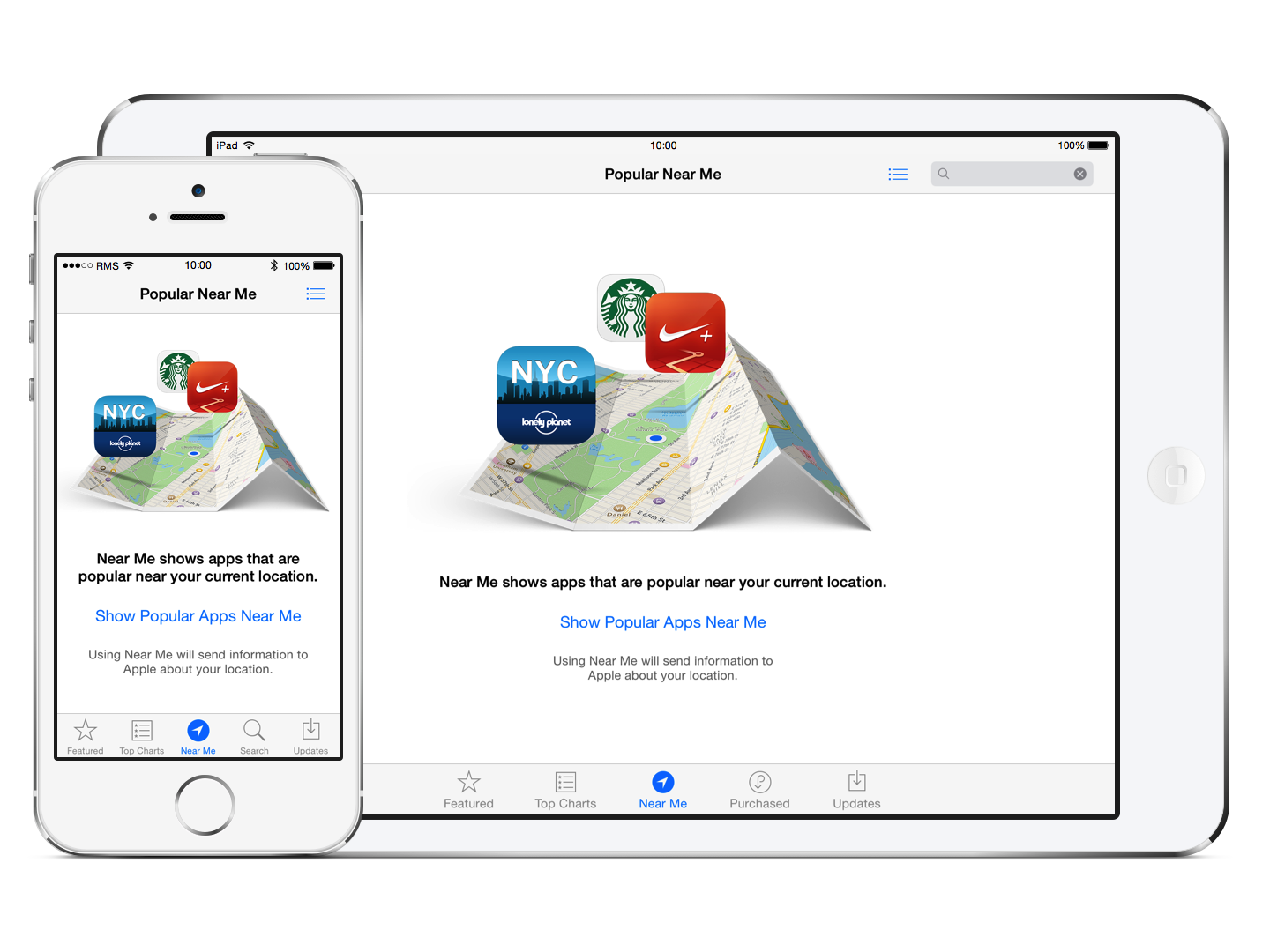
Apple introduces the ‘Popular Near Me’ section of the App Store to new users.

The initial Near Me view is not only visually appealing, with a clean graphic that illustrates its obvious use, but also displays a concise description, an unobtrusive call to action button, and finally a privacy note to the user that using this feature will send information to Apple about their location. All this information is shown clearly within a single view.

Again, another great example is set for concisely display potentially complex information to the user in a friendly, personal manner.

No dead ends

Taking time to help users discover new features within an app is great but it’s also worth ensuring users aren’t led to a point at which they appear to hit a dead end.

Dead ends may not only be a completely empty view but another part of the UI that perhaps doesn’t perform an appropriate function. Some examples of this may be a blank list view with no suggestion as to add content, or even a button that has no effect within the current view that should really be disabled instead.

Error views are an example of where many users may expect to hit a dead end. Errors are actually great opportunity to create positive experience within an app out of a potentially negative situation. Any error is probably shown as a result of something going wrong.

I like to see apps clearly disclose to the user easy to understand information as to what went wrong and how they get back on track.

Pro Tip: Look at tracking the error pages (such as 404s) on your site. Being able to see what a user was requesting when they were greeted with an error allows you to redirect common URL typos and searches to help reduce the number of avoidable error pages being served.

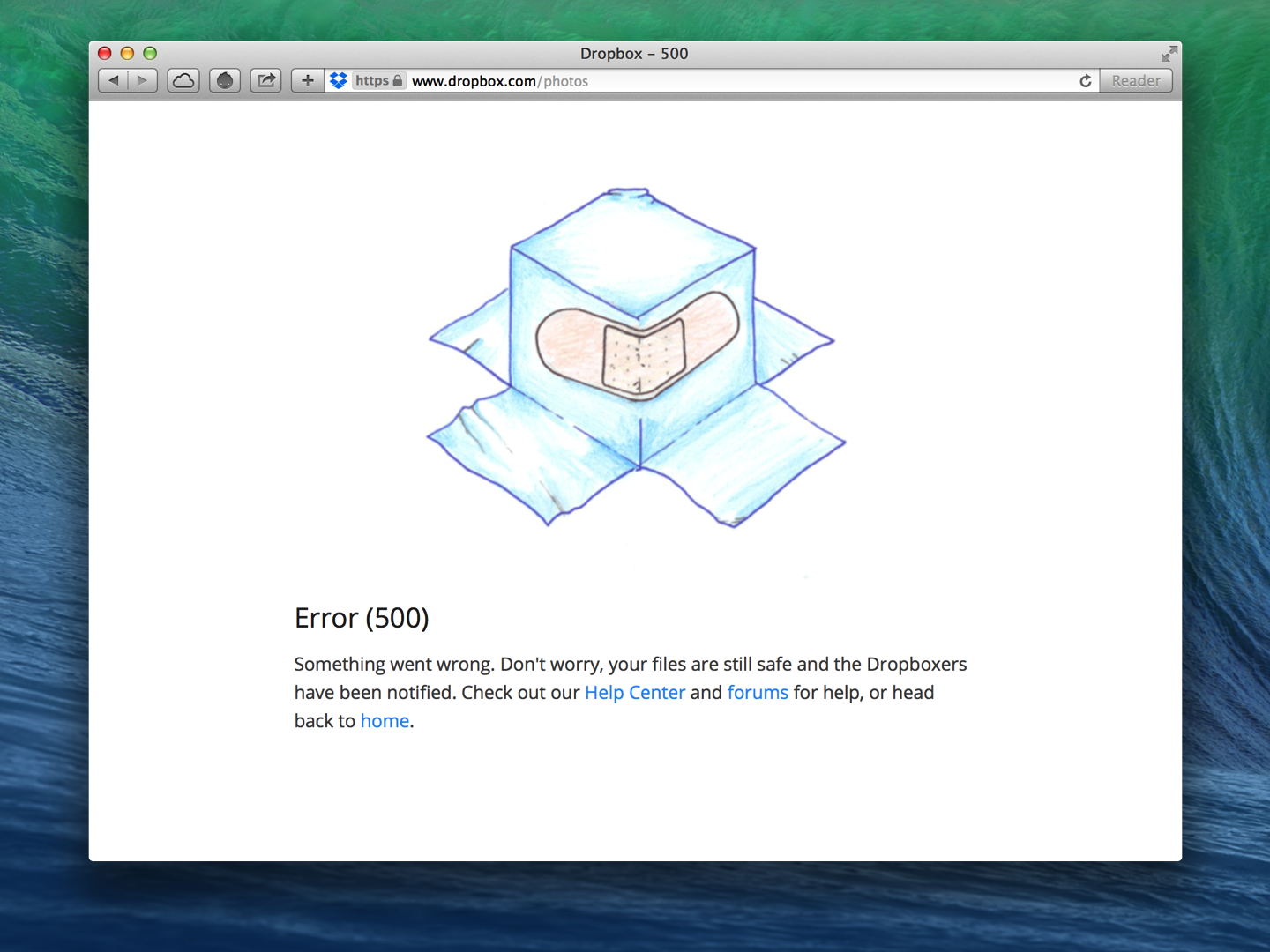
The error view on the webpage below not only reassures the user that their data is safe, but also clearly directs the user to the appropriate channels should the wish to seek further help. This page is far from being a dead end.

helpful errors@2x 730x547 Designing the details: Why empty states matter

Dropbox reassure users while providing links to find help.

Even if “Dropbox” wasn’t mentioned anywhere in the image above, the error is still instantly recognizable as its own.

Dropbox consistently show similar illustrations in views across its products, helping to create a relaxed and friendly experience that’s particularly important when dealing with an error or scenario requiring further support.

Personality

While using a consistent approach in empty views across devices or platforms can help develop an app’s brand or personality, consider whether an empty view needs to be the same on different devices.

In Ember for Mac we show some beautiful illustrations within our empty views but when building Ember for iOS, we chose not to include any illustrations, similar or otherwise, as we were building an app specifically for iOS 7 which places a great emphasis on simplicity and text, in particular.

Don’t be afraid to be different. Empty views are a blank canvas after all and provide a great opportunity to do something fun or inspiring. Be unique.

clear quotes@2x 730x547 Designing the details: Why empty states matter

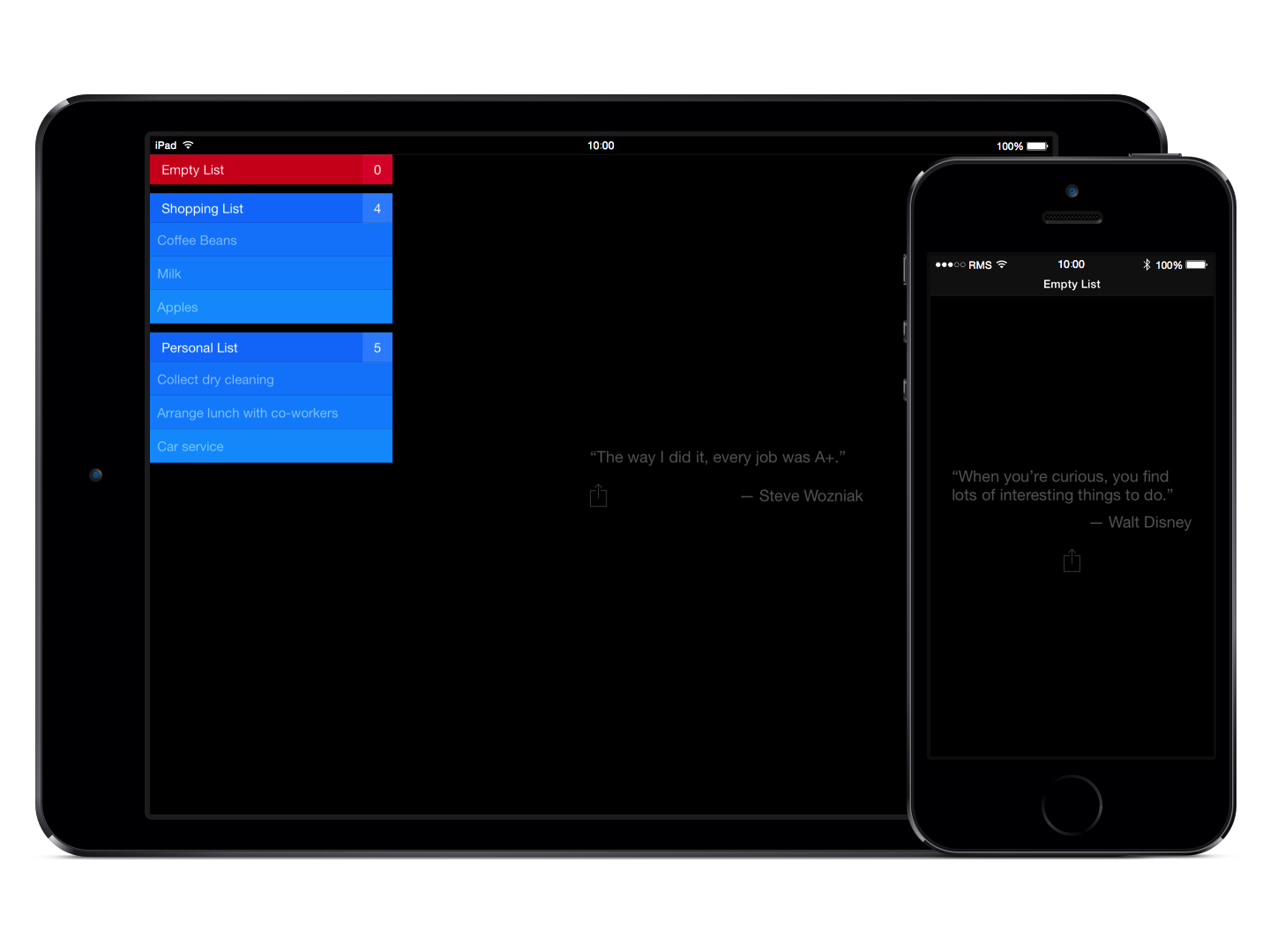
Quotes shown within Clear.

Clear takes the opportunity to show users inspirational quotes. The typical use-case when an empty list-view is shown is where a user has cleared some aspirational to-dos or completed some work-related tasks.

A quote is then shown after all tasks have been cleared that aims to inspire user to do more, not necessarily within the app itself but in the users daily life.

Lastly, it’s worth allowing additional time to test these empty views before shipping, especially if an empty view was added as an after-through or late in the project.

Ensure localised copy is displayed consistently throughout while handling all appropriate cases where pluralisations occur, particularly in error strings that may be presented to the user.

The areas I’ve touched upon in this post are all contributing factors towards the perceived quality and user experience of an app. Hopefully, you’ve already given careful consideration to such areas or have been reminded to do so now.

If you’d like to check out what other apps are doing in their empty states be sure to check out both the Empty States and Little Big Details blogs. If you’ve any questions or comments relating to this post, I’d love to hear them. Feel free to reach me on Twitter.

Image credit: Shutterstock/ronstik

└ Tags: syndicated
a couple of laughzillas on a blue diamond background

Designing the details: Why empty states matter

Feb18
by Sindy Cator on February 18, 2014 at 6:29 pm
Posted In: Analysis and Opinion, Around the Web, Design & Dev, How-To's

blank page 520x245 Designing the details: Why empty states matter

Hamish McNeill is the QA Manager at Realmac Software, a small, award-winning independent iOS and OS X development studio behind Clear, Ember and Rapidweaver. The original version of this article was published on the Realmac Software blog.


One of my favourite things to do with new apps is to check out and screenshot the first-run experience. After navigating any initial welcome screens, I go in search of empty states; views within the app typically devoid of content or data.

Essentially a blank slate, an empty state can be used to form the first impression made on a user. It’s the importance of these views that I find so interesting as they can often be a good indicator as to the level detail put in to building the app.

As you’ll see, empty views can often be far from empty.

Warm welcome

It may just be the nature of a QA engineer, but I’ll openly admit that when using an app for the first time I’m incredibly skeptical of its quality until soundly proven otherwise. A good first impression goes a long way to pacify such doubts.

“First impressions are crucial. If you fail to design a thoughtful blank slate, you’ll create a negative (and false) impression of your application or service.”

– The Blank Slate, Getting Real by 37signals

It’s common courtesy to greet new users upon arrival, even a simple “Welcome to [App Name]” can help show a user they’re valued. However, it’s as important to decide what to say next:

Do any gestures which perform key functions in the app need to be introduced?

Is there ‘dummy’ content designed to be manipulated by the user?

Does the user need to be shown how to add content of their own?

Ensure the tone of the copy used in such first-run or welcome views is helpful and friendly, also take care not to appear condescending.

When showing helpful information to assist users in getting up and running, avoid overwhelming them with too much information on the first run. Don’t even think about pointing an arrow at a new feature just for the sake of highlighting the new.

Would new (or existing) users find this feature easily themselves? If so, then there might not be a need to annotate it.

Apple provide a good point of reference for gauging how much useful information should be shown to new users. Both iBooks and iTunes use similar first-run experiences on the Mac.

ibooks welcome@2x 730x547 Designing the details: Why empty states matter

Do you think Apple want users to go to the iBooks Store?

iBooks tells the user what’s missing from this view, boldly stating that they’ve no books in their library while clearly directing them how to add content. Users are directed to the iBooks Store not only by showing an arrow that highlights the Store button but also by having a dedicated call to action button within the empty view itself.

While iTunes similarly channels users into adding (or purchasing) content, Apple also show the user an iTunes product-shot, filled with content, essentially showing the regular state of the app.

itunes welcome@2x 730x547 Designing the details: Why empty states matter

iTunes shows users what their library could look like.

What’s presented here is actually an uncluttered, ideal, view of how their library may look, set upon a backdrop of what is probably a clean install of OS X.

Being able to make a potentially complex app like iTunes appear both beautiful and simple within the first-run experience only serves to encourage users to follow the suggested steps and begin using the app in earnest.

Inbox Zero

While many empty states guide users in performing actions to create and add content, this isn’t suitable for every scenario.

A great example of this is Inbox Zero, perhaps the most well known of empty states. Inbox Zero is essentially a view from which a user has removed, cleared or dealt with all previous content (email being the usual suspect here).

Such views are often designed to be rewarding and rightly so for users may aim (and often struggle) to reach this point within the app on a regular basis.

For example, the user of a fitness app has just completed a list comprising of their daily exercise routine. What should the fitness app do or suggest within the empty list-view now?

It’s probably not a good idea to suggest adding more (or creating new) exercises here. A more helpful suggestion would be to congratulate the user on their impressive workout while showing an option to add a reminder, encouraging the user to plan their next training session.

This behaviour may help the user get on with another task while encouraging use of the app in the longer term, instead of being a plea for constant, prolonged use in the immediate-term.

While I’ll leave covering regular Inbox Zero type views in more detail for a future post, it’s worth keeping in mind areas on an app that may not be viewed quite so often.

Discover

Like with first-runs I enjoy exploring apps for other empty, explanatory views or features that I might not know in detail. Again, Apple allows users to discover even more apps via the ‘Near Me’ section within the App Store that also features a great empty state.

app store near me@2x 730x547 Designing the details: Why empty states matter

Apple introduces the ‘Popular Near Me’ section of the App Store to new users.

The initial Near Me view is not only visually appealing, with a clean graphic that illustrates its obvious use, but also displays a concise description, an unobtrusive call to action button, and finally a privacy note to the user that using this feature will send information to Apple about their location. All this information is shown clearly within a single view.

Again, another great example is set for concisely display potentially complex information to the user in a friendly, personal manner.

No dead ends

Taking time to help users discover new features within an app is great but it’s also worth ensuring users aren’t led to a point at which they appear to hit a dead end.

Dead ends may not only be a completely empty view but another part of the UI that perhaps doesn’t perform an appropriate function. Some examples of this may be a blank list view with no suggestion as to add content, or even a button that has no effect within the current view that should really be disabled instead.

Error views are an example of where many users may expect to hit a dead end. Errors are actually great opportunity to create positive experience within an app out of a potentially negative situation. Any error is probably shown as a result of something going wrong.

I like to see apps clearly disclose to the user easy to understand information as to what went wrong and how they get back on track.

Pro Tip: Look at tracking the error pages (such as 404s) on your site. Being able to see what a user was requesting when they were greeted with an error allows you to redirect common URL typos and searches to help reduce the number of avoidable error pages being served.

The error view on the webpage below not only reassures the user that their data is safe, but also clearly directs the user to the appropriate channels should the wish to seek further help. This page is far from being a dead end.

helpful errors@2x 730x547 Designing the details: Why empty states matter

Dropbox reassure users while providing links to find help.

Even if “Dropbox” wasn’t mentioned anywhere in the image above, the error is still instantly recognizable as its own.

Dropbox consistently show similar illustrations in views across its products, helping to create a relaxed and friendly experience that’s particularly important when dealing with an error or scenario requiring further support.

Personality

While using a consistent approach in empty views across devices or platforms can help develop an app’s brand or personality, consider whether an empty view needs to be the same on different devices.

In Ember for Mac we show some beautiful illustrations within our empty views but when building Ember for iOS, we chose not to include any illustrations, similar or otherwise, as we were building an app specifically for iOS 7 which places a great emphasis on simplicity and text, in particular.

Don’t be afraid to be different. Empty views are a blank canvas after all and provide a great opportunity to do something fun or inspiring. Be unique.

clear quotes@2x 730x547 Designing the details: Why empty states matter

Quotes shown within Clear.

Clear takes the opportunity to show users inspirational quotes. The typical use-case when an empty list-view is shown is where a user has cleared some aspirational to-dos or completed some work-related tasks.

A quote is then shown after all tasks have been cleared that aims to inspire user to do more, not necessarily within the app itself but in the users daily life.

Lastly, it’s worth allowing additional time to test these empty views before shipping, especially if an empty view was added as an after-through or late in the project.

Ensure localised copy is displayed consistently throughout while handling all appropriate cases where pluralisations occur, particularly in error strings that may be presented to the user.

The areas I’ve touched upon in this post are all contributing factors towards the perceived quality and user experience of an app. Hopefully, you’ve already given careful consideration to such areas or have been reminded to do so now.

If you’d like to check out what other apps are doing in their empty states be sure to check out both the Empty States and Little Big Details blogs. If you’ve any questions or comments relating to this post, I’d love to hear them. Feel free to reach me on Twitter.

Image credit: Shutterstock/ronstik

└ Tags: syndicated
  • Page 14,496 of 14,637
  • « First
  • «
  • 14,494
  • 14,495
  • 14,496
  • 14,497
  • 14,498
  • »
  • Last »
The Daily Dose, The Daily Dose © 1996 - Present. All Rights Reserved.
  • Home
  • About
  • Archive
  • Books
  • Collections
  • Links
  • Shop
  • Submit a joke
  • Video
  • Privacy Policy