

The Daily Dose

laugh every day with cartoons jokes and humor
  • Home
  • About
    • Press
      • Press Release – Announcing Laughzilla the Third ebook
      • Press Release – The Daily Dose Kicks Off Its 16th Year with New Books and More Irreverent Laughter
      • Press Release – Themes Memes and Laser Beams Now Available in Paperback
      • Press Release – Announcing Themes Memes and Laser Beams
      • In The News
    • Privacy
  • Archive
  • Books
  • Shop
  • Collections
    • Galleries
      • Gallery
      • Captions
      • Flash Cartoons & Greeting Cards
        • Laughzilla’s Oska Flash Animation Cartoon Greeting Cards
        • Oska Cupid Love Humor
    • #OccupyWallStreet
    • cats
    • China
    • Food
      • Hors d’oeuvres
        • Ball of Cream Cheese
      • Entrees / Main Courses
        • Meatballs with Baked Beans and Celery
    • Gadaffy
    • Google
  • Links
  • Video
  • Submit a joke
DeviantART Facebook Twitter Flickr pinterest YouTube RSS

Subscribe for Free Laughs!


Latest Comics

  • This Memorial Day, Trump Meme Coin Congratulates Profit Takers
  • 25 Years of The Daily Dose
  • The Best Cartoons
  • Bitcoin sings “Fly Me To The Moon”
  • 22 years of The Daily Dose

Comic Archive

Syrian Civil War Editorial Caricature

Daily Dose News Roundup

  • Netflix launches Playground, a standalone games app for children aged eight and under
  • Monzo is shutting down its US operation, and its European banking licence explains why
  • Anthropic cuts Claude subscribers off from OpenClaw in cost crackdown
  • Musk wants a million data centre satellites. Bezos wants 51,600. Scientists want to know why.
  • Google launches Gemma 4: four open-weight models from smartphones to workstations

Quotable

"Scientists have discovered that 'Thinking outside the box might be facilitated by having a somewhat less intact box', which begs the question, why are people always thinking in or around boxes? Maybe it's time we think relative to other things ... like oceans, fields, galaxies, mountains and muppets." ~ Yasha Harari

Fresh Baked Goods

Get The Daily Dose's ebook: Laughzilla the Third - A Funny Stuff Collection of 101 Cartoons from TheDailyDose. Click here to get the e-book on Amazon kdp. Laughzilla the Third (2012) The Third Volume in the Funny Stuff Cartoon Book Collection Available Now.

Click here for the Paperback edition


Support independent publishing: Buy The Daily Dose's book: Themes Memes and Laser Beams - A Funny Stuff Collection of 101 Cartoons by Laughzilla from TheDailyDose. Click here to get the book on Amazon. Themes Memes and Laser Beams - The Second Volume in the Funny Stuff Cartoon Book Collection.

Click Here to get the book in Paperback While Available on Amazon

Themes Memes and Laser Beams - 101 Cartoons by Laughzilla. Get the e-book on Lulu.

Click Here to get The Daily Dose Cartoon ebook on amazon kindle

Funny Stuff :
The First Cartoon Book
from The Daily Dose.
Available on Lulu.

a couple of laughzillas on a blue diamond background

What’s more effective: Long or short landing pages?

Feb19
by Sindy Cator on February 19, 2014 at 6:10 pm
Posted In: Analysis and Opinion, Around the Web, Design & Dev

Long vs. Short Landing Page 520x245 Whats more effective: Long or short landing pages?

Brian Honigman is a marketing consultant, a professional speaker and a freelance writer. This post originally appeared on the Positionly blog. 


Landing pages help sell the value of your company’s products, services, content and more to help encourage increased conversions from your Web traffic. Many factors of a landing page impact if a visitor will convert like the inclusion of an explainer video, trust elements like a client logo or a recent award, a bulleted list of benefits the resource offers, a strong call-to-action and more.

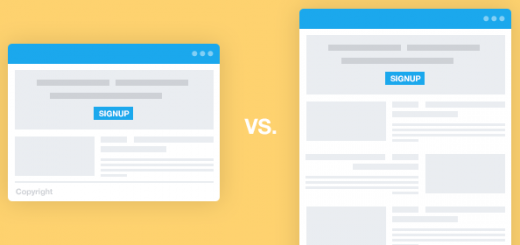
The length of a landing page also impacts how well visitors convert – but what’s better to increase conversions: a shorter, more concise landing page or a longer, extensive resource-rich one?

Both long landing pages have advantages and disadvantages, as do short landing pages. It is all dependent on a few factors, but is mostly impacted by what resource is actually being featured on the landing page and what goals you’re trying to achieve.

Experimenting with landing pages is key

The best route to take when it comes to choosing the right length for your landing pages is to perform extensive testing to see what works best for your audience. A/B test two versions of your landing pages where one aspect is altered to see if it helps one version perform better over another.

Perform multiple A/B testing experiments to confirm what you already know about your online audience, while also learning something new about the preferences of your Web traffic.

This Dropbox landing page could be extensively A/B tested to see if each aspect of the page is in the right place, the correct imagery is being used, if the call-to-action is helping increase conversions etc.
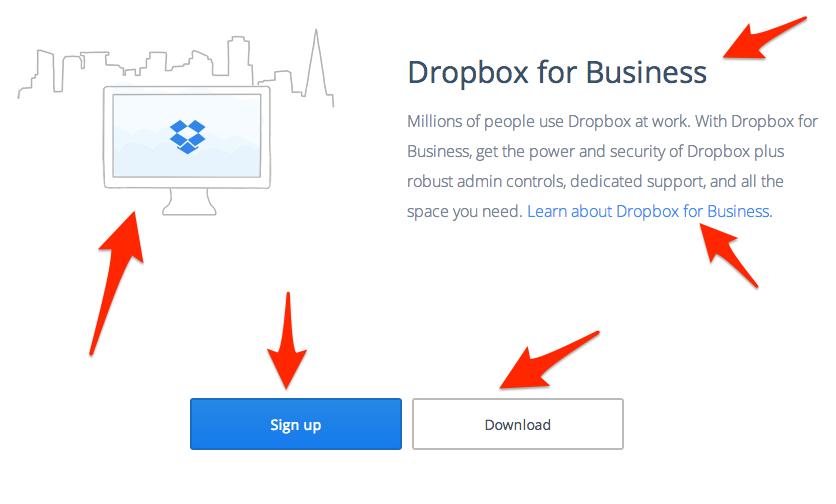
image00 520x313 Whats more effective: Long or short landing pages?Try performing multivariate testing as well to test multiple variables at once to best understand the appropriate length of your landing pages.

Test the length of your sign-up forms by adding and reducing the number of fields that need to be filled out to see the biggest change in the amount of conversions related to the length of your landing page.

Long landing pages

Longer landing pages are better for generating more trust and credibility to motivate a Web visitor to convert since they have more room for information about your company and more opportunity to convince a visitor to perform an action.

The bigger the ask, the longer the page should be says KISSmetrics and Crazy Egg cofunder Neil Patel, which is a good rule of thumb to follow.

The advantage of this is that the user who scrolls through to the bottom where the sign-up form is located and views all the aspects of the page is typically a higher quality lead. Not to mention, the more quality text and properly optimized visuals on your landing pages the better they’ll do in the search engines in the long-term.

General Assembly, a tech education startup, uses long landing pages to display information about its courses and help better inform visitors of what to expect from signing up.

The apply now call-to-action button follows a visitor throughout the landing page, allowing them to become a lead at whatever point they become interested in the course after learning more about its benefits. A non-invasive scrolling call-to-action button helps improve the likelihood that a visitor converts, a strategy any company should experiment with regardless of the length of their landing page.

image03 520x225 Whats more effective: Long or short landing pages?

Longer landing pages are more suited for products offerings that require someone to purchase the item when they fill out the form, since the ability to add more copy typically helps increase quality conversions.

When someone is making a purchase from your website, they need more information to gain their trust and decide to spend their money on your product. Long landing forms are the most ideal when encouraging potential customers to make a purchase, as well as build your company’s relationship with them for the long-term.

Well-known freelance writer and blogger Kristi Hines uses a longer landing page to explain the value of her premium course and help illustrate her credibility as an expert at what she does best. Her landing pages provide a context as to who she is as a professional as you continue to scroll down through to view text, images, examples of her past work, testimonials from well-known leaders in the marketing industry and more.

image02 Whats more effective: Long or short landing pages?

Long-term relationship building on a longer landing page is achieved through adding extensive trust elements to the page. This helps to fulfill promises like a full refund if there isn’t satisfaction with the purchase, and provide complete transparency as to what customers should and shouldn’t expect from purchasing a resource from your company. You can build trust with your customers that could extend past their first interaction with your business if done right.

The disadvantage to a longer landing page is that you’ll receive less leads overall because the barrier to entry is much higher as opposed to a shorter landing page with less elements to distract them from clicking.

Short landing pages

If you’re looking to increase the number of leads overall, then using shorter landing pages is the key to achieving your goal, which are often referred to as more successful depending on the circumstances.

Shorter landing pages feature less information, which means fewer distractions that deter a person from signing up. When the sign-up form is shorter on your landing page, it is easier for a person to fill it out and become a lead then if it is particularly extensive and time consuming.

The major advantage of a shorter landing page is that it helps increase conversions if the elements on the page are enough to convince a person to perform an action since it is kept simple and short, which many regard as an effective means of driving conversions.
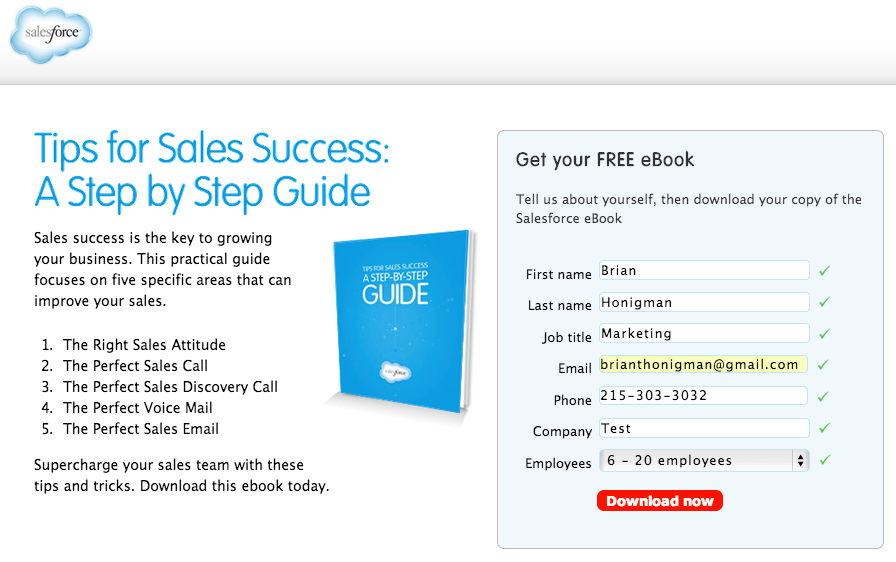
image04 520x326 Whats more effective: Long or short landing pages?

Salesforce typically uses short form landing pages to entice its visitors to download its premium content. Shorter landing pages are the most ideal when you’re offering a free resource like a white paper or eBook, signing up for an email newsletterm or other low commitment actions that don’t cost a person anything other then some information about themselves to take action.

Signing up for a free eBook is a low risk action for a visitor to your website, therefore the landing page doesn’t need to be as extensive as long as it captures helpful information about them for future use in your CRM.
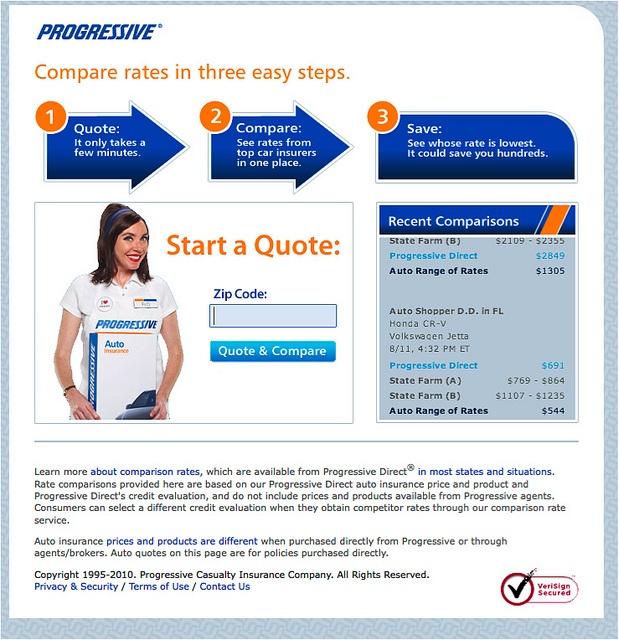
image01 520x537 Whats more effective: Long or short landing pages?

Insurance brand Progressive uses short landing pages to get leads to sign up for an insurance quote since there isn’t a heavy commitment to perform this task and therefore, it doesn’t require the inclusion of extensive credibility driving information to drive people to take action.

The visual elements on the shorter landing page help direct a person to perform the action of comparing insurance quotes, effectively making use of the limited space on this particular landing page.

The use of visual elements throughout your landing pages, no matter the size, are a highly effective technique for increasing conversions.

The main disadvantage of a shorter landing page is the fact that the leads generated from it are much lower in quality. The quality of the leads decreases since it is much easier to sign-up on your form and the page overall requires a much lower barrier to entry.

Does your business typically use long or short landing pages to capture leads? Have you performed A/B and multivariate testing to discover your sweet spot in terms of optimal landing page length? Sound off in the comments below!
└ Tags: syndicated
a couple of laughzillas on a blue diamond background

Pinterest’s new Chrome extension adds hovering ‘Pin It’ buttons for photos and right-click to pin

Feb19
by Sindy Cator on February 19, 2014 at 6:00 pm
Posted In: Around the Web, Product Updates, Social Media

If you’re an avid Pinterest, user you’ll want to take note of the upgraded ‘Pin It’ button that was released for the Chrome browser today.

Now, when you hover over an image you’ll see the familiar ‘Pin It’ icon appear in the top left-hand corner. Select it and you’ll see a pop-up window that lets you save it to any of your Pinterest boards with a custom description. If the image is contained within a blog post or article, you’ll also get the URL in the pin description, making it a little easier to share its origins on Pinterest.

2014021902 730x584 Pinterests new Chrome extension adds hovering Pin It buttons for photos and right click to pin

If these prove to be a bit of a nusiance, you still have the option of turning them off, however. The updated button for Chrome also introduces a right-click to pin feature, which should suit those who would rather forgo the roll-over icon.

While the new Pin It button is exclusvely for Chrome users, Pinterest says it’ll be available on other browsers soon.

➤ Pin It button for Chrome (Via Blog Post)

└ Tags: syndicated
a couple of laughzillas on a blue diamond background

Pinterest’s new Chrome extension adds hovering ‘Pin It’ buttons for photos and right-click to pin

Feb19
by Sindy Cator on February 19, 2014 at 6:00 pm
Posted In: Around the Web, Product Updates, Social Media

If you’re an avid Pinterest, user you’ll want to take note of the upgraded ‘Pin It’ button that was released for the Chrome browser today.

Now, when you hover over an image you’ll see the familiar ‘Pin It’ icon appear in the top left-hand corner. Select it and you’ll see a pop-up window that lets you save it to any of your Pinterest boards with a custom description. If the image is contained within a blog post or article, you’ll also get the URL in the pin description, making it a little easier to share its origins on Pinterest.

2014021902 730x584 Pinterests new Chrome extension adds hovering Pin It buttons for photos and right click to pin

If these prove to be a bit of a nusiance, you still have the option of turning them off, however. The updated button for Chrome also introduces a right-click to pin feature, which should suit those who would rather forgo the roll-over icon.

While the new Pin It button is exclusvely for Chrome users, Pinterest says it’ll be available on other browsers soon.

➤ Pin It button for Chrome (Via Blog Post)

└ Tags: syndicated
a couple of laughzillas on a blue diamond background

Heap Analytics: Now anyone in your company can track any interaction with your website

Feb19
by Sindy Cator on February 19, 2014 at 6:00 pm
Posted In: Apps, Around the Web, Design & Dev, Product Updates

Heap 520x245 Heap Analytics: Now anyone in your company can track any interaction with your website

Heap Analytics, a startup with a clever approach to tracking interactions on websites and in iOS apps, is today rolling out a new feature that makes it easy for anyone to harness this power, no matter how non-technical they may be.

Once installed, Heap Analytics records every single interaction that occurs on your website or in your app – every page load, button click, form submission and the like. Then when you decide you want to start tracking, say, how many people are clicking a particular button, you can set it up and immediately see historical data as well as fresh information as it comes in.

Until now, you needed to have some technical knowledge and access to your website’s back-end to set up tracking for specific events, but the new Event Visualizer is designed to let anyone in the company do it via a simple point-and-click interface.

The startup’s video explains it well, demonstrating how Dropbox could use the feature to track drop-offs in the user sign-up flow:

Heap Analytics co-founder Matin Movassate says that the idea for the service came from his experiences as a product manager at Facebook. “Any time we needed new metrics, we’d go through an annoying feedback loop: 1) find an engineer; 2) get engineer to write logging code (begrudgingly, since they have better things to build); 3) wait until next release cycle for the code to ship; 4) wait a few more days for data to trickle in; 5) have a data analyst fetch the data and prepare a report.”

That personal frustration translated into a much wider gap in the analytics market. “We found that non-technical folks were increasingly dependent on analytics to make decisions,” says Movassate. “Marketers need to measure engagement across traffic sources, product managers need to quantify feature use, salespeople need to identify promising leads. But they were constantly bottlenecked on engineers to manually instrument and target the right events for them.”

The new Event Visualiser is a slick solution to a real problem.

➤ Heap Analytics

└ Tags: news, syndicated
a couple of laughzillas on a blue diamond background

Heap Analytics: Now anyone in your company can track any interaction with your website

Feb19
by Sindy Cator on February 19, 2014 at 6:00 pm
Posted In: Apps, Around the Web, Design & Dev, Product Updates

Heap 520x245 Heap Analytics: Now anyone in your company can track any interaction with your website

Heap Analytics, a startup with a clever approach to tracking interactions on websites and in iOS apps, is today rolling out a new feature that makes it easy for anyone to harness this power, no matter how non-technical they may be.

Once installed, Heap Analytics records every single interaction that occurs on your website or in your app – every page load, button click, form submission and the like. Then when you decide you want to start tracking, say, how many people are clicking a particular button, you can set it up and immediately see historical data as well as fresh information as it comes in.

Until now, you needed to have some technical knowledge and access to your website’s back-end to set up tracking for specific events, but the new Event Visualizer is designed to let anyone in the company do it via a simple point-and-click interface.

The startup’s video explains it well, demonstrating how Dropbox could use the feature to track drop-offs in the user sign-up flow:

Heap Analytics co-founder Matin Movasette says that the idea for the service came from his experiences as a product manager at Facebook. “Any time we needed new metrics, we’d go through an annoying feedback loop: 1) find an engineer; 2) get engineer to write logging code (begrudgingly, since they have better things to build); 3) wait until next release cycle for the code to ship; 4) wait a few more days for data to trickle in; 5) have a data analyst fetch the data and prepare a report.”

That personal frustration translated into a much wider gap in the analytics market. “We found that non-technical folks were increasingly dependent on analytics to make decisions,” says Movasette. “Marketers need to measure engagement across traffic sources, product managers need to quantify feature use, salespeople need to identify promising leads. But they were constantly bottlenecked on engineers to manually instrument and target the right events for them.”

The new Event Visualiser is a slick solution to a real problem.

➤ Heap Analytics

└ Tags: news, syndicated
  • Page 14,483 of 14,637
  • « First
  • «
  • 14,481
  • 14,482
  • 14,483
  • 14,484
  • 14,485
  • »
  • Last »
The Daily Dose, The Daily Dose © 1996 - Present. All Rights Reserved.
  • Home
  • About
  • Archive
  • Books
  • Collections
  • Links
  • Shop
  • Submit a joke
  • Video
  • Privacy Policy