
The Daily Dose

laugh every day with cartoons jokes and humor
  • Home
  • About
    • Press
      • Press Release – Announcing Laughzilla the Third ebook
      • Press Release – The Daily Dose Kicks Off Its 16th Year with New Books and More Irreverent Laughter
      • Press Release – Themes Memes and Laser Beams Now Available in Paperback
      • Press Release – Announcing Themes Memes and Laser Beams
      • In The News
    • Privacy
  • Archive
  • Books
  • Shop
  • Collections
    • Galleries
      • Gallery
      • Captions
      • Flash Cartoons & Greeting Cards
        • Laughzilla’s Oska Flash Animation Cartoon Greeting Cards
        • Oska Cupid Love Humor
    • #OccupyWallStreet
    • cats
    • China
    • Food
      • Hors d’oeuvres
        • Ball of Cream Cheese
      • Entrees / Main Courses
        • Meatballs with Baked Beans and Celery
    • Gadaffy
    • Google
  • Links
  • Video
  • Submit a joke
DeviantART Facebook Twitter Flickr pinterest YouTube RSS

Subscribe for Free Laughs!


Latest Comics

  • This Memorial Day, Trump Meme Coin Congratulates Profit Takers
  • 25 Years of The Daily Dose
  • The Best Cartoons
  • Bitcoin sings “Fly Me To The Moon”
  • 22 years of The Daily Dose

Comic Archive

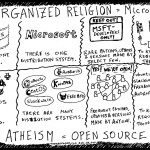
Organized Religion Is Microsoft – Atheism Is Open Source

Daily Dose News Roundup

  • Cloudflare cut 1,100 jobs and then grew its engineering team by 45 percent, and its CEO says the pattern will repeat everywhere
  • Ford had to rehire 350 engineers after its AI got vehicle quality wrong
  • The hidden cost of complacency and Jay Roland’s mission against corporate America’s technical debt crisis
  • Anthropic accuses Alibaba of running the largest distillation campaign yet against Claude
  • ByteDance unveils Seedance 2.5, a 30-second native 4K AI video model that accepts 50 reference inputs

Quotable

"My friend didn't get the boxing gloves he wanted for Christmas. Now it's Boxing Day and guess who's in a fight with the Postman?!" ~ Yasha Harari

Fresh Baked Goods

Get The Daily Dose's ebook: Laughzilla the Third - A Funny Stuff Collection of 101 Cartoons from TheDailyDose. Click here to get the e-book on Amazon kdp. Laughzilla the Third (2012) The Third Volume in the Funny Stuff Cartoon Book Collection Available Now.

Click here for the Paperback edition


Support independent publishing: Buy The Daily Dose's book: Themes Memes and Laser Beams - A Funny Stuff Collection of 101 Cartoons by Laughzilla from TheDailyDose. Click here to get the book on Amazon. Themes Memes and Laser Beams - The Second Volume in the Funny Stuff Cartoon Book Collection.

Click Here to get the book in Paperback While Available on Amazon

Themes Memes and Laser Beams - 101 Cartoons by Laughzilla. Get the e-book on Lulu.

Click Here to get The Daily Dose Cartoon ebook on amazon kindle

Funny Stuff :
The First Cartoon Book
from The Daily Dose.
Available on Lulu.

a couple of laughzillas on a blue diamond background

See the most common words used in any App Store review with this neat visualizer

Feb26
by Sindy Cator on February 26, 2014 at 4:15 pm
Posted In: Apps, Around the Web, Insider

20140226 155915 520x245 See the most common words used in any App Store review with this neat visualizer

While it’s not exactly something you’d call a consumer product, Otter App Ratings Visualizer from Mutual Mobile isn’t meant to be. But this neat little Web app could still give reporters, marketers and developers some interesting insights into reviews on the App Store.

Otter was created initially as in internal tool to garner insights around iOS apps it built itself. But Mutual Mobile soon realized it may have a broader appeal, and launched it to the public – though it technically remains a beta product for now.

How it works

Simply enter the name of an app into the search box at the top, hit ‘search’, and you’ll see a large bubble cloud with the most commonly-used words from the reviews. Positive words are green, negative are red, and words used most often are larger.

oters 730x376 See the most common words used in any App Store review with this neat visualizer

You can also click on each word, and filter down into the actual reviews that contain that specific descriptive, as you can see here with the word ‘can’t’:

cantz 730x384 See the most common words used in any App Store review with this neat visualizer

While the tool is a great concept, it really needs to filter out the many, many redundant words in there – such as ‘see’, ‘if’, ‘get’, ‘just’ and all the rest. These just clog things up and bring very little value to proceedings – it would be great if it could focus more on adjectives, though not necessarily exclusively.

At any rate, it’s a neat little tool with a lot of potential. You can check out the iOS app version now, and we’re told that the developers will be rolling out one specifically for Android apps shortly.

➤ Otter | iOS User Feedback Visualizer

└ Tags: syndicated
a couple of laughzillas on a blue diamond background

Little data: Tracking your life through numbers

Feb26
by Sindy Cator on February 26, 2014 at 4:02 pm
Posted In: Analysis and Opinion, Around the Web, Dominic Smith

dominicsmith top story post Little data: Tracking your life through numbers

Chances are good that you have at least one friend who tracks calories, workouts, or books read. But do you know anyone who puts out an annual report of those numbers in exquisite, visual detail?

Nicholas Felton, the design brain behind Facebook’s timeline feature, has put out his own personal annual report for years. The last one he produced was for 2012 and it featured beautifully rendered charts of where he ate, the airports he passed through, who he spent time with, his most productive days.

When that edition was made available for pre-order at $28 on his website, all 2,500 copies quickly sold out.

Critics might ask why we should care about the aggregated, daily routine of a man most of us will never never meet. But fans would argue that these reports aren’t merely novelties for the coffee table—they represent data as art, a single year of human life parsed into graphs and charts. (You can decide for yourself by viewing a preview of the 2012 report here.)

For a growing number of personal data enthusiasts, this is the way of the future. When Felton’s Reporter app became widely available on the iPhone last year, it was downloaded by thousands of people thirsting for meaning in the fray of their daily lives.

Every 90 minutes the app buzzes to get their attention and offers up some quick survey questions before storing the data on the cloud. By the end of a year, users might be able to find answers to those nagging questions—Where did all the time go? and, Did I spend my year wisely?

Apps like Reporter are part of a growing trend around “the quantified self” or, as statistician Nathan Yau, Ph.D., calls it, “self surveillance.” There are now hundreds of tracking apps in the market place, from the wearable, automated programs that track your mileage and heart rate while on a run to the manual, sharing apps for people around the world with the same medical condition.

According to ABI Research, more than 90 million wearable devices will ship in 2014. Aware of the booming market for all manner of human measurement, Apple just received a patent for a biometric sensor that reads your heart rate through a pair of ear buds.

Meanwhile, companies like MapMyFitness—which serves 17 million users worldwide and logs 400,000 activities on the cloud a day—have had to ramp up their infrastructure to keep up with demand.

If the Quantified Self movement sounds to you like a fringe group for existential mathematicians, then it’s worth exploring quantifiedself.com, the website collaboration that serves over 100 groups in 34 countries.

Gary Wolf, one of the founders of the movement and an organization called Quantified Self Labs, is a contributing editor at Wired. His 2010 TED talk and his piece on the data-driven life for The New York Times Magazine have been hailed as definitive and compelling glimpses into the personal data movement. They offer a close-up look at the people who track their every waking—and sleeping—movement and why any of it matters to them in the first place.

A quick review of the videos on the Quantified Self site reveals that these are not merely vanity projects. People use self-tracking tools to share information on everything from the progression of Parkinson’s Disease to the relative health of an artificial heart valve through blood analysis to the fulfillment of a reading goal of five books a week.

Nathan Yau, the statistician who runs the website flowingdata.com, is interested not only in the aggregation of a single person’s data over time, but in the sum of many people’s activities. He recently accessed public data records for the app RunKeeper to produce some fascinating visualizations called Where People Run.

He produced a kind of athletic heat map for 22 cities around the world. It’s no surprise that people like to choose the most scenic routes possible (as Sydney and New York illustrate below) but Yau also hopes his work will help city planners better serve a health-conscious population.

nyc people run 220x338 Little data: Tracking your life through numbers

Image credit: Nathan Yau, flowingdata.com

Where People Run: New York City


australia ppl run 520x473 Little data: Tracking your life through numbers

Image credit: Nathan Yau, flowingdata.com

Where People Run: Sydney

As more and more people record and store their daily activities, moods, and biometry, we’re likely to see a lot of “little data” turning into Big Data. Just like enterprises that are mining Big Data for business insight and higher margins, these folks are looking for meaning in the constantly moving stream of information.

Instead of trying to better understand customer behavior, they want to better understand their own. How do they make their days more productive? How do they run faster and further? How do they find more time to do the things they love?

As a result of millions of people tracking some aspect of their activities, we’re probably not likely to see a sudden uptick in the number of personal, annual data reports given as Christmas gifts. We’ll leave that to the true fanatics like Felton and Yau, who’ve managed to turn their obsession with data into fulfilling careers.

└ Tags: syndicated
a couple of laughzillas on a blue diamond background

The UK TV licence fee should cover iPlayer on-demand too, says BBC Director-General

Feb26
by Sindy Cator on February 26, 2014 at 3:48 pm
Posted In: Around the Web, Insider, UK

BBC2 520x245 The UK TV licence fee should cover iPlayer on demand too, says BBC Director General

At the 13th annual Oxford Media Convention in England today, BBC Director-General Tony Hall outlined his case for publicly funded broadcasting and, more specifically, the UK TV licence fee.

For the uninitiated, the BBC TV licence fee costs the British public £145.50 each year per household – £49 if you’re still watching in black-and-white (seriously). Everyone who watches or records TV as it is broadcast (i.e. ‘live’) needs to be covered by a TV licence. This includes TV on computers, mobile phones, DVD/video recorders and other devices. But there has been one glaring caveat in the licence fee requirement – it doesn’t cover those who choose to watch TV on catch-up services such as iPlayer.

Earlier today, Hall said that the BBC’s vision was to modernize the licence fee, so it takes into account all broadcast content, including on-demand via iPlayer:

“When and how best to take the next step is, of course, a matter for the Government. Our view is that there is room for modernisation so that the fee applies to the consumption of BBC TV programmes, whether live on BBC One or on-demand via BBC iPlayer.”

The BBC TV licence fee was introduced in 1946 at a cost of £2 a year per-household, at a time when you had a handful of TV and radio programmes to choose from. We live in a different age now, and it’s easy to see why some people may feel a little aggrieved at forking out £145.50 each year – £49 if you’re still watching in black-and-white (seriously) – when they’re already paying for other entertainment services, such as Sky, Virgin or Netflix.

The UK Government sets the level of the licence fee, and in January 2007 it was agreed for a six-year period with the amount being approved each year by Parliament. More recently, the Government decided to freeze the licence fee at its 2010 level (£145.50) until the end of the current BBC Charter period in 2016.

While there is still a strong case for a TV licence fee, there is evidently a growing tide of resentment against being forced to pay it. However, Hall says that out of all the alternative forms of funding the BBC, support for the licence fee remains the highest.

“Support for the licence fee is at 53% per cent – way ahead of subscription on 17% and advertising on 26% ,” he says. “It’s the top choice for funding the BBC across all ages, all socio-economic groups and whether you’re in a Freeview, Sky or Virgin household.

“Under a subscription model, the BBC’s incentives would change,” he continues. “We would become an organisation motivated by maximising profit. Our programming choices would change as a result. We’d make programming for those with the highest willingness to pay. Some audiences would become more important than others. And as payment would cease to be universal, those paying would have to spend more to get the BBC.”

Hall also hit on the subject of advertising on the BBC, or lack thereof. “Of course, there is always advertising,” he says. “Yet having no advertising is one of the characteristics that people most value about the BBC.”

This is likely to stir up much heated debate around the licence fee, with two years remaining on the current licence fee price-freeze.

Meanwhile, you can read a full transcript of Tony Hall’s speech here.

Related read: As Finland drops TV licence fees for a means-tested tax, what does the future hold for other nations?

└ Tags: news, syndicated
a couple of laughzillas on a blue diamond background

Skype for Windows Phone gets Microsoft account support, account linking, and a typing indicator

Feb26
by Sindy Cator on February 26, 2014 at 3:42 pm
Posted In: Apps, Around the Web, Mobile

Skype today updated its Windows Phone app with support for Microsoft accounts, including when signing up for the service and for linking your Skype account, as well as a new typing indicator. You can download the new version now directly from the Windows Phone Store.

The full changelog is as follows:

  • A new and simpler way to sign in to Skype. Just use the same Microsoft account you use for your phone. Already got a Skype account? Link it with your Microsoft account to carry your credit, contacts, history, and settings over.
  • See when someone’s typing a message.
  • General fixes and improvements.

By linking your Skype and Microsoft accounts you can find friends just by searching for their email address and you can also recover your password easier than before, but support is limited to just one account: you’ll need to create a new Microsoft account to link to your other Skype accounts. The new typing indicator is the first time Skype is supporting the feature on mobile, so expect to see it on Android and iOS soon.

➤ New to Skype and having trouble signing in?

Image Credit: Robert Scoble

└ Tags: microsoft, syndicated
a couple of laughzillas on a blue diamond background

CameraBag 2 Mobile adds high-quality vintage chic to your photos

Feb26
by Sindy Cator on February 26, 2014 at 3:30 pm
Posted In: Apps, Around the Web, Product Reviews

shutterstock 10338592 520x245 CameraBag 2 Mobile adds high quality vintage chic to your photos

Despite the massive popularity of photo filters (OK, Instagram), changing the fundamental appearance of a photo by layering on an algorithm is mostly a take-it-or-leave-it proposition.

Never one to judge the aesthetic tastes of others, I personally tend to shy away from radical alteration of photographic reality (as opposed to routine editing for exposure, crop, and sharpen). It’s kind of like wearing tinted contact lenses. You’re not displaying the genuine article, but rather transforming it into something it is not.

photo 7 520x390 CameraBag 2 Mobile adds high quality vintage chic to your photos

CameraBag 2 for iPad lets you browse the preview chooser alongside your image.

That said, certain photo filters are truly striking, and I use them—albeit sparingly—not merely to enhance my photos but to achieve a certain unique edge that will boost viewer appreciation and even offer some photographic historical reference. That last bit is what Nevercenter’s CameraBag 2 Mobile is about.

Like Alien Skin’s Alt Photo or JixiPix’s Vintage Scene, the recently updated CameraBag 2 tears a page from the past. And it is a worthy addition to any mobile photo kit for its high-quality output, vast variety, ease of use, and scalability.

CameraBag 2′s mobile version comes in two separate versions, an iPhone ($2) and an iPad HD ($4) app. I’m guessing that the iPhone app might prove somewhat more popular—not only because it costs less—but because the phone is the more accessible camera for shooting and instant uploads to social networks like Facebook, Twitter, and Instagram, to which the app can provide a direct link.

photo 6 520x390 CameraBag 2 Mobile adds high quality vintage chic to your photos

As with the iPhone version, move the slider with your finger to watch the preview change.

The selling point of CameraBag for iOS, as with its desktop version for Mac and PC, is that its filters have a distinct historical and stylistic identity and excellent quality. The mobile app features the same 32-bit-per-channel engine as the desktop version, which assures that filtered images retain smooth color gradations regardless of which filters are used. With both, you can either shoot an original photo within the app or pull one out of your Camera Roll.

The icon based menu at the bottom of the interface gives you the choice of first cropping the photo to the desired size, aspect ratio, and border styles. The filter icon then leads you to the heart of the app, where you can access filters with names like 1962, 1974, Film NC-1A, Instachrome, Pinhole, Field Guide, Helga, SLR, Portofino, and many more.

photo 33 220x390 CameraBag 2 Mobile adds high quality vintage chic to your photos

Choose from a large number of borders and aspect ratios, or do your own manual crop.

If you’re not instantly overwhelmed by the built-in choices, feel free to knock yourself out by accessing the online style library. There, you’ll find the Monochrome collection, Helga remixes, and Legacy styles. If you like anything, download it, free of charge.

With the swipe-through interface of full screen previews for each style, you won’t come up for air anytime soon.

Real time edits

Each style offers assorted editing opportunities and previews you can adjust and view in real-time. For example, Instachrome lets you use the onscreen slider to adjust exposure, instant amount, autochrome amount, contrast, and saturation. As you move the slider, the app automatically shows you a small dynamic preview of what the composition would look like.

Portofino, on the other hand, lets you adjust exposure, shadowiness, vignette, coloring, grain, and blur. Moving the slider left to right intensifies the chosen effect. A remix button on the canvas encourages you to look at different auto-generated edits before saving and sharing.

photo 23 220x390 CameraBag 2 Mobile adds high quality vintage chic to your photos

Tap the remix icon to see different versions of the filter you chose.

What I like most about CameraBag’s mobile version is that despite the vast variety, it’s dead simple to use. The concentration is more on the images and less on the social networking aspect of the app. It’s a little disappointing that you can’t use gestures to zoom into the subject of a frame. However, you can crop by using the built-in presets to change the aspect ratio and image dimension, or manually adjusting your crop.

Pros: The phone and tablet apps are equally easy to work with, vast variety of cool historical effects, lets you save custom presets and apply them between desktop and mobile versions; growing library of free additional filters online.

Cons: iPhone version only operates in portrait mode, no basic edits such as exposure and sharpening.

➤ CameraBag 2 Mobile

Image credit: Shutterstock

└ Tags: creativity, syndicated
  • Page 14,429 of 14,651
  • « First
  • «
  • 14,427
  • 14,428
  • 14,429
  • 14,430
  • 14,431
  • »
  • Last »
The Daily Dose, The Daily Dose © 1996 - Present. All Rights Reserved.
  • Home
  • About
  • Archive
  • Books
  • Collections
  • Links
  • Shop
  • Submit a joke
  • Video
  • Privacy Policy