



Emotient has announced a private beta of its facial recognition and emotion tracking tech for Google Glass, as well as revealing that it has secured an additional $6 million in funding.
The US-based company shared details of the private beta today, confirming that, for now, it’s only available to select partners and customers.
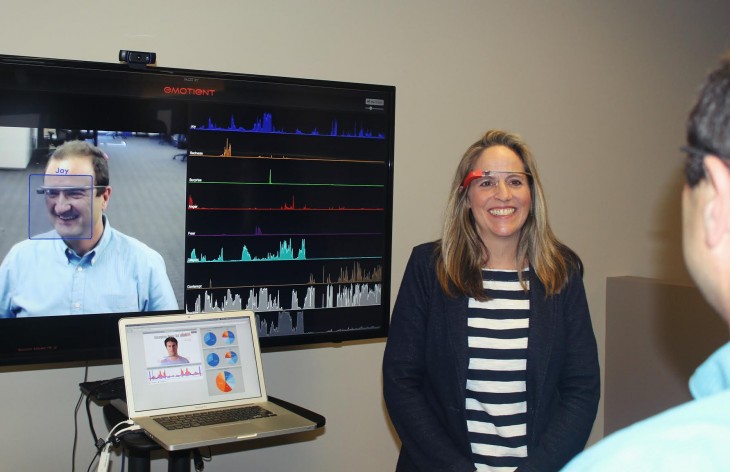
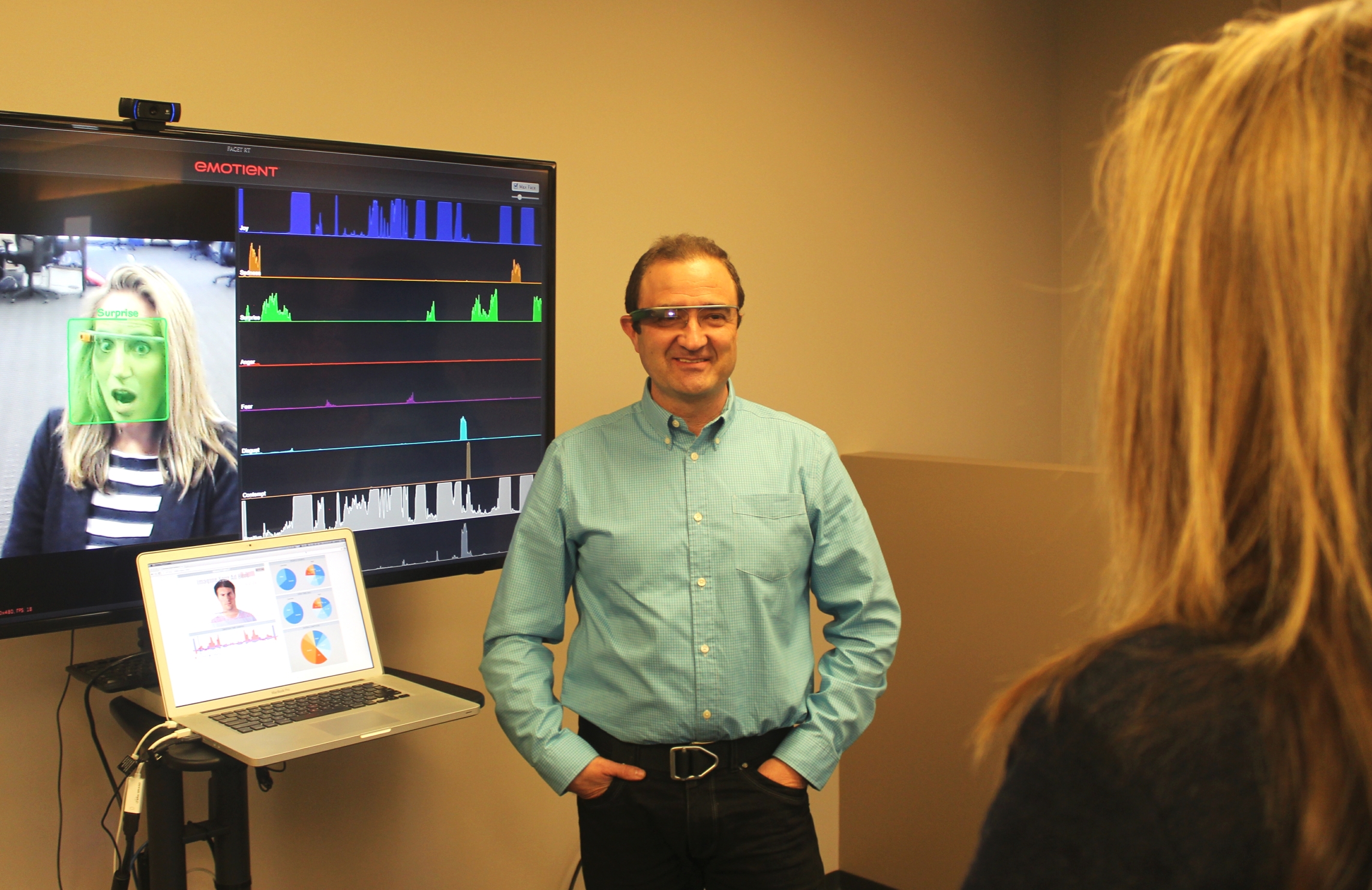
In essence, what the company does is use cameras to identify and process facial expressions and provide an emotional read-out that measures overall sentiment (positive, negative or neutral), primary emotions (joy, surprise, sadness, fear, disgust, contempt and anger) and more advanced emotions like frustration and confusion. It doesn’t really require any special hardware, for the demo we saw a run-of-the-mill Logitech webcam was used.
So, in this case, the wearer of Google Glass can simply fire up the app and have the emotions and sentiments of everyone around them displayed in their line-of-sight and fed back to the software platform.
In the demo, the recognition happens very quickly and has no problem dealing with more subtle expressions (like looking deliberately slightly sad) or very quick smiles, for example. While it’s easy to think of the one-on-one benefits this could bring, the app is really a proof of concept for Emotient – the ultimate aim is to get its facial tracking tech in all manner of different devices and services.
On one side of that equation you have a deal with Intel that will see the tech feature as part of the Intel Real Sense SDK and reach a far wider audience than it otherwise could.
“Intel Capital is our first institutional investor and they are also a customer of ours, our technology is going to be integrated into the upcoming version of its perceptual computing SDK – renamed Real Sense at CES. That will open up the capabilities of our technology out to all of the developer communities that are a part of its perceptual computing division,” Dr. Marian Bartlett, one of the co-founders of Emotient, told TNW.
To give an example, imagine the Virgin Atlantic staff wearing Google Glass being equipped with this software. Not only would they be able to recognize passengers, but they’d also have a pretty good idea of exactly how they were feeling as they got on board. To be clear, there’s no suggestion that Virgin Atlantic is working with Emotient to achieve this, but there’s no reason it couldn’t.
Silent intent
On the other, arguably more important, side of the equation, Emotient is looking at which key industries it could best be applied to initially, although it’s clear that there are many more potential uses for future diversification.
One of the most obvious ones on that list is retail. The ability to really know what a customer thinks of a product or service without them needing to say a word is a powerful tool. Whether or not customers will be happy giving genuine feedback that they perhaps had no intention or desire to give remains to be seen. In theory though, it’s a mutually beneficial deal: the store gets to know what you think, and using that feedback it should be able to offer more of the things that make you happy and less of the ones that you’re indifferent about.
Right now, the system is capable of automatically identifying the gender of a person, but in the future it will also be able to identify their age and eventually their ethnicity too – allowing for an even more detailed analysis of group sentiment filtered by various factors.
Ken Denman, CEO of Emotient explained a little more about the company’s multiple routes to market:
The real power of this is to be able to basically aggregate real feedback, the implicit response people have to various stimuli and situations…to aggregate that information in an anonymized fashion such that you really have a sense of what groups and sub-groups think about a particular customer experience, a particular product, merchandising,[or] audience measurement of some content. That’s the real value here in my opinion.
The one-on-one is interesting and people get intrigued by it, but it’s not really where the value is. If you look at this in the context of how do you add value economically to the world, it’s about helping consumers, users, customers. In the end, systems will have a better understanding of what they value and what they don’t value – and that will translate into faster product developments, faster product changes, faster customer service improvements. So, in thinking about the long-game, that’s what we’re focused on.
The near-term intrigue and interest is really cool but the value here is going to be picking up information ‘in the wild’ as we move around… We’re not storing the images and we’re not really interested in who you are, so to speak, it’s more about how you feel about whatever you’re experiencing.
Some of the emotions it tracks, like disgust, are more closely linked to things like buying intentions rather than just general feeling about a product, so tracking that allows for actual prediction of future sales. Offered up as anecdotal evidence of this, the company told me that as part of its testing it had compared its facial recognition system to a traditional survey to see whether frangrace buying behaviour could be predicted by either. To cut a long story short, the survey couldn’t predict the outcome accurately but the Emotient tech could.
“Disgust is an important emotion because it’s closely related to dislike. So, when someone dislikes something, an offer – including a financial offer – people will [pull a face] without even realizing they are doing it… Contempt is also an important emotion because there’s often a disconnect between what people say and what people do,” Bartlett explained.
There’s obviously a rather large privacy-shaped elephant in this particular room, though. Despite multiple assurances from the company that no picture data is stored, I can see the idea of having your non-verbal communication scanned and analyzed not sitting too well with some people, whether that’s in a retail setting or some other situation. For me, there’s also an issue of taking feedback that the individual perhaps had no desire to share with you. To be clear though, the company reiterated several times that the aggregated emotional responses are the only data that is stored. Once a ‘score’ has been assigned, no other data is held – and it’s not held on an individual level.
Momentum
Despite some potential privacy concerns, the idea is clearly gaining some traction. In addition to already scoring the deal with Intel this year, the company is also today announcing that it secured an additional $6 million in Series B funding in a round led by Handbag LLC. Intel Capital also participated in this second round.
While Emotient is focusing on industries like retail and healthcare for now, there are big ambitions to reach out into other sectors too, according to Denman.
What we found is that the technology applies horizontally in some many ways that it’s almost overwhelming. There are so many opportunities to leverage the technology, but of course when you’re bringing a new concept to market, the important thing to do is decide on a focus area and go deliver in that area. That’s not to say we’re not interested in these other areas that will evolve over time, but we’re focused on a couple of areas – retail and healthcare – where we’re engaged with some of the largest players and names you know who definitely want us to deliver applications to meet their needs in the near-term, so we’re going to focus on getting those done and stay close to other areas. There are some non-obvious places that we can’t just fully focus on as the other opportunities are bigger and nearer.
Honda was an early purchaser of our technology… In the research area they began to spend time thinking about how to improve the infotainment center, the cabin of the car – cars turn over nowadays based on the electronics and entertainment, so there’s a lot of interest from the auto industry but that’s just a little further out.
The other natural match, given what the technology does, would be combining it with voice analysis software like Beyond Verbal’s for an even more accurate picture of sentiment or emotion, but for now, Denman says this isn’t on the cards.
Voice is obviously another measure that could be taken and integrated with facial expression, clearly, and our team has worked on voice in the past, but we’re not currently focused on that. We may partner with some one in that regard, or we could develop our own. Right now, we think we have the sweet spot and want to be the best in the world at facial expression recognition – we believe we are already… but that’s an ongoing conversation within our team – how and when do we integrate voice.
If, however, it does get to the point of drawing on voice data too, it would become all the more powerful. Facial expression might be a good indicator of how someone is feeling, but it’s by no means a guarantee of their true thoughts; adding more information can only result in a more accurate overall picture. Whether that’s an exciting vision of the future or a terrifying potential invasion of your privacy is up to you.
Featured Image Credit – Shutterstock