



I know a good thing when I see it. Dick’s use of the word Redux in yesterday’s post for one. Dick’s nifty CreateDynamicNames() sub for another. Put them together, and you’ve got a winning combination. Or at least, 5 minutes of distraction between whatever the heck it is you’re supposed to be doing instead of reading this post. Work, most likely.
Yesterday I posted a barely fleshed out bit of code that took some of the tedium out of maintaining Named Ranges. Mostly it saved you scrolling through a potentially overwhelming list of Names in order to find the one you want to maintain or zap:
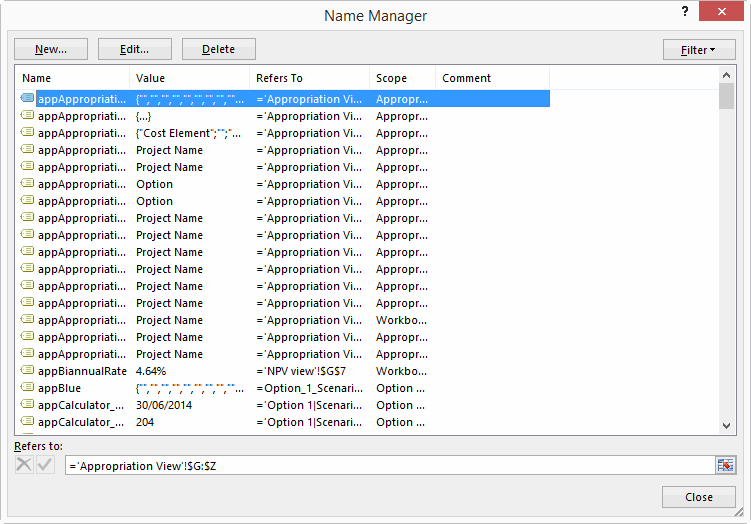
Today, we’re going to turn yesterday’s rather underwhelming interface:
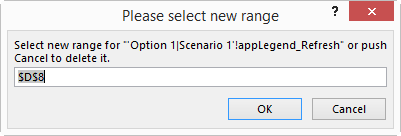
…into this slightly less underwhelming interface:
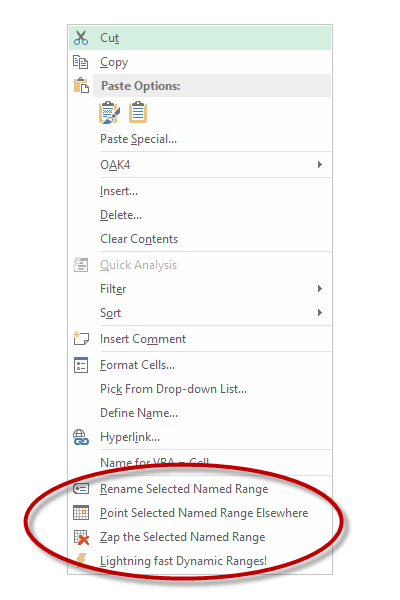
Our first step is to put some code in the Personal Macro Workbook to add those additional right-click items to the right-click menus – aka context menus – that we’re likely to use in relation to the grid. Three of these menus spring to mind:
- The “List Range PopUp” CommandBar that you see if you right click over a Table.
- The “PivotTable Context Menu” CommandBar that you see if you right click over a PivotTable.
- The “Cell” CommandBar that you’re likely to see if you right click over a range that’s not a Table or a PivotTable.
There’s probably more. Let me know in the comments if you can think of others relevant to this post.
Name your poison
Here’s the code I use to add the shortcuts:
Dim cbr As CommandBar
Dim i As Long
DeleteShortcuts
For i = 1 To 3
Select Case i
Case 1: Set cbr = Application.CommandBars("Cell")
Case 2: Set cbr = Application.CommandBars("List Range PopUp")
Case 3: Set cbr = Application.CommandBars("PivotTable Context Menu")
End Select
‘Add Stand-alone buttons for Duplicate/Delete resource subs
With cbr.Controls.Add(Type:=msoControlButton, Temporary:=True)
.Caption = Chr(Asc("&")) + "Rename Selected Named Range"
.Tag = "RenameName"
.OnAction = "RenameName"
.Style = msoButtonIconAndCaption
.Picture = Application.CommandBars.GetImageMso("NameDefine", 16, 16)
.BeginGroup = True
End With
With cbr.Controls.Add(Type:=msoControlButton, Temporary:=True)
.Caption = Chr(Asc("&")) + "Point Selected Named Range Elsewhere"
.Tag = "RepointName"
.OnAction = "RepointName"
.Style = msoButtonIconAndCaption
.Picture = Application.CommandBars.GetImageMso("ArrangeByAppointmentStart", 16, 16)
End With
With cbr.Controls.Add(Type:=msoControlButton, Temporary:=True)
.Caption = Chr(Asc("&")) + "Zap the Selected Named Range"
.Tag = "DeleteName"
.OnAction = "DeleteName"
.Style = msoButtonIconAndCaption
.Picture = Application.CommandBars.GetImageMso("DeleteTable", 16, 16)
End With
With cbr.Controls.Add(Type:=msoControlButton, Temporary:=True)
.Caption = Chr(Asc("&")) + "Lightning fast Dynamic Ranges!"
.Tag = "DynamicRanges"
.OnAction = "CreateDynamicNames"
.Style = msoButtonIconAndCaption
.Picture = Application.CommandBars.GetImageMso("UMLEvents", 16, 16)
End With
Next
End Sub
Here’s the code I use to delete ‘em:
Dim cbr As CommandBar
Dim ctrl As CommandBarControl
Dim i As Long
For i = 1 To 3
Select Case i
Case 1: Set cbr = Application.CommandBars("Cell")
Case 2: Set cbr = Application.CommandBars("List Range PopUp")
Case 3: Set cbr = Application.CommandBars("PivotTable Context Menu")
End Select
‘ Delete the custom controls with the Tag : My_Cell_Control_Tag.
For Each ctrl In cbr.Controls
Select Case ctrl.Tag
Case "RenameName", "RepointName", "DeleteName", "DynamicRanges"
ctrl.Delete
End Select
Next ctrl
Next i
End Sub
That Chr(Asc(“&”)) + stuff in that first routine sets the accelerator keys, so that all you musophobes don’t have to obsessively wash your hands each time you use these. Instead, you can use the menu key:

…and then hit the R, P, Z, or L keys accordingly.
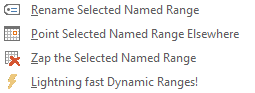
I was going to try to spell something rude with these, but it was like playing Scrabble against Microsoft, who already took all the best letters. Cheats!
(Aside: There’s a good discussion over at Chandoo’s blog about the menu key, and what to do if some tight-wad manufacturer hasn’t put it on their machines.)
These shortcuts get added when Excel starts/closes courtesy of the Workbook_Open/Workbook_Close events in the ThisWorkbook module in my Personal Macro Workbook:
AddShortcuts
End Sub
DeleteShortcuts
End Sub
So that sets the stage. Next, we need some actual routines to do something when we select from those right-click menus.
Hi. My name is…
(what?) My name is… (who?)
My name is… [scratches] Slim Shady
Here’s the main function: a routine that returns a delimited string containing the names of any names that reference your reference:
‘Identifies any Named Ranges that map directly to rng
Dim nm As Name
Dim strNames As String
For Each nm In ActiveWorkbook.Names
On Error Resume Next
If nm.RefersToRange.Address(External:=True) = rng.Address(External:=True) Then
If Err.Number = 0 Then strNames = strNames & nm.Name & "|"
End If
On Error GoTo 0
Next
IdentifyNames = strNames
End Function
And here’s my three functions to Repoint, Rename, or completely ‘Reck those names:
Dim nm As Name
Dim strNames As String
Dim rngNew As Range
Dim rngExisting As Range
Dim lngNames As Long
Dim strMessage As String
Dim strMultipleNames As String
Dim i As Long
Set rngExisting = Selection
strNames = IdentifyNames(rngExisting)
lngNames = UBound(Split(strNames, "|"))
If lngNames = -1 Then
‘There is no named range that matches. So let the user choose one.
Application.Dialogs(xlDialogNameManager).Show
Else:
For i = 0 To lngNames – 1
Set nm = ActiveWorkbook.Names(Split(strNames, "|")(i))
If lngNames > 1 Then
strMultipleNames = "I found " & lngNames & " Named Ranges that reference your selection, "
strMultipleNames = strMultipleNames & "so we ‘ll go through them one by one."
strMultipleNames = strMultipleNames & vbNewLine & vbNewLine
strMultipleNames = strMultipleNames & "Name " & i + 1 & " of " & lngNames & ":"
strMultipleNames = strMultipleNames & vbNewLine & vbNewLine
End If
On Error Resume Next
Set rngNew = Application.InputBox( _
Title:="Please select new range", _
Prompt:=strMultipleNames & "Select the range where you want """ & nm.Name & """ to point at.", _
Default:=Selection.Address, _
Type:=8)
On Error GoTo 0
If Not rngNew Is Nothing Then
nm.RefersTo = "=’" & ActiveSheet.Name & "’!" & rngNew.Address
rngNew.Select
End If
Next i
End If
End Sub
Dim nm As Name
Dim strNames As String
Dim nmExists As Name
Dim strRefersTo As String
Dim strMultipleNames As String
Dim strNew As String
Dim rng As Range
Dim lngNames As Long
Dim i As Long
Set rng = Selection
strNames = IdentifyNames(rng)
lngNames = UBound(Split(strNames, "|"))
If lngNames = -1 Then
‘There is no named range that matches. So let the user choose one.
Application.Dialogs(xlDialogNameManager).Show
Else:
For i = 0 To lngNames – 1
Set nm = ActiveWorkbook.Names(Split(strNames, "|")(i))
If lngNames > 1 Then
strMultipleNames = "I found " & lngNames & " Named Ranges that reference your selection, "
strMultipleNames = strMultipleNames & "so we ‘ll go through them one by one."
strMultipleNames = strMultipleNames & vbNewLine & vbNewLine
strMultipleNames = strMultipleNames & "Name " & i + 1 & " of " & lngNames & ":"
strMultipleNames = strMultipleNames & vbNewLine
End If
On Error Resume Next
strNew = Application.InputBox( _
Title:="Please input the new name…", _
Prompt:=strMultipleNames & "Please type the new name for """ & nm.Name & """.", _
Default:=nm.Name, _
Type:=2)
If strNew = "False" Then Exit Sub
If Not strNew = nm.Name Then
strNew = Fix_Name(strNew)
On Error Resume Next
Set nmExists = ActiveWorkbook.Names(strNew)
On Error GoTo 0
If nmExists Is Nothing Then
nm.Name:=strNew
Else:
MsgBox "That name already exists. Please choose another."
Set nmExists = Nothing
End If
End If
Next
End If
End Sub
Dim nm As Name
Dim strNames As String
Dim strMessage As String
Dim iResponse As Integer
Dim rngExisting As Range
Dim lngNames As Long
Dim i As Long
strNames = IdentifyNames(Selection)
lngNames = UBound(Split(strNames, "|"))
Select Case lngNames
Case -1:
‘There is no named range that matches. So let the user choose one.
Application.Dialogs(xlDialogNameManager).Show
Case 1: ActiveWorkbook.Names(Split(strNames, "|")(0)).Delete
Case Else:
For i = 0 To lngNames – 1
Set nm = ActiveWorkbook.Names(Split(strNames, "|")(i))
strMessage = "I found " & lngNames & " Named Ranges that reference your selection, "
strMessage = strMessage & "so we ‘ll go through them one by one."
strMessage = strMessage & vbNewLine & vbNewLine
strMessage = strMessage & "Name " & i + 1 & " of " & lngNames & ":"
strMessage = strMessage & vbNewLine
strMessage = strMessage & "Do you want to delete the Named Range """ & nm.Name & """?"
iResponse = MsgBox( _
Title:="Multiple Names Found", _
Prompt:=strMessage, _
Buttons:=vbYesNoCancel + vbQuestion)
Select Case iResponse
Case vbYes: nm.Delete
Case vbNo: ‘do nothing
Case vbCancel: Exit Sub
End Select
Next i
End Select
End Sub
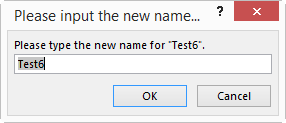
These subs are all fairly intelligent in that they handle the case where just one Named Range resolves to the selection:
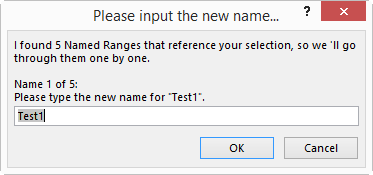
…as well as multiple Named Ranges resolving to the selected range:
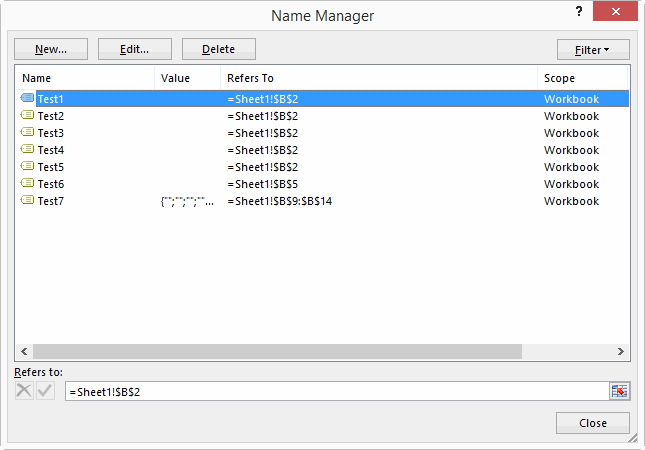
So given this code is supposed to do something to Named Ranges that point at the current selection, what happens if someone runs it on a range that no names point at? Glad I asked. It brings up a the inbuilt ‘Name Manager’, in case the user does actually want to do something with a name, but forgot to select the range it resolves to:
Lastly, here’s Dick’s code that I shamelessly lifted, that lets you create lots of Dynamic Named Ranges from your current selection, in response to a question from GMF. (Now that is a strange name!)
Dim rCell As Range
Dim sCol As String
Dim sPrefix As String
Dim strPrompt As String
If TypeName(Selection) = "Range" Then
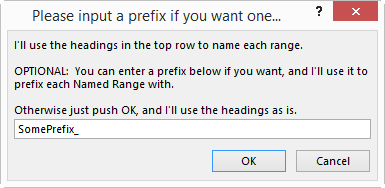
strPrompt = "I’ll use the headings in the top row to name each range." & vbNewLine & vbNewLine
strPrompt = strPrompt & "OPTIONAL: You can enter a prefix below if you want, and I’ll use it to prefix each Named Range with." & vbNewLine & vbNewLine
strPrompt = strPrompt & "Otherwise just push OK, and I’ll use the headings as is."
sPrefix = Application.InputBox( _
Title:="Please input a prefix if you want one…", _
Prompt:=strPrompt, _
Type:=2)
If sPrefix = "False" Then Exit Sub
For Each rCell In Selection.Rows(1).Cells
If rCell.Value <> "" Then ActiveWorkbook.Names.Add Fix_Name(sPrefix & rCell.Value), "=’" & rCell.Parent.Name & "’!" & rCell.Offset(1).Address & ":INDEX(‘" & rCell.Parent.Name & "’!" & rCell.EntireColumn.Address & ",COUNTA(‘" & rCell.Parent.Name & "’!" & rCell.EntireColumn.Address & "))"
Next rCell
End If
End Sub
This code is a real timesaver. Simply select a range that looks like this:
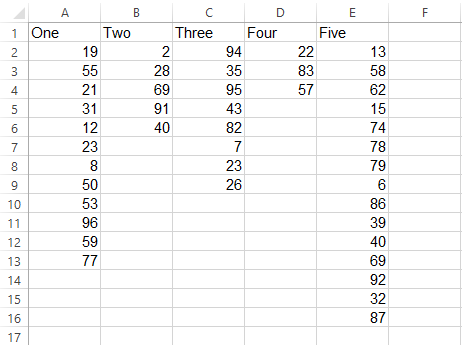
…select this from the Right Click menu:

…add a prefix if you want:
…and next time you open NameManager, you’ll see those names are all good to go:
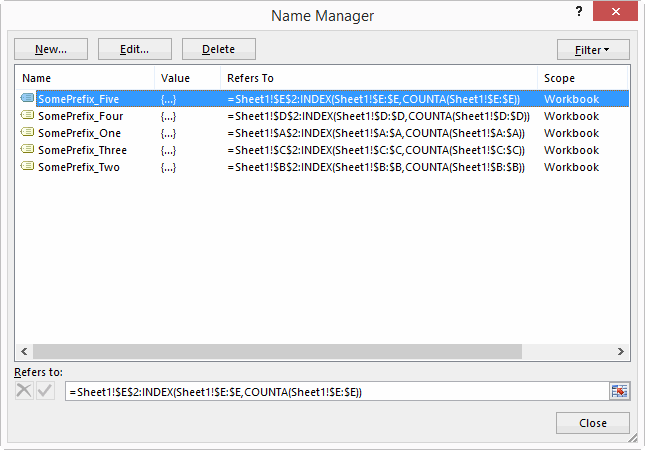
Pure magic, Dick.
And lastly, here’s Craig Hatmaker’s function I use to clean names:
‘ Description:Conforms a string so it can be used as a name
‘ Parameters: sName String to be conformed
‘ Example: sColumnName = Fix_Name("1st deposit %")
‘ Date Ini Modification
‘ 11/02/10 CWH Initial Programming
‘ 11/20/10 CWH Used "Like" operator
‘If Not DebugMode Then On Error GoTo ErrHandler
Fix_Name = sName
Dim i As Integer
‘Substitute special invalid characters w/standard abbreviations
sName = Replace(sName, "#", "_NUM")
sName = Replace(sName, "$", "_AMT")
sName = Replace(sName, "%", "_PCT")
sName = Replace(sName, "-", ".")
sName = Replace(sName, ",", "-")
sName = Replace(sName, " ", "_")
‘Get rid of all other illegal characters
i = 1
Do While i <= Len(sName)
If Not Mid(sName, i, 1) Like "[A-Z,a-z,0-9,.,_,\]" Then _
sName = Left(sName, i – 1) & Right(sName, Len(sName) – i)
i = i + 1
Loop
‘First Character cannot be numeric & result cannot look like cell ref.
If IsNumeric(Left(sName, 1)) Or sName Like "[A-Z]#" Then _
sName = "_" & sName
Fix_Name = sName
ErrHandler:
If Err.Number <> 0 Then MsgBox _
"Fix_Name – Error#" & Err.Number & vbCrLf & _
Err.Description, vbCritical, "Error", Err.HelpFile, Err.HelpContext
On Error GoTo 0
End Function
All this is in the attached file, along with some names for you to try it out on. Adjust Named Ranges_20140801
Name-dropper!
In terms of how the above code works, you can find a very good introduction on Ron de Bruin’s site, and you’ll likely learn a lot by poking around Doug Glancy’s site and in the VBA in his MenuRighter and FaceIdViewer addins.