The Daily Dose

laugh every day with cartoons jokes and humor
  • Home
  • About
    • Press
      • Press Release – Announcing Laughzilla the Third ebook
      • Press Release – The Daily Dose Kicks Off Its 16th Year with New Books and More Irreverent Laughter
      • Press Release – Themes Memes and Laser Beams Now Available in Paperback
      • Press Release – Announcing Themes Memes and Laser Beams
      • In The News
    • Privacy
  • Archive
  • Books
  • Shop
  • Collections
    • Galleries
      • Gallery
      • Captions
      • Flash Cartoons & Greeting Cards
        • Laughzilla’s Oska Flash Animation Cartoon Greeting Cards
        • Oska Cupid Love Humor
    • #OccupyWallStreet
    • cats
    • China
    • Food
      • Hors d’oeuvres
        • Ball of Cream Cheese
      • Entrees / Main Courses
        • Meatballs with Baked Beans and Celery
    • Gadaffy
    • Google
  • Links
  • Video
  • Submit a joke
DeviantART Facebook Twitter Flickr pinterest YouTube RSS

Subscribe for Free Laughs!


Latest Comics

  • This Memorial Day, Trump Meme Coin Congratulates Profit Takers
  • 25 Years of The Daily Dose
  • The Best Cartoons
  • Bitcoin sings “Fly Me To The Moon”
  • 22 years of The Daily Dose

Comic Archive

Occupy History Lil Kim Jong Il Is Dead

Daily Dose News Roundup

  • Google wants Gemini 4 out ‘much earlier’ than the end of the year
  • Australian inquiry asks Altman and Amodei to testify
  • Tesla’s Semi finally enters production, nine years after it was shown
  • Chinese cities offer subsidies and cheap computing to lure AI film studios
  • Starlink ground station near Warsaw hit by fire, Poland suspects sabotage

Quotable

"If an employee of the Lost & Found department loses something, where do they go to find it?" ~ Laughzilla

Fresh Baked Goods

Get The Daily Dose's ebook: Laughzilla the Third - A Funny Stuff Collection of 101 Cartoons from TheDailyDose. Click here to get the e-book on Amazon kdp. Laughzilla the Third (2012) The Third Volume in the Funny Stuff Cartoon Book Collection Available Now.

Click here for the Paperback edition


Support independent publishing: Buy The Daily Dose's book: Themes Memes and Laser Beams - A Funny Stuff Collection of 101 Cartoons by Laughzilla from TheDailyDose. Click here to get the book on Amazon. Themes Memes and Laser Beams - The Second Volume in the Funny Stuff Cartoon Book Collection.

Click Here to get the book in Paperback While Available on Amazon

Themes Memes and Laser Beams - 101 Cartoons by Laughzilla. Get the e-book on Lulu.

Click Here to get The Daily Dose Cartoon ebook on amazon kindle

Funny Stuff :
The First Cartoon Book
from The Daily Dose.
Available on Lulu.

a couple of laughzillas on a blue diamond background

BlackBerry is offering up to $550 if you trade-in your iPhone for a BlackBerry Passport

Nov24
by Sindy Cator on November 24, 2014 at 11:50 pm
Posted In: Around the Web, Insider

BlackBerry has struggled as of late, but it’s trying hard to lure users over to its latest hardware. The  company today announced that it’s offering a ‘trade-up’ program that could save iPhone owners up to $550 on a purchase of a Blackberry Passport. The payment is split up into a $150 as a Visa Prepaid card for every device, plus up  to $400 dollars depending on the model and condition of the phone. Blackberry is accepting every iPhone model since the 4s, but that model will only net you $90 in addition to the $150 card. The trade-up program starts on…

This story continues at The Next Web

└ Tags: syndicated
a couple of laughzillas on a blue diamond background

Evaluate(Evaluate)

Nov24
by Sindy Cator on November 24, 2014 at 9:31 pm
Posted In: Around the Web

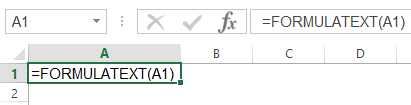
Since Excel 2013, Microsoft has given us a FORMULATEXT function, which if you point at a cell will do just that. Here’s a naughty snapshot of FORMULATEXT playing with itself in the corner:
 

FormulaText
 
 
I thought I’d have a go at writing a FormulaArray function to complement it, because when I’m building up a complicated formula that uses lots of array manipulation, then I like to document how all the different arrays within it fit together. (I was going to say “come together” there, but after that crack about FORMULATEXT playing with itself, I thought better of it. But now that I’ve said crack, I’m gonna throw caution to the wind and say wind too.)

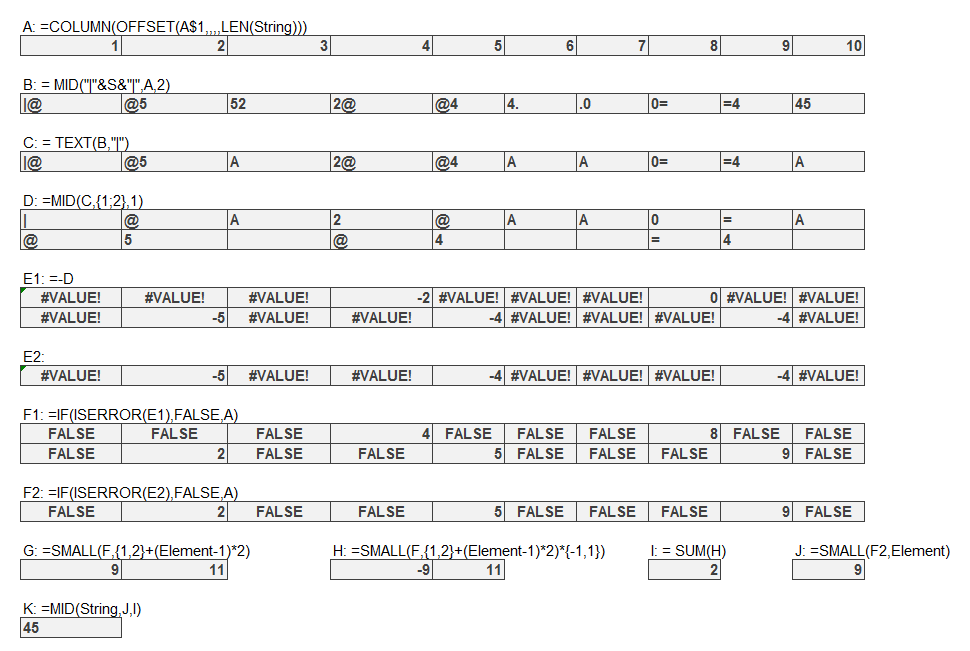
Currently I document my formula beasts by either either array-enter a sub-part in the sheet with some notes, like this:
 
Documentation 1
 
 
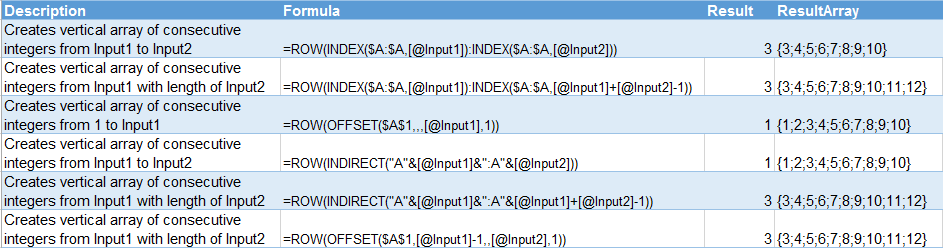
…which shows how my ExtractNumber formula works, or I enter the desired formula in one cell with a ShowFormula to the left and a hand-rolled hard-coded array to the right, like in this table where I’m documenting a few ways to dynamically generate consecutive integers:
 
Documentation 2
 
 
I get that ResultArray manually, by clicking in the formula bar, pushing F9, copying the resulting evaluated array, then pasting it in another cell. Tedious. Especially when I later make a change to that sub-part, because then I get to do those steps all over.

So I started to roll my own FormulaArray function. I got a bit bogged down in the joining bit, but after about an hour of Googling, I rediscovered Nigel Heffernan’s code for joining two dimensional arrays. Which is very concerning, because I discovered it like just 10 days ago, and even wrote an extensive blog post on it right here. Senility is obviously setting in. If I start saying the same thing over and over like my mother does, just shoot me. If I start saying the same thing over and over like my mother does, just shoot me.

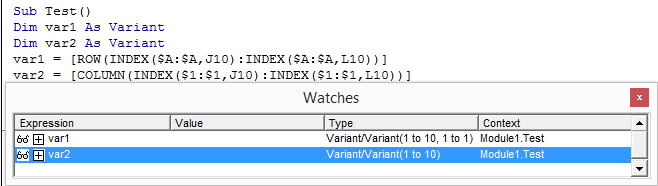
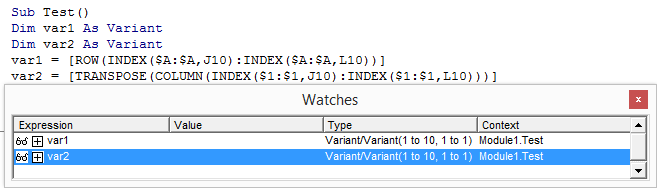
Anyways, Nigel’s function needs a 2D array. You can create an array from formula text by using VBA’s Evaluate method. If the formula returns a Row vector or a 2D vector, then Evaluate nicely turns it into a 2D vector. But here’s the rub: if the formula returns a Column vector, then Evaluate only gives us a 1D vector, which ain’t gonna wash with Nigel’s function:
 
Row vs Column
 
 
So what we need to do is TRANSPOSE any formulas that would return Column vectors, because chucking a TRANSPOSE into the mix has the desired effect:
 
Row vs Column2
 
 
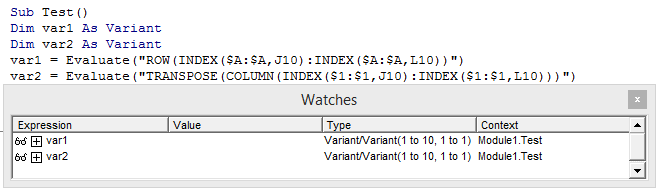
Note that I’m using the square brackets [ ] shortcut for Evaluate. I could just have easily done it like this:
 
Row vs Column3


Okay, so we know that if our formula string returns a Column vector, we’ve got to transpose it. But how can we tell that ahead of time? I can’t think of a way. So I just do this:

Function FormulaArray(Target As Range) As String
Dim var1 As Variant
Dim var2 As Variant
Dim lb As Long

var1 = Mid(Target.Formula, 2, Len(Target.Formula))
var2 = Worksheet.Evaluate(var1)
On Error Resume Next
lb = LBound(var2, 2)
If Err.Number <> 0 Then
    var2 = Application.Transpose(Worksheet.Evaluate(var1))
    FormulaArray = Join2d(var2, ",", ";")
Else:
    FormulaArray = Join2d(var2, ";", ",")
End If
   
End Function

So I evaluate the formula as if it’s a Row vector, then check if I’ve got 2 dimensions as a result. If not, it must have been a column vector, in which case I transpose it, then reevaluate it. Shame about the double evaluation, but I can’t think of a foolproof way to do it differenty, other than perhaps array entering the formula into a 2D range on the worksheet and looking at where the #N/A! errors fall.

Anyway, it seems to work just fine:
 
Result_NoTable2


..unless you happen to be using Structured Table References, and your arguments happen to use the @ table notation to point at something on the same row:
 
Result_SameTable
 
 
…or unless you happen to have a formula with the INDIRECT function in it:
 
Result_INDIRECT2
 
 
With the ThisTableRow thing, I guess I can just replace the @[SomeColumn] bit with the actual address, but I can’t think of easy ways around the INDIRECT thing. Anyone got any ideas?

Sample workbook:

FormulaArray_20141125

There’s a handy post over at Charles Williams’ site that talks about some other quirks of Evaluate that’s worth checking out:
https://fastexcel.wordpress.com/2011/11/02/evaluate-functions-and-formulas-fun-how-to-make-excels-evaluate-method-twice-as-fast/
└ Tags: syndicated
a couple of laughzillas on a blue diamond background

Sony Pictures hacked, entire computer system reportedly unusable

Nov24
by Sindy Cator on November 24, 2014 at 7:58 pm
Posted In: Around the Web, Insider

sony
Reports that Sony Pictures has been hacked have been trickling in this morning, after a thread appeared on Reddit claiming all computers at the company were offline due to a hack. According to the Reddit thread, an image appeared on all employee’s computers reading “Hacked by #GOP” and demanding their “requests be met” along with links to leaked data. The Reddit user that posted the thread posted a year ago that they worked at Sony Pictures. The image shown on employee computers – we’ve blurred out the links to leaked documents The ZIP files mentioned in the images contain a number…

This story continues at The Next Web

└ Tags: syndicated
a couple of laughzillas on a blue diamond background

What I would do differently if I was learning to code today

Nov24
by Sindy Cator on November 24, 2014 at 7:30 pm
Posted In: Analysis and Opinion, Around the Web, Design & Dev, LifeHacks

14337016445_923bc0abf9_k
This post originally appeared on the Crew blog. I’ve been learning to build iOS apps in Objective-C for the past few months and I’m finally starting to really get my head around it. It’s been a lot harder and taken a lot longer than I expected. I often get stuck, get frustrated, and spend many more hours searching for bug fixes than actually writing code. But it’s an amazing feeling to play with an app on my phone and know that I built it from scratch. I’ve learned a lot along the way—not just about developing iOS apps, but about…

This story continues at The Next Web

└ Tags: syndicated
a couple of laughzillas on a blue diamond background

Ideal Gifts: ‘Our Final Invention’ – the perfect guide to how AI could kill us all

Nov24
by Sindy Cator on November 24, 2014 at 7:25 pm
Posted In: Around the Web, gifts2014, Insider, Product Reviews

James Barrat cover
In the Ideal Gifts series, The Next Web team shares personal recommendations for gifts to give this holiday season.  No single book has inspired me this year more than Our Final Invention, a book by documentary maker James Barrat. This book is a really accessible guide to the argument that artificial intelligence will eventually become ‘super-intelligence’ and kill us all. That may sound like something from a Terminator movie, but it’s a threat that increasing numbers of people are taking seriously. If annihilation-by-AI is a topic you’ve never thought much about, this is a great place to start. It starts by explaining…

This story continues at The Next Web

└ Tags: syndicated
  • Page 12,257 of 14,670
  • « First
  • «
  • 12,255
  • 12,256
  • 12,257
  • 12,258
  • 12,259
  • »
  • Last »
The Daily Dose, The Daily Dose © 1996 - Present. All Rights Reserved.
  • Home
  • About
  • Archive
  • Books
  • Collections
  • Links
  • Shop
  • Submit a joke
  • Video
  • Privacy Policy