

The Daily Dose

laugh every day with cartoons jokes and humor
  • Home
  • About
    • Press
      • Press Release – Announcing Laughzilla the Third ebook
      • Press Release – The Daily Dose Kicks Off Its 16th Year with New Books and More Irreverent Laughter
      • Press Release – Themes Memes and Laser Beams Now Available in Paperback
      • Press Release – Announcing Themes Memes and Laser Beams
      • In The News
    • Privacy
  • Archive
  • Books
  • Shop
  • Collections
    • Galleries
      • Gallery
      • Captions
      • Flash Cartoons & Greeting Cards
        • Laughzilla’s Oska Flash Animation Cartoon Greeting Cards
        • Oska Cupid Love Humor
    • #OccupyWallStreet
    • cats
    • China
    • Food
      • Hors d’oeuvres
        • Ball of Cream Cheese
      • Entrees / Main Courses
        • Meatballs with Baked Beans and Celery
    • Gadaffy
    • Google
  • Links
  • Video
  • Submit a joke
DeviantART Facebook Twitter Flickr pinterest YouTube RSS

Subscribe for Free Laughs!


Latest Comics

  • This Memorial Day, Trump Meme Coin Congratulates Profit Takers
  • 25 Years of The Daily Dose
  • The Best Cartoons
  • Bitcoin sings “Fly Me To The Moon”
  • 22 years of The Daily Dose

Comic Archive

President Obama Caricature Reelection Victory Message

Daily Dose News Roundup

  • Anthropic says China’s GLM-5.3 nearly matches Mythos at cyber exploits
  • Chinese-powered AI agents show the same deception as their US rivals
  • OpenAI, Blackstone and unions form a data centre alliance, Axios reports
  • Google wants Gemini 4 out ‘much earlier’ than the end of the year
  • Australian inquiry asks Altman and Amodei to testify

Quotable

Holding some matzah, a blind man said "Who the heck wrote this crap!?"

Fresh Baked Goods

Get The Daily Dose's ebook: Laughzilla the Third - A Funny Stuff Collection of 101 Cartoons from TheDailyDose. Click here to get the e-book on Amazon kdp. Laughzilla the Third (2012) The Third Volume in the Funny Stuff Cartoon Book Collection Available Now.

Click here for the Paperback edition


Support independent publishing: Buy The Daily Dose's book: Themes Memes and Laser Beams - A Funny Stuff Collection of 101 Cartoons by Laughzilla from TheDailyDose. Click here to get the book on Amazon. Themes Memes and Laser Beams - The Second Volume in the Funny Stuff Cartoon Book Collection.

Click Here to get the book in Paperback While Available on Amazon

Themes Memes and Laser Beams - 101 Cartoons by Laughzilla. Get the e-book on Lulu.

Click Here to get The Daily Dose Cartoon ebook on amazon kindle

Funny Stuff :
The First Cartoon Book
from The Daily Dose.
Available on Lulu.

a couple of laughzillas on a blue diamond background

Handling Specific Errors

Jan07
by Sindy Cator on January 7, 2015 at 1:28 am
Posted In: Around the Web, VBA

A few years ago I posted my code for pasting values. It’s changed a bit since then. This morning, it looked like this:

Sub CopyPasteValues()
   
    gclsAppEvents.AddLog "^+v", "CopyPasteValues"
   
    If TypeName(Selection) = "Range" And Application.CutCopyMode = xlCopy Then
        Selection.PasteSpecial xlPasteValuesAndNumberFormats
    ElseIf Application.CutCopyMode = xlCut Then
        If Not ActiveSheet Is Nothing Then
            ActiveSheet.Paste
        End If
    End If
End Sub

If I’m copying, then I paste both the values and the number formats (but not other formats, comments, data validation, etc). I found that this was my most common need. When I only want values, I use Alt+E+S like in the old days. If I’m cutting, I can’t PasteSpecial, so I just Paste.

Usually I select the first cell where I want to paste and press Ctrl+Shift+V and the selection expands to fit the data. Sometimes, however, that expanded selection contains merged cells which causes an error. I’ve just ignored the error in the past, but I figured it was time to fix it. Now my code looks like this:

Sub CopyPasteValues()
   
    gclsAppEvents.AddLog "^+v", "CopyPasteValues"
   
    If TypeName(Selection) = "Range" And Application.CutCopyMode = xlCopy Then
        On Error GoTo ErrHandler
        Selection.PasteSpecial xlPasteValuesAndNumberFormats
    ElseIf Application.CutCopyMode = xlCut Then
        If Not ActiveSheet Is Nothing Then
            ActiveSheet.Paste
        End If
    End If
   
ErrExit:
    Exit Sub
   
ErrHandler:
    Select Case Err.Number
        Case 1004
            If IsNull(Selection.MergeCells) Then
                MsgBox "The range " & Selection.Address & " has merged cells. Can’t paste"
            Else
                MsgBox Err.Description
            End If
        Case Else
            MsgBox Err.Description
    End Select
   
    Resume ErrExit
   
End Sub

Above the PasteSpecial line, I put an On Error statement to direct the program flow to an error handler. I didn’t apply that to the Cut portion of the code because cutting and pasting prompts me to unmerge cells and that’s the behavior I want.

In the error handling block, I check for the specific error 1004. I didn’t want to gloss over any old error, just this one in particular. If the error is 1004 (PasteSpecial method of Range class failed, or something like that), I then check to see if the new, expanded selection has any merged cells. While this is the only scenario that I’ve experienced that produces that error, it’s a pretty generic error and I’m sure there’s more. So I wanted to see the error description for any other errors.

To check for merged cells, I use IsNull(Selection.MergeCells). When the selection is more than one cell, the MergeCells property returns True if all the cells are merged, False, if none of the cells are merged, and Null if only some of the cells are merged. I don’t try to fix the situation, just display a somewhat meaningful error message. I don’t use merged cells all that often (it’s usually someone else’s spreadsheet, but not always). When I encounter this error, it’s usually because I copied more cells than I thought – hidden cells in the copy range. So it’s best to go back and start over.

At then end of the error block, it Resumes to ErrExit where it simply exits the sub. If there are no errors, the Exit Sub is executed before the ErrHandler label is reached.

└ Tags: syndicated
a couple of laughzillas on a blue diamond background

Intel’s Curie is the future of tiny wearable computers

Jan07
by Sindy Cator on January 7, 2015 at 1:25 am
Posted In: Around the Web, Insider

SONY DSC
A new device shown off during Intel’s CES keynote called Curie is a wearable computer the size of a button. Curie’s tiny module contains a Quark SoC, a Bluetooth Low-Energy radio and sensors for tracking fitness. It can be used with a watch battery or a rechargeable source. Curie will be available in Q2 2015 for partners to integrate in new products; Intel says Curie just came out of it’s lab so it has a little bit of work to do yet.

└ Tags: syndicated
a couple of laughzillas on a blue diamond background

Intel is working on a touch-sensitive holographic display

Jan07
by Sindy Cator on January 7, 2015 at 1:17 am
Posted In: Around the Web, CES, Gadgets, Insider

SONY DSC
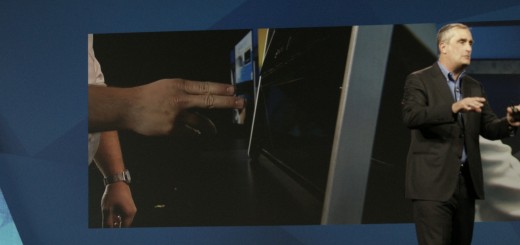
A demonstration at Intel’s CES keynote today showed off a new display the company is working on that creates the illusion of items in mid-air and allows you to interact with them. The demonstration showed that you can play a keyboard in mid-air, which is recognized by Intel’s Real Sense camera technology. The holographic technology demoed is a new, unannounced prototype that Intel is working on and isn’t used in a real product yet, but is a cool step toward our sci-fi future.

└ Tags: syndicated
a couple of laughzillas on a blue diamond background

Intel introduces wearables module based for third-party developers

Jan07
by Sindy Cator on January 7, 2015 at 1:11 am
Posted In: Around the Web, Design & Dev, Product Launches, wearables

SONY DSC
CES is full of things you slap onto your wrist or shove on your face. Intel being Intel, the company sees the rise of wearables as its opportunity to get Intel Inside (dun den dun dan – Intel chimes). The new Intel Curie is a tiny piece of hardware that that’s based on the company’s 32-bit Quark SE SoC (System on Chip). The low-power, BLE -enabled module has a six-axis motion sensor, will do computations, has battery charging capabilities and runs on the open source RTOS. The module is the size of a button and can be used my hardware developers…

This story continues at The Next Web

└ Tags: news, syndicated
a couple of laughzillas on a blue diamond background

Monster sues Apple’s Beats Audio founders Dre and Iovine

Jan07
by Sindy Cator on January 7, 2015 at 12:11 am
Posted In: Around the Web, Gadgets, Insider

0523_beats_apple
No better time to sue than after a multi-billion dollar sale has been settled, right? USA Today reports that Monster is suing Beats, saying that the technology behind the headphones was stolen. According to the report, Monster claims that the Beats co-founders Iovine and Dre deliberately hid Monster’s involvement in designing and engineering its headphones, as well as the education the company provided for engineering, manufacturing, distribution and the actual sale of the headphones. Monster CEO Noel Lee says that he and Monster invented the technology found in Beats By Dr. Dre headphones and that the technology was “pirated” away from the…

This story continues at The Next Web

└ Tags: syndicated
  • Page 12,008 of 14,670
  • « First
  • «
  • 12,006
  • 12,007
  • 12,008
  • 12,009
  • 12,010
  • »
  • Last »
The Daily Dose, The Daily Dose © 1996 - Present. All Rights Reserved.
  • Home
  • About
  • Archive
  • Books
  • Collections
  • Links
  • Shop
  • Submit a joke
  • Video
  • Privacy Policy