The Daily Dose

laugh every day with cartoons jokes and humor
  • Home
  • About
    • Press
      • Press Release – Announcing Laughzilla the Third ebook
      • Press Release – The Daily Dose Kicks Off Its 16th Year with New Books and More Irreverent Laughter
      • Press Release – Themes Memes and Laser Beams Now Available in Paperback
      • Press Release – Announcing Themes Memes and Laser Beams
      • In The News
    • Privacy
  • Archive
  • Books
  • Shop
  • Collections
    • Galleries
      • Gallery
      • Captions
      • Flash Cartoons & Greeting Cards
        • Laughzilla’s Oska Flash Animation Cartoon Greeting Cards
        • Oska Cupid Love Humor
    • #OccupyWallStreet
    • cats
    • China
    • Food
      • Hors d’oeuvres
        • Ball of Cream Cheese
      • Entrees / Main Courses
        • Meatballs with Baked Beans and Celery
    • Gadaffy
    • Google
  • Links
  • Video
  • Submit a joke
DeviantART Facebook Twitter Flickr pinterest YouTube RSS

Subscribe for Free Laughs!


Latest Comics

  • This Memorial Day, Trump Meme Coin Congratulates Profit Takers
  • 25 Years of The Daily Dose
  • The Best Cartoons
  • Bitcoin sings “Fly Me To The Moon”
  • 22 years of The Daily Dose

Comic Archive

America’s Heartland The Home Of Political Maize

Daily Dose News Roundup

  • AI can’t fix a business system with broken processes
  • EU set to name AWS and Azure DMA gatekeepers in November
  • Anthropic says China’s GLM-5.3 nearly matches Mythos at cyber exploits
  • Chinese-powered AI agents show the same deception as their US rivals
  • OpenAI, Blackstone and unions form a data centre alliance, Axios reports

Quotable

"Turkey's leader has accused WikiLeaks of spilling its beans to benefit Israel, which might be a credible accusation, if it wasn't being made by the Turks." ~ Yasha Harari

Fresh Baked Goods

Get The Daily Dose's ebook: Laughzilla the Third - A Funny Stuff Collection of 101 Cartoons from TheDailyDose. Click here to get the e-book on Amazon kdp. Laughzilla the Third (2012) The Third Volume in the Funny Stuff Cartoon Book Collection Available Now.

Click here for the Paperback edition


Support independent publishing: Buy The Daily Dose's book: Themes Memes and Laser Beams - A Funny Stuff Collection of 101 Cartoons by Laughzilla from TheDailyDose. Click here to get the book on Amazon. Themes Memes and Laser Beams - The Second Volume in the Funny Stuff Cartoon Book Collection.

Click Here to get the book in Paperback While Available on Amazon

Themes Memes and Laser Beams - 101 Cartoons by Laughzilla. Get the e-book on Lulu.

Click Here to get The Daily Dose Cartoon ebook on amazon kindle

Funny Stuff :
The First Cartoon Book
from The Daily Dose.
Available on Lulu.

a couple of laughzillas on a blue diamond background

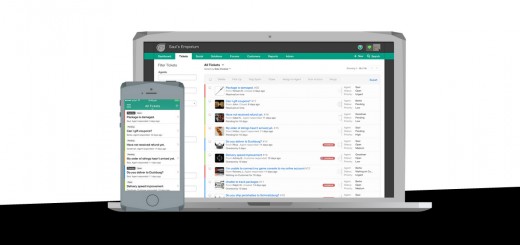
Freshdesk app updates make Twitter customer support easier

Jan21
by Sindy Cator on January 21, 2015 at 12:33 pm
Posted In: Apps, Around the Web, customer support, Insider

FreshDesk
Freshdesk announced today that it has updated its Android and iOS apps with new features to allow its users to easily respond to customer support issues on Twitter. The company’s apps now include a tab dedicated to social media support. It allows users to surface urgent tweets in a custom stream so they can spot customers’ questions and respond quickly. Tweets can also be converted into support tickets right from the app, and assigned to the right team for quick resolution. Plus, when a customer tweets to a brand, support agents can access past interactions over email, phone, chat and other channels for…

This story continues at The Next Web

└ Tags: syndicated
a couple of laughzillas on a blue diamond background

Inserting a Range into an Outlook Appointment

Jan21
by Sindy Cator on January 21, 2015 at 12:30 pm
Posted In: Around the Web, Outlook

Jesse asks:

In VBA, how do I add a range of cells to the body of an appointment?

Unlike email, the AppointmentItem does not have an HTMLBody property. If it did, then I would convert the range to HTML and use that property. Formatted text in the body of an AppointmentItem is Rich Text Format (RTF). I don’t know of any good ways to convert a range to RTF. Sure, you could learn what all the RTF codes are and build the string to put into the RTFBody property of the AppointmentItem. Then you could go to the dentist for a no-novocaine root canal. I’m not sure which of those would be more fun.

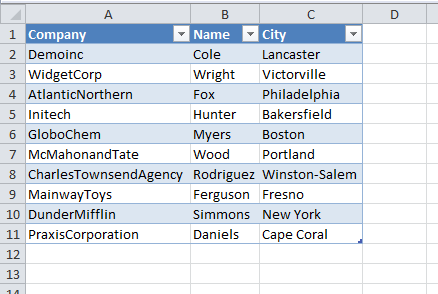
A better way is to programmatically copy the range and paste it into the body of the appointment. Since Office 2007, almost every Outlook object allows you to compose in Word. That’s an option I quickly turn off, but it’s still there under the hood. We’ll use that to our advantage. But first, let’s set up some data. Here I have a Table in Excel with some sample data.

To create a new appointment with this range in the body, I used this code:

Sub MakeApptWithRangeBody()
   
    Dim olApp As Outlook.Application
    Dim olApt As Outlook.AppointmentItem
   
    Const wdPASTERTF As Long = 1
   
    Set olApp = Outlook.Application
    Set olApt = olApp.CreateItem(olAppointmentItem)
   
    With olApt
        .Start = Now + 1
        .End = Now + 1.2
        .Subject = "Test Appointment"
        Sheet1.ListObjects(1).Range.Copy
        .Display
        .GetInspector.WordEditor.Windows(1).Selection.PasteAndFormat wdPASTERTF
    End With
   
End Sub

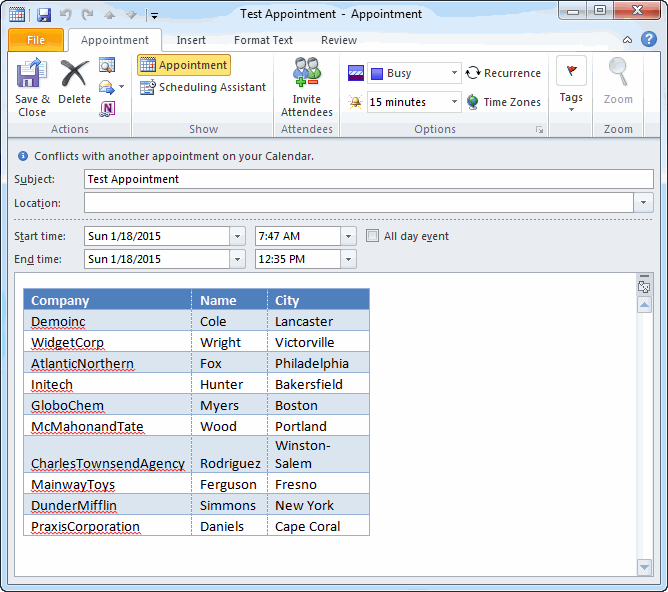
Be sure to set a reference to the Microsoft Outlook 1x.x Object Library (VBE – Tools – References). The code produces this happy customer.

The code creates an appointment and fills in some properties, like Start, End, and Subject. The Excel Table is copied to the clipboard ready to be pasted into the appointment. Before we can get to the AppointmentItem’s WordEditor, we have to display it. That’s why the .Display method comes before the paste operation.

The last bit is to paste the range. Starting with an AppointmentItem, we have to get the Inspector object, then the WordEditor object, then a Window object, and finally we can use the PasteAndFormat method on the Selection object. Gool ol’ Word where everything is a Selection object.

This code simply displays the appointment, you will need the .Save method, .Close method, or .Send method if you want to automate any of that.

└ Tags: syndicated
a couple of laughzillas on a blue diamond background

iBillionaire now tracks more investments from more billionaires, with revamped mobile apps

Jan21
by Sindy Cator on January 21, 2015 at 11:57 am
Posted In: Apps, Around the Web

iBillionaire

Want to make your money work for you? iBillionaire, the service that tracks investments made by some of the world’s richest stock market players, has launched a new index and updated its mobile apps with new features to inspire users to invest smarter. iBillionaire 2.0 for iOS and Android incorporates featured stocks, watchlists and shareable cards, in a new design. The apps also track more billionaires than before, with Nelson Peltz and Marc Lasry being added to the list that already features Warren Buffett and George Soros. iBillionaire is also launching a new High Dividend Index that tracks such stocks across a…

This story continues at The Next Web

└ Tags: syndicated
a couple of laughzillas on a blue diamond background

BBC News app for iOS and Android gets first major redesign since 2010

Jan21
by Sindy Cator on January 21, 2015 at 11:35 am
Posted In: Apps, Around the Web, BBC, BBC News, ios, Product Updates

TNW image template
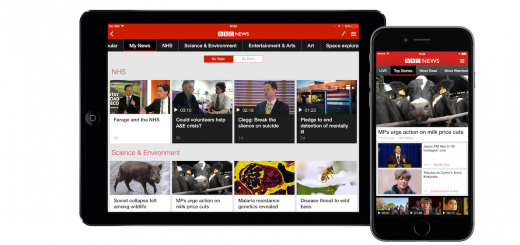
The BBC is giving the free BBC News app for iOS and Android its first major redesign since it launched in 2010. The new app will roll out for both platforms in the UK over the next few days and go global over the next few months. The new app showcases top stories, most watched stories and live coverage with personally selected and recommended topics based on what you read and what’s trending. The update now lets you follow topics that particularly interest you, bring them together in the My News section. There’s access to live coverage from the BBC News channel and…

This story continues at The Next Web

└ Tags: android, media, news, syndicated
a couple of laughzillas on a blue diamond background

Get 23% off the futuristic Equil Smartpen 2

Jan21
by Sindy Cator on January 21, 2015 at 11:30 am
Posted In: Around the Web, Gadgets, Offers, TNWDeals

If you still enjoy using a pen and paper for sketches and notes in 2015, this is for you. The Equil Smartpen 2 lets you draw and write naturally on any kind of paper or on your iOS/Android device, and captures your ideas digitally — so you can continue your work on mobile devices or desktops. Perfect for taking notes at meetings and lectures, or for sketching ideas and illustration, the Equil Smartpen 2 uses real ballpoint ink cartridges so that it feels just like a real pen. And when you’re done working, the Smartpen saves your notes to the…

This story continues at The Next Web

└ Tags: syndicated
  • Page 11,911 of 14,671
  • « First
  • «
  • 11,909
  • 11,910
  • 11,911
  • 11,912
  • 11,913
  • »
  • Last »
The Daily Dose, The Daily Dose © 1996 - Present. All Rights Reserved.
  • Home
  • About
  • Archive
  • Books
  • Collections
  • Links
  • Shop
  • Submit a joke
  • Video
  • Privacy Policy