The Daily Dose

laugh every day with cartoons jokes and humor
  • Home
  • About
    • Press
      • Press Release – Announcing Laughzilla the Third ebook
      • Press Release – The Daily Dose Kicks Off Its 16th Year with New Books and More Irreverent Laughter
      • Press Release – Themes Memes and Laser Beams Now Available in Paperback
      • Press Release – Announcing Themes Memes and Laser Beams
      • In The News
    • Privacy
  • Archive
  • Books
  • Shop
  • Collections
    • Galleries
      • Gallery
      • Captions
      • Flash Cartoons & Greeting Cards
        • Laughzilla’s Oska Flash Animation Cartoon Greeting Cards
        • Oska Cupid Love Humor
    • #OccupyWallStreet
    • cats
    • China
    • Food
      • Hors d’oeuvres
        • Ball of Cream Cheese
      • Entrees / Main Courses
        • Meatballs with Baked Beans and Celery
    • Gadaffy
    • Google
  • Links
  • Video
  • Submit a joke
DeviantART Facebook Twitter Flickr pinterest YouTube RSS

Subscribe for Free Laughs!


Latest Comics

  • This Memorial Day, Trump Meme Coin Congratulates Profit Takers
  • 25 Years of The Daily Dose
  • The Best Cartoons
  • Bitcoin sings “Fly Me To The Moon”
  • 22 years of The Daily Dose

Comic Archive

President Obama’s American Jobs Act

Daily Dose News Roundup

  • DeepSeek to lead seed round in $400mn robot AI start-up, Bloomberg reports
  • Turkey’s social media ban for under-15s starts on 1 November
  • Vittorio Colao defends copyright rules and the DSA in Europe’s AI debate
  • Apple reportedly cuts iPhone 18 Pro component orders by at least 15%
  • Tetris makes its North American in-car debut at New York Comic Con

Quotable

A young lady who had just been dumped by her boyfriend seemed unusually cheerful. When asked why, and she replied that, sooner or later, time wounds all heels. ~ Les Stilettos

Fresh Baked Goods

Get The Daily Dose's ebook: Laughzilla the Third - A Funny Stuff Collection of 101 Cartoons from TheDailyDose. Click here to get the e-book on Amazon kdp. Laughzilla the Third (2012) The Third Volume in the Funny Stuff Cartoon Book Collection Available Now.

Click here for the Paperback edition


Support independent publishing: Buy The Daily Dose's book: Themes Memes and Laser Beams - A Funny Stuff Collection of 101 Cartoons by Laughzilla from TheDailyDose. Click here to get the book on Amazon. Themes Memes and Laser Beams - The Second Volume in the Funny Stuff Cartoon Book Collection.

Click Here to get the book in Paperback While Available on Amazon

Themes Memes and Laser Beams - 101 Cartoons by Laughzilla. Get the e-book on Lulu.

Click Here to get The Daily Dose Cartoon ebook on amazon kindle

Funny Stuff :
The First Cartoon Book
from The Daily Dose.
Available on Lulu.

a couple of laughzillas on a blue diamond background

Who gets the byline? How brands should navigate content authorship

Mar22
by Sindy Cator on March 22, 2015 at 10:00 am
Posted In: Around the Web, branding, content, Insider, Investigations, Social Media

authorcontent
Brian Honigman is a marketing consultant, speaker and freelance writer. For more insights on how to be a better marketer, sign up for Brian Honigman’s weekly newsletter. This post originally appeared on his blog. New advertising realities are forcing brands that have had nothing to do with media to suddenly become content creators. In the age of content marketing, every brand must learn to think like a media company. Creating content brings a lot of related concerns along with it. One particularly tricky issue for brands to navigate is the question of authorship. Many brands shy away from giving individuals credit because they…

This story continues at The Next Web

└ Tags: syndicated
a couple of laughzillas on a blue diamond background

Daily Dose for Sun, Mar 22: The Signature of All Things

Mar22
by Sindy Cator on March 22, 2015 at 8:00 am
Posted In: Around the Web


The Signature of All Things by Elizabeth Gilbert
Reviewed by Diana from La Mesa, California.

└ Tags: syndicated
a couple of laughzillas on a blue diamond background

Formula Arguments and Intellisense

Mar22
by Sindy Cator on March 22, 2015 at 2:31 am
Posted In: Around the Web

Even though you’ve seen Excel’s Formula Intellisense a million times, I bet there’s a few things that you don’t know about it that can make your life even easier.

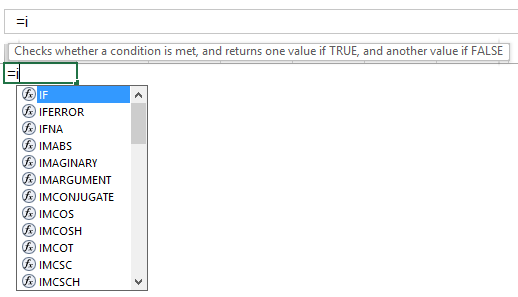
Let’s first look at an example for one of Excel’s in-built functions. Say we want to use an IFERROR function. As soon as we type the = sign in the toolbar and the opening ‘I’ from IFERROR, Excel provides a helpful list of functions that start with the letter ‘I’, as well as a pop-up tool tip telling us what the currently highlighted function from that list does. That popup tool tip is often in the way, but you can move it somewhere else simply by clicking on it and dragging it to the naughty corner.
 
Intellisense 1
 
 
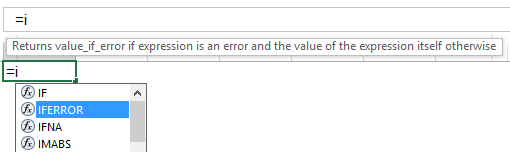
To select the IFERROR function from that list, we can either use the arrow keys to navigate down that intellisense list, or we can left-click on the particular function we want:
 
Intellisense 2
 
 
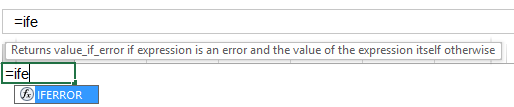
…or we can continue typing, which allows Excel to gradually narrow down the number of functions until there is only one possible choice…the IFERROR function we’re after:
 
Intellisense 3
 
 
At this stage, I almost always push Enter in order to get Excel to populate this one remaining function in the intellisense list into the formula bar. And then I almost always swear out loud, because Enter is the incorrect key, and because Excel has never heard of an ife function, it asks me for my name, so that it can pass it on to the ‘re-education’ team at Microsoft:
 
Intellisense 4
 
 
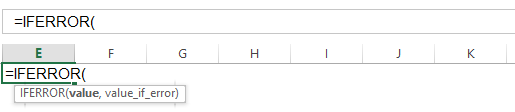
The correct key we need to push is the TAB key, which tells Excel to fill out the rest of the IFERROR name for us. After it’s done this, Excel then helpfully prompts us for the two arguments of the IFERROR function with another handy pop-up tool-tip:
 
Intellisense 5
 
 
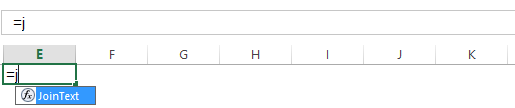
Now let’s compare that to the options Excel gives us for a UDF. I’ll use my JoinText UDF. Typing =j pops up a very short list indeed: there are no other functions starting with J. But the UDF’s name is all we get. There’s no tooltip remindingus what the JoinText function actually does…
 
Intellisense 6
 
 
…and after we select it by hitting that TAB key, there’s no tooltip prompting us for the function arguments:
 
Intellisense 7
 
 
So why don’t UDFs have intellisense? That’s a damn good question, and one that programmers have been asking Microsoft about for years. If you can’t remember the arguments for your UDF, you won’t be getting very far. Unless you happen to know this handy little trick: If you push CTRL + SHIFT + A at this stage, Excel helpfully inserts placeholders for all the argument names for that function into the formula bar:
 
Intellisense 8
 
 
…which you can then overtype with the actual arguments, now that you’ve been reminded what they are. How cool is that!

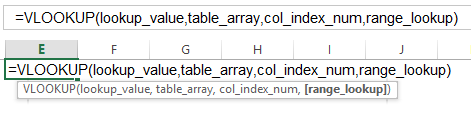
This trick also works with Excel’s native functions, too:
 
Intellisense 9
 
 
But the problem we still have with that UDF is this: Which arguments are optional? In the case of the VLOOKUP above, we can see this by the square brackets around the optional [range_lookup] argument in the tool-tip. (As if that argument is optional in the real world…)

But with our UDF, we don’t get that tool-tip pop-up.

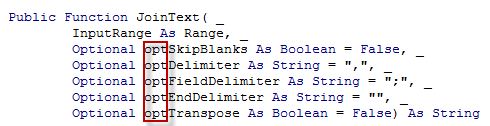
Sure, we could just put the prefix opt in front of the optional arguments in the VBE:
 
opt prefix
 
 
…which would give us this:
 
Intellisense 13
 
…but where’s the fun in that?

It would be cool if we could simply add square brackets to our variable names back in the VBE, so that when we do our Ctrl + Shift + A trick, those arguments look like this:
 
Intellisense 14


…but it won’t compile:
 
Intellisense 10


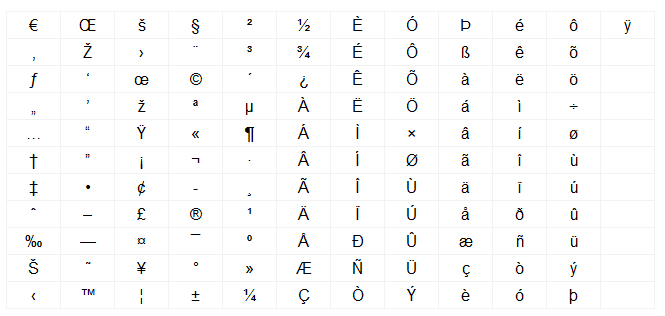
So what other interesting characters can we use in VBA variable names? According to this thread, these ones:
 
Legal Characters
 
 
Any character in the range 128-255 is allowable. That’s right, you can copy-write and trademark your variable names if you want!

And a couple of them look quite bracketish. Let’s try them:
 
Intellisense 11
 
 
Yup, that compiles. And how does it look when we Ctrl + Shift + A that sucker?
 
Intellisense 12
 
 
Hmmm. Works a treat.

Down side? Don’t know. You tell me…

└ Tags: syndicated
a couple of laughzillas on a blue diamond background

Comic for March 21, 2015

Mar21
by Sindy Cator on March 21, 2015 at 11:59 pm
Posted In: Around the Web

Dilbert readers – Please visit Dilbert.com to read this feature. Due to changes with our feeds, we are now making this RSS feed a link to Dilbert.com.

└ Tags: syndicated
a couple of laughzillas on a blue diamond background

Katch uploads any Meerkat stream to YouTube with a simple hashtag

Mar21
by Sindy Cator on March 21, 2015 at 10:02 pm
Posted In: Apps, Around the Web, Insider

Meerkat
Meerkat, the app that makes it easy to stream live video to Twitter, lacks one major feature: the ability to quickly upload the video of the stream for watching after it’s over. Katch solves this problem; all you have to do is use the hashtag #katch in the title or comments of any stream and it’ll automatically create a YouTube video and post it into the comments. Once the stream is over, Katch will tweet out the link to your video. You can of course save your stream in Meerkat, but then you’d need to manually upload it yourself. It’s an awesome little hack that…

This story continues at The Next Web

└ Tags: syndicated
  • Page 11,453 of 14,673
  • « First
  • «
  • 11,451
  • 11,452
  • 11,453
  • 11,454
  • 11,455
  • »
  • Last »
The Daily Dose, The Daily Dose © 1996 - Present. All Rights Reserved.
  • Home
  • About
  • Archive
  • Books
  • Collections
  • Links
  • Shop
  • Submit a joke
  • Video
  • Privacy Policy