The Daily Dose

laugh every day with cartoons jokes and humor
  • Home
  • About
    • Press
      • Press Release – Announcing Laughzilla the Third ebook
      • Press Release – The Daily Dose Kicks Off Its 16th Year with New Books and More Irreverent Laughter
      • Press Release – Themes Memes and Laser Beams Now Available in Paperback
      • Press Release – Announcing Themes Memes and Laser Beams
      • In The News
    • Privacy
  • Archive
  • Books
  • Shop
  • Collections
    • Galleries
      • Gallery
      • Captions
      • Flash Cartoons & Greeting Cards
        • Laughzilla’s Oska Flash Animation Cartoon Greeting Cards
        • Oska Cupid Love Humor
    • #OccupyWallStreet
    • cats
    • China
    • Food
      • Hors d’oeuvres
        • Ball of Cream Cheese
      • Entrees / Main Courses
        • Meatballs with Baked Beans and Celery
    • Gadaffy
    • Google
  • Links
  • Video
  • Submit a joke
DeviantART Facebook Twitter Flickr pinterest YouTube RSS

Subscribe for Free Laughs!


Latest Comics

  • This Memorial Day, Trump Meme Coin Congratulates Profit Takers
  • 25 Years of The Daily Dose
  • The Best Cartoons
  • Bitcoin sings “Fly Me To The Moon”
  • 22 years of The Daily Dose

Comic Archive

a couple of laughzillas on a blue diamond background
21 years down. It’s official. We can drink now.

Daily Dose News Roundup

  • Estonian energy storage firm Skeleton becomes unicorn with Siemens deal
  • Palantir CTO says the Pentagon has already replaced Anthropic’s AI
  • DeepSeek to lead seed round in $400mn robot AI start-up, Bloomberg reports
  • Turkey’s social media ban for under-15s starts on 1 November
  • Vittorio Colao defends copyright rules and the DSA in Europe’s AI debate

Quotable

"Toyota! We Are Driven. We stop at nothing ... Literally." ~ Roger K.

Fresh Baked Goods

Get The Daily Dose's ebook: Laughzilla the Third - A Funny Stuff Collection of 101 Cartoons from TheDailyDose. Click here to get the e-book on Amazon kdp. Laughzilla the Third (2012) The Third Volume in the Funny Stuff Cartoon Book Collection Available Now.

Click here for the Paperback edition


Support independent publishing: Buy The Daily Dose's book: Themes Memes and Laser Beams - A Funny Stuff Collection of 101 Cartoons by Laughzilla from TheDailyDose. Click here to get the book on Amazon. Themes Memes and Laser Beams - The Second Volume in the Funny Stuff Cartoon Book Collection.

Click Here to get the book in Paperback While Available on Amazon

Themes Memes and Laser Beams - 101 Cartoons by Laughzilla. Get the e-book on Lulu.

Click Here to get The Daily Dose Cartoon ebook on amazon kindle

Funny Stuff :
The First Cartoon Book
from The Daily Dose.
Available on Lulu.

a couple of laughzillas on a blue diamond background

10 startups that graduated from Rockstart’s Amsterdam 2015 cohort

May29
by Sindy Cator on May 29, 2015 at 11:34 am
Posted In: Around the Web, Insider

DSCF7502
Amsterdam’s Rockstart accelerator takes on 10 startups every year to develop their ideas into a business. This year’s startups pitched a crowd of investors, journalists and other business people on demo day inside an old warehouse in Amsterdam North and we came away impressed with the calibre of companies. Rockstart also announced that it’s expanding the accelerator program into Asia with a new startup hub in Singapore. Here’s what each of them had to offer: Undeveloped If you’ve ever tried to acquire the perfect domain name for your startup from another person, you’ll understand how difficult it is to negotiate the price and actually…

This story continues at The Next Web

└ Tags: syndicated
a couple of laughzillas on a blue diamond background

Global name meets Local, Global freaks out

May29
by Sindy Cator on May 29, 2015 at 11:27 am
Posted In: Around the Web

So here’s something I came across today. Somehow I’d managed to set up both local AND global names in a sheet, and found that I pretty much couldn’t do anything with the Global name via VBA as a result.

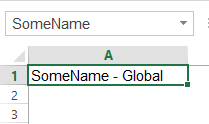
Say I set up this global name:
 
SomeName - Global
 
 
Note that it says SomeName in the NameBox when I have the name selected. Nothing weird about that.

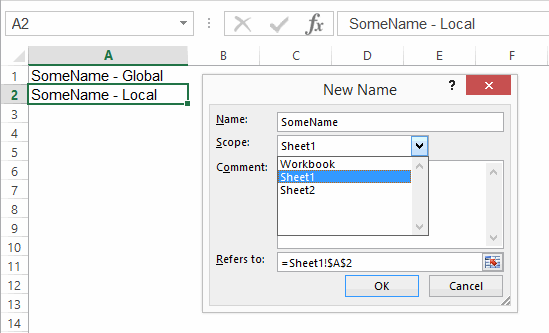
Now I add a local name with the same name, pointing to A2:
 
SomeName - Local
 
 
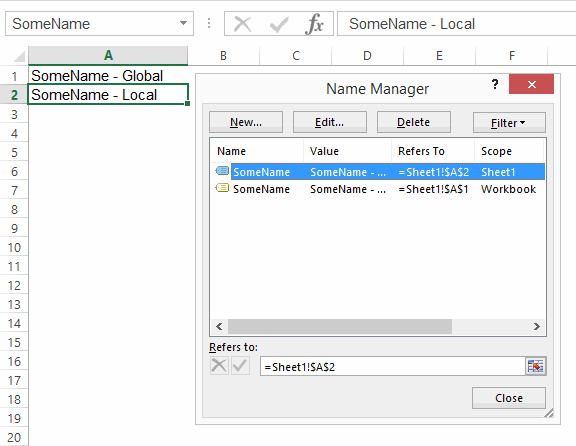
…and here you can see both names in the Name Manager. Note that it says SomeName in the NameBox when I have the local name selected. Nothing weird about that, either…local names take precedence over global.
 

SomeName - Both_Name Manager
 
 
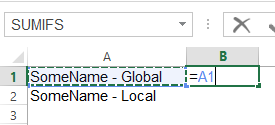
If I type = then select A1 where the global name lives, note that no name comes up in the intellisense:
 
Equals Global
 
 
..but if I do the same with the local name, I get intellisense:
 
Equals Local
 
 
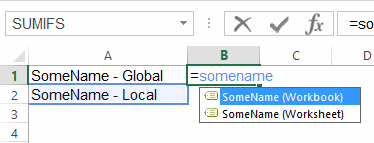
Now things get a little weirder. If I type =SomeName, I get two options in the intellisense:
 
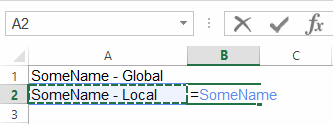
Equals SomeName
 
 
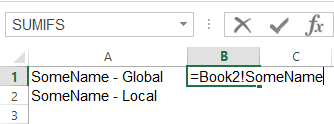
If I select the SomeName (Workbook) option, Excel qualifies the reference with the workbook name:
 
Book2 SomeName
 
 
…but when I push Enter, it’s still the local name that’s being referenced:
 
Book2 SomeName Not
 
 
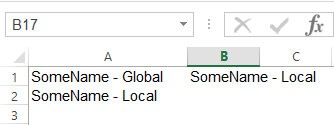
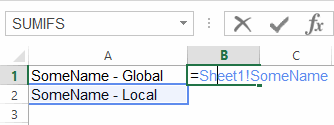
…and when I select it again, I see that Excel has bizarrely changed that Book1! qualifier to a Sheet1! qualifier. In other words, it’s said ‘I know you asked for workbook, but I’m giving you local’:
 
Book2 SomeName Local Qualifier
 
 
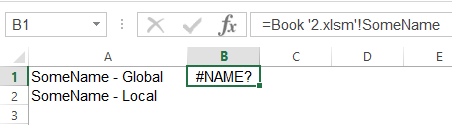
So what the hell is the point of those two options in the intellisense, if no matter what you do, Excel gives you the local name? Beats me. What’s worse, if your workbook name has a space in it, then Excel forgets to wrap apostrophes around it, and the Update Values dialog comes up:
 
Update Values dialog
 
 
What a mess. Push cancel, and you’re left with an invalid name:
 
Book2 SomeName spaces


Names and Collections

It turns out that the local name gets added to both the ActiveWorkbook.Names collection AND the ActiveSheet.Names Collection:
? activeworkbook.Names.Count
2
? activesheet.names.count
1

You can reference both names by index number just fine:
? activeworkbook.Names(1).Name
Sheet1!SomeName
? activeworkbook.Names(2).Name
SomeName

…but any attempt to reference the globally scoped one by name gives you the local name. Here, I retrieve their names from their index numbers:
? activeworkbook.Names(1).Name
Sheet1!SomeName
? activeworkbook.Names(2).Name
SomeName

Here I retrieve their refersto ranges from those index numbers:
? activeworkbook.Names(1).RefersTo
=Sheet1!$A$2
? activeworkbook.Names(2).RefersTo
=Sheet1!$A$1

Here I try to retrieve their refersto ranges from their names:
? activeworkbook.Names(“Sheet1!SomeName”).RefersTo
=Sheet1!$A$2
? activeworkbook.Names(“SomeName”).RefersTo
=Sheet1!$A$2

And here I try to retrieve their names from their names:
? activeworkbook.Names(“Sheet1!SomeName”).Name
Sheet1!SomeName
? activeworkbook.Names(“SomeName”).Name
Sheet1!SomeName

As per this Stack Overflow thread, If you want to identify the global one, you have to loop through the collection of names and find the one that has an “!” in its name.

So there you have it: if you’re referencing names by name, don’t assume you’ll get the one you want. Tedious!

└ Tags: syndicated
a couple of laughzillas on a blue diamond background

GIFs are finally working on Facebook

May29
by Sindy Cator on May 29, 2015 at 9:50 am
Posted In: Around the Web, Insider

Screen Shot 2015-05-29 at 11.43.10 ☀️
Better late than never, right? Facebook appears to be finally rolling out GIF support. After a false start in 2013 when Giphy introduced a workaround that made GIFs from its service appear as videos, Facebook is now allowing GIFs from other websites to play properly. All you need to do to embed your favorite GIF is drop in a link in your status to a GIF hosted on any site, like Tumblr or Imgur, and it’ll play inline. Easy! http://cdn.diply.com/img/e7de0169-8cdb-4d97-9515-6504c0a1f495.jpg Posted by Owen Williams on Friday, May 29, 2015 You can check out some animated GIFs in action in this Facebook group. It looks…

This story continues at The Next Web

└ Tags: facebook, syndicated
a couple of laughzillas on a blue diamond background

Handpick turns Instagram into the world’s largest recipe book

May29
by Sindy Cator on May 29, 2015 at 9:19 am
Posted In: Apps, Around the Web, Food, Handpick, Insider, instagram

FullSizeRender
Instagram can be hell if you’re hungry. The photo-sharing social network is full of people sharing the delicious dishes they’ve just whipped up as well as ridiculously well posed restaurant fare. The trouble is, while there are millions of posts about food, actually searching for them and connecting images to recipes isn’t easy. Instagram’s native search just isn’t up to the job. That’s where Handpick (for Android and iOS) comes in. While the food discovery app has been around since 2013, it got really useful this week. The app’s original aim was to reduce the amount of food waste in the world by making…

This story continues at The Next Web

└ Tags: syndicated
a couple of laughzillas on a blue diamond background

Here’s Apple’s temporary fix for that nasty iOS Messages bug

May29
by Sindy Cator on May 29, 2015 at 9:07 am
Posted In: Around the Web, bug, imessage, ios, messages

DSCF7496
A bug was uncovered in iOS recently that crashed the Messages app when users received a message with a unique string of Unicode characters. Apple’s working on a permanent solution, and has a fix you can try in the meantime. Follow these steps to re-open Messages on your iPhone: Ask Siri to “read unread messages.” Use Siri to reply to the malicious message. After you reply, you’ll be able to open Messages again. In Messages, swipe left to delete the entire thread. Or tap and hold the malicious message, tap More, and delete the message from the thread. ➤ If…

This story continues at The Next Web

└ Tags: apple, syndicated
  • Page 10,950 of 14,673
  • « First
  • «
  • 10,948
  • 10,949
  • 10,950
  • 10,951
  • 10,952
  • »
  • Last »
The Daily Dose, The Daily Dose © 1996 - Present. All Rights Reserved.
  • Home
  • About
  • Archive
  • Books
  • Collections
  • Links
  • Shop
  • Submit a joke
  • Video
  • Privacy Policy