The Daily Dose

laugh every day with cartoons jokes and humor
  • Home
  • About
    • Press
      • Press Release – Announcing Laughzilla the Third ebook
      • Press Release – The Daily Dose Kicks Off Its 16th Year with New Books and More Irreverent Laughter
      • Press Release – Themes Memes and Laser Beams Now Available in Paperback
      • Press Release – Announcing Themes Memes and Laser Beams
      • In The News
    • Privacy
  • Archive
  • Books
  • Shop
  • Collections
    • Galleries
      • Gallery
      • Captions
      • Flash Cartoons & Greeting Cards
        • Laughzilla’s Oska Flash Animation Cartoon Greeting Cards
        • Oska Cupid Love Humor
    • #OccupyWallStreet
    • cats
    • China
    • Food
      • Hors d’oeuvres
        • Ball of Cream Cheese
      • Entrees / Main Courses
        • Meatballs with Baked Beans and Celery
    • Gadaffy
    • Google
  • Links
  • Video
  • Submit a joke
DeviantART Facebook Twitter Flickr pinterest YouTube RSS

Subscribe for Free Laughs!


Latest Comics

  • This Memorial Day, Trump Meme Coin Congratulates Profit Takers
  • 25 Years of The Daily Dose
  • The Best Cartoons
  • Bitcoin sings “Fly Me To The Moon”
  • 22 years of The Daily Dose

Comic Archive

Occupy Cyber Monday

Daily Dose News Roundup

  • Estonian energy storage firm Skeleton becomes unicorn with Siemens deal
  • Palantir CTO says the Pentagon has already replaced Anthropic’s AI
  • DeepSeek to lead seed round in $400mn robot AI start-up, Bloomberg reports
  • Turkey’s social media ban for under-15s starts on 1 November
  • Vittorio Colao defends copyright rules and the DSA in Europe’s AI debate

Quotable

"When Warren Buffet sings, people listen, to see if his lyrics contain any good, free financial advice." ~ Yasha Harari

Fresh Baked Goods

Get The Daily Dose's ebook: Laughzilla the Third - A Funny Stuff Collection of 101 Cartoons from TheDailyDose. Click here to get the e-book on Amazon kdp. Laughzilla the Third (2012) The Third Volume in the Funny Stuff Cartoon Book Collection Available Now.

Click here for the Paperback edition


Support independent publishing: Buy The Daily Dose's book: Themes Memes and Laser Beams - A Funny Stuff Collection of 101 Cartoons by Laughzilla from TheDailyDose. Click here to get the book on Amazon. Themes Memes and Laser Beams - The Second Volume in the Funny Stuff Cartoon Book Collection.

Click Here to get the book in Paperback While Available on Amazon

Themes Memes and Laser Beams - 101 Cartoons by Laughzilla. Get the e-book on Lulu.

Click Here to get The Daily Dose Cartoon ebook on amazon kindle

Funny Stuff :
The First Cartoon Book
from The Daily Dose.
Available on Lulu.

a couple of laughzillas on a blue diamond background

Twitter tests pages and Pinterest-like collections for products and businesses

Jun19
by Sindy Cator on June 19, 2015 at 4:18 pm
Posted In: Around the Web, Insider

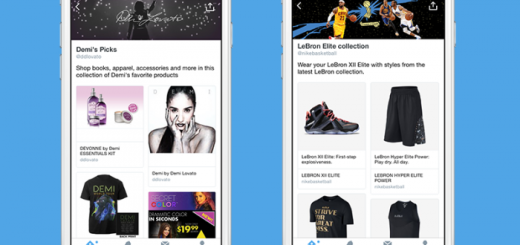
Two_collection_screens

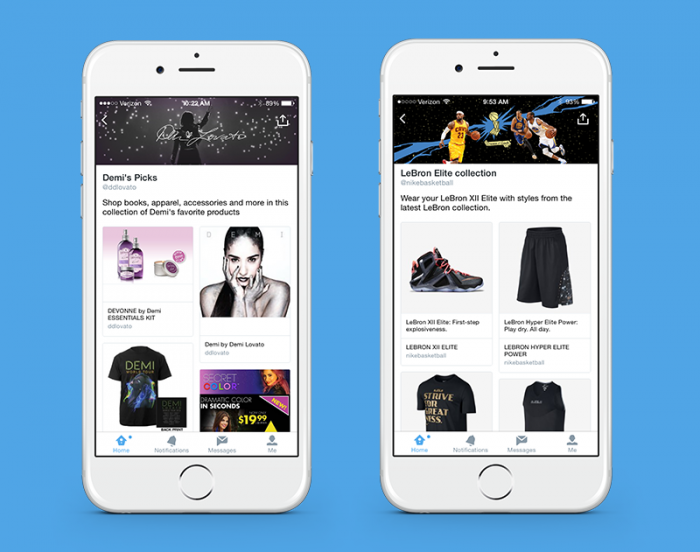
Twitter is working on some big changes in the way it feeds you products through your feeds. The company today announced it’s testing two new type of pages to help highlight businesses, places and products.

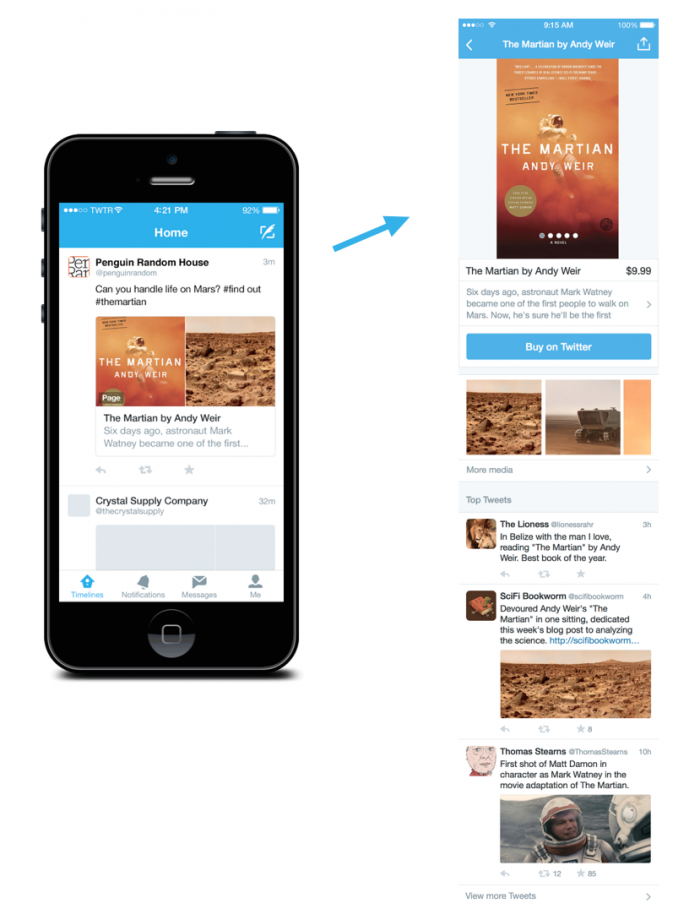
First up, Twitter is creating dedicated pages for businesses where you can find out more information about a particular product or brand. The page will show you images, related tweets, price and a description. You’ll also be able to buy products right from the app or the Web.

The_Martian_card_and_page

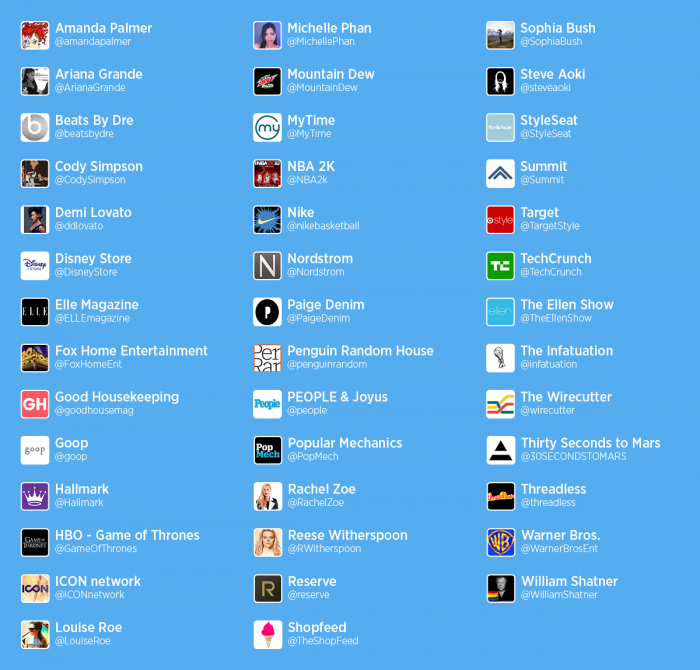
The second page type of page is called Collections, Pinterest-like hubs to for brands to amass products and places their audiences might be interested in. Some of the initial partner accounts include Nike, Game of Thrones and Target; here’s the full set:

brand_list

On Android, iOS and Twitter.com, you can visit a brand’s profile to see their collections. On iOS, you’ll also be able to search for collections through the category menu that shows up when you tap on the search bar.

Two_collection_screens

Keep in mind you’ll have to update to the most recent version of the mobile apps to view the collections, however.

Though these tests are limited to a few brands to start, we wouldn’t be surprised to see them stick around, given the big changes going on a Twitter HQ.

And just yesterday, BuzzFeed revealed the upcoming Project Lightning, which will turn Twitter into a news-curating service. It even works for peeople without an account – something that should help fight stagnating user growth.

The company makes a point in its blog post to that pages and Collections are just the beginning of a set of new features, so expect to read more news from Twitter in the coming months.

Developing….

➤ Testing new ways to make it easier to discover products and places [Twitter]

└ Tags: syndicated, twitter
a couple of laughzillas on a blue diamond background

This social engineering trick makes breaking into email accounts scarily easy

Jun19
by Sindy Cator on June 19, 2015 at 3:54 pm
Posted In: Around the Web, Insider

DSCF7838

We’ve all heard of phishing attacks, but a new type of social engineering hack that uses your mobile phone to trick you is a little scarier.

I came across a Symantec video that explains a new way that attackers are trying to get into your email account. The idea is simple: if you want to reset someone’s password, all you really need is their mobile number.

The anatomy of the attack in the video is fairly simple, but surprisingly effective:

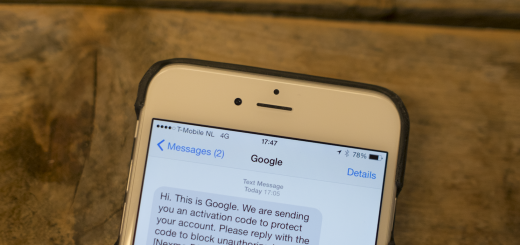
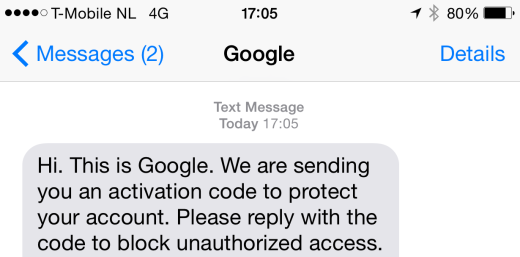
  • Send the victim a text from an unknown number, warning them that they’re about to receive a code to ensure their Google account is secure and asking them to reply with the code to confirm
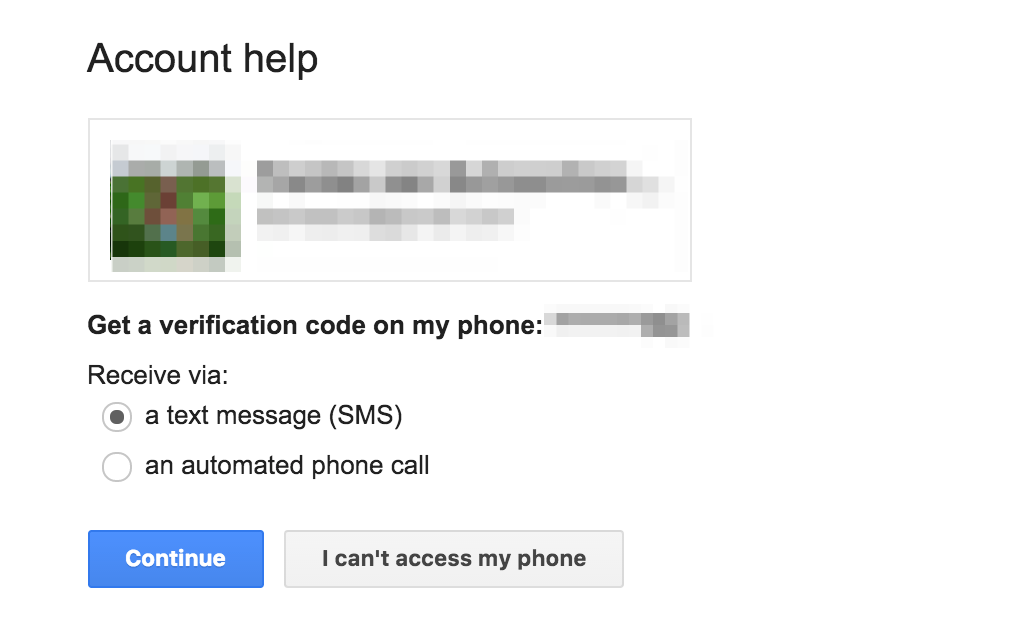
  • Trigger the Gmail password reset process, which sends a message containing an unlock code to the registered phone
    Screen_Shot_2015-06-19_at_5_14_20_PM
  • The user receives the code they’ve been warned about and sends it back to the attacker
  • Attacker logs in to Gmail account without detection

Before I saw this video, I’d never thought of such a method being used to get into someone’s account.

When I had imagined a hacker using social engineering to get into my account, I’d imagined them calling a help desk to trick them into giving out my information or simply sending me a phishing email.

For some reason, this is a dangerously potent trick that even I would probably have fallen for if I hadn’t heard of it.

Most people would likely reply to an unknown number simply assuming it really is the company, because receiving messages from companies on unknown numbers isn’t all that uncommon.

With the advent of services like Twilio and Nexmo that allow you to send a message directly from your computer with few traces, it makes it far easier to orchestrate this type of attack, given the right skills.

I wondered if it could be taken to the next level — some services actually allow you to send a text message that identifies as a company or person on the victim’s phone — so set out to send a message to myself with a familiar name rather than an unknown number.

IMG_0080

Within ten minutes of setting out to try it out, I had sent myself a text messaging from my Mac’s terminal posing as Google. It’s as easy as assuming any other company name by simply changing a word in the command.

That’s more than enough to fool even some of the smartest people into replying with their verification code, ultimately letting you into their accounts. It’s trivial to send a message with the name of any company, so this could be used to attack many services.

This attack could also be used to circumvent services that utilize two factor authentication, though it’s worth noting that Google will not send an SMS for your second factor if it’s already set up.

The problem with this type of attack is that it’s relatively hard to stop, outside of educating people to never reply to any sort of SMS that asks for a password or authentication code.

Many services now rely on sending an SMS to verify the user’s identity if you’ve forgotten your password, since a phone is an intimate device that’s most likely to be with you. This type of social engineering attack shows it’s still incredibly easy to fool people who have no way to know any better.

If you ever receive a message from any number asking for your password, login, confirmation code or any other personal information, we urge you not to reply to it. There’s simply no reason for companies to be asking for that — or any other information — over SMS.

└ Tags: syndicated
a couple of laughzillas on a blue diamond background

Sony won’t be announcing backwards compatibility on the PS4 anytime soon

Jun19
by Sindy Cator on June 19, 2015 at 3:31 pm
Posted In: Around the Web, Gadgets, Insider

FRANCE-JAPAN-ENTERTAINMENT-VIDEOGAMES

Microsoft announced at E3 this week that it was making Xbox 360 games backwards compatible with the Xbox One.

It seemed logical to assume that Sony may go down the same route, but unfortunately there are no plans to do so.

Sony’s Worldwide Studios boss Shuhei Yoshida told Eurogamer:

PS3 is such a unique architecture, and some games made use of SPUs very well. It’s going to be super challenging to do so. I never say never, but we have no plans.

Yoshida added that he thought Microsoft’s move was “surprising” and that he “didn’t think it was possible.”

Microsoft built a unique Xbox 360 emulator for the Xbox One to be able run the old games and at the moment it supports 22 games. The company has plans for it to support up to 100 by the end of the year though.

“They talked about 100 games, but what kind of games will be included? Is it smaller games or big games? We don’t know,” Yoshida said in the interview.

While we don’t know what titles are in the running, Microsoft is letting fans vote on the games they’d like to see made compatible, so we do have a say.

➤ Don’t hold your breath for PS4 backwards compatibility [Eurogamer via Ars Technica]

Read next: Shenmue III makes a heroic comeback, becomes the fastest game to hit $2 million Kickstarter goal

└ Tags: syndicated
a couple of laughzillas on a blue diamond background

Apple is no longer selling the original iPad mini, its last non-Retina iOS device

Jun19
by Sindy Cator on June 19, 2015 at 2:49 pm
Posted In: Around the Web, Gadgets, Insider

iPad Mini

Apple has quietly removed the original iPad mini from both its website and the Apple Store.

It was about time, after all. The mini was introduced in 2012, yet was still being sold alongside its two successors for a reduced price of $249 for the 16GB model (down from the original $329).

It was the last iOS device Apple still sold without a Retina display – its panel is just 1024 x 768 or 163 ppi . It’s also the last iPad running on 32-bit architecture, so developers should at least have a bit of an easier time working across devices.

Though you can still buy refurbished devices and resellers will still have some available as they empty their stock, it looks like Apple will no longer be producing new ones from here on out. So long.

➤ Apple quietly pulls original iPad mini from web site and Apple Store [9to5Mac]

└ Tags: apple, syndicated
a couple of laughzillas on a blue diamond background

I have too many unread articles saved for later… and that’s okay

Jun19
by Sindy Cator on June 19, 2015 at 2:02 pm
Posted In: Around the Web, Insider, pocket, Reading

reading_glass_laptop_hires_designerspics

The day I heard about Pocket, I installed every app and extension the service had to offer because it solved a major problem I had at the time: saving articles from the Web so I could read them later.

Fast forward a couple of years and my Pocket reading list is so long I can’t endless-scroll to the bottom of it. Part of the problem is that I have IFTTT set up to send articles I save on other services like Feedly and Twitter to my list as well.

Pocket certainly isn’t to blame; my habit of saving more content than I can consume in a lifetime extends to Facebook, Reddit, YouTube, SoundCloud and others.

I’ve tried to prune my list several times, with various approaches. One of my favorite weapons was the TimeToRead Chrome extension, which added a tag describing how long each of my Pocket articles would take to finish reading.

I first used it to help me find short articles (by searching for the tag ‘1 minute or less’) and blazing through them first. That helped to a certain degree; many of these posts were also time-sensitive, so it was easy to delete the dated ones quickly. Similarly, I tried sorting my articles by date, weeding out the oldest articles that I didn’t care for anymore.

You’d think that these tricks would have helped a lot — but even after days of diligent reading and deleting, I’d barely made a dent in my article queue.

Am I a digital hoarder?

My motivation for saving content for later was to avoid wasting time reading during the work day. The only problem was that, after work, I hardly wanted to look at walls of text. So the articles kept piling up. In fact, I added five articles to my reading list while writing this post.

Why do I continue to save articles when I know I probably won’t get around to reading them? Did I have some hoarder tendency that was manifesting itself in my digital life?

I kept telling myself that I had to get things under control. Reading those articles would not only enrich and entertain me, but it would also help me clear out my digital clutter and achieve reading list zero.

Then I tried reading…

I added a shortcut to Pocket on my home screen and my personal start page. For a time, I managed to get through a few articles a day and it felt good to be getting something out of all those times I clicked ‘Add to Pocket’ on my devices.

The real payoff came when I traveled around Europe for about a month in April, I found myself frequently offline and using the app a lot more — on long flights, waiting for buses and trains, and whenever I had a few minutes to spare.

What I learned was that I was the best possible curator for myself. Over the past few years, I’ve saved a wide variety of brilliant articles, tutorials, stories, songs and videos to keep me engrossed for days. And when you have time on your hands and nowhere to go, there’s nothing quite like a deep treasure trove of great content to explore.

Since then, I’ve been opening up my reading lists and saved item queues on all the apps that have them. It’s a treat to dive in and pick something at random from a list, knowing that it’s almost certain you’ll find it interesting. After all, who would pick better stuff for you than you?

I’ll probably never be able to completely clear my reading list — or even come close to doing so. But I believe that it’s better to have a library full of stuff you’ve never read, than a scanty queue of just the latest articles doing the rounds, that you probably already know about.

Is ‘reading list zero’ a myth? It’s hard to say, but until I find out, I’m enjoying the ride one article at a time.

Image credit: Designerspics

Read next: How to create content VIPs will love to share

└ Tags: syndicated
  • Page 10,780 of 14,673
  • « First
  • «
  • 10,778
  • 10,779
  • 10,780
  • 10,781
  • 10,782
  • »
  • Last »
The Daily Dose, The Daily Dose © 1996 - Present. All Rights Reserved.
  • Home
  • About
  • Archive
  • Books
  • Collections
  • Links
  • Shop
  • Submit a joke
  • Video
  • Privacy Policy