



Applying NumberFormat Version 4
I’ve been using a macro to apply the comma style for about five years. I’ve even enhanced it. It’s such a simple bit of code that it really never broke – until now. I got a workbook that caused the code to fail because it didn’t have a style named ‘Comma’. I just assumed that style was built in to all workbooks.
I received a workbook in 2003 format (.xls). I Saved As to 2010 format (.xlsx) because that’s what I always do. I even closed and re-opened it because I don’t like it when it says ‘Compatibility Mode’ in the title. Here’s what the Styles gallery looks like compared to the Styles gallery on a new workbook below.
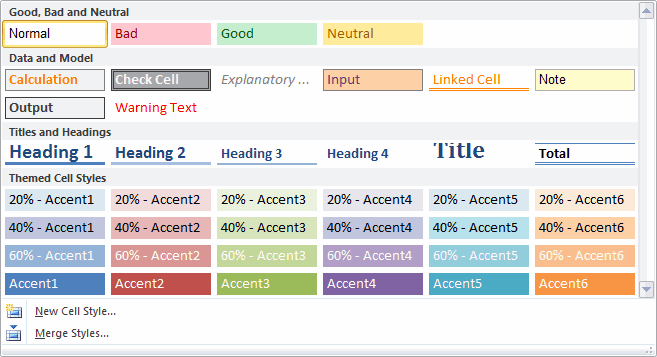
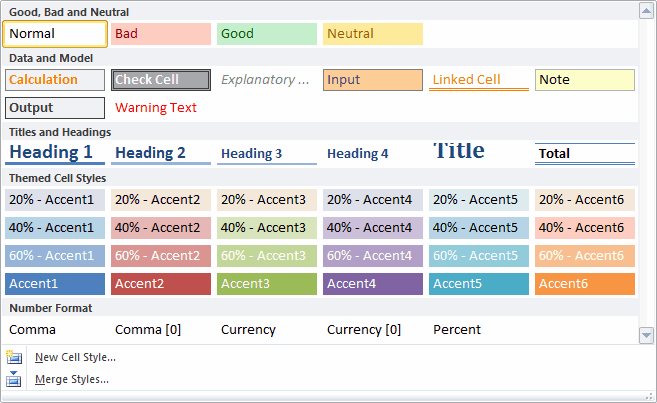
OK, somebody deleted the number format styles. Seems strange, but I’ve seen stranger. Then more strangeness occurred. None of the cells on this unprotected worksheet were locked. And when I add a new worksheet to the workbook, every cell on the new worksheet was unlocked. I don’t recall ever seeing that before. Generally, every cell on a new worksheet is locked and the sheet is unprotected. That way when you protect a worksheet, you get expected behavior.
I still don’t understand why this workbook behaves the way it does, but I do need to change my code to account for it. I toyed with the idea of adding a Comma style if it didn’t exist, but the Comma style is just a number format, so I didn’t see any downside to just applying a number format instead of a style. Also, I’ve thoroughly enjoyed my new toggle feature for PivotItems that switches between zero and two decimal places and applied that same logic to cells.
Dim pf As PivotField
Const sONEDECIMAL As String = "#,##0"
Const sTWODECIMALS As String = "#,##0.00"
Const sCOMMAONE As String = "_(* #,##0_);_(* (#,##0);_(* ""-""_);_(@_)"
Const sCOMMATWO As String = "_(* #,##0.00_);_(* (#,##0.00);_(* ""-""??_);_(@_)"
gclsAppEvents.AddLog "^m", "MakeComma"
If TypeName(Selection) = "Range" Then
On Error Resume Next
Set pf = ActiveCell.PivotField
On Error GoTo 0
If pf Is Nothing Then
If Selection.NumberFormat = sCOMMATWO Then
Selection.NumberFormat = sCOMMAONE
Else
Selection.NumberFormat = sCOMMATWO
End If
Else
If pf.NumberFormat = sTWODECIMALS Then
pf.NumberFormat = sONEDECIMAL
Else
pf.NumberFormat = sTWODECIMALS
End If
End If
End If
End Sub