The first Wednesday of every November is International Keyboard Shortcut Day. Today people from all over the world will become far less efficient for short time in an effort to be far more efficient the rest of the year.

The end of inefficiencies. Am I right?
To celebrate this year, I took my wall calendar off my wall and I’ll use Win+Alt+D to view the Windows calendar. My usual method to see an electronic calendar is to Alt+Tab to Outlook and Ctrl+2 to switch to the calendar (Ctrl+1 switches you back to the inbox (or wherever you were in Mail)). I also might Win+1 to get there because Outlook is the first icon on my taskbar. That’s less desirable, though, because Outlook doesn’t always play nice. Sometimes it’s not on month view and it’s a pain to get it to look like I want. So I’ll try out my new found Win+Alt+D to use the built-in Windows calendar.
If you just want to get your feet wet, head over to True Insights and download the The Ultimate Excel 2016 Keyboard Shortcut List. It’s an Excel workbook listing all the shortcuts you’ll ever need. And because it’s in Excel, it’s sortable and filterable. Find one you like and try to put it to use today. Thanks Jacques for putting the list together.
Want to kick it up a notch? Set aside some time today where you only navigate windows folders with the keyboard. Here are some tips to get you started:
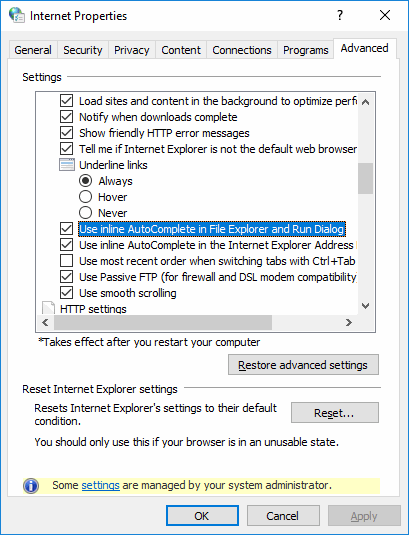
- Turn on autocomplete in File Explorer. Press the
Win key and start typing Internet Options. When the app shows up, arrow down to it and press enter. Use Ctrl+tab to get to the Advanced tab. Page Down and arrow down about 1/3 of the way and select Use inline AutoComplete in File Explorer and Run Dialog. Finally tab to the OK button and press Enter.
Win+E will open a new Windows Explorer window. Once there, Alt+D will put you in the address bar.- As you start typing, Windows will autocomplete folder names. If you type
C:\u, Windows will likely autocomplete to C:\Users. Then you can press Tab to complete the entry or arrow down to a different entry if there is more than one. It would be nice if Windows would insert a \ for you, put you have to type that yourself.
Really want to show off? Create your own shortcut key in Excel using Appliction.OnKey. Put it in your PMW or in your general purpose utility addin. Mine is called UIHelpers.xlam. I use 27 different Appliction.OnKey lines in my Auto_Open procedure. Here are a few of my favorites:
Application.OnKey "^;", "IncrementDate"
Application.OnKey "^+;", "DecrementDate"
Application.OnKey "^+m", "GetMappedAddress"
Application.OnKey "^l", "FollowLink"
See Incrementing Dates and Times for what those do. I don’t think I ever posted GetMappedAddress, so here it is.
Sub GetMappedAddress()

    Dim doClip As MSForms.DataObject

    gclsAppEvents.AddLog "^+m", "GetMappedAddress"

    Set doClip = New MSForms.DataObject

    If Not Application.ActiveProtectedViewWindow Is Nothing Then
        doClip.SetText Application.ActiveProtectedViewWindow.Workbook.FullName
        doClip.PutInClipboard
    Else
        doClip.SetText ActiveWorkbook.FullName
        doClip.PutInClipboard
    End If

    Set doClip = Nothing

End Sub
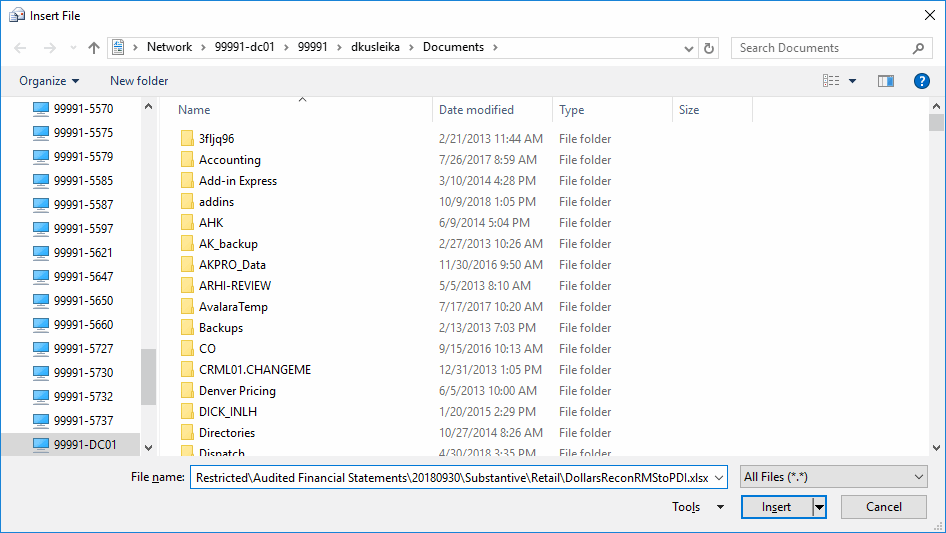
It just puts the full path of the active workbook in the clipboard. I use it all the time to create a hyperlink in Outlook or to add it as an attachement. I just paste the full path in the File Name box and I don’t have to navigate to where the file is.
That’s a big long path pasted into File Name. Even though my current folder is My Documents, I just paste in that big path and hit enter and it’s done.
Finally, see Hyperlink Keyboard Shortcut Update and be sure to read the comments if you want to implement this one.
Have a great IKSD and leave a comment with how you’ll be celebrating.