


Hey, remember back in 2010 when I had that bright idea about a repurposing Ctrl+PgUp and Ctrl+PgDn? Sure you do. The idea was that when I’m at the end of a workbook with a lot of worksheets, it would be easier to hit Ctrl+PgDn and wrap around to the first sheet rather than hold down Ctrl+PgUp until I got to the first sheet. I gave that shortcut the ol’ college try, but in the end I abandoned it. It turns out that I like holding down Ctrl+PgUp to get to the first page. But when I do that and this utility is active, it blows right by the first page and wraps around.
There’s this thing called Fitts’ Law and it indicates some things about infinity
Fitts’ law indicates that the most quickly accessed targets on any computer display are the four corners of the screen, because of their pinning action, and yet, for years, they seemed to be avoided at all costs by designers.
Fitts’ Law deals with pointing devices and targets, but the same principle applies to hotkeys. In Excel, if you hold down Ctrl+PgDn for infinity, you will end up on the last visible sheet of your workbook. That’s powerful because it removes all of your precision responsibility. I don’t care how imprecise you are, you can certainly hit an infinitely wide barn. Contrast that with the File menu in Excel 2010. Press Alt+F and then hold the down arrow for infinity. If the UI designers had been paying attention you would end up on “Exit” (the last item on the list), but you don’t. The cursor just keeps looping through the items on the list.
Even though I abandoned the hotkey, I can’t seem to get it out of my head that it’s a good idea. I’m stubborn like that. What if I could have the best of both worlds? What if I could race to the end of a workbook by holding down Ctrl+PgDn, but still wrap around to the first sheet when I wanted to? I changed the code to add a little delay. I started with 1 second, but determined that 1/2 second works better. Now, if the time between the last time I pressed Ctrl+PgDn and now is greater that 0.5 seconds, sheet activation will wrap around to the first sheet. If it’s less than 0.5 seconds, it’s assumed that I’m looking for infinity and remains on the last worksheet. And it all works the same for Ctrl+PgUp, just in reverse. I start with a module level variable and a module level constant.
Private msnLastWrap As Single
Private Const msnWRAPBUFFER As Single = 0.05
Private Const msnWRAPBUFFER As Single = 0.05
The Single msnLastWrap will keep track of the last time I pressed the hotkey. The rest of the code is the same from the prior post except that I added a couple of If statements to check the time differential and of course to set msnLastWrap.
Sub WrapSheetsUp()
If ActiveSheet.Index = FirstVisibleSheetIndex Then
If Timer – msnLastWrap > msnWRAPBUFFER Then
ActiveWorkbook.Sheets(LastVisibleSheetIndex).Activate
End If
Else
ActiveWorkbook.Sheets(NextVisibleSheetIndex(False)).Activate
End If
msnLastWrap = Timer
End Sub
If ActiveSheet.Index = FirstVisibleSheetIndex Then
If Timer – msnLastWrap > msnWRAPBUFFER Then
ActiveWorkbook.Sheets(LastVisibleSheetIndex).Activate
End If
Else
ActiveWorkbook.Sheets(NextVisibleSheetIndex(False)).Activate
End If
msnLastWrap = Timer
End Sub
Sub WrapSheetsDown()
If ActiveSheet.Index = LastVisibleSheetIndex Then
If Timer – msnLastWrap > msnWRAPBUFFER Then
ActiveWorkbook.Sheets(FirstVisibleSheetIndex).Activate
End If
Else
ActiveWorkbook.Sheets(NextVisibleSheetIndex(True)).Activate
End If
msnLastWrap = Timer
End Sub
In WrapSheetsDown when it gets to the last sheet (ActiveSheet.Index = LastVisibleSheetIndex) it checks to see how much time has elapsed (Timer – msnLastWrap). Timer is a VBA function that returns the number of seconds since midnight. Regardless of the results of that test, I assign Timer to my module level variable.
The rest of the code is unchanged, but for completeness, here’s what I have in my Auto_Open and Auto_Close procedures respectively.
Application.OnKey "^{PGUP}", "WrapSheetsUp"
Application.OnKey "^{PGDN}", "WrapSheetsDown"
Application.OnKey "^{PGDN}", "WrapSheetsDown"
Application.OnKey "^{PGUP}"
Application.OnKey "^{PGDN}"
And the rest of the procedures needed.
Public Function FirstVisibleSheetIndex() As Long
Dim lReturn As Long
Dim sh As Object
For Each sh In ActiveWorkbook.Sheets
If sh.Visible Then
lReturn = sh.Index
Exit For
End If
Next sh
FirstVisibleSheetIndex = lReturn
End Function
Dim lReturn As Long
Dim sh As Object
For Each sh In ActiveWorkbook.Sheets
If sh.Visible Then
lReturn = sh.Index
Exit For
End If
Next sh
FirstVisibleSheetIndex = lReturn
End Function
Public Function LastVisibleSheetIndex() As Long
Dim lReturn As Long
Dim i As Long
For i = ActiveWorkbook.Sheets.Count To 1 Step -1
If ActiveWorkbook.Sheets(i).Visible Then
lReturn = i
Exit For
End If
Next i
LastVisibleSheetIndex = lReturn
End Function
Public Function NextVisibleSheetIndex(bDown As Boolean) As Long
Dim lReturn As Long
Dim i As Long
If bDown Then
For i = ActiveSheet.Index + 1 To ActiveWorkbook.Sheets.Count
If ActiveWorkbook.Sheets(i).Visible Then
lReturn = i
Exit For
End If
Next i
Else
For i = ActiveSheet.Index – 1 To 1 Step -1
If ActiveWorkbook.Sheets(i).Visible Then
lReturn = i
Exit For
End If
Next i
End If
NextVisibleSheetIndex = lReturn
End Function
Formula Auditing by RefTreeAnalyser: Objects included
Jan14
on January 14, 2014
at 8:53 am
Posted In: Around the Web, Data Validation, Downloads, Excel Intermediate, Formulas, MVP, Navigation, Pivot Tables, Worksheet Functions
Hi all,
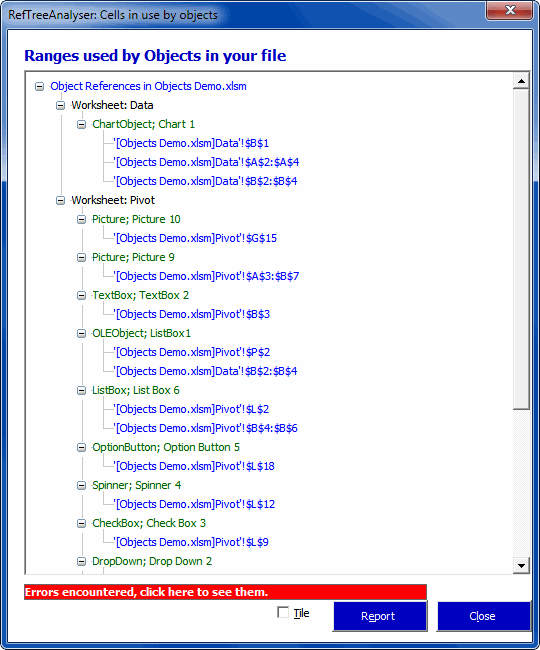
I’ve been working on my RefTreeAnalyser again. What I’ve been up to this time is building tools which help with the analysis of dependencies which are mostly hidden from view:
- Charts (series formula)
- Pivot table (source data)
- Data Validation formulas
- Conditional Formatting formulas
- Form controls (linked cell, listfillrange)
- ActiveX controls (linked cell, listfillrange)
- Picture objects (linked cell)
A new dialog has been added that shows all sources of the objects in your file:
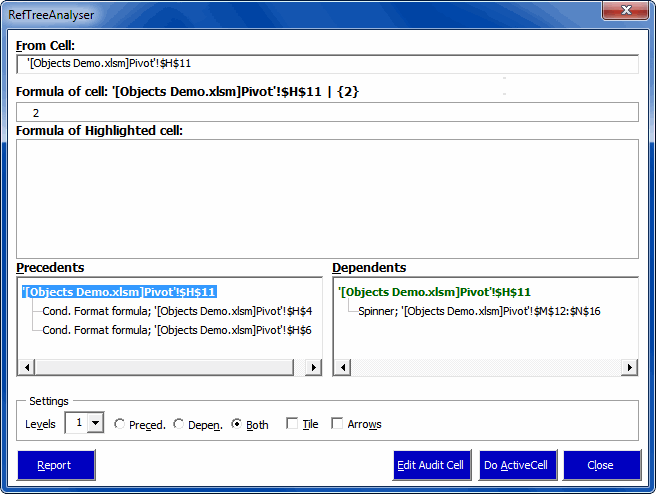
Moreover, when you analyse a particular cell for its dependencies, objects are taken into account too (well, to be perfectly honest, only if you purchase a license):
If you haven’t already done so, why don’t you head over to my website and download the tool. The demo is free and (almost!) fully functional.
Regards,
Jan Karel Pieterse
www.jkp-ads.com