


Mad Maudlin (Bedlam Bard #6) by Mercedes Lackey and Rosemary Edghill
Reviewed by MartyV from Eureka, California.
Reamde by Neal Stephenson
Reviewed by Thomascyne from Portland, Oregon.
I always select data from the top down, when I go to make a chart.
I never think to hit the Ctrl + Down Arrow first, so that I can select the range while leaving the active cell at the top.
I always end up with a chart waaay down at the bottom of that very long selection, where my active cell is.
I never want it all the way down there.
I always select the wayward chart, then move it gingerly up towards the Headings bar, in the vain hope that Excel will go into scroll mode, and let me release the chart where it belongs…at the top.
I never seem to hit that magic sweet spot, where Excel starts scrolling quicker than a crawl.
I always curse, then cut the chart, hit Ctrl + Up Arrow, then paste it up where it belongs.
I never remember this monkey business the next time I go to make a chart.
I always hope that MS will sort out basic usability stuff like this in the next release.
I never hold my breath.
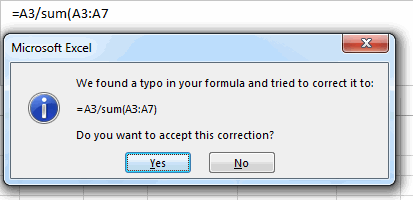
Yes please.
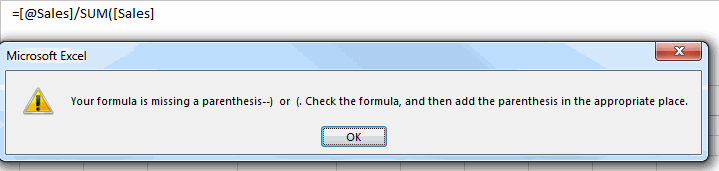
WTF? That formula is the same as the last one, only it uses Table notation!
–Edit–
Out of interest, here’s how that 1st message looks in Excel 2010. (Apologies for the old-school look of these next two screenshots, vs the previous ones. I’m too tight to install Excel 2010 AND 2013 on all the machines in our house, so this screenshot comes from my wife’s PC, which runs XP, on account of that same monetary tightness.)
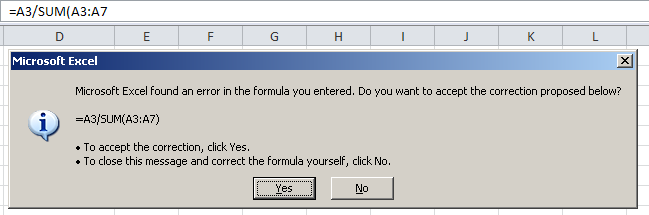
Let’s say I do decide to take the option offered in that 2nd bullet point – to close the message and correct the formula myself – and click NO. What do I get?
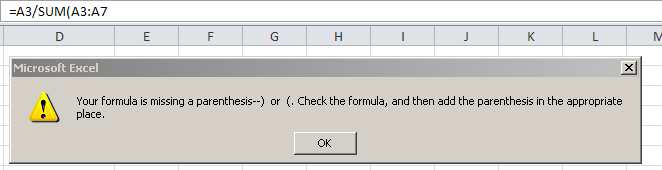
You told me that one click ago. Get out of my way, so I can do what I said I was going to do one click ago…i.e. fix the damn thing!
I spend heaps and heaps of my time on usability things when I build stuff in Excel. I can’t comprehend why these really crappy legacy usability issues are still perpetuated by the MS developers release after release. WTF.