The Daily Dose

laugh every day with cartoons jokes and humor
  • Home
  • About
    • Press
      • Press Release – Announcing Laughzilla the Third ebook
      • Press Release – The Daily Dose Kicks Off Its 16th Year with New Books and More Irreverent Laughter
      • Press Release – Themes Memes and Laser Beams Now Available in Paperback
      • Press Release – Announcing Themes Memes and Laser Beams
      • In The News
    • Privacy
  • Archive
  • Books
  • Shop
  • Collections
    • Galleries
      • Gallery
      • Captions
      • Flash Cartoons & Greeting Cards
        • Laughzilla’s Oska Flash Animation Cartoon Greeting Cards
        • Oska Cupid Love Humor
    • #OccupyWallStreet
    • cats
    • China
    • Food
      • Hors d’oeuvres
        • Ball of Cream Cheese
      • Entrees / Main Courses
        • Meatballs with Baked Beans and Celery
    • Gadaffy
    • Google
  • Links
  • Video
  • Submit a joke
DeviantART Facebook Twitter Flickr pinterest YouTube RSS

Subscribe for Free Laughs!


Latest Comics

  • This Memorial Day, Trump Meme Coin Congratulates Profit Takers
  • 25 Years of The Daily Dose
  • The Best Cartoons
  • Bitcoin sings “Fly Me To The Moon”
  • 22 years of The Daily Dose

Comic Archive

Wikileaks Assange Ecuador Embassy Debacle

Daily Dose News Roundup

  • Fusion’s best-funded bet raised another $1bn, and hired the banker who took Moderna public
  • Everyone else is shrinking satellites. K2 raised $500m to build giant ones, and put AI in orbit.
  • The unsexy layer AI agents actually need: DataBahn raises $40m to sell it
  • The chips that wire GPUs together are the new prize. Xsight raised $300m to sell an open one.
  • A $2 sticker defeats the one feature holding Meta’s ‘pervert glasses’ together

Quotable

"While you were out (watching the FIFA 2010 World Cup Finals) ... Millions more gallons of oil leaked into the Gulf of Mexico. Better get some Bounty ... you know, the Quicker Picker Upper." ~ Yasha Harari

Fresh Baked Goods

Get The Daily Dose's ebook: Laughzilla the Third - A Funny Stuff Collection of 101 Cartoons from TheDailyDose. Click here to get the e-book on Amazon kdp. Laughzilla the Third (2012) The Third Volume in the Funny Stuff Cartoon Book Collection Available Now.

Click here for the Paperback edition


Support independent publishing: Buy The Daily Dose's book: Themes Memes and Laser Beams - A Funny Stuff Collection of 101 Cartoons by Laughzilla from TheDailyDose. Click here to get the book on Amazon. Themes Memes and Laser Beams - The Second Volume in the Funny Stuff Cartoon Book Collection.

Click Here to get the book in Paperback While Available on Amazon

Themes Memes and Laser Beams - 101 Cartoons by Laughzilla. Get the e-book on Lulu.

Click Here to get The Daily Dose Cartoon ebook on amazon kindle

Funny Stuff :
The First Cartoon Book
from The Daily Dose.
Available on Lulu.

a couple of laughzillas on a blue diamond background

Apple’s first Brazilian retail store will open in Rio de Janeiro on February 15

Feb06
by Sindy Cator on February 6, 2014 at 11:24 am
Posted In: Around the Web, Latin America

Apple Brazil Retail Store 730x273 Apples first Brazilian retail store will open in Rio de Janeiro on February 15

We knew it was coming, but Apple has finally announced its first Brazilian retail store will be opening in Rio de Janeiro’s Barra de Tijuaca VillageMall on February 15.

The announcement, spotted by Brazilian publication MacMagazine [via Apple Insider], was made on Apple’s Brazil website earlier today, and marks a major move from the Cupertino company into the South American market.

➤ MacMagzine [via Apple Insider]

└ Tags: apple, news, syndicated
a couple of laughzillas on a blue diamond background

Fed up with Twitter’s official Android app? Try these alternatives

Feb06
by Sindy Cator on February 6, 2014 at 11:07 am
Posted In: Apps, Around the Web, evergreen, Roundups

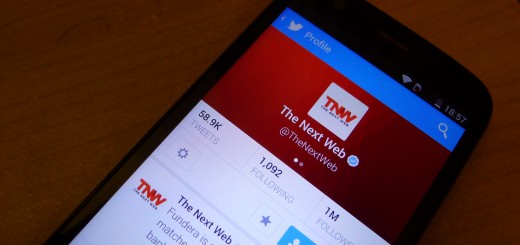
twitter crop 520x245 Fed up with Twitters official Android app? Try these alternatives

Twitter’s official Android app can feel bloated and unintuitive. The Discover and Activity tabs are given prominence at the top of the screen, but it’s difficult to know exactly what it’s showing you. Mentions have been absorbed into a new area called Notifications, which also include favorites and retweets by default, in addition to the usual inbox for direct messages.

It’s not unusable, but many longtime Twitter users (myself included) often feel like they’re fighting against the app, rather than with it. If you feel the same way, we’ve put together a shortlist for our favorite third-party alternatives.

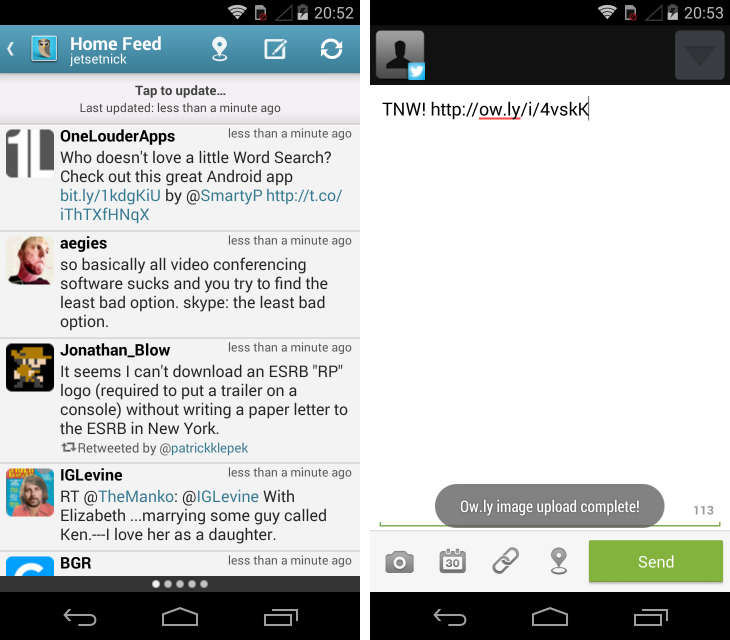
TweetCaster Pro ($4.99/£3.07)

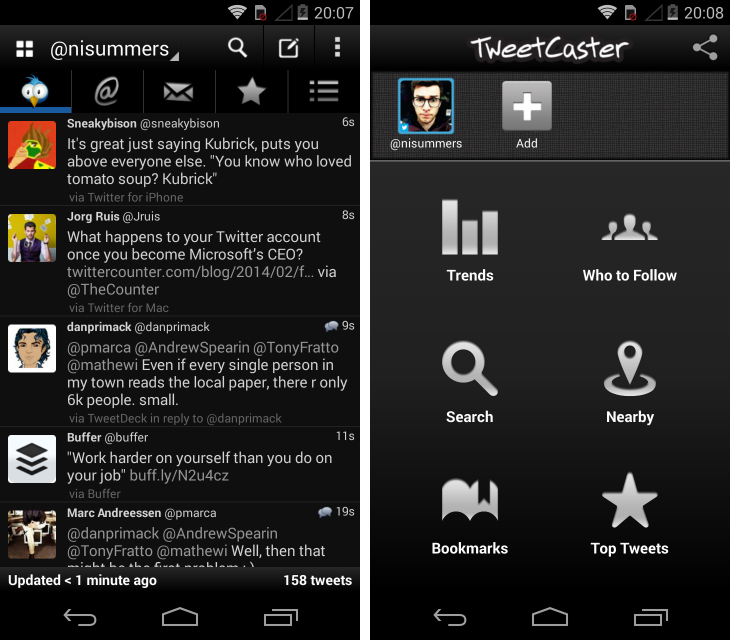
TweetCaster Pro doesn’t do much for me in the design department. The icons that lead to your mentions, direct messages, favorites and lists at the top of the screen look uninspired. Some of the themes are pretty garish and parts of the app feel overcrowded and poorly spaced out.

Nevertheless, I love TweetCaster Pro for its reliability. The app is surprisingly nippy and unlike Twitter’s official Android offering, it doesn’t try to hide the information that you want behind ambiguous labels such as Discover and Activity. Mentions and direct messages are clearly signposted, and it’s easy to look up trending topics and new people to follow when the need arises.

tweetcast Fed up with Twitters official Android app? Try these alternatives
Better yet, TweetCaster Pro offers a wealth of customization options. In addition to multiple themes, you can set the font size, the color of tweets that mention your account, auto-refresh intervals, background notifications and more. All of these settings, combined with its hands-off approach to the core Twitter experience, make this a great choice.

Note: A free version of this app is also available, but is supported with ads.

➤ TweetCaster Pro | Google Play

Plume Premium ( $4.98/£3.73)

Plume is a no-nonsense Twitter app with a straightforward design that you can wrap your head around in about 10 seconds flat. Tweets are displayed in vertical feeds which you can jump between by swiping across the display on your smartphone or tablet. It’s a common gesture for Twitter apps, but it works well when you want to quickly open the app and check everything that’s come in.

Alternatively, there are tabs at the top of the screen that let you quickly switch to your timeline, mentions and direct messages. Next to each header is a number that denotes unread tweets or messages, and you can quickly jump to the top of a column by tapping on the tab while you’re within the same feed.

plume Fed up with Twitters official Android app? Try these alternatives

A menu that slides out on the left-hand side gives you access to search, favorites, lists and other connected Facebook and Twitter accounts. The search offering is a little basic and I found reviewing retweets from my profile page was unintuitive, but they’re small knocks on what is otherwise a very well-made app. Modders will also appreciate the vast customization options, which allow you to tinker with its appearance, notifications and streaming mode.

Note: A free version of this app is also available,  but is supported with ads.

➤ Plume | Google Play

Falcon Pro (Free)

Falcon Pro disappeared from the Google Play store a while back after hitting its token limit; Twitter gives developers access to a finite amount (which are needed to accept new users) to cap the growth of third-party apps. However, it’s still possible to get this app online. Just navigate to the developer’s website, download the .apk file and run through the subsequent installation process. To get past the token requirement, just tap the Falcon logo, followed by the four corners of the display. Once all the colored shapes have appeared, toggle the orange square off and shake your phone for a moment.

Next, you’ll need to head to dev.twitter.com, sign-in with your Twitter account and hit the My Applications drop-down in the top right-hand corner. Create a new app and add literally anything to the subsequent text fields. Once you’re done, go under settings and tick the last check-box under Access. Finally, grab your consumer key and secret from the OAuth tool, jump back across to Falcon Pro and enter them in the corresponding log-in fields.

falcon Fed up with Twitters official Android app? Try these alternatives

If you’ve managed to jump through those hoops unscathed, you’ve just unlocked one of the best Twitter apps available on the Android platform. The app has its own notification-style menu bar at the top, showing the number of unread direct messages, mentions or tweets in your timeline. They’re beautifully designed and take up very little space, allowing the tweets themselves to take center stage. The animations are gorgeous, with a quick swipe revealing a well-stocked side menu on the left and a shortcut to all of your lists, saved searches, trending topics and starred users on the right.

It’s blazing fast and includes an internal browser with improved readability, light and dark themes, custom colors, notification options and more. It also integrates with Dashclock, making it one of the best all-round Twitter apps.

➤ Falcon Pro

Tweet Lanes (Free)

Tweet Lanes hit its token limit back in November 2012, but it’s worth checking the Google Play store again because, at the time of writing, this excellent third-party Twitter client still has some new tokens to dole out.

tweetlanes Fed up with Twitters official Android app? Try these alternatives
It has a fresh, original take on the Twitter experience. All outgoing tweets are sent through a ‘Context Box’ which is always present on-screen. Likewise, you can select multiple tweets in your feed with a long-press for a quick message that mentions multiple users.

The design pales in comparison to Carbon (see below) and Falcon Pro, but there are some interesting ideas here that go far beyond Twitter’s official Android app.

➤ Tweet Lanes | Google Play

Twidere (Free)

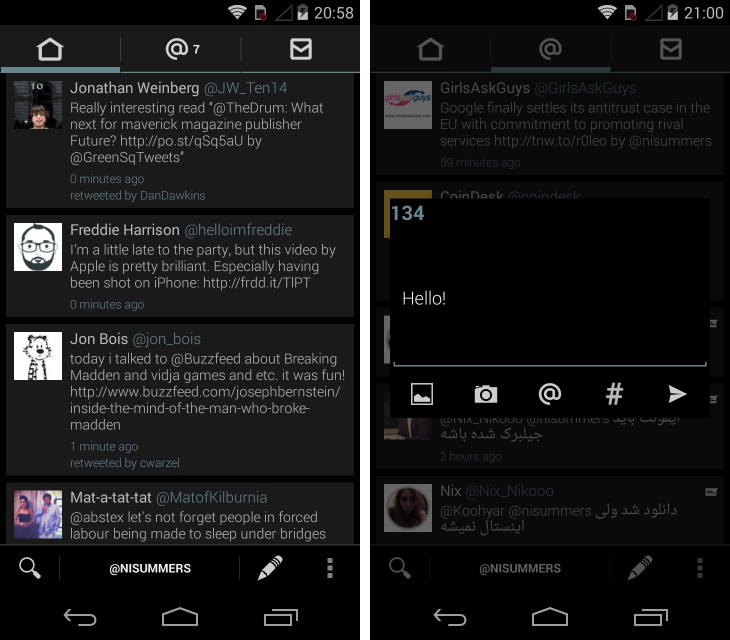
Twidere is about as close as you can get to building your own Twitter app from scratch; at least without writing a single line of code, anyway. From the outset, the app asks you to set the theme, background, colors and typeface, as well as how individual tweets are displayed, including animations, images and text.

While the core design is locked in, this level of customization means that it’s easy to tweak the experience to suit your needs and preferences. Once you’ve gone through the initial set up, there are further refinements that you can make in the app’s settings – these include toggling the count for unread tweets, a scroll slider on the side of the screen and the position of the compose button.

twidere Fed up with Twitters official Android app? Try these alternatives

If you ignore all of these options though, Twidere is still a slick and reliable Twitter app for the Android platform. It’s fast and responsive, with a packed side menu and horizontal swipes for quickly moving between feeds. Profile pages look a little bland and there’s no way to see who has retweeted or favorited any of your tweets at the moment. Otherwise, this is another solid contender.

➤ Twidere | Google Play

Tweetings ($3.25/£1.99)

With a $3 price-tag and no free version to speak of, Tweetings is one of the more expensive Android apps on our list. It’s not much in reality (an outstanding Twitter app is arguably worth the price of a Starbucks coffee) but given that many of our alternatives are free, Tweetings certainly has its work cut out.

Similar to Twidere, the app stands out by offering an enormous number of customization options that affect its look, feel and functionality. That includes themes (dark and light), the choice of typeface, and the color of tweets that you’ve posted, had favorited or been mentioned in.

tweetings Fed up with Twitters official Android app? Try these alternatives

Personally, I’m not enthused by either theme, but the workaround is to choose the dark theme in conjunction with a transparent background. The effect is fantastic and you can edit the effect to suit the wallpaper on your device. There are portrait and landscape dual-pane options, as well as the option to create new feeds containing almost any content type including retweets, saved searches and specific users. I also love the fact that with streaming enabled, you can set the app so that the feed always shows your most recent tweets, just like it would on a desktop app such as Tweetdeck. For power users, it’s an invaluable way of tracking stories, live events and hash-tags in real-time.

➤ Tweetings | Google Play

Twicca (Free)

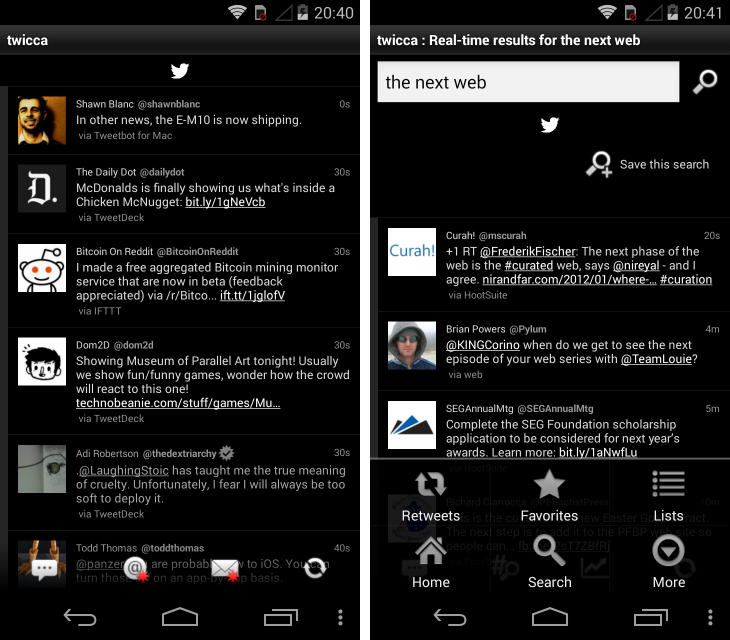
Parts of Twicca feel a little dated. Certain icons are in need of a revamp, horizontal swipes for feed navigation aren’t supported and changing certain settings then requires rebooting the app. It’s not bad by any means, but there are other Twitter apps that feel a little more polished and forward-thinking.

twicca Fed up with Twitters official Android app? Try these alternatives

Yet Twicca has its fans. Each timeline or feed has a dedicated refresh button, which is often faster than the ‘pull to refresh’ gesture implemented in many Android and iOS apps. The app is focused and lightweight, avoiding the heavy, bloated interfaces that often plague other Twitter clients. Text can also be set to a microscopic font size, which is ideal for smaller devices and users who want to get the maximum number of tweets on-screen at once.

➤ Twicca | Google Play

Tweedle (Free)

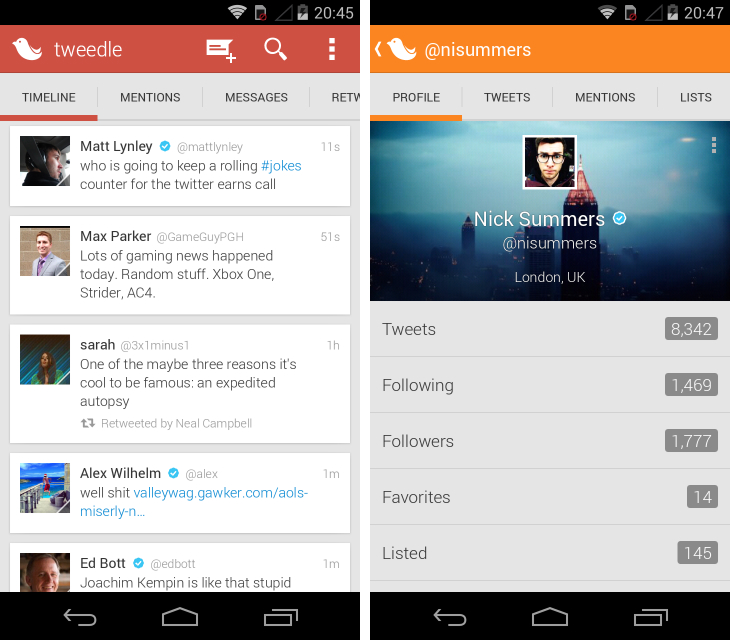
Tweedle makes our shortlist for one simple reason: it has a modern, refined design by default. If you want a Twitter app that looks the part, but doesn’t require changing at least half-a-dozen different customization options, this is the app for you. It’s a simple design, with tabs for your timeline, mentions and direct messages positioned at the top of the screen. Scrolling is buttery smooth and individual tweets are clearly legible, utilising a card design and font that has more than a passing resemblance to Google+.

tweedle Fed up with Twitters official Android app? Try these alternatives

By tapping on one of the headers, you can quickly shoot to the top of your timeline or inbox. A long tap brings up the usual options (reply, retweet, favorite, etc.) and the compose button is clearly visible at the top of the screen. It’s the polish and design details that make this such an outstanding user experience, however. The flat design is excellent and the number of sub-menus and options are kept to a minimum.

For those that like to experiment, Tweedle has some extensive options for handling notifications, adding new columns syncing and tweaking the color scheme. Personally, I’m a fan of the red theme copied from the Google Play Movies app (shown above).

➤ Tweedle | Google Play

Robird ($1.99/£1.21)

Robird is another Twitter client for Android boasting a minimalistic interface. It’s not the most sophisticated or fully featured app in the Google Play store, but it’s got a slick look and integrates with DashClock.

The app has a straightforward three column design, separated by icons at the top of the screen. You can flick between them by swiping to the left and right, and tap on tweets to review replies and take action (share, retweet, reply, etc.)

robird Fed up with Twitters official Android app? Try these alternatives
There are a few different themes to choose from and granular settings for tweet streaming, notifications and the information that is shown alongside each tweet. If you’ve been floating between third-party Twitter apps for a while now, Robird is definitely worth checking out.

➤ Robird | Google Play

Hootsuite (Free)

For marketers, social media managers and business owners, Hootsuite needs no introduction. It’s one of the most prolific desktop services for managing accounts from a number of social networks including Facebook, Twitter, LinkedIn and Foursquare. All four of these can be monitored using the firm’s Android app, although it’s also capable as a standalone Twitter client.

hs Fed up with Twitters official Android app? Try these alternatives

You can configure which streams are shown in the app and switch between them with a sideways swipe. Hootsuite can be a little slow and unresponsive on Android, and the design – in my opinion – is way behind many dedicated third-party Twitter apps. Even so, if you’re a fan of Hootsuite or want to access multiple social networks from a single app, this is one to consider.

➤ Hootsuite | Google Play

Carbon (Free)

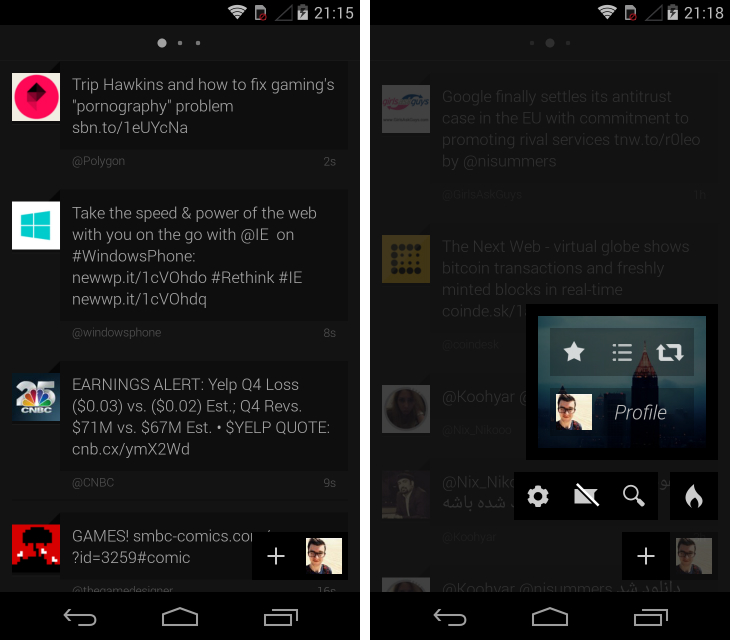
Quite simply, Carbon is my favorite Twitter app on Android. It’s therefore unsurprising to hear that like so many other third-party Twitter clients, its creators have run out of tokens and can no longer accept new users. Technically, it’s still possible to pick up the app provided another user gives up their token, so if you keep checking the Google Play store it might be possible to sneak in.

The design is sublime – Carbon is by far the most beautiful Twitter app I’ve used on Android – with a user interface that is refreshing and truly unique. For starters, there are very few icons or visual cues on-screen. When you browse your feeds, there are just three tiny circles positioned at the top which tell you whether you’re viewing your timeline, mentions or direct messages.

carbon Fed up with Twitters official Android app? Try these alternatives
By tapping your tiny profile picture in the bottom left-hand corner, you’ll find some quick shortcuts to your favorites, lists and retweets, which slide out in a separate column on the right-hand side of the screen. It’s natural, fast and intuitive – if you can grab a token, don’t hesitate to install this terrific alternative to Twitter’s official Android app.

➤ Carbon | Google Play

Honorable Mentions:

A smattering of apps that didn’t quite make the grade, but are still worth checking out if you’re a serious Twitter addict…

– Echofon
– Branches
– UberSocial
– Seesmic
– Buffer
– Talon

└ Tags: syndicated
a couple of laughzillas on a blue diamond background

Multimedia messaging app Cubie now lets you create and share your own stickers

Feb06
by Sindy Cator on February 6, 2014 at 10:50 am
Posted In: Apps, Around the Web, Product Updates, stickers

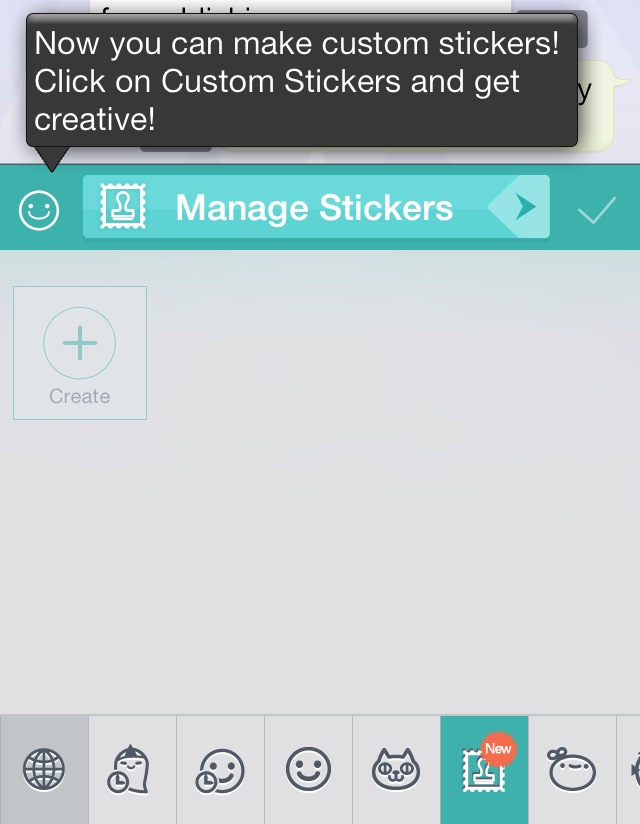
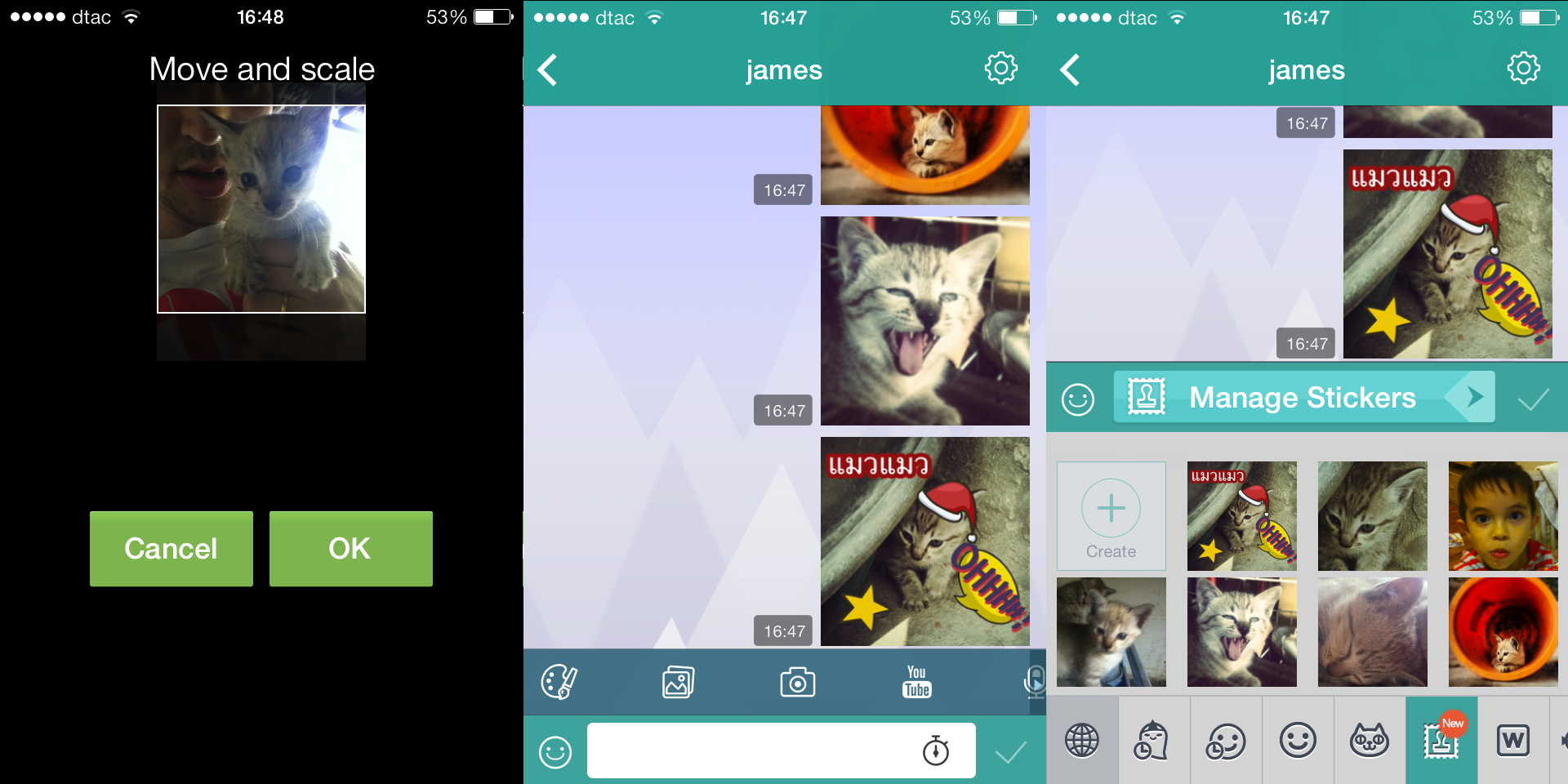
image 31 Multimedia messaging app Cubie now lets you create and share your own stickersStickers are all the rage now on messaging apps — and 500 Startups-backed messaging app Cubie has taken it a step further by launching custom stickers. Now you can create your own stickers and “share the funny with friends,” in the company’s own words.

Creating a custom sticker on Cubie essentially consists of pulling a photo off your camera roll, zooming in to focus on any part of the photo, and then saving it into your sticker drawer. You can’t edit in-app though — you’ll need to head to a dedicated photo app such as Molome to do that.

If someone else sends you a sticker, you can also collect it by pressing and holding on your friends’ sticker messages as well. Cubie’s James Hill tells us that there are plans for further customization — we’re hoping that means advanced editing and… custom GIFs!

Cubie Stickers 730x365 Multimedia messaging app Cubie now lets you create and share your own stickers

➤ Cubie: iOS | Google Play

└ Tags: news, syndicated
a couple of laughzillas on a blue diamond background

Why you should buy Final Fantasy VI: A true classic now on iOS and Android

Feb06
by Sindy Cator on February 6, 2014 at 10:21 am
Posted In: Apps, Around the Web, Product Reviews

ff6 520x245 Why you should buy Final Fantasy VI: A true classic now on iOS and Android

Square Enix has just released Final Fantasy VI on iOS, following on from its Android release last month. If you have any interest at all in the series, or in Japanese role-playing games, you should buy it.

Final Fantasy VI is a true work of art. Originally released on the SNES in 1994, it was the pinnacle of the 2D Japanese role-playing game era. While The Secret of Mana and its Japan-only sequel may have had fancier graphics, nothing could touch the sixth instalment of this long-running franchise for sheer scale and depth.

The story – with multiple central characters and a plot that draws inspiration from sources as varied as steampunk, Star Wars and The Legend of Zelda: A Link to the Past – is light years ahead of what most games of the time had achieved. The limited expressive palette of the 2D sprites was more than compensated for by the script and Nobuo Uematsu’s masterful soundtrack that expressed emotions through music that the graphics at the time simply couldn’t convey.

 Why you should buy Final Fantasy VI: A true classic now on iOS and Android

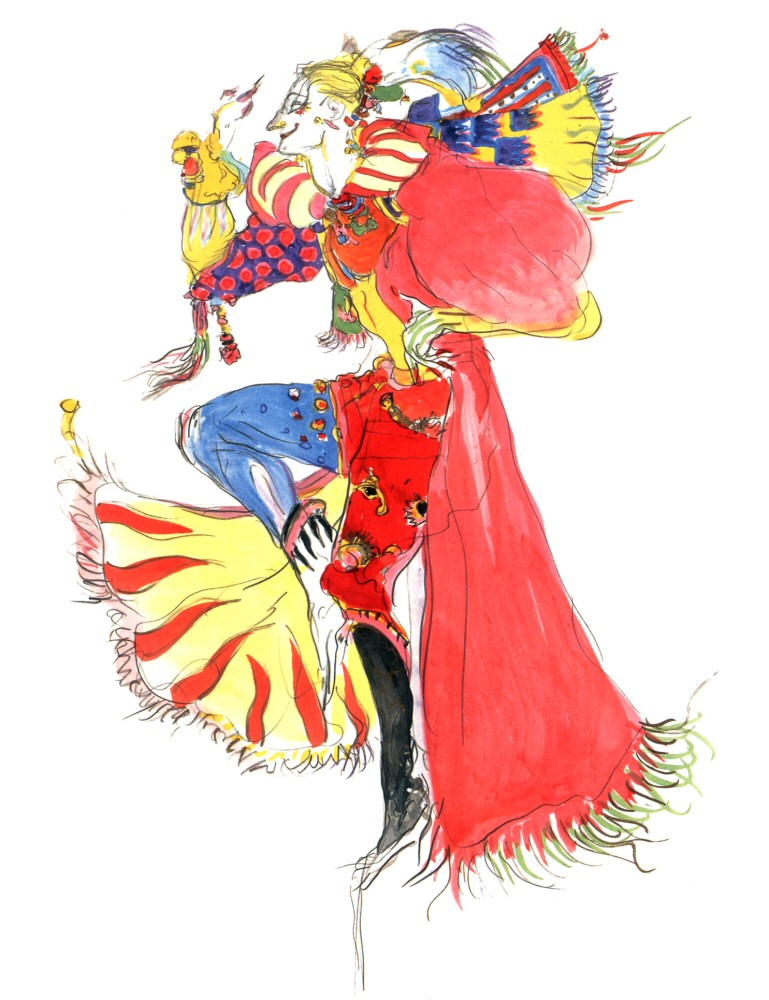
With highlights like the opera house scene (make sure you remember your lines!) and a truly maniacal villain in the form of Kefka, an Imperial general with an almost literal God complex, this is a game that keeps on handing out treat after treat the more you play it.

FF6 Kefkaart 520x676 Why you should buy Final Fantasy VI: A true classic now on iOS and Android

Kefka: One of greatest villains in videogame history

There’s a valid argument that games like this don’t play out quite as well on mobile devices as they did on a 16-bit console connected to a TV, but you’re really not going to get any better than this when it comes to a remake of a classic jRPG – there simply isn’t a better game to remake.

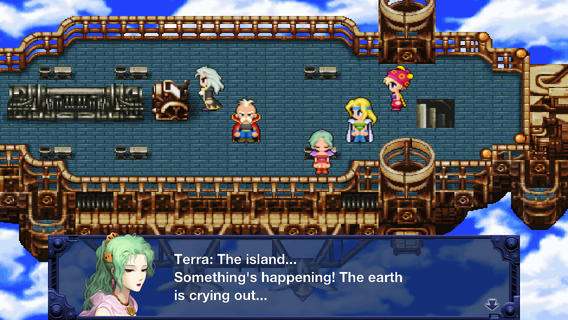
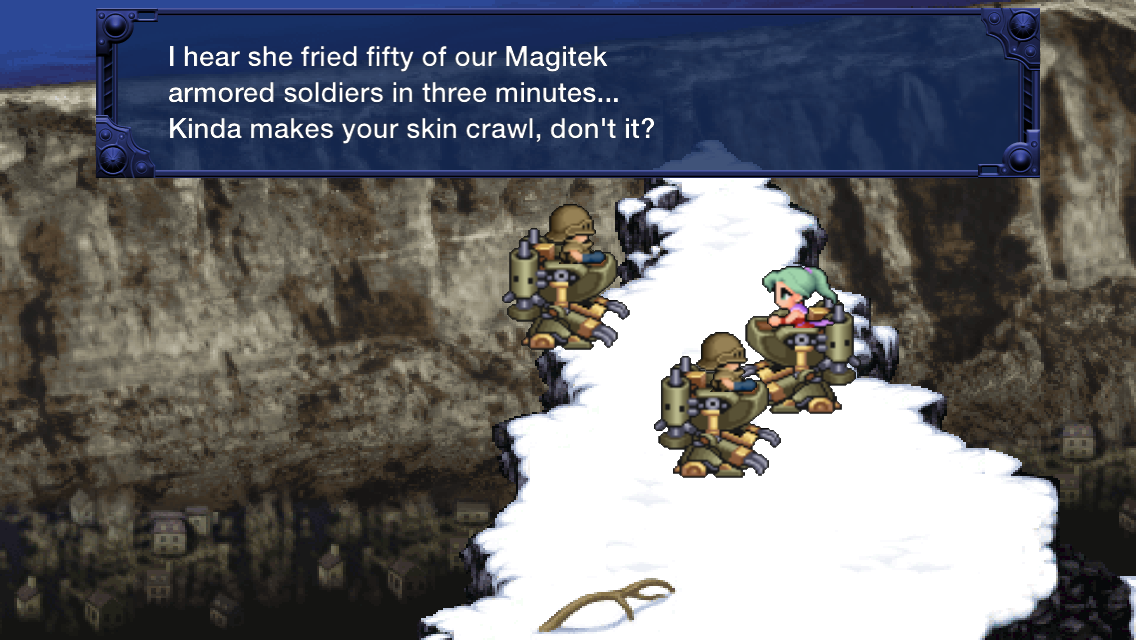
Final Fantasy VI 3 520x292 Why you should buy Final Fantasy VI: A true classic now on iOS and Android

Square Enix has refined its approach to mobile ports over the years, and our initial experience of the iOS version here is that it’s a joy to control, particularly during fight sequences. The redrawn sprites may not be to everyone’s tastes but they’re better than if the developers had just reused the pixellated originals. Among the other small concessions to the modern world is the addition of iCloud saves in the iOS version.

 Why you should buy Final Fantasy VI: A true classic now on iOS and Android

At $15.99 or local equivalent, it’s not exactly cheap for a 20-year-old game, but this really isn’t any old game – it’s a true classic, a piece of video game history. If you’ve never played it, now’s the time.

➤ Final Fantasy VI [iOS / Android]

└ Tags: news, syndicated
a couple of laughzillas on a blue diamond background

Flappy Bird is a validation for Asia’s messaging app giants and their global plans

Feb06
by Sindy Cator on February 6, 2014 at 10:11 am
Posted In: Around the Web, Asia, flappy bird, kakao, wechat

 Flappy Bird is a validation for Asias messaging app giants and their global plans

The hype around Flappy Bird, that crazily addictive iOS and Android that surfaced out of nowhere, may be driving you insane whether you play it or not, but its success is great news for Asia’s mobile messaging firms. It may seem strange to draw parallels between a humbly created app and billion dollar companies, but casual games like Flappy Bird are a major part of the chat app makers’ global strategies.

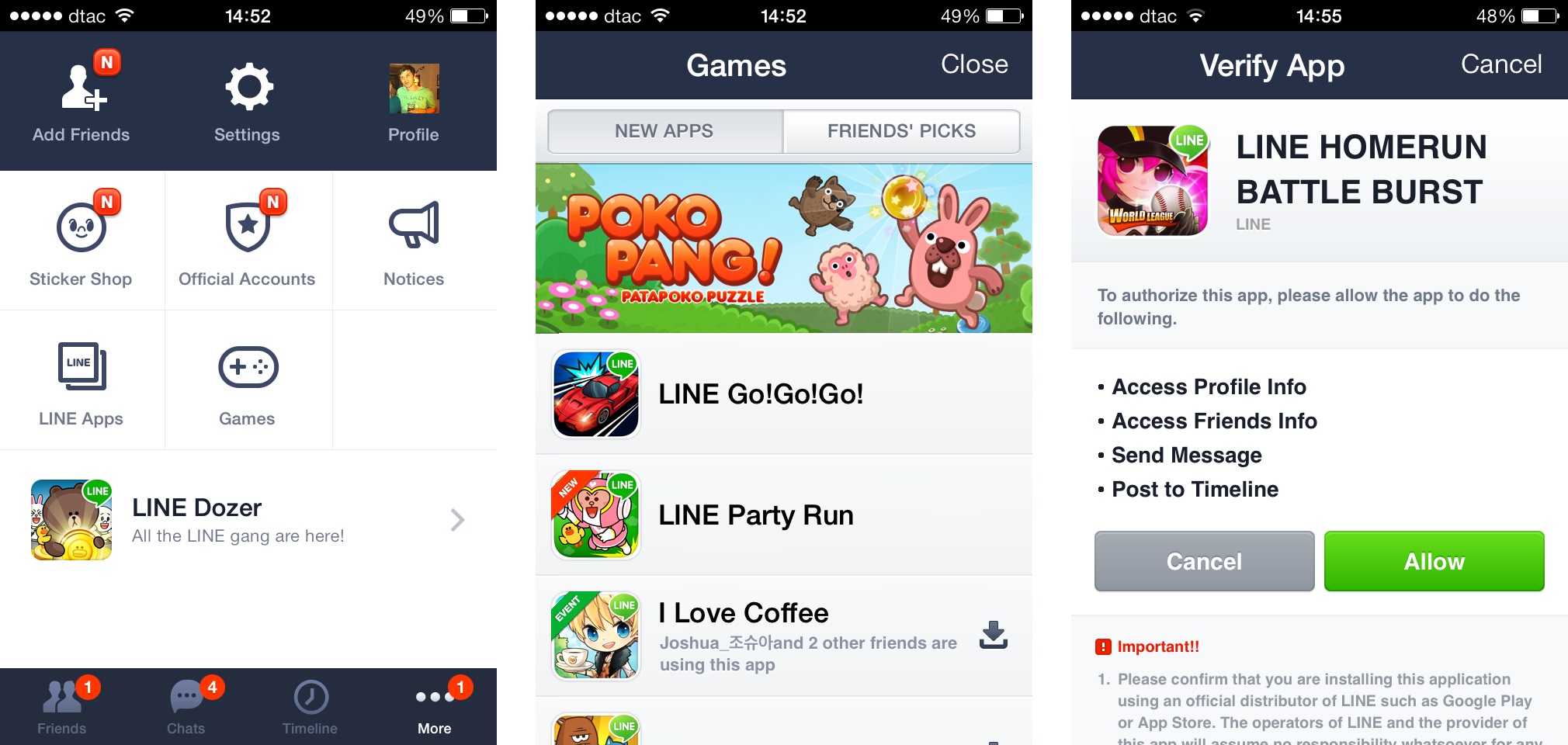
Line, WeChat and Kakao Talk each offer a messaging app that includes, among other things, a games platform bolted on to it. That may be seen as unnecessary to many, but it represents a hugely important component aimed at keeping users engaged, helping grow sign-ups via word-of-mouth and — of course — making money.

A whopping 60 percent of Line’s $338 million revenue for 2013 came via in-app purchases from games, while Kakao Talk games grossed $311 million in half a year. App Annie ranked Line as the fifth-highest grossing games firm for iOS and Android in 2013, while one of its titles — Pokopang — was the year’s ninth biggest earner.

aaaa horz Flappy Bird is a validation for Asias messaging app giants and their global plans

Yet, despite seeing this success in Asia — Line has over 200 million game downloads, WeChat hit 670 million downloads in three months — the trio are commonly seen as facing a cultural barrier in the West, where more basic messaging clients like Kik, WhatsApp and (even) Snapchat reign supreme.

That perceived dilemma of adapting to US consumer culture — i.e. ‘why are there games in my messaging app’ — is likely one of the reasons that all three have put off expansion into the US thus far. However, with Flappy Bird the talk of the town on social networks and raking in $50,000 per day via in-app ads, the app is popular worldwide, even in the US.

That jives well for Line because the ingredients of Flappy Bird are exactly those that the Japanese firm puts into its social games, which are equally as addictive. That’s right, don’t be fooled by the basic aesthetics, Flappy Bird is indeed genius: it hooks users because the concept is dead simple, but tough to master.

It also uses social dynamics — such as scoreboards of friends’ scores and sharing scores direct to social networks — which are common in games from Line, WeChat and Kakao Talk.

games1 730x346 Flappy Bird is a validation for Asias messaging app giants and their global plans

Indeed, Line must be kicking itself that none of its catalog of 30 or so iOS or Android games have seen this much attention — though, in reality, much of the appeal of Flappy Bird is down to its lack of polish, which is down-right amateurish compared to professionally produced content.

Were I working at Line, I would see Flappy Bird’s success as a validation for the gaming model that the company offers.

Titles like baseball game Home Run Burst, Candy Crush-like Line Bubble, Let’s Golf and car racer Go!Go!Go! are super simple to play and pretty addictive, Line just needs to package them in a way that appeals to the mass market in the West. That’s something that seems a little more feasible right now.

IMG 5840 520x346 Flappy Bird is a validation for Asias messaging app giants and their global plans
IMG 5835 520x346 Flappy Bird is a validation for Asias messaging app giants and their global plans
IMG 5834 520x346 Flappy Bird is a validation for Asias messaging app giants and their global plans
IMG 5837 520x346 Flappy Bird is a validation for Asias messaging app giants and their global plans
IMG 5842 520x346 Flappy Bird is a validation for Asias messaging app giants and their global plans
IMG 5843 520x346 Flappy Bird is a validation for Asias messaging app giants and their global plans
IMG 5844 520x346 Flappy Bird is a validation for Asias messaging app giants and their global plans
IMG 5845 520x346 Flappy Bird is a validation for Asias messaging app giants and their global plans
IMG 5847 520x346 Flappy Bird is a validation for Asias messaging app giants and their global plans
IMG 5850 520x780 Flappy Bird is a validation for Asias messaging app giants and their global plans
IMG 5851 520x780 Flappy Bird is a validation for Asias messaging app giants and their global plans
IMG 5852 520x780 Flappy Bird is a validation for Asias messaging app giants and their global plans
IMG 5853 520x780 Flappy Bird is a validation for Asias messaging app giants and their global plans
IMG 5856 520x780 Flappy Bird is a validation for Asias messaging app giants and their global plans
IMG 5857 520x780 Flappy Bird is a validation for Asias messaging app giants and their global plans
IMG 5858 520x780 Flappy Bird is a validation for Asias messaging app giants and their global plans
IMG 5859 520x780 Flappy Bird is a validation for Asias messaging app giants and their global plans
IMG 5861 520x780 Flappy Bird is a validation for Asias messaging app giants and their global plans

└ Tags: line, syndicated
  • Page 14,615 of 14,659
  • « First
  • «
  • 14,613
  • 14,614
  • 14,615
  • 14,616
  • 14,617
  • »
  • Last »
The Daily Dose, The Daily Dose © 1996 - Present. All Rights Reserved.
  • Home
  • About
  • Archive
  • Books
  • Collections
  • Links
  • Shop
  • Submit a joke
  • Video
  • Privacy Policy