The Daily Dose

laugh every day with cartoons jokes and humor
  • Home
  • About
    • Press
      • Press Release – Announcing Laughzilla the Third ebook
      • Press Release – The Daily Dose Kicks Off Its 16th Year with New Books and More Irreverent Laughter
      • Press Release – Themes Memes and Laser Beams Now Available in Paperback
      • Press Release – Announcing Themes Memes and Laser Beams
      • In The News
    • Privacy
  • Archive
  • Books
  • Shop
  • Collections
    • Galleries
      • Gallery
      • Captions
      • Flash Cartoons & Greeting Cards
        • Laughzilla’s Oska Flash Animation Cartoon Greeting Cards
        • Oska Cupid Love Humor
    • #OccupyWallStreet
    • cats
    • China
    • Food
      • Hors d’oeuvres
        • Ball of Cream Cheese
      • Entrees / Main Courses
        • Meatballs with Baked Beans and Celery
    • Gadaffy
    • Google
  • Links
  • Video
  • Submit a joke
DeviantART Facebook Twitter Flickr pinterest YouTube RSS

Subscribe for Free Laughs!


Latest Comics

  • This Memorial Day, Trump Meme Coin Congratulates Profit Takers
  • 25 Years of The Daily Dose
  • The Best Cartoons
  • Bitcoin sings “Fly Me To The Moon”
  • 22 years of The Daily Dose

Comic Archive

The Day After The Mayan Calendar Editorial Cartoon

Daily Dose News Roundup

  • Estonian energy storage firm Skeleton becomes unicorn with Siemens deal
  • Palantir CTO says the Pentagon has already replaced Anthropic’s AI
  • DeepSeek to lead seed round in $400mn robot AI start-up, Bloomberg reports
  • Turkey’s social media ban for under-15s starts on 1 November
  • Vittorio Colao defends copyright rules and the DSA in Europe’s AI debate

Quotable

"For nearly twenty years, the West has said Iran will have an atomic bomb within three years. By now they should already have an impressive nuke arsenal. Trouble is, they used Russian engineers to build their enrichment facilities, and Iran's nuclear scientists were trained in America." ~ Yasha Harari

Fresh Baked Goods

Get The Daily Dose's ebook: Laughzilla the Third - A Funny Stuff Collection of 101 Cartoons from TheDailyDose. Click here to get the e-book on Amazon kdp. Laughzilla the Third (2012) The Third Volume in the Funny Stuff Cartoon Book Collection Available Now.

Click here for the Paperback edition


Support independent publishing: Buy The Daily Dose's book: Themes Memes and Laser Beams - A Funny Stuff Collection of 101 Cartoons by Laughzilla from TheDailyDose. Click here to get the book on Amazon. Themes Memes and Laser Beams - The Second Volume in the Funny Stuff Cartoon Book Collection.

Click Here to get the book in Paperback While Available on Amazon

Themes Memes and Laser Beams - 101 Cartoons by Laughzilla. Get the e-book on Lulu.

Click Here to get The Daily Dose Cartoon ebook on amazon kindle

Funny Stuff :
The First Cartoon Book
from The Daily Dose.
Available on Lulu.

a couple of laughzillas on a blue diamond background

9 of the best podcast apps for the iPhone and iPad

Feb19
by Sindy Cator on February 19, 2014 at 7:26 pm
Posted In: Apps, Around the Web, Roundups
Pages: 1 2

shutterstock 163052525 520x245 9 of the best podcast apps for the iPhone and iPad

I love podcasts. When I’m stuck on a train, cooking in the kitchen or running around my local park, they offer a wonderful escape and explore many of my favorite hobbies, interests and pastimes. There are an overwhelming number of podcasts to choose from – it’s never been easier to produce a show and share it with the world – so keeping up with them all can feel like a full-time job.

If you want to manage them all through your iPhone or iPad, there are a number of podcast apps to consider. We tackled the problem back in 2011, but a lot has changed in the last three years – so here’s our updated shortlist.

Podcasts (Free)

If you’re delving into podcasts for the first time, Apple’s own offering is a decent place to start. The Podcasts app is a free download on the App Store, but it usually come pre-installed on every new iPhone or iPad anyway.

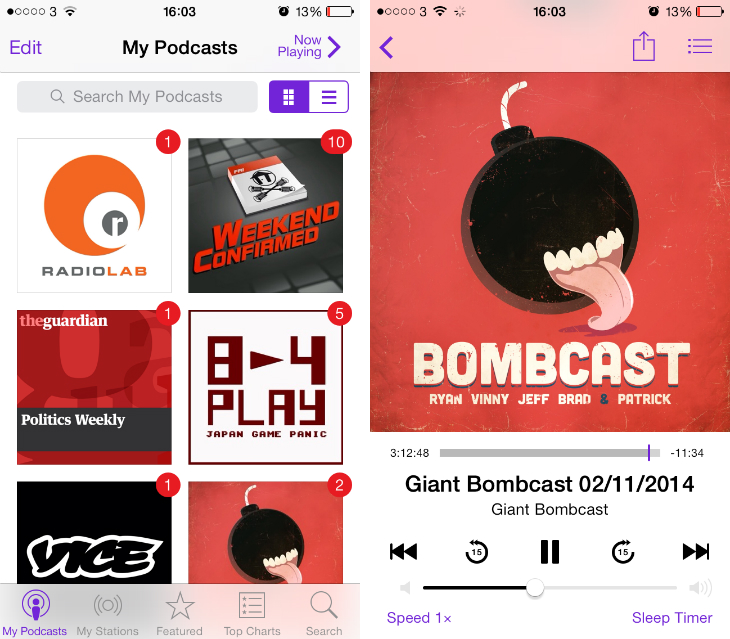
The design is in keeping with Apple’s flat iOS 7 aesthetic, opting for a sparse, white background with the odd splash of purple for buttons, toggles and menu tabs. You can search the Podcasts Store for a specific show or hit the Top Charts and Featured sections if you’re looking for something new.
podcasts1 9 of the best podcast apps for the iPhone and iPad

You can subscribe to as many as you like and individually set whether you want new episodes to be downloaded automatically, how many episodes should be stored offline, and the ordering of episodes both for browsing and playback. It’s all fairly straightforward and the audio player also supports different playback speeds and a sleep timer. Did I mention that it’s free?

➤ Podcasts | App Store


Instacast 4 ($3.99/£2.49)

Instacast 4 feels like a spiritual successor to Apple’s Podcasts app, or a premium version that was designed with long-time podcast listeners in mind. The app follows the iOS 7 philosophy with a minimalist look, but it also offers some fresh design ideas and advanced features that surpass Apple’s creation.

You can swipe in from the edge of the screen to access a slick sidebar with shortcuts for a number of different menus and listening modes. This includes Unplayed – a list of episodes that you haven’t listened to just yet – anything you’ve imported and a play queue for episodes that you want to listen to next. That last feature is particularly useful as it means that if you’re out running or have your hands full, you can set Instacast 4 to play new episodes from your subscriptions automatically.

instacast1 9 of the best podcast apps for the iPhone and iPad

The app lets you add custom bookmarks so you can easily return to specific points in an episode, and offers granular control over when new episodes are downloaded, deleted and other general playback settings. These can be configured for individual subscriptions too, so if you find one podcast difficult to follow, you can slow down the default playback speed or configure longer skip intervals without affecting your other shows.

➤ Instacast 4 | App Store


Downcast ($2.99/£1.99)

If that sounds a little overwhelming, Downcast is a lightweight alternative. The general interface and horizontal menu bar is similar in design to Apple’s Podcasts app, but you’ll quickly notice that the tabs and general user experience is pretty different. For starters, all of the app’s discovery options are covered under the ‘Add’ option, including search, manual imports and top charts.

Episodes are then accessed from the Podcasts tab (no surprises there) but what’s unique is that Downcast uses sub-headers to show whether each of them have any new or unplayed episodes to listen to. The app also gives prominence to your download queue, which is valuable when you’re wondering how long it’ll take before you can dig into another episode.

downcast1 9 of the best podcast apps for the iPhone and iPad

Downcast uses a dark theme for its audio player, prioritzing show notes over the creator’s artwork. It’s not the most beautiful design, but it means I always read the show notes – an area of podcast apps I usually never engage with. It’s also worth highlighting the four skip buttons at the top of the player, which let you move 15 or 30 seconds back and 30 seconds or 2 minutes forwards.

➤ Downcast | App Store


Pocket Casts ($3.99/£2.49)

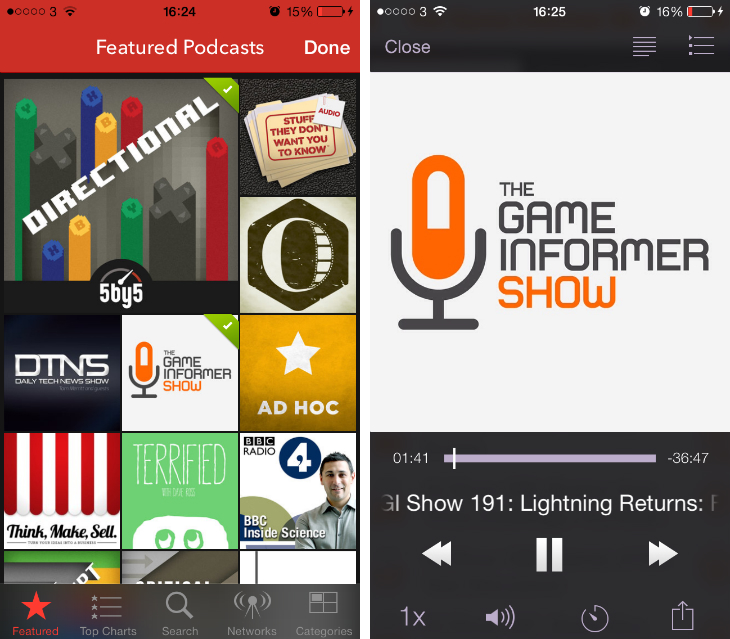
If you gazed at Pocket Casts from afar, you would be forgiven for thinking this is a glossy news reader app similar to Flipboard. That’s because this sublime piece of software cares about podcast artwork, offering up a vibrant mosaic both in the directory and your personal library. It’s striking and sharp, making it one of my favorite podcast apps to explore.

The top menu is similar to the sidebar in Instacast 4, giving you quick access to your subscriptions, unplayed episodes and download queue. It’s a simple, intuitive interface that makes it easy to bounce between menus at breakneck speed. For each subscription you can note whether you want new episodes to be downloaded automatically and also whether you want to start them partway through – a joyous feature if you hate a particular podcast intro.
pocketcasts1 9 of the best podcast apps for the iPhone and iPad

A small knock against Pocket Casts is the audio player. While you can customize the length of time for skipping forwards and backwards in the app’s settings, these are mapped to the standard fast-forward and rewind buttons. A quick tap triggers a skip – which makes sense – but when I’m running or in a busy environment it’s easy to select it by mistake. Finally, be sure to check out the Episode Filter option, which gives you the ability to create automated playlists (with customizable designs) based on pre-defined parameters.

➤ Pocket Casts | App Store


Castro ($2.99/£1.99)

Castro is an exercise in minimalism. When you first launch the app on your iPhone or iPad, you’ll appreciate the sparse design almost immediately. A single button presents itself for adding new podcasts and you’ll be given just two further options – search, or add a supported URL from your clipboard. The lack of categories and top charts is disappointing, but the gorgeous aesthetics and smooth animations give Castro a slick feel.
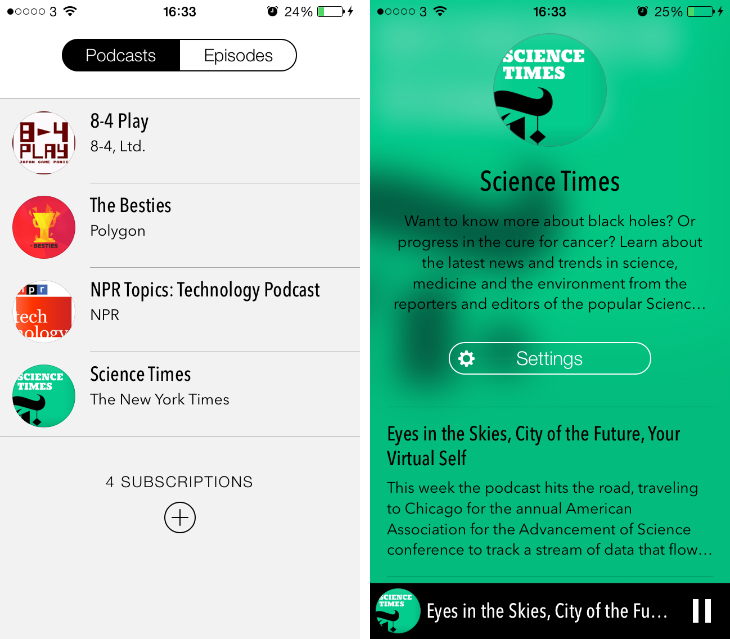
Castro1 9 of the best podcast apps for the iPhone and iPad

The main interface is split into just two tabs – podcasts and episodes – with notifications for new subscriptions and finished downloads dropping down from the top of the screen. Castro is restrained in its approach, offering only a few options for configuring playback speed and automatic downloads for each show. Nevertheless, this is a promising app for podcast addicts that are truly passionate about design.

➤ Castro | App Store

Next: Pod Wrangler, iCatcher! and more…

└ Tags: syndicated
a couple of laughzillas on a blue diamond background

The redesigned Google Maps for desktop begins rolling out to all users

Feb19
by Sindy Cator on February 19, 2014 at 7:05 pm
Posted In: Around the Web, Google

145812100 520x245 The redesigned Google Maps for desktop begins rolling out to all users

Google is finally bringing its redesigned Google Maps desktop experience to the masses.

After unveiling it as a ‘preview’ during its annual I/O conference last year, Google will now make it the default for users everywhere. It’s worth noting that this version has been available for anyone to access by heading to maps.google.com/preview since last July, however.

png base649c09923ccb858940 730x360 The redesigned Google Maps for desktop begins rolling out to all usersIt’s a radical overhaul that focuses on full-screen maps and smart discovery features that take into account nearby businesses and where you’re headed. Whe asking for directions, It’s also possible to compare different forms of transportation and instantly switch to Earth View – which has been brought in from Google Earth for the first time.

For a full re-cap, it’s worth revisiting this Google promo video from last May:

Google says it’ll be rolling out the updated Google Maps over the coming weeks. “With any product redesign, there may be bumps along the road,” Brian McClendon, VP of Google Maps said. “We’re hoping that you’re as excited as we are to navigate uncharted territory in pursuit of the perfect map.”

➤ Thank you, and welcome to the new Google Maps (Blog Post)

Image Credit:  Justin Sullivan/Getty Images

└ Tags: news, syndicated
a couple of laughzillas on a blue diamond background

Nextt’s iOS and Android apps for making plans with friends now include a ‘self-destruct’ feature

Feb19
by Sindy Cator on February 19, 2014 at 6:55 pm
Posted In: Apps, Around the Web, Insider, Product Updates

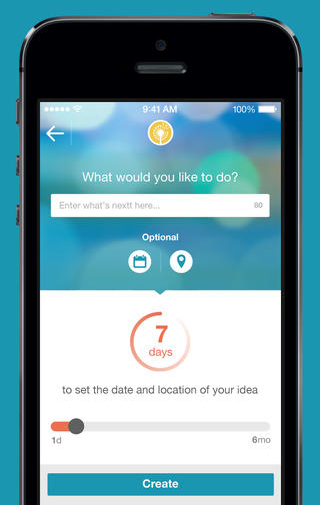
Nextt 220x347 Nextts iOS and Android apps for making plans with friends now include a self destruct featureNextt, the app that wants to make it easier for groups of friends to make plans offline, has been updated for iOS and Android to include a self-destruct option so that suggested plans now have an expiry date by default. Be quick or miss out, is the general idea.

The update also brought a couple more new features, like better integrated private messaging that allows you to have a conversation with a friend about an event and then use Nextt’s planning features to nail down the who, when and where.

And if your friends aren’t using Nextt, they will now get “hassle-free notifications” via email or SMS. These link to a dedicated space where the unregistered user can catch up on all the event details.

➤ Nextt | Google Play | App Store

Feature Image Credit – Shutterstock

└ Tags: news, syndicated
a couple of laughzillas on a blue diamond background

Nextt’s iOS and Android apps for making plans with friends now include a ‘self-destruct’ feature

Feb19
by Sindy Cator on February 19, 2014 at 6:55 pm
Posted In: Apps, Around the Web, Insider, Product Updates

Nextt 220x347 Nextts iOS and Android apps for making plans with friends now include a self destruct featureNextt, the app that wants to make it easier for groups of friends to make plans offline, has been updated for iOS and Android to include a self-destruct option so that suggested plans now have an expiry date by default. Be quick or miss out, is the general idea.

The update also brought a couple more new features, like better integrated private messaging that allows you to have a conversation with a friend about an event and then use Nextt’s planning features to nail down the who, when and where.

And if your friends aren’t using Nextt, they will now get “hassle-free notifications” via email or SMS. These link to a dedicated space where the unregistered user can catch up on all the event details.

➤ Nextt | Google Play | App Store

Feature Image Credit – Shutterstock

└ Tags: news, syndicated
a couple of laughzillas on a blue diamond background

Google wants to bring Google Fiber gigabit Internet to 34 new cities in the US

Feb19
by Sindy Cator on February 19, 2014 at 6:25 pm
Posted In: Around the Web, Google, Insider

Screen Shot 2014 02 19 at 18.27.07 520x245 Google wants to bring Google Fiber gigabit Internet to 34 new cities in the US

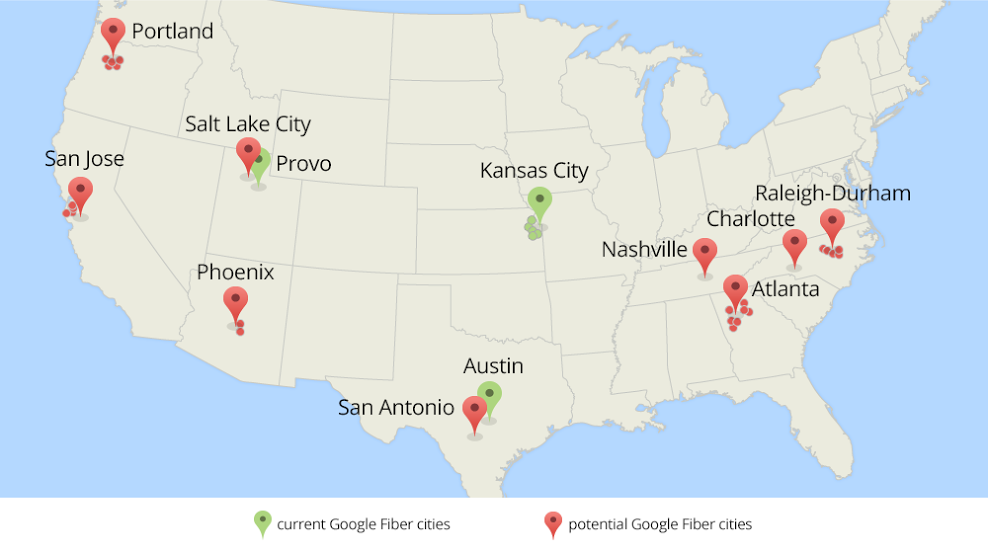
Google is planning a huge expansion for Google Fiber, its ultra-fast Internet and television service in the United States. The company has reached out to 34 cities, spanning nine metro areas across the country, to see what, if any, roadblocks there are to rolling out Google Fiber in their area.

At the moment, Google Fiber is only available in Kansas City, Kansas and Provo, Utah – with plans to support Austin, Texas by mid-2014. support Austin, Texas by mid-2014. While the initiative has certainly attracted attention, it’s only affected a tiny proportion of the United States population up until now.

The new municipalities that Google is considering are:

Avondales Estates, Brookhaven, College Park, Decatur, East Point, Hapeville, Sandy Springs and Smyrna (Atlanta); Scottsdale and Tempe (Pheonix); Beaverton, Hillsboro, Gresham, Lake Oswego and Tigard (Portland); Carrborro, Cary, Chapel Hill, Durham, Garner, Morrisville and Raleigh (Raleigh-Durham); Santa Clara, Mountain View, Sunnyvale and Palo Alto (San Jose); Charlotte, Nashville, Salt Lake City and San Antonio.

1200map updated green2 730x408 Google wants to bring Google Fiber gigabit Internet to 34 new cities in the US

Google says that it’ll announce which of the new cities will receive Google Fiber by the end of the year. For each location, the company will consider a number of factors that could affect the roll-out, such as the nature of the landscape, the density of housing and local infrastructure. City leaders, meanwhile, will be asked to provide information about the current conduit, water, gas and electricity lines in their area.

“They’ll also help us find ways to access existing infrastructure—like utility poles—so we don’t unnecessarily dig up streets or have to put up a new pole next to an existing one,” Milo Medin, VP for Google Access Services said.

Before you check the map though, heed Google’s warning that “it might not work out for everyone.” Although it’s considering 34 cities, there’s no guarantee that they’ll all be approved for Google Fiber.

➤ Exploring new cities for Google Fiber (Blog Post)

└ Tags: news, syndicated
  • Page 14,518 of 14,673
  • « First
  • «
  • 14,516
  • 14,517
  • 14,518
  • 14,519
  • 14,520
  • »
  • Last »
The Daily Dose, The Daily Dose © 1996 - Present. All Rights Reserved.
  • Home
  • About
  • Archive
  • Books
  • Collections
  • Links
  • Shop
  • Submit a joke
  • Video
  • Privacy Policy