The Daily Dose

laugh every day with cartoons jokes and humor
  • Home
  • About
    • Press
      • Press Release – Announcing Laughzilla the Third ebook
      • Press Release – The Daily Dose Kicks Off Its 16th Year with New Books and More Irreverent Laughter
      • Press Release – Themes Memes and Laser Beams Now Available in Paperback
      • Press Release – Announcing Themes Memes and Laser Beams
      • In The News
    • Privacy
  • Archive
  • Books
  • Shop
  • Collections
    • Galleries
      • Gallery
      • Captions
      • Flash Cartoons & Greeting Cards
        • Laughzilla’s Oska Flash Animation Cartoon Greeting Cards
        • Oska Cupid Love Humor
    • #OccupyWallStreet
    • cats
    • China
    • Food
      • Hors d’oeuvres
        • Ball of Cream Cheese
      • Entrees / Main Courses
        • Meatballs with Baked Beans and Celery
    • Gadaffy
    • Google
  • Links
  • Video
  • Submit a joke
DeviantART Facebook Twitter Flickr pinterest YouTube RSS

Subscribe for Free Laughs!


Latest Comics

  • This Memorial Day, Trump Meme Coin Congratulates Profit Takers
  • 25 Years of The Daily Dose
  • The Best Cartoons
  • Bitcoin sings “Fly Me To The Moon”
  • 22 years of The Daily Dose

Comic Archive

Occupy Wall Street as Bankers LOL

Daily Dose News Roundup

  • OpenClaw creator’s $1.3 million monthly OpenAI bill reveals the real cost of autonomous AI coding at scale
  • Apple’s Siri app in iOS 27 will auto-delete your chats. It may also launch as a beta, again.
  • Faraday Future raised $25 million for its robotics pivot. The fine print tells a different story.
  • Anthropic and the Gates Foundation are betting $200 million that AI can do more than make money
  • Figma’s numbers say AI is a tailwind. Its stock price says the market isn’t sure.

Quotable

"Apple has brought you iTunes, iPhone, iPod, iPad, and iCloud. Soon his reign of techor shall bring iRain." ~ Yasha Harari

Fresh Baked Goods

Get The Daily Dose's ebook: Laughzilla the Third - A Funny Stuff Collection of 101 Cartoons from TheDailyDose. Click here to get the e-book on Amazon kdp. Laughzilla the Third (2012) The Third Volume in the Funny Stuff Cartoon Book Collection Available Now.

Click here for the Paperback edition


Support independent publishing: Buy The Daily Dose's book: Themes Memes and Laser Beams - A Funny Stuff Collection of 101 Cartoons by Laughzilla from TheDailyDose. Click here to get the book on Amazon. Themes Memes and Laser Beams - The Second Volume in the Funny Stuff Cartoon Book Collection.

Click Here to get the book in Paperback While Available on Amazon

Themes Memes and Laser Beams - 101 Cartoons by Laughzilla. Get the e-book on Lulu.

Click Here to get The Daily Dose Cartoon ebook on amazon kindle

Funny Stuff :
The First Cartoon Book
from The Daily Dose.
Available on Lulu.

a couple of laughzillas on a blue diamond background

Accelerator spotlight: The 10 teams that just graduated from Amsterdam’s Rockstart

Jun13
by Sindy Cator on June 13, 2014 at 12:35 pm
Posted In: Around the Web, Insider, Roundups

Rockstart
We no longer talk about every startup accelerator that we come across – there are simply too many. Still, from time to time we like to share the cohorts from programs that catch our eye around the world. Amsterdam’s Rockstart Accelerator held its latest demo day yesterday. Here’s what they had to offer: Bomberbot Bomberbot is a game that encourages children to code by teaching them key programming concepts in a fun way. It’s currently on trial in a small number of Dutch schools and will be gradually rolled out more widely in Europe. CoffeeStrap CoffeeStrap lets you learn new languages by…

This story continues at The Next Web

└ Tags: europe, news, syndicated
a couple of laughzillas on a blue diamond background

Stamplay: An easy, IFTTT-like way to create your own Web apps

Jun13
by Sindy Cator on June 13, 2014 at 12:30 pm
Posted In: Apps, Around the Web, Design & Dev, Profiles and Interviews

Stamplay
While growing numbers of children learn to code in school, if not in kindergarten, there’s still a lot of we grown-ups whose skills are rudimentary at best and don’t go much farther than basic HTML editing. Although creating sophisticated software and understanding encapsulation, inheritance, and polymorphism will most probably remain unreachable for many of us, there are still some easier things that non-developers can do. One of the products that can significantly ease creation of simple web applications is Stamplay, a recent Seedcamp alumni that is working on what the company calls “IFTTT for apps.” Living up to this comparison, the service…

This story continues at The Next Web

└ Tags: syndicated
a couple of laughzillas on a blue diamond background

Priceline snaps up OpenTable for a tasty $2.6bn

Jun13
by Sindy Cator on June 13, 2014 at 12:27 pm
Posted In: Around the Web, Insider

Priceline, a platform for finding and booking hotels, flights, cruises, car hire and more, has announced that it will purchase online restaurant reservation platform OpenTable. Announced today, the deal sees OpenTable’s shares snapped up for $103 each, making a total company valuation of $2.6 billion. Priceline described OpenTable as a “great match” and said the purchase provides a “natural extension into restaurant marketing services”. Priceline also said that OpenTable would continue to be based in San Francisco and would remain operating as an independent business led by its current management team, so there shouldn’t be too many changes afoot. ➤…

This story continues at The Next Web

└ Tags: news, syndicated
a couple of laughzillas on a blue diamond background

Twitter brings Bing translation to its mobile apps, adds in-line translation to Web platform

Jun13
by Sindy Cator on June 13, 2014 at 12:08 pm
Posted In: Apps, Around the Web, Product Updates

twitter crop
Twitter has rolled out a new feature for its iOS and Android apps which allow people to use Microsoft’s Bing translation engine to translate tweets with the tap of a button. First spotted by CNET, the feature doesn’t actually show the translation option in your stream of tweets, rather, you need to tap on the tweet first to look at it individually and then select to translate it. In addition to the new mobile translation option, Twitter has also extended the reach of its translation powers on the Web. Previously, if you wanted to translate a tweet you needed to click…

This story continues at The Next Web

└ Tags: news, syndicated, twitter
a couple of laughzillas on a blue diamond background

T Accounts

Jun13
by Sindy Cator on June 13, 2014 at 11:30 am
Posted In: Around the Web, Downloads

I’ve made an Excel template for filling out T accounts. For you non-accounting folks, a T account is a method to trace accounting transactions through the accounts on the general ledger. Hey, wake up! This post isn’t finished yet!

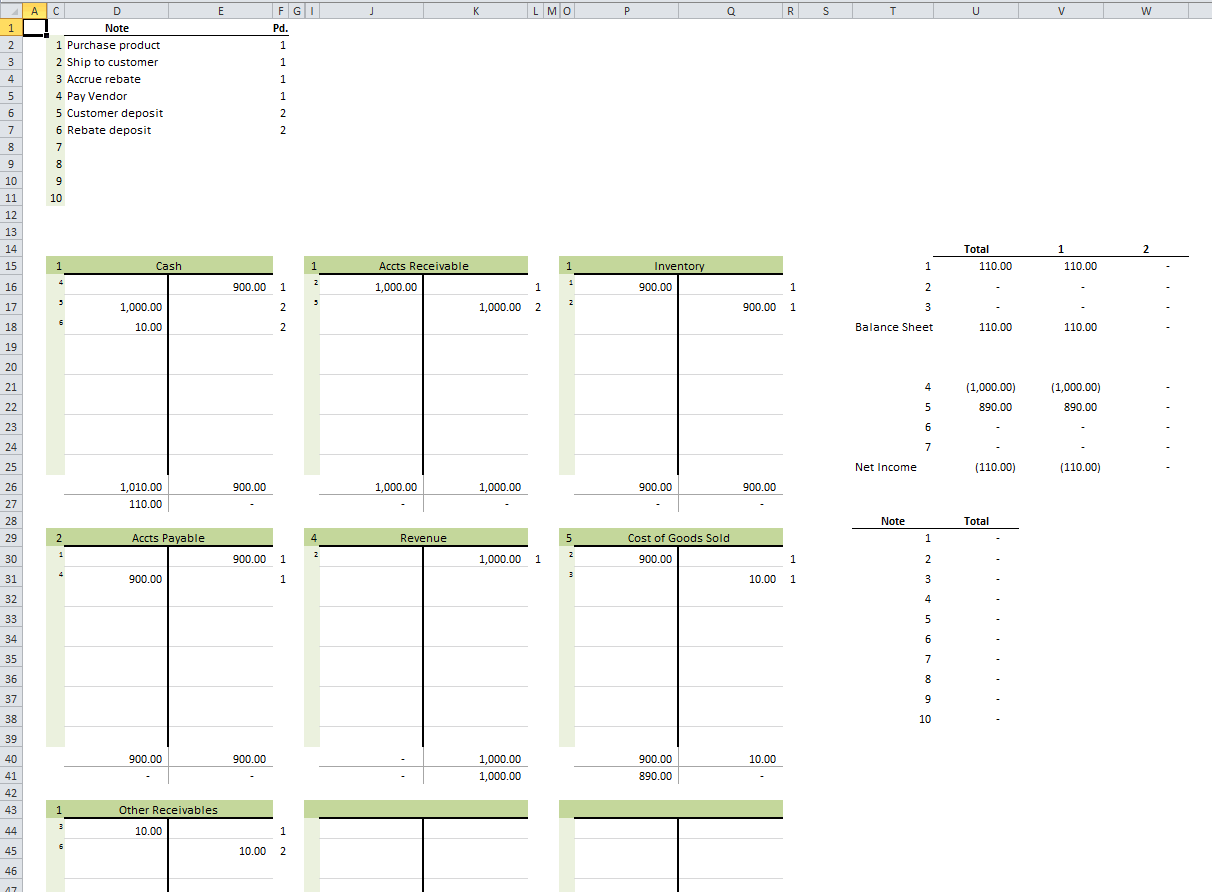
I’ve made a T account template at least three times in my Excel career. They never work out. They never make it easier than pencil-to-paper or marker-to-whiteboard. It doesn’t seem to stop me from trying, though, and now I’m making my latest attempt available to you. First, let’s look at this huge image (click to embiggen).

The top left section (C2:F11) is where you write a brief description for up to 10 transactions. Column C is the transaction number and can’t be edited. Column D is where you type the brief description. Column E is overflow for column D because I hate merged cells. Column F is the general ledger period. You can put them all in the same GL Period if it’s not applicable to your transactions. You don’t have to use this section. That is, you can leave off the descriptions and the periods, but good luck trying to figure out what you were thinking.

In this example, the transactions are listed in the order they will happen over time. This series of transactions represent a sale where we get a kickback from the vendor and we’re passing that savings on to the customer. First, we buy the inventory from the vendor. Next, we ship it to the our customer. At that point we need to make our costs correct by accruing the rebate we’re entitled to from the vendor. We pay the vendor, get paid by the customer, and finally get our rebate from the Vendor.

The main section of the workbook is a 3×3 grid of T accounts. This is where the magic happens. The top left cell of each T account is a financials statement classification number. It’s a data validation dropdown containing the numbers 1-7.

  1. Assets
  2. Liabilities
  3. Equity
  4. Sales
  5. Cost of Goods Sold
  6. Expenses
  7. Other Income and Expenses

That financial statement classification number is replicated down the hidden column B (and H and N) for formula purposes.

To the right of the financial statement classification number is the (merged) cell where you type the account name. The account name is only for your reference and has no bearing on any formulas in the model.

The lighter green section down the left side of the T account is a series of data validation dropdowns that allow you to select the transaction number. The main white area of the T account that’s divided vertically is the area where you record your debits and credits. At the bottom of the T account, the debits and credits are summed up and the net debit or credit is displayed.

There are two other areas to the right of the T accounts grid. The top area shows the effects on the major sections of your balance sheet and income statement. It expands to the right for however many periods you have. The financial statement classification number at the top left of the T account determines where your transaction ends up in this area. And, obviously, the period you identify in the transactions section determine the column.

The bottom area is a list of the 10 transactions and the net debit or credit by transaction. If any of these are not zero, you’re missing a piece of the transaction.

Please leave your thoughts and suggestions in the comments.

You can download TAccounts.zip

└ Tags: syndicated
  • Page 13,545 of 14,643
  • « First
  • «
  • 13,543
  • 13,544
  • 13,545
  • 13,546
  • 13,547
  • »
  • Last »
The Daily Dose, The Daily Dose © 1996 - Present. All Rights Reserved.
  • Home
  • About
  • Archive
  • Books
  • Collections
  • Links
  • Shop
  • Submit a joke
  • Video
  • Privacy Policy