The Daily Dose

laugh every day with cartoons jokes and humor
  • Home
  • About
    • Press
      • Press Release – Announcing Laughzilla the Third ebook
      • Press Release – The Daily Dose Kicks Off Its 16th Year with New Books and More Irreverent Laughter
      • Press Release – Themes Memes and Laser Beams Now Available in Paperback
      • Press Release – Announcing Themes Memes and Laser Beams
      • In The News
    • Privacy
  • Archive
  • Books
  • Shop
  • Collections
    • Galleries
      • Gallery
      • Captions
      • Flash Cartoons & Greeting Cards
        • Laughzilla’s Oska Flash Animation Cartoon Greeting Cards
        • Oska Cupid Love Humor
    • #OccupyWallStreet
    • cats
    • China
    • Food
      • Hors d’oeuvres
        • Ball of Cream Cheese
      • Entrees / Main Courses
        • Meatballs with Baked Beans and Celery
    • Gadaffy
    • Google
  • Links
  • Video
  • Submit a joke
DeviantART Facebook Twitter Flickr pinterest YouTube RSS

Subscribe for Free Laughs!


Latest Comics

  • This Memorial Day, Trump Meme Coin Congratulates Profit Takers
  • 25 Years of The Daily Dose
  • The Best Cartoons
  • Bitcoin sings “Fly Me To The Moon”
  • 22 years of The Daily Dose

Comic Archive

Al Qaeda Hiring Jobs Boom

Daily Dose News Roundup

  • The Boring Company raises $3bn at a $23bn valuation, led by the UAE
  • CloudNC raises $20M to expand its AI machining tools and launch a quoting product
  • South Korea’s AI boom could need 20 new nuclear reactors’ worth of power
  • Fluencify raises $4.3M pre-seed after passing $2M ARR six months from launch
  • Isar Aerospace reaches orbit on its second flight, a first for a European commercial launcher

Quotable

"Presidents Day means Sales, not sails." ~ Yasha Harari

Fresh Baked Goods

Get The Daily Dose's ebook: Laughzilla the Third - A Funny Stuff Collection of 101 Cartoons from TheDailyDose. Click here to get the e-book on Amazon kdp. Laughzilla the Third (2012) The Third Volume in the Funny Stuff Cartoon Book Collection Available Now.

Click here for the Paperback edition


Support independent publishing: Buy The Daily Dose's book: Themes Memes and Laser Beams - A Funny Stuff Collection of 101 Cartoons by Laughzilla from TheDailyDose. Click here to get the book on Amazon. Themes Memes and Laser Beams - The Second Volume in the Funny Stuff Cartoon Book Collection.

Click Here to get the book in Paperback While Available on Amazon

Themes Memes and Laser Beams - 101 Cartoons by Laughzilla. Get the e-book on Lulu.

Click Here to get The Daily Dose Cartoon ebook on amazon kindle

Funny Stuff :
The First Cartoon Book
from The Daily Dose.
Available on Lulu.

a couple of laughzillas on a blue diamond background

Flickr’s Marketplace program helps photographers license their work and find original assignments

Jul29
by Sindy Cator on July 29, 2014 at 2:57 pm
Posted In: Around the Web, Insider

Screen Shot 2014-07-29 at 15.45.13

Earning a decent wage as a freelance photographer can be tough. To help talented camera aficionados put food on the table, Yahoo today unveiled a new ‘Marketplace‘ service that will connect Flickr users with photo editors, designers and agencies. Spotted by TechCrunch, the new Flickr Marketplace is run by a “curatorial” team that aims to connect users with global media outlets, industry press and anyone else that might want to license their work. Details are scarce at the moment, but in a blog post Yahoo said its team would be constantly scouring Flickr for suitable images and then reaching out to photographers via Flickr…

This story continues at The Next Web

The post Flickr’s Marketplace program helps photographers license their work and find original assignments appeared first on The Next Web.

└ Tags: news, syndicated
a couple of laughzillas on a blue diamond background

Medium finds a revenue stream with Re:form, a new collection of stories sponsored by BMW

Jul29
by Sindy Cator on July 29, 2014 at 2:19 pm
Posted In: Around the Web, Insider, Product Launches

shutterstock_194412035

Medium launched its first sponsored “collection,” a term used to describe one of its curated sections or publications, with BMW on its renowned blogging platform today. Re:form, an encapsulated part of Medium for design-focused journalism, sports a bold “presented by BMW” logo on the front page. The minimalist branding is replicated in each article, just below the main featured image, as well as at the bottom above suggested links. Otherwise, no traditional advertising is visible. That could change in the future though. As AdAge reports: Medium staff also plans to work with BMW and its agencies to produce four to five…

This story continues at The Next Web

The post Medium finds a revenue stream with Re:form, a new collection of stories sponsored by BMW appeared first on The Next Web.

└ Tags: media, news, syndicated
a couple of laughzillas on a blue diamond background

Medium finds a revenue stream with Re:form, a new collection of stories sponsored by BMW

Jul29
by Sindy Cator on July 29, 2014 at 2:19 pm
Posted In: Around the Web, Insider, Product Launches

shutterstock_194412035

Medium launched its first sponsored “collection,” a term used to describe one of its curated sections or publications, with BMW on its renowned blogging platform today. Re:form, an encapsulated part of Medium for design-focused journalism, sports a bold “presented by BMW” logo on the front page. The minimalist branding is replicated in each article, just below the main featured image, as well as at the bottom above suggested links. Otherwise, no traditional advertising is visible. That could change in the future though. As AdAge reports: Medium staff also plans to work with BMW and its agencies to produce four to five…

This story continues at The Next Web

The post Medium finds a revenue stream with Re:form, a new collection of stories sponsored by BMW appeared first on The Next Web.

└ Tags: media, news, syndicated
a couple of laughzillas on a blue diamond background

Confused by Reddit? Now there’s an official beginner’s guide

Jul29
by Sindy Cator on July 29, 2014 at 11:31 am
Posted In: Around the Web, Insider

Reddit, a site often described as “the front page of the internet,” allows anyone to share, discuss and joke about what’s new on the web. But for newcomers, it can often feel like a pretty confusing and alienating place. How do I find new Subreddits? What is ‘karma’ and how does it affect my account? What should I know about Reddiquette? To make the on-boarding process a little easier, a new “Reddit 101” guide has been published as a sticky post in subreddits and as a permanent Wiki page. It runs through most of the basics, including the sidebar, creating a customised…

This story continues at The Next Web

The post Confused by Reddit? Now there’s an official beginner’s guide appeared first on The Next Web.

└ Tags: news, syndicated
a couple of laughzillas on a blue diamond background

Listing Conditional Formatting Redux

Jul29
by Sindy Cator on July 29, 2014 at 11:30 am
Posted In: Around the Web, Formatting, VBA

Back in the day, I posted some code to list conditional formatting. It didn’t contemplate having multiple conditional formats for the same range. Because who would ever do that right? Of course that happens all the time and was very short-sighted of me. I aim to atone.

I used a Collection object because Collection objects can’t have two Keys that are the same. It’s a good way to get a unique list out of a list that contains duplicates. I used the range to which the FormatCondition applies as the key (and that was my downfall). My thought was this: I’m checking each cell individually and a FormatCondition that spans two cell would be counted twice. A FormatCondition that applied to L9:M9 would be counted for L9 and M9. By using the address as my unique key, it would only be counted once – the first time for L9 and it would error out and not be counted for M9.

Except you can have two FormatConditions that apply to L9:M9 and only the first would every be counted. I needed a way to identify what was a duplicate and what was a legitimate second FormatCondition. I cleverly devised (read stole from Bob Phillips) that I would add the count to the end of the address. But I got lucky in that it failed for my particular setup. The way my FormatConditions were created, they weren’t in the same order for all the cells. So even though an FC was the same for a later cell, it was the 3rd FC instead of the 2nd, and that made it seem unique.

I set out to find a better way to uniquely identify FCs, and here it is

Public Function CFSignature(ByRef cf As Variant) As String
   
    Dim aReturn(1 To 3) As String
   
    aReturn(1) = cf.AppliesTo.Address
    aReturn(2) = FCTypeFromIndex(cf.Type)
    On Error Resume Next
        aReturn(3) = cf.Formula1
       
    CFSignature = Join(aReturn, vbNullString)
   
End Function

It’s still no guarantee of uniqueness, but if you have two FCs with the same range, the same type, and the same formula, well, you gets what you deserves. Now I can use the ‘signature’ instead of the address.

Public Sub ShowConditionalFormatting()
   
    Dim cf As Variant
    Dim rCell As Range
    Dim colFormats As Collection
    Dim i As Long
    Dim wsOutput As Worksheet
    Dim aOutput() As Variant
   
    Set colFormats = New Collection
   
    For Each rCell In Sheet1.Cells.SpecialCells(xlCellTypeAllFormatConditions).Cells
        For i = 1 To rCell.FormatConditions.Count
            With rCell.FormatConditions
                On Error Resume Next
                    colFormats.Add .Item(i), CFSignature(.Item(i))
                On Error GoTo 0
            End With
        Next i
    Next rCell
       
    ReDim aOutput(1 To colFormats.Count + 1, 1 To 5)
   
    Set wsOutput = Workbooks.Add.Worksheets(1)
    aOutput(1, 1) = "Type": aOutput(1, 2) = "Range"
    aOutput(1, 3) = "StopIfTrue": aOutput(1, 4) = "Formual1"
    aOutput(1, 5) = "Formual2"
   
    For i = 1 To colFormats.Count
        Set cf = colFormats.Item(i)
           
        aOutput(i + 1, 1) = FCTypeFromIndex(cf.Type)
        aOutput(i + 1, 2) = cf.AppliesTo.Address
        aOutput(i + 1, 3) = cf.StopIfTrue
        On Error Resume Next
            aOutput(i + 1, 4) = "’" & cf.Formula1
            aOutput(i + 1, 5) = "’" & cf.Formula2
        On Error GoTo 0
    Next i
   
    wsOutput.Range("A1").Resize(UBound(aOutput, 1), UBound(aOutput, 2)).Value = aOutput
    wsOutput.UsedRange.EntireColumn.AutoFit
   
End Sub

And in case you forgot, here’s how I got the type.

Function FCTypeFromIndex(lIndex As Long) As String
   
    Select Case lIndex
        Case 12: FCTypeFromIndex = "Above Average"
        Case 10: FCTypeFromIndex = "Blanks"
        Case 1: FCTypeFromIndex = "Cell Value"
        Case 3: FCTypeFromIndex = "Color Scale"
        Case 4: FCTypeFromIndex = "DataBar"
        Case 16: FCTypeFromIndex = "Errors"
        Case 2: FCTypeFromIndex = "Expression"
        Case 6: FCTypeFromIndex = "Icon Sets"
        Case 14: FCTypeFromIndex = "No Blanks"
        Case 17: FCTypeFromIndex = "No Errors"
        Case 9: FCTypeFromIndex = "Text"
        Case 11: FCTypeFromIndex = "Time Period"
        Case 5: FCTypeFromIndex = "Top 10?"
        Case 8: FCTypeFromIndex = "Unique Values"
        Case Else: FCTypeFromIndex = "Unknown"
    End Select
       
End Function

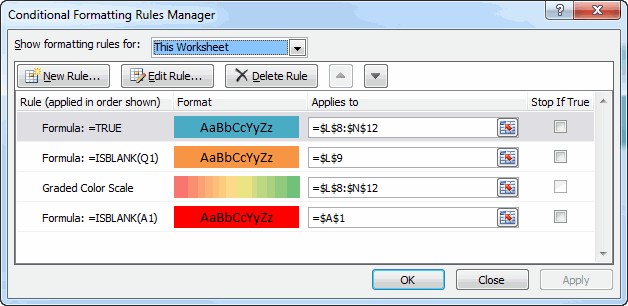
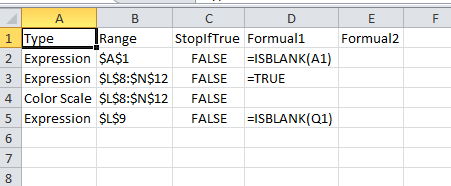
Now this

gets you this
└ Tags: syndicated
  • Page 13,199 of 14,666
  • « First
  • «
  • 13,197
  • 13,198
  • 13,199
  • 13,200
  • 13,201
  • »
  • Last »
The Daily Dose, The Daily Dose © 1996 - Present. All Rights Reserved.
  • Home
  • About
  • Archive
  • Books
  • Collections
  • Links
  • Shop
  • Submit a joke
  • Video
  • Privacy Policy