



ExcelXOR has a great post on using formulas to extract all numbers from a string where:
- The string in question consists of a mixture of numbers, letters and special characters
- The numbers may appear anywhere within that string
- Decimals within the string are to be returned as such
- The desired result is to have all numbers returned to separate cells
That’s a tall order with formulas. Here’s what ExcelXOR came up with:
+{0,1},1)))>6)*{2,1},{1;1})=2,ROW(INDIRECT(“1:”&LEN(“α”&s&”α0″)-1))),e),SUM(SMALL(IF(ISNUMBER(MATCH(MMULT(0+(ABS(51.5-CODE(
MID(SUBSTITUTE(“α”&s&”α0″,”/”,”α”),ROW(INDIRECT(“1:”&LEN(“α”&s&”α0″)-1))+{0,1},1)))>6)*{2,1},{1;1}),{1,2},0)),ROW(INDIRECT(
“1:”&LEN(“α”&s&”α0″)-1))),2*e+{-1,0})*{-1,1}))
…where s is the string you want to break apart, and e the element you want returned.
That fatboy runs to 415 characters. Which is a heck of a lot less than my first effort:
OFFSET($A$1,,,LEN(s)))^0),(IF((ISNUMBER(-MID(s&"|",ROW(OFFSET($A$1,,,LEN(s)))*COLUMN(OFFSET($A$1,,,,LEN(s)))^0,COLUMN(OFFSET(
$A$1,,,,LEN(s)))*ROW(OFFSET($A$1,,,LEN(s)))^0))*NOT(ISNUMBER(-MID("|"&s&"|",ROW(OFFSET($A$1,,,LEN(s)))*COLUMN(OFFSET($A$1,,,,
LEN(s)))^0,COLUMN(OFFSET($A$1,,,,LEN(s)))*ROW(OFFSET($A$1,,,LEN(s)))^0)))*NOT(ISNUMBER(-MID(s&"|",1+ROW(OFFSET($A$1,,,LEN(s)))
*COLUMN(OFFSET($A$1,,,,LEN(s)))^0,COLUMN(OFFSET($A$1,,,,LEN(s)))*ROW(OFFSET($A$1,,,LEN(s)))^0))))>0,ROW(OFFSET($A$1,,,LEN(s)))
*COLUMN(OFFSET($A$1,,,,LEN(s)))^0) = SMALL(IF((ISNUMBER(-MID(s&"|",ROW(OFFSET($A$1,,,LEN(s)))*COLUMN(OFFSET($A$1,,,,LEN(s)))^0,
COLUMN(OFFSET($A$1,,,,LEN(s)))*ROW(OFFSET($A$1,,,LEN(s)))^0))*NOT(ISNUMBER(-MID("|"&s&"|",ROW(OFFSET($A$1,,,LEN(s)))*COLUMN(
OFFSET($A$1,,,,LEN(s)))^0,COLUMN(OFFSET($A$1,,,,LEN(s)))*ROW(OFFSET($A$1,,,LEN(s)))^0)))*NOT(ISNUMBER(-MID(s&"|",1+ROW(OFFSET
($A$1,,,LEN(s)))*COLUMN(OFFSET($A$1,,,,LEN(s)))^0,COLUMN(OFFSET($A$1,,,,LEN(s)))*ROW(OFFSET($A$1,,,LEN(s)))^0))))>0,ROW(OFFSET
($A$1,,,LEN(s)))*COLUMN(OFFSET($A$1,,,,LEN(s)))^0),e))),0))
…although there is some pretty nifty stuff going on in there, that I’ll bore you with at a later date…including a MID that breaks a string down into ALL possible slices of text:
I couldn’t rest with just that. Literally. It was too heavy. So I had another crack. The result: Here’s a generic ExtractNumbers formula I just put together. And by ‘just’ I mean I only just managed it, and it took an entire weekend, I ignored the kids, and forgot to bathe. (That last one is pretty much a given, and I can’t really blame Excel).
SUM(SMALL (IF(ISERROR(-MID(TEXT(MID(“|”&s&”|”,ROW(OFFSET($A$1,,,LEN(s)+1)),2),”|”),{1,2},1)),FALSE,ROW(OFFSET($A$1,,,LEN(s)+1
))),{1,2}+(E-1)*2)*{-1,1}))
…again, where:
S = the string you want to break apart
E = the number element you want to return
It will handle numbers with decimal places provided there is a digit to the right of the decimal place e.g. 5.745 and NOT .745, and it’s a much more svelte 277 characters in length. Isn’t she a beauty?
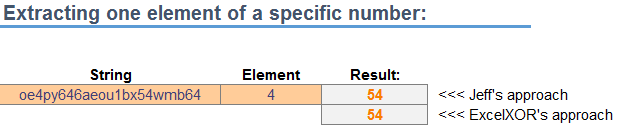
In that incarnation, you can use it to extract just one element of a specific number:
Or if you prefer, you can use this version:
($A28)))),COLUMNS($B28:B28))-1,SUM(SMALL(IF(ISERROR(-MID(TEXT(MID(“|”&$A28&”|”,ROW(OFFSET($A$1,,,LEN($A28)+1)),2),”|”),{1,2},1)),
FALSE,ROW(OFFSET($A$1,,,LEN($A28)+1))),{1,2}+(COLUMNS($B28:B28)-1)*2)*{-1,1}))
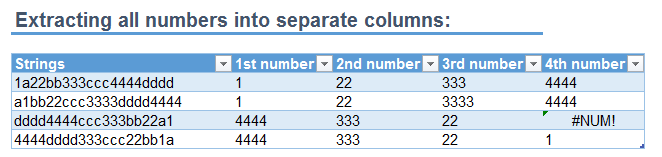
…you can use it to extract numbers into separate columns, where $A28 holds the string to be split, and B28 holds the first column that you want to extract a number to. Like so:
I don’t know how either of these perform against a UDF, let alone each other. Anyone got a lean, mean, UDF-based splitting machine that we can test it against?
Here’s a sample file:
ExtractNumber_20141120