



So after doing some incredibly complicated formula challenges and ninja-grade VBA, I thought I’d turn my hand to something simple: finally changing the default template that loads when Excel starts or when I create a new workbook or worksheet so that gridlines are turned off. Because if there’s one thing I hate about Excel, it’s those gridlines: they make everything look like it was done in Excel. And if there’s one thing I do as soon as I open a new file, it’s turn those gridlines off. Tables and PivotTables give me all the borders I need, thank you very much.
Boy, what a battle. I have saved my changed book as an XLTM to just about everywhere I can think of.
- I’ve tried saving it to C:UsersSamsungAppDataRoamingMicrosoftExcelXLSTART but when I start Excel, I have gridlines.
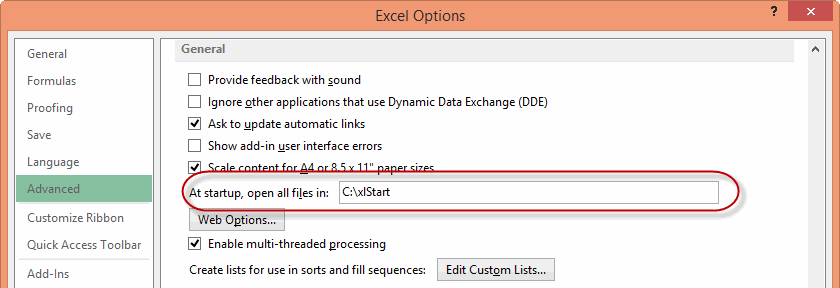
- I’ve tried creating a new file at C:xlStart with the template in it, and told Excel via Options>Advanced to open files in that folder but when I start Excel, I have gridlines:

- I’ve saved it to C:UsersSamsungDocumentsCustom Office Templates but when I start Excel, I have gridlines
I’ve gone from feeling like I’ve mastered to Excel, to feeling like I’m a complete idiot. Anyone care to tell me that I’m not?
How the heck the average user is supposed to know how to do this stuff is beyond me. Why isn’t there simply a button on the ribbon or backstage that says:
Give all future workbooks the settings of this one.
I’m using Excel 2013 365. But I’m thinking of doing a complete 180.

According to a new report from Sandvine, a company that builds equipment for consumer internet service providers, Netflix has topped 35% of overall US internet traffic. The streaming service now reportedly uses 34.89 percent of downstream and 9.4 percent of upstream bandwidth during peak periods on US fixed lines. Sandvine’s report suggests that Netflix is using a whopping 20% more bandwidth than the nearest downstream competitor, YouTube. Netflix is second only to BitTorrent traffic for upstream bandwidth, with the torrenting protocol at a huge 25.49 percent. You might be wondering why Netflix uses upstream traffic when it’s not a peer-to-peer service; Ars…
This story continues at The Next Web

Citymapper, the popular mobile and Web app that makes it easier to get around, has launched today in Mexico City, marking the app’s first expansion into Latin America. It’s also launching Tokyo support as a preview, starting today. The news comes today via an app update on the Apple store today. Citymapper wrote in its release notes of its excitement to be rolling out to such a large city: Enough with the #firstworldproblems, it’s time to help some real people. So begins our broader international expansion into emerging markets where some of our greatest work is to be done. Hola to 21 million…
This story continues at The Next Web

Jolla has smashed the $1 million mark for its new Sailfish OS tablet, which is quite a remarkable feat given the crowdfunding campaign kicked off less than 48 hours ago. Founded by a group of ex-Nokia employees who wanted to give MeeGo a second chance, Jolla was the first smartphone to offer a fresh take on the forgotten platform, which is called Sailfish OS. The Jolla smartphone went on sale across Europe last December via a dedicated online store on Jolla’s website. Now Jolla is looking to add a tablet to its arsenal too, and what better way to fund the…
This story continues at The Next Web