

The Daily Dose

laugh every day with cartoons jokes and humor
  • Home
  • About
    • Press
      • Press Release – Announcing Laughzilla the Third ebook
      • Press Release – The Daily Dose Kicks Off Its 16th Year with New Books and More Irreverent Laughter
      • Press Release – Themes Memes and Laser Beams Now Available in Paperback
      • Press Release – Announcing Themes Memes and Laser Beams
      • In The News
    • Privacy
  • Archive
  • Books
  • Shop
  • Collections
    • Galleries
      • Gallery
      • Captions
      • Flash Cartoons & Greeting Cards
        • Laughzilla’s Oska Flash Animation Cartoon Greeting Cards
        • Oska Cupid Love Humor
    • #OccupyWallStreet
    • cats
    • China
    • Food
      • Hors d’oeuvres
        • Ball of Cream Cheese
      • Entrees / Main Courses
        • Meatballs with Baked Beans and Celery
    • Gadaffy
    • Google
  • Links
  • Video
  • Submit a joke
DeviantART Facebook Twitter Flickr pinterest YouTube RSS

Subscribe for Free Laughs!


Latest Comics

  • This Memorial Day, Trump Meme Coin Congratulates Profit Takers
  • 25 Years of The Daily Dose
  • The Best Cartoons
  • Bitcoin sings “Fly Me To The Moon”
  • 22 years of The Daily Dose

Comic Archive

Michele Bachmann Acts Of God

Daily Dose News Roundup

  • Anthropic says China’s GLM-5.3 nearly matches Mythos at cyber exploits
  • Chinese-powered AI agents show the same deception as their US rivals
  • OpenAI, Blackstone and unions form a data centre alliance, Axios reports
  • Google wants Gemini 4 out ‘much earlier’ than the end of the year
  • Australian inquiry asks Altman and Amodei to testify

Quotable

"If time is money, then maybe the US Dollar, Japanese Yen, and European Euro would all be stronger if their leaders would spend less time on the debt problem." ~ Yasha Harari

Fresh Baked Goods

Get The Daily Dose's ebook: Laughzilla the Third - A Funny Stuff Collection of 101 Cartoons from TheDailyDose. Click here to get the e-book on Amazon kdp. Laughzilla the Third (2012) The Third Volume in the Funny Stuff Cartoon Book Collection Available Now.

Click here for the Paperback edition


Support independent publishing: Buy The Daily Dose's book: Themes Memes and Laser Beams - A Funny Stuff Collection of 101 Cartoons by Laughzilla from TheDailyDose. Click here to get the book on Amazon. Themes Memes and Laser Beams - The Second Volume in the Funny Stuff Cartoon Book Collection.

Click Here to get the book in Paperback While Available on Amazon

Themes Memes and Laser Beams - 101 Cartoons by Laughzilla. Get the e-book on Lulu.

Click Here to get The Daily Dose Cartoon ebook on amazon kindle

Funny Stuff :
The First Cartoon Book
from The Daily Dose.
Available on Lulu.

a couple of laughzillas on a blue diamond background

Comic for January 09, 2015

Jan09
by Sindy Cator on January 9, 2015 at 11:59 pm
Posted In: Around the Web

Dilbert readers – Please visit Dilbert.com to read this feature. Due to changes with our feeds, we are now making this RSS feed a link to Dilbert.com.

└ Tags: syndicated
a couple of laughzillas on a blue diamond background

#CES2015 Recap: Selfie mania punctuated with 4K curved TVs, concept cars and drones

Jan09
by Sindy Cator on January 9, 2015 at 11:30 pm
Posted In: Around the Web, Insider

vegas
Insert joke about how quickly the week flew by like drones at CES. Napier, Robbie and I had a great time covering CES this year! As we look back at the week that was CES 2015, here’s some of biggest news to come out of Vegas, along with the silliest things off the show floors. For those who missed our daily recap, check them out below: Day 0 | Day 1 | Day 2 | Day 3 Cool beans US-based TV watchers were excited by this week’s announcement of Dish’s Sling TV — a $20 per month subscription service to select cable channels.…

This story continues at The Next Web
└ Tags: news, syndicated
a couple of laughzillas on a blue diamond background

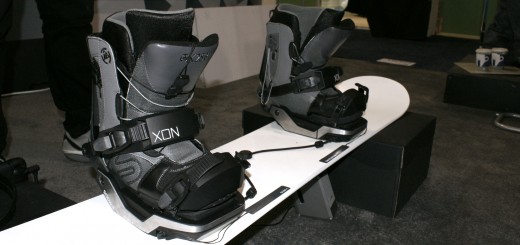
Become a better snowboarder with these motion tracking bindings

Jan09
by Sindy Cator on January 9, 2015 at 9:14 pm
Posted In: Around the Web, Gadgets, Insider, Product Launches

0109_xon1
CES had so many things to put on your wrist. Some were cool, most were just a waste of money. But nearly all of them want to tell you how many steps you take. Fortunately, some tracking devices don’t need your wrist and are ready for more than just a way to see how far you walked (spoiler, I walked a lot at CES). The XON Snow-1 bindings track your snowboarding form with a flex sensor that attaches to your snowboard and load-balance sensors in each binding to track your balance. The data, in conjunction with the Bluetooth-tethered companion app, can…

This story continues at The Next Web
└ Tags: news, syndicated
a couple of laughzillas on a blue diamond background

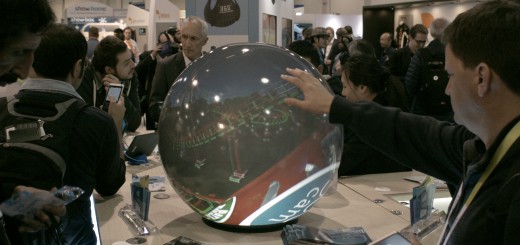
The PufferSphere M ball display is the non-headset way to see 360 degree videos

Jan09
by Sindy Cator on January 9, 2015 at 8:32 pm
Posted In: Around the Web, Gadgets, Insider, Product Launches

0109_ball
The 360-degree market is exploding thanks to VR headsets like the Oculus Rift. But while more and more cameras are being shoved into the market, beyond cramming your eyes into a headset or watching on a flat screen, there’s few ways to watch these videos in a fun, dynamic way. Pufferfish’s PufferSphere M is a video ball that lets you navigate a 360-degree video as if it were a globe. Just scroll with your fingers to peer around the video scene. While it can be a little odd, if you’re a business trying to display a 360-degree video, this is an…

This story continues at The Next Web

└ Tags: news, syndicated
a couple of laughzillas on a blue diamond background

Finding the Next Row in a ListObject in VBA

Jan09
by Sindy Cator on January 9, 2015 at 8:14 pm
Posted In: Around the Web, VBA

ListObjects (Tables in Excel’s UI) are structured ranges. I use them constantly. I love the built-in named ranges and referring to them in VBA without a lot of hullabaloo. It’s as close to a database as you’re going to get in Excel. Recently I decided to automate a process of adding some payroll records to the end of a table. If I were using just a range, I would find the next available row like

Set rStart = wshSalaries.Cells(wshSalaries.Rows.Count,1).End(xlUp).Offset(1,0)

That works most of the time for ListObjects too. It returns the row right below the last row of the ListObject. In most cases, when you add some data to that row, the ListObject expands. In the case where there is no data in the ListObject and there is only a blank row, however, it doesn’t work. The ListObject doesn’t expand, and even if it did, you would have a blank row.

The ListObject object has a InsertRowRange property that returns a Range object. When a ListObject has no data, it has a header row and a blank row[1] ready to accept data.
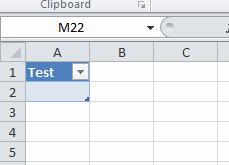
When you enter something into that row, it doesn’t give you a new insert row, it just sits there.
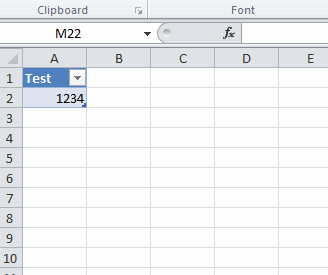
When I’m trying to write something to the end of a ListObject, I test to see if InsertRowRange is nothing[1]. Here’s a snippet

Set lo = wshSalaries.ListObjects(1)
If lo.InsertRowRange Is Nothing Then
    Set rStart = lo.HeaderRowRange.Cells(1).Offset(lo.ListRows.Count + 1)
Else
    Set rStart = lo.InsertRowRange.Cells(1)
End If

If InsertRowRange is Nothing, then table isn’t empty and I offset down however many rows there are plus one. The old method of End(xlup) works in this situation too. I don’t find top down better or worse than bottom up, so use whatever you like. If InsertRowRange isn’t Nothing, that means there’s no data in the table. In that case, I can insert starting in InsertRowRange.

Here’s the whole procedure, if you’re looking for context.

Public Sub ProcessWageFile()
   
    Dim clsEmployees As CEmployees
    Dim clsActives As CEmployees
    Dim clsEmployee As CEmployee
    Dim aOutput() As Variant
    Dim lCnt As Long
    Dim lo As ListObject
    Dim rStart As Range
   
    Set clsEmployees = New CEmployees
    clsEmployees.FillFromRange wshEmployee.ListObjects(1).DataBodyRange
    clsEmployees.FillCompsFromRange ActiveSheet.UsedRange.Offset(1)
    Set clsActives = clsEmployees.FilterByActive(True).FilterByHasComps
   
    ReDim aOutput(1 To clsActives.Count, 1 To 5)
   
    For Each clsEmployee In clsActives
        lCnt = lCnt + 1
        aOutput(lCnt, 1) = clsEmployee.FullName
        aOutput(lCnt, 2) = clsEmployee.Comps.Period
        aOutput(lCnt, 3) = clsEmployee.Comps.TotalWages
        aOutput(lCnt, 4) = clsEmployee.TotalBenes
        aOutput(lCnt, 5) = clsEmployee.Comps.TotalTaxes
    Next clsEmployee
   
    Set lo = wshSalaries.ListObjects(1)
    If lo.InsertRowRange Is Nothing Then
        Set rStart = lo.HeaderRowRange.Cells(1).Offset(lo.ListRows.Count + 1)
    Else
        Set rStart = lo.InsertRowRange.Cells(1)
    End If
   
    rStart.Resize(UBound(aOutput, 1), UBound(aOutput, 2)).Value = aOutput
   
End Sub

[1]: Now you get the disclaimer. There’s a lot you can do with Tables in Excel. You can have a header row or now header row. You can have a totals row or not. And you can have a bunch of other stuff that makes this code not work. I use Tables a lot from a UI perspective and sometimes I have various features on or off. But the way I’m using a ListObject in this example is as a datastore. It’s not meant to be messed with – only for the VBA to read from and write to. In those cases, I make the Table the only thing on the sheet, it always has a header, and it never has a total row. If you want to use Tables differently, you’ll have to modify the code to accommodate the differences.

└ Tags: syndicated
  • Page 11,979 of 14,670
  • « First
  • «
  • 11,977
  • 11,978
  • 11,979
  • 11,980
  • 11,981
  • »
  • Last »
The Daily Dose, The Daily Dose © 1996 - Present. All Rights Reserved.
  • Home
  • About
  • Archive
  • Books
  • Collections
  • Links
  • Shop
  • Submit a joke
  • Video
  • Privacy Policy