



I upgraded my standing desk from paper boxes to something a little fancier.
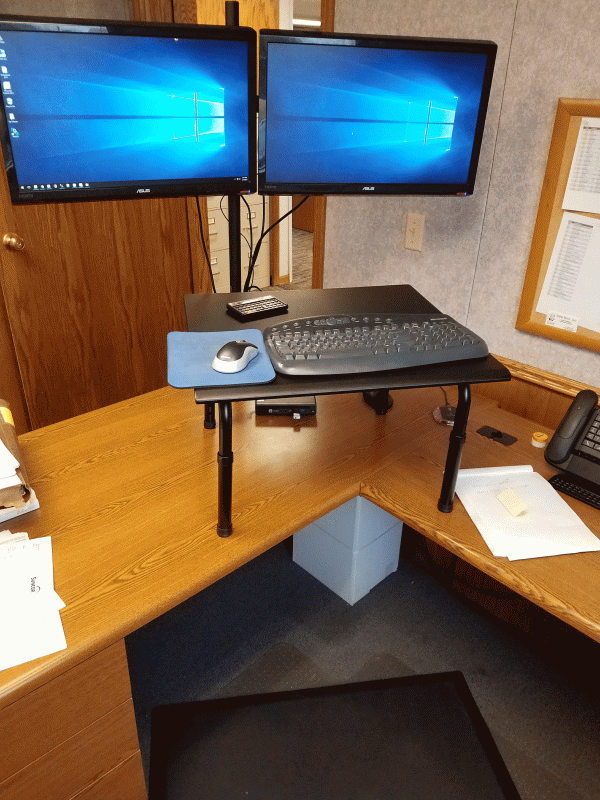
The three components are a monitor pole, a desk for the top of my desk, and a mat.
VIVO Dual Monitor Stand Up Desk Mount


Adjustable height standing desk.


Imprint CumulusPRO Anti-Fatigue Mat


I tried this laptop stand for my keyboard and mouse, but it was a little too unstable. A comment on Amazon said it was designed to hold seven pound laptops and a lightweight keyboard may not work as well. It wasn’t super wobbly, but enough that I didn’t like it.
Portable Laptop-Table-Stand with Mouse Pad


The whole getup ran about $170. Compare that to almost $400 for a real stand up desk without the floor mat.
VARIDESK Height Adjustable Standing Desk Black


The downside is that I have to raise and lower the monitors manually. I loosen the allen screw, slide the monitors down the pole, and re-tighten. That’s not as easy as it sounds. The weight of the monitors makes the sleeve that holds them bind against the pole. Sliding them down means first lifting them up to unbind the sleeve. If my desk backed up to a wall this would be impossible. You really have to be dedicated to frugality to want this set up.
The next step is moving the floor mat out of the way and moving the desktop desk over to my credenza. I don’t really have a lot of paper or other stuff on my credenza, so there’s plenty of room. But again, this is hardly a universally appropriate set up. If I decide I hate it, I’m only out $170, so there’s that.