



Unique Entries in Userform Dependent Listboxes
…could you please help me tweak the code so that I can make multiple selections in listbox 1 in such a way that the values selected in list box two has all the values applicable for the selections made (listbox) but removes all duplicates?
First, a word about that post. I have used the relationship listbox template exactly zero times. I simply prefer to build my classes from scratch with names that reflect the business objects they represent. But I did reuse the userform and I didn’t change the control names from Parent/Child to Class/Student. I’m conflicted about that, but I’ll get over it.
Let’s say we have some classes and students. A class can have many students and a student can have many classes.
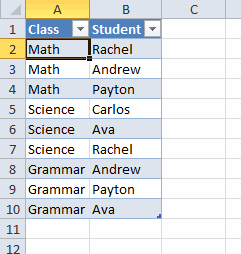
When you select a class, the userform lists the students. If you select more than one class, the userform lists all the student from the selected classes, but each student is listed only once.
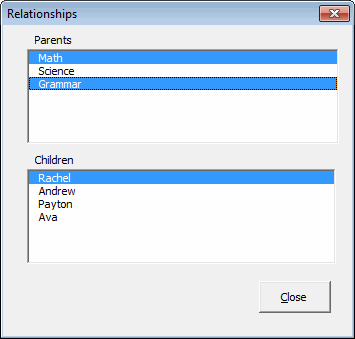
Andrew and Payton are only listed once.
There are some significant changes to the code, not the least of which is removing the grandchildren. Also instead of tracking ActiveParent (singular), I now track ActiveClasses (plural) because my top listbox is now multiselect. When my Parent listbox changes, I have to see all the classes that are selected.
Dim clsClass As CClass
Dim i As Long
If Me.lbxParents.ListIndex <> -1 Then
Set Me.ActiveClasses = New CClasses
For i = 0 To Me.lbxParents.ListCount – 1
If Me.lbxParents.Selected(i) Then
Me.ActiveClasses.Add Me.Classes.ClassByClassName(Me.lbxParents.List(i))
End If
Next i
Else
Set Me.ActiveClasses = Nothing
End If
FillChildren
End Sub
Private Sub FillChildren()
Me.lbxChildren.Clear
If Not Me.ActiveClasses Is Nothing Then
If Me.ActiveClasses.StudentCount > 0 Then
Me.lbxChildren.List = Me.ActiveClasses.StudentList
Me.lbxChildren.ListIndex = 0
End If
End If
End Sub
To get a unique student list, I use a dictionary object. My favorite thing about dictionaries is returning a zero-based array from the Keys or Items properties.
Dim clsClass As CClass
Dim clsStudent As CStudent
Dim dcReturn As Scripting.Dictionary
Set dcReturn = New Scripting.Dictionary
For Each clsClass In Me
For Each clsStudent In clsClass.Students
If Not dcReturn.Exists(clsStudent.StudentName) Then
dcReturn.Add clsStudent.StudentName, clsStudent.StudentName
End If
Next clsStudent
Next clsClass
StudentList = dcReturn.Keys
End Property
You can check out the rest of the code in the downloadable file.
