



What good is the Data Model without PowerPivot?
So in the book I’m forever writing, I have an example of how you can use the Data Model to effectively do VLOOKUPS. Take the example where we’ve got a transactional list of sales that has a product ID but no ‘friendly’ name or price, and another table that maps Product ID to price and friendly name.
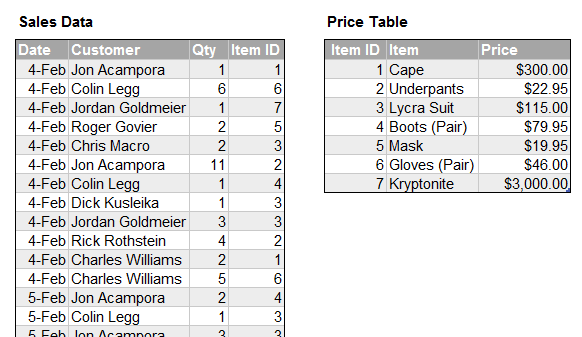
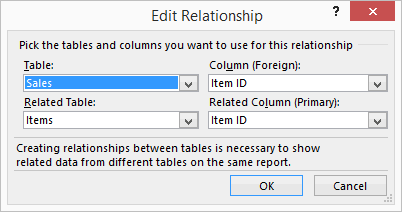
We can use the Data Model to set up a relationship between these two tables…
…so that we can display friendly product names from the Price table against aggregated sales quantities from the Sales Data:
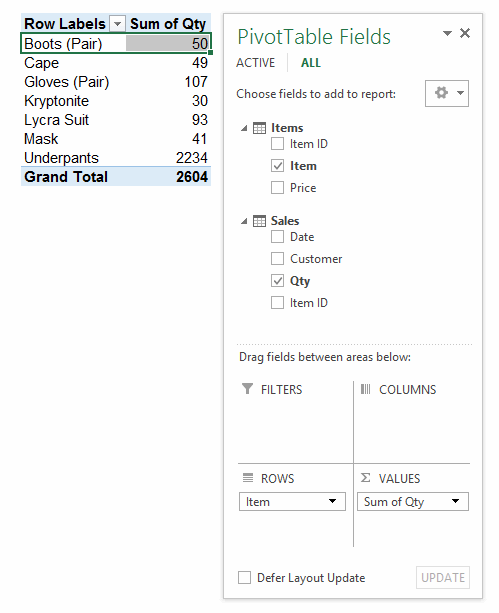
Sweet. No VLOOKUPs necessary. So…given that we’ve got quantity, and prices, how much money did we make? Let’s find out. First, lets’ drag that Price field into the Values area of the PivotTable and see what it gives us:

Well, that obviously isn’t what we’re after…it gives us the price of every item, not total revenue. Maybe we need to create a calculated field to multiply Qty against Price:
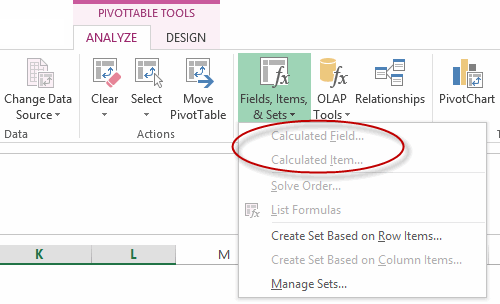
Oh wait…we can’t. Unless the average user has a premium version of Excel that includes the glorious thing that is PowerPivot (not to mention the wherewithal to not be daunted by a completely different, programmer-centric User Interface) then they can’t do this rather basic datamodel-ish thing.
So here we are…15.64% of the way through this century, and yet your average user still doesn’t have the ability to mash together relational tables in the world’s most widely used business productivity tool. (Or mash together flat files from different sheets or workbooks, for that matter.) Unless of course they go back to last century and do it like this:
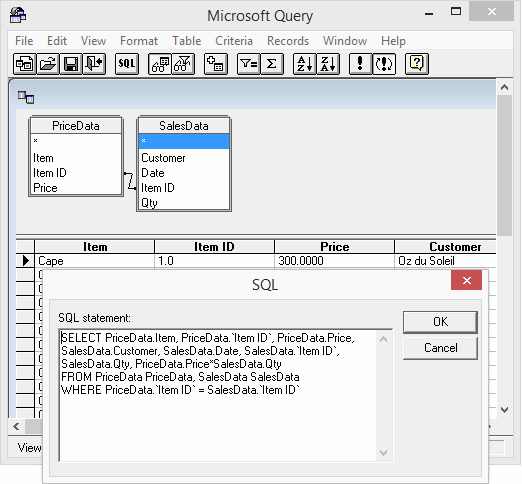
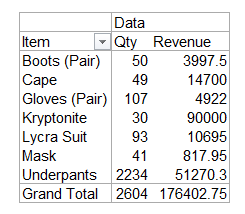
I just don’t get this. What’s the point of exposing non-premium users to something like the Data Model if it doesn’t let them do diddly squat? Without calculated fields, surely it’s a big red herring that unnecessarily confuses users? (And okay, so if the Data Model on its own isn’t the hammer for this particular nut, what is?)
I thought I was missing something here, so asked someone smarter than me about these matters (Sam). Sam tells me:
From 2013 onward the Data Model and the DAX Engine are separate
The Data Model is only to create Relationships (Joins) – available to all versions of Excel. The DAX engine if for the Calculations – the Pro Plus and Stand Alone versions.
The only extra function on which you can aggregate data in the Data Model based Pivot Table is Distinct Count at the expense of Numerical Count and Product of a normal pivot. A Data model based pivot table disables both Calculated fields and Items as well as the ability to Group. So the short answer is No – you need DAX alternately use SQL to create the Joins
Don’t get me wrong…Powerthis and Powerthat is all very exciting. But Microsoft: How about showing the tiniest bit of love for the common man (and woman) who live in the common version. Those folk shouldn’t have to upgrade to some fully-featured business intelligence flagship product merely so they can mash data from within Excel together, surely? (And yes, they might be able to use PowerQuery for free to join their relational data together, but leaving aside the fact that they’d probably end up with a flat file in Excel after importing the data from PQ, it’s just not good enough that they would have to go learn another programmer-centric tool just to do something that should be childs-play in Excel itself.
Don’t get me wrong: I’m not one of those that think that PowerPivot should be bundled into all versions of Excel just because we want it to be. Microsoft have spent a lot of money on PowerPivot, and I don’t expect them to have a sudden attack of benevolence merely because it suits users. Theirs is a money-making venture. And their shareholders expect them to do the best job possible at that.
But here’s the thing: It’s nearly 2016, and MS still have not given users the ability to do some pretty basic stuff natively in Excel, such as mash together data in separate sheets or workbooks and serve it up piping hot as a PivotTable. Don’t they know that in the real world, people have to mash together data from different sheets all the time? You get a sheet emailed to you from division A, a sheet from division B, and a sheet from division C. You need to mash it up to get an overview. A lot.
I’m not asking for Tableau here. I’m just asking for a core product that also moves with the times. Or at the very least, keeps up with last century.