



Well THAT sure got your attention.
I was doing a bit of research for the book (the only bit, mind), and I came across this great old thread on VLOOKUP vs INDEX/MATCH.
There’s a few false starts in terms of test methodology until Jon von der Hayden puts things back on the right track about halfway through the thread.
Conclusion is that INDEX/MATCH is probably way to go, but there’s not a great deal in it.
But I think there’s another important point in the INDEX/MATCH combo’s favor that has been overlooked in this thread: and that’s this bit in bold:
=VLOOKUP(lookup_value,table_array,col_index_num,range_lookup)
The fact that a VLOOKUP functions points at an entire table of data – even though it only ever actually makes use of two columns of it (the key column on the far left, and the nth column given by the col_index_num argument) – means that any time you change any cell in that table, your VLOOKUP is going to recalculate. And then so are ALL formulas downstream of those VLOOKUPS. It’s exactly as if VLOOKUP is a volatile function, where changes to that that Table is concerned.
Whereas with INDEX/MATCH, your functions will ONLY recalculate if you change something in the specific columns that the INDEX and MATCH combo references.
Given that, I’ll take INDEX/MATCH any time.
One thing still puzzles me hugely about VLOOKUP though: the recalculation time incurred from updating the lookup table seems much much longer than the recalculation time incurred from changing an input parameter for the VLOOKUP itself. And the same goes with INDEX/MATCH.
Take the situation where you’ve got a VLOOKUP and Table that looks like this:
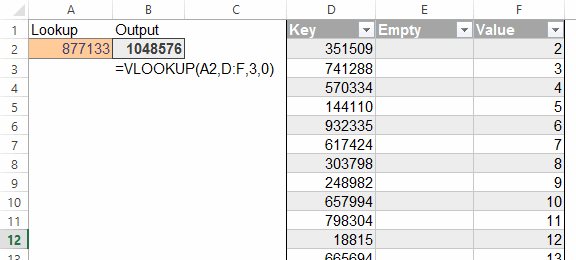
The KEY column is just the numbers 2 through 1,048,576 sorted in random order. And the Value column is just the row number. I won’t post a sample file because it runs to about 20MB, but it’s easy to set up yourself in about 20 seconds.
Changing the orange input cell triggers the VLOOKUP, which gets the right answer pretty quick. I haven’t timed it, but we’re talking ‘blink of an eye’… even when I tell it to look for a number that I happen to know is right at the bottom. Really fast.
But if I type anything in that middle column in the Table – which also causes our VLOOKUP to recalc – Excel acts really really sluggish. Maybe a second of delay in some cases, plus it makes my screen flash.
Which is weird, because it’s the same one VLOOKUP that gets triggered in both cases.
Why would that be?