



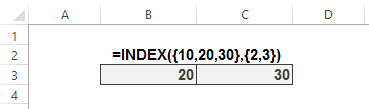
Everybody knows that you can’t do some things with the result of an INDEX function unless you return it to the worksheet first. For instance, I can return the 2nd and 3rd members of the array {10,20,30} to the worksheet with an array-entered INDEX function like this:
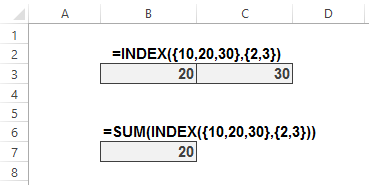
…but if I wrap a SUM around that INDEX, I get the wrong answer:
…meaning I have to return that INDEX function to the grid and then point my SUM function at it:
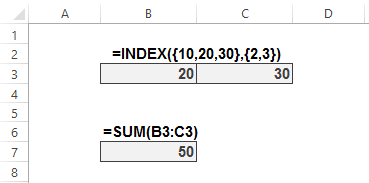
Everybody knows that, right? Well, everybody’s wrong. Everybody but the author over at the new ExcelXOR blog, that is. At this earth-shattering post the Author shows several intriguing ways to get INDEX to play nicely with outer functions:
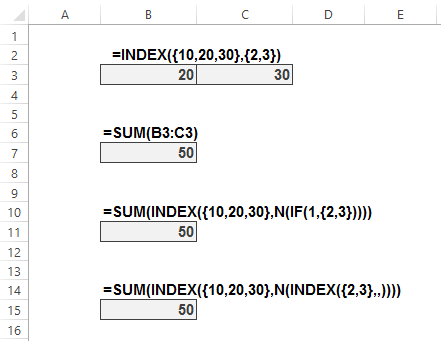
Far out! That’s the kind of trick I would have sold my soul to the devil to learn.
There’s a lot to learn at that site: go to http://excelxor.com/blog/ and scroll most of the way down until the Archives section, and then get clicking. The earliest post is practically from yesterday: August 2014. But there’s a lifetime of learnings there already…both in the posts, and in the comments. Plus the most wicked formula challenges you will find in one place.