



Found a couple of funny bugs today that I thought I’d share.
First, this one:

Weird: Partially italicizing right-aligned text screws with the display of trailing spaces. But it doesn’t do the same to left-aligned text with leading spaces:

And then there’s this one, where you start with a file that you’ve suppressed gridlines on:
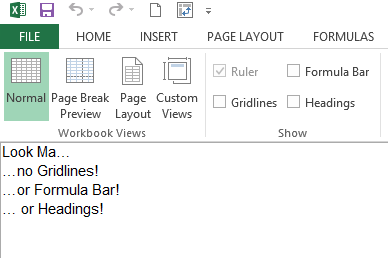
…and then you add a New Window…which allows you to look at a different parts of the same file on dual monitors – or even the same monitor if it’s suitably wide, by clicking on this:

(Aside: I never rated this feature as being particularly useful until I got a second monitor and then recently rediscovered it. Now I’m starting to think is indispensable, as I no longer have to scroll around half as much as I do when getting to grips with how spreadsheets are laid out, or when putting in new formulas that point from one region of a workbook to a completely different region of the same workbook. I’m sure Dick has been using it for years to avoid rodenting.)
But when you compare the new window (which Excel temporarily renamed SomeFileName:2) to the old (which Excel temporarily renamed SomeFileName:1), there’s a couple of subtle differences:
&nbps;
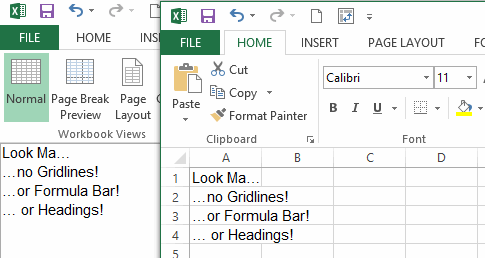
So it respects my wishes to not show the Formula bar, but ignores my wish to not display gridlines and headings. And if I close the original window – the one called SomeFileName:1 – then those settings I didn’t want from SomeFileName:2 are now in the file SomeFileName. Bummer.
So make sure that’s the one you close when you’re done. Otherwise your file now has gridlines and/or headings when you didn’t want it to.